
1. Tuote ohiview
This manual provides essential instructions for the proper installation, operation, and maintenance of your SEEIRIR TP.HV352T.PB753(N) TV Motherboard. This motherboard is designed as a replacement component for televisions, offering precise adaptation and stable performance.
Tärkeimmät ominaisuudet:
- Precise Adaptation: Engineered for perfect replacement of original TV motherboards.
- Vian korjaus: Capable of resolving common display issues such as black screen, blurred screen, or no signal.
- Vakaa ja kestävä: Constructed with industrial-grade PCB materials to withstand high temperatures and moisture, ensuring long-term reliability.
- Helppo asennus: Features clear interface identification and includes a comprehensive installation guide.
- Perustoiminnot: Provides all necessary functions for daily television use.
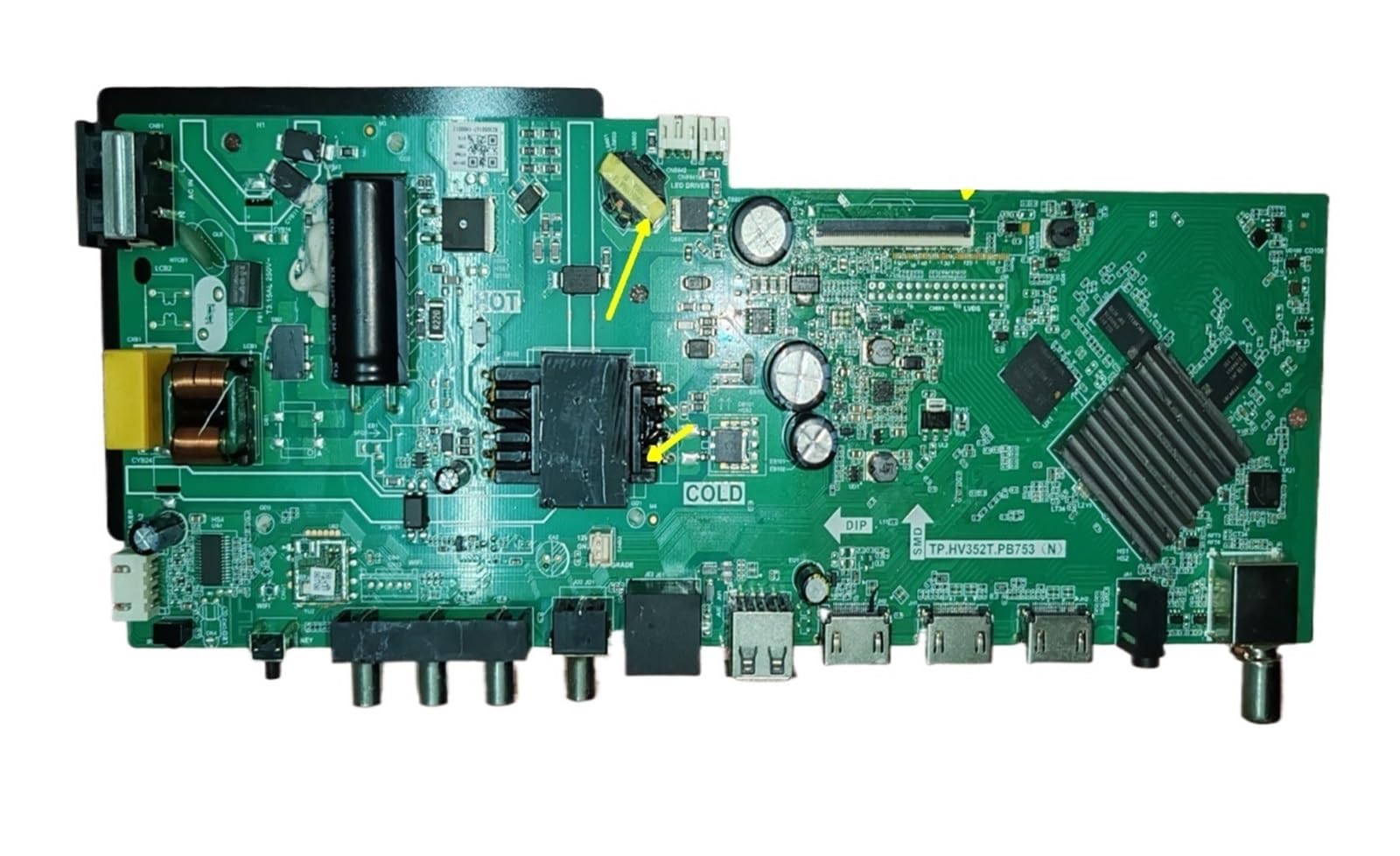
Kuva 1: Etuosa view of the SEEIRIR TP.HV352T.PB753(N) TV Motherboard, showing various ports and components.
2. Turvallisuustiedot
Please read and understand all safety instructions before attempting to install or operate this product. Failure to follow these instructions may result in electric shock, fire, or damage to the product or other equipment.
- Virran katkaisu: Always disconnect the television from the main power supply before beginning any installation or maintenance work.
- Staattinen sähkö: Electronic components are sensitive to static electricity. Use appropriate anti-static precautions (e.g., anti-static wrist strap) when handling the motherboard.
- Ammattimainen asennus: Jos et ole varma kyvystäsi suorittaa asennus, pyydä apua pätevältä teknikolta.
- Ilmanvaihto: Ensure adequate ventilation around the television after installation to prevent overheating of components.
- Nestealtistus: Keep the motherboard and television away from liquids and excessive moisture.
- Komponenttien käsittely: Käsittele emolevyä reunoista välttääksesi herkkien komponenttien koskettamista.
3. Asennus ja käyttöönotto
This section provides general guidelines for installing the TP.HV352T.PB753(N) TV Motherboard. Refer to the detailed installation guide included with your product for specific steps and diagrams.
- Valmistele televisio:
- Irrota television virtajohto pistorasiasta.
- Aseta televisio näyttö alaspäin pehmeälle ja puhtaalle alustalle näytön suojaamiseksi.
- Irrota television takakansi päästäksesi käsiksi sisäisiin osiin.
- Remove the Old Motherboard:
- Carefully disconnect all cables connected to the existing motherboard (e.g., power, LVDS, backlight, speaker, input ports). Note their positions or take photos for reference.
- Unscrew the mounting screws holding the old motherboard in place.
- Gently lift and remove the old motherboard.
- Install the New Motherboard:
- Align the new SEEIRIR TP.HV352T.PB753(N) motherboard with the mounting holes in the TV chassis.
- Kiinnitä emolevy asianmukaisilla ruuveilla. Älä kiristä liikaa.
- Reconnect all cables to their corresponding ports on the new motherboard. Ensure all connections are firm and correctly oriented. Pay special attention to the LVDS cable and power connections (35-110V, 600mA, FCP 75W).
- Ensimmäinen käynnistys:
- Before replacing the back cover, plug the TV into a power outlet.
- Power on the TV and check for basic functionality (e.g., power indicator, screen display, sound).
- If issues arise, refer to the Troubleshooting section.
- Lopullinen kokoonpano:
- Once basic functionality is confirmed, unplug the TV again.
- Aseta television takakansi takaisin paikalleen ja kiinnitä se ruuveilla.
- Reconnect all external peripherals and power up the TV for full testing.
Huomautus: The motherboard features clear interface identification to assist with correct cable connections. Always double-check connections before powering on.
4. Käyttö
Once the SEEIRIR TP.HV352T.PB753(N) TV Motherboard is correctly installed, the television should function as expected. The motherboard manages all core TV operations.
- Virta päälle/pois: Use the TV's remote control or physical power button to turn the television on or off.
- Tulon valinta: Select desired input sources (HDMI, AV, USB, etc.) using the TV remote.
- Kanavan viritys: If applicable, perform channel scanning for over-the-air or cable channels.
- Valikon navigointi: Access and navigate the TV's on-screen display (OSD) menu for settings adjustments (picture, sound, network, etc.).
Refer to your television's original user manual for detailed instructions on specific TV functions and menu navigation.
5. Huolto
The SEEIRIR TP.HV352T.PB753(N) TV Motherboard is designed for durability with industrial-grade PCB. Minimal maintenance is required, but following these guidelines can extend its lifespan and ensure optimal performance:
- Pölynpoisto: Periodically clean the interior of the TV (with power disconnected) using compressed air to remove dust buildup, which can impede cooling and cause component failure.
- Ilmanvaihto: Ensure the TV's ventilation openings are not blocked. Proper airflow is crucial to prevent overheating of the motherboard and other internal components.
- Ympäristöolosuhteet: Käytä televisiota vakaassa ympäristössä välttäen äärimmäisiä lämpötiloja, korkeaa kosteutta ja suoraa auringonvaloa.
- Virtapiikit: Consider using a surge protector to safeguard the TV and its internal components, including the motherboard, from electrical spikes.
6. Vianmääritys
This section addresses common issues you might encounter after installing the SEEIRIR TP.HV352T.PB753(N) TV Motherboard. If problems persist, consult a qualified technician.
| Ongelma | Mahdollinen syy | Ratkaisu |
|---|---|---|
| Ei virtaa / Televisio ei käynnisty |
|
|
| Black Screen / No Display |
|
|
| Blurred Screen / Distorted Image |
|
|
| Ei signaalia |
|
|
7. Tekniset tiedot
| Ominaisuus | Yksityiskohta |
|---|---|
| Mallinumero | TP.HV352T.PB753(N) |
| Merkki | SEEIRIR |
| Compatible & Video Equipment Style | Näyttölaitteet |
| Tulo Voltage Alue | 35-110V |
| Nykyinen lähtö | 600mA |
| Power Output (Variant) | FCP 75W |
| Tuotteen paino | 500 grammaa |
| ASIN | B0FF41WYG7 |
8. Takuu ja asiakastuki
Takuutiedot:
Specific warranty terms for the SEEIRIR TP.HV352T.PB753(N) TV Motherboard are typically provided by the seller at the time of purchase. Please refer to your purchase documentation or contact the seller directly for details regarding warranty coverage, duration, and claims procedures. Standard return policies may apply as per the retailer's terms.
Asiakastuki:
For technical assistance, installation queries, or troubleshooting beyond the scope of this manual, please contact the seller or manufacturer directly. You can typically find their contact information on your purchase invoice or the product packaging.
Myyjä: taizhoushidimaimaoyistore