
1. Tuote ohiview
The WESECUU Light Bulb Security Camera offers comprehensive home surveillance with easy installation. Designed for both indoor and outdoor use, this camera provides a 360° panoramic view, motion tracking, and AI detection for enhanced security.
- Vaivaton asennus: Screws into a standard light bulb socket, requiring no drilling or complex wiring.
- 360 ° panoraama View & Auto Motion Tracking: Provides full-area coverage and automatically follows detected movement.
- Älykäs AI-tunnistus: Distinguishes between people and other movements to reduce false alerts.
- Kaksisuuntainen ääni: Features a built-in speaker and microphone for real-time communication.
- 24/7 Day & Night Monitoring: Ensures continuous surveillance in various lighting conditions.

2. Pakkauksen sisältö
Varmista, että pakkauksessasi on kaikki tarvittavat osat:
- WESECUU-valonheitinvalvontakamera
- Käyttöohje (tämä asiakirja)
3. Asennusohjeet
3.1 Fyysinen asennus
The camera is designed for simple installation into a standard E27/E26 light bulb socket.
- Varmista, että valaisinpistorasian virta on katkaistu sulakkeesta ennen asennusta.
- Carefully screw the WESECUU Light Bulb Security Camera into the light bulb socket until it is secure. Do not overtighten.
- Turn the power back on at the circuit breaker. The camera will power on and initiate its startup sequence.
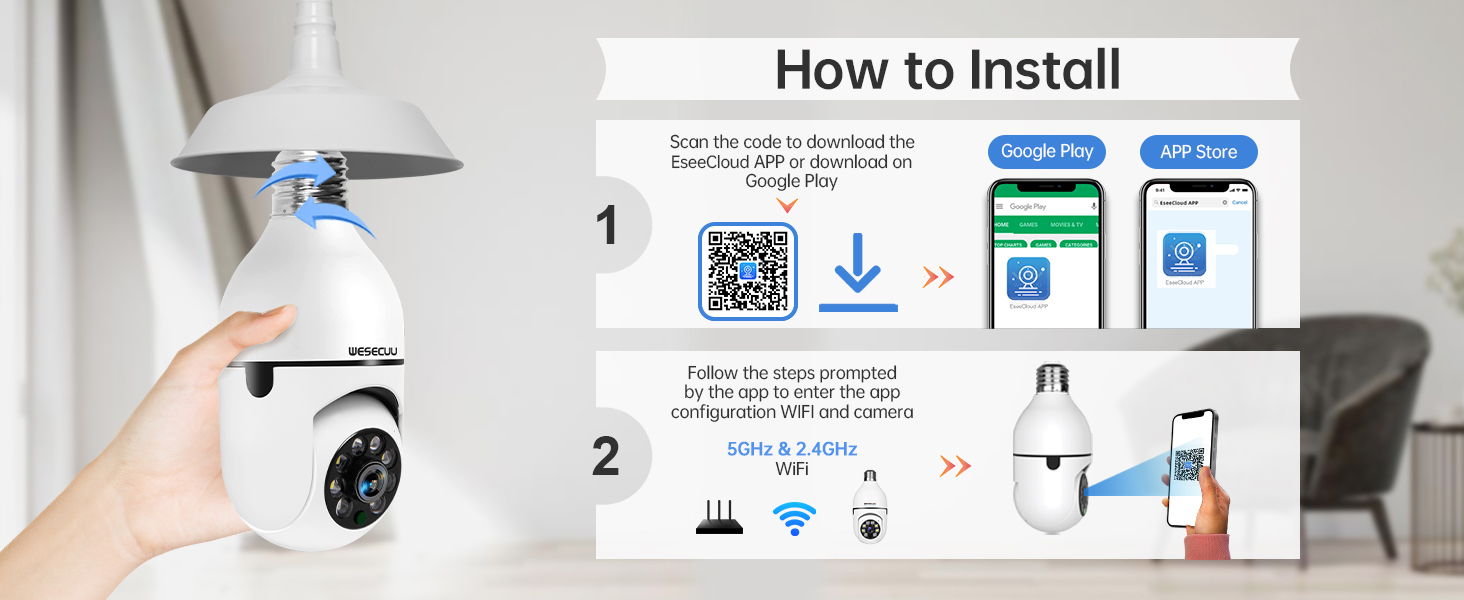
3.2 App Download and Camera Pairing
To operate your camera, you need to download the EseeCloud APP and pair the device.
- Download the EseeCloud APP from the Google Play Store or Apple App Store. You can also scan the QR code provided in the installation image below or visit http://www.e-seenet.com/download/indexm.php?p=tjesee.
- Open the EseeCloud APP and create an account or log in.
- Follow the in-app instructions to add your new camera. Ensure your smartphone is connected to a 2.4GHz or 5GHz Wi-Fi network during the pairing process. The camera supports both 2.4GHz and 5GHz Wi-Fi.
- Once successfully paired, you can access the live feed and camera settings through the app.
4. Käyttöohjeet
4.1 Livenä View ja Toisto
Access the EseeCloud APP to view the live feed from your camera. You can also review tallennettu footage from the SD card (if installed) or cloud storage (if subscribed).

4.2 Liikkeentunnistus ja -seuranta
The camera features advanced motion detection and automatic tracking. When motion is detected, the camera will pan and tilt to follow the subject, ensuring continuous coverage. Alerts will be sent to your smartphone.

4.3 AI Detection Alerts
The integrated AI technology helps differentiate between human movement and other sources of motion, such as pets or passing vehicles, reducing irrelevant notifications.

4.4 Kaksisuuntainen ääni
Utilize the two-way audio feature to communicate through the camera. This allows you to speak to visitors, deter intruders, or comfort pets remotely.

4.5 Pimeänäkö
The camera provides both full-color night vision and infrared night vision modes for clear monitoring in low-light conditions.

4.6 Tallennusvaihtoehdot
The camera supports local storage via an SD card (16-128GB, not included) and offers optional cloud storage plans for continuous recording and advanced features.

5. Huolto
Varmistaaksesi WESECUU-lampputurvakamerasi optimaalisen suorituskyvyn ja pitkän käyttöiän, noudata näitä huolto-ohjeita:
- Linssien puhdistus: Gently wipe the camera lens with a soft, dry microfiber cloth to remove dust or smudges. Avoid abrasive cleaners.
- Virtalähde: Ensure the camera receives a stable power supply. Avoid frequent power interruptions.
- Laiteohjelmistopäivitykset: Regularly check the EseeCloud APP for available firmware updates to ensure your camera has the latest features and security enhancements.
- Ympäristöolosuhteet: While designed for outdoor use, avoid direct exposure to extreme weather conditions if possible, and ensure the light socket is weather-protected.
6. Vianmääritys
If you encounter issues with your WESECUU Light Bulb Security Camera, refer to the following common solutions:
- Kamera ei muodosta yhteyttä Wi-Fi-verkkoon:
- Varmista, että Wi-Fi-verkkosi on 2.4 GHz:n tai 5 GHz:n taajuudella ja vakaa.
- Varmista, että Wi-Fi-salasana on syötetty oikein sovellukseen.
- Siirrä kamera lähemmäs Wi-Fi-reititintä asennuksen aikana.
- Käynnistä reititin ja kamera uudelleen.
- No Image or Black Screen:
- Check if the camera is properly powered on and the light socket has power.
- Ensure the camera lens is not obstructed.
- Restart the camera by turning off and on the power to the socket.
- Liiketunnistus ei toimi:
- Check motion detection settings in the EseeCloud APP.
- Ensure the detection sensitivity is set appropriately.
- Verify that notification permissions are enabled for the app on your smartphone.
- Huono kuvanlaatu:
- Puhdista kameran linssi.
- Ensure adequate lighting for optimal image clarity, especially for color night vision.
- Check your internet connection speed, as a slow connection can affect streaming quality.

Figure 10: Visual comparison demonstrating the superior clarity of WESECUU's 3MP resolution compared to other standard resolutions.
7. Tekniset tiedot
| Ominaisuus | Erittely |
|---|---|
| Mallinumero | TP-8052BW3 |
| Merkki | WESECUU |
| Sisä-/ulkokäyttö | Ulkona |
| Yhteystekniikka | Langaton (Wi-Fi) |
| Yhteysprotokolla | Wi-Fi (2.4 GHz ja 5 GHz) |
| Virtalähde | Johdollinen sähkö |
| Videon sieppaustarkkuus | 4K |
| Asennustyyppi | Kattoon kiinnitys |
| Erikoisominaisuus | Säädettävä |
| Yhteensopivat laitteet | Amazon Alexa |
| Ohjaimen tyyppi | Amazon Alexa |
| Tuotteen mitat (P x L x K) | 1 x 1 x 1 tuumaa |
| Tuotteen paino | 7.2 unssia (0.21 kiloa) |
8. Takuutiedot
For detailed warranty information, please refer to the warranty card included with your product packaging or visit the official WESECUU websivusto. Takuuehdot voivat vaihdella alueen ja ostopäivämäärän mukaan.
9. Asiakastuki
If you require further assistance or have questions not covered in this manual, please contact WESECUU customer support:
- Asiakaspalvelupuhelin: +1-888-9716718
- Työajat: Pacific Standard Time 6:00 PM - 3:00 AM, Monday to Friday
- Online-tuki: Visit the official WESECUU websivusto usein kysyttyjen kysymysten, tukiresurssien ja yhteydenottolomakkeiden osalta.