
1. Tuote ohiview
This manual provides essential information for setting up, operating, maintaining, and troubleshooting your HP OMEN 16L Gaming Desktop. This high-performance desktop is equipped with an Intel Core i7-14700F processor, NVIDIA GeForce RTX 4060 graphics, 64GB DDR5 RAM, and a 2TB PCIe NVMe M.2 Solid State Drive, running on Windows 11 Pro.
The HP OMEN 16L is designed for demanding gaming and computing tasks, offering robust performance and efficient cooling. It comes bundled with a Thunderobot KG3089R Gaming Keyboard to enhance your experience.

Kuva 1.1: Edessä view of the HP OMEN 16L Gaming Desktop.
2. Asennusopas
2.1 Laatikon purkaminen ja alkusijoitus
- Carefully remove the desktop and all accessories from the packaging. Retain packaging for future transport or service.
- Aseta pöytätietokone vakaalle ja tasaiselle alustalle, jossa on riittävä tuuletus joka puolelta. Varmista, ettei mikään tuuletusaukko ole tukittu.
2.2 Oheislaitteiden liittäminen
Connect your monitor, keyboard, mouse, and other peripherals to the appropriate ports on the desktop. Refer to the 'Ports' section for a detailed diagram.
- Monitori: Connect your monitor using a DisplayPort or HDMI cable to the dedicated graphics card ports.
- Näppäimistö ja hiiri: Connect the Thunderobot KG3089R Gaming Keyboard and your mouse to any available USB Type-A ports.
- Teho: Connect the power cable to the desktop's power supply port and then to a grounded electrical outlet.
- Verkko: For wired internet, connect an Ethernet cable to the RJ-45 port. For wireless, ensure Wi-Fi 6 is enabled after initial setup.

Kuva 2.1: Esim.ample of a complete desktop setup with peripherals connected.
2.3 Ensimmäinen käynnistys ja Windows 11 Pron asennus
- Paina pöytätietokoneen etuosassa olevaa virtapainiketta.
- Suorita Windows 11 Pron alkuasennus loppuun noudattamalla näytön ohjeita, mukaan lukien kielen, alueen, verkkoyhteyden ja käyttäjätilin luominen.
- Ensure all drivers are up-to-date after Windows setup for optimal performance.
3. Käyttöohjeet
3.1 Virta päälle/pois
- Virta päälle: Paina pöytätietokoneen etuosassa olevaa virtapainiketta.
- Virta pois: Click the Start button in Windows, then select Power > Shut down. Avoid direct power-offs unless necessary to prevent data loss.
3.2 Verkkoyhteydet
- Langallinen (Ethernet): Connect an Ethernet cable to the RJ-45 port on the rear of the desktop. The connection should be automatically detected.
- Wireless (Wi-Fi 6): Napsauta Windowsissa tehtäväpalkin verkkokuvaketta, valitse Wi-Fi-verkkosi, anna salasana ja muodosta yhteys.
3.3 Using Ports and Connections
The desktop offers a variety of ports for connecting external devices:
- Etuportit: 3 x Superspeed USB Type-A (5Gbps signaling rate), 1 x Superspeed USB Type-C (10Gbps signaling rate), 1 x Headphone/Microphone combo.
- Takaportit: 4 x USB Type-A 2.0, 1 x RJ-45 (Ethernet), 1 x HDMI, 3 x DisplayPort, 2 x Audio Port.

Image 3.1: Front panel ports for easy access.
3.4 Pelaaminen ja suorituskyky
The HP OMEN 16L is optimized for gaming. Utilize the pre-installed OMEN Gaming Hub software to monitor system performance, customize RGB lighting, and optimize game settings. Ensure your graphics drivers are regularly updated for the best gaming experience.

Image 3.2: The HP OMEN 16L desktop in a gaming environment.
4. Huolto
4.1 Puhdistus
- Ulkopuoli: Käytä pehmeää, damp liinalla ulkopintojen puhdistamiseen. Vältä voimakkaita kemikaaleja.
- Vents: Periodically use compressed air to clear dust from the intake and exhaust vents to maintain optimal airflow and cooling. Ensure the system is powered off before cleaning vents.
4.2 Ohjelmistopäivitykset
- Tarkista ja asenna Windows-päivitykset säännöllisesti Windowsin asetuksista.
- Update graphics drivers (NVIDIA GeForce RTX 4060) directly from the NVIDIA website or through the GeForce Experience application.
- Update HP-specific drivers and firmware using the HP Support Assistant or OMEN Gaming Hub.
4.3 Tietojen varmuuskopiointi
Varmuuskopioi tärkeät tietosi säännöllisesti ulkoiselle asemalle tai pilvitallennustilaan estääksesi tietojen menetyksen järjestelmävian sattuessa.
5. Vianmääritys
Tässä osiossa käsitellään yleisiä ongelmia, joita saatat kohdata.
5.1 Ei virtaa
- Varmista, että virtajohto on kytketty kunnolla sekä pöytätietokoneeseen että pistorasiaan.
- Varmista pistorasian toiminta kytkemällä siihen toinen laite.
5.2 Ei näyttöä
- Check that the monitor is powered on and the video cable (DisplayPort/HDMI) is securely connected to both the desktop's graphics card and the monitor.
- Varmista, että näytölläsi on valittu oikea tulolähde.
- If using multiple monitors, test with a single monitor.
5.3 Järjestelmän hidastuminen tai jumiutuminen
- Sulje taustalla käynnissä olevat tarpeettomat sovellukset.
- Check Task Manager (Ctrl+Shift+Esc) for processes consuming high CPU, RAM, or disk resources.
- Ensure the system has adequate ventilation and is not overheating. Clean vents if necessary.
- Suorita täysi järjestelmän tarkistus haittaohjelmien tai virusten varalta.
5.4 Verkkoyhteysongelmat
- Langallinen: Tarkista Ethernet-kaapelin yhteys ja reitittimen tila.
- Langaton: Restart your router/modem. Ensure Wi-Fi is enabled in Windows and try reconnecting to the network.
6. Tekniset tiedot
Detailed technical specifications for the HP OMEN 16L Gaming Desktop (Model TG03).
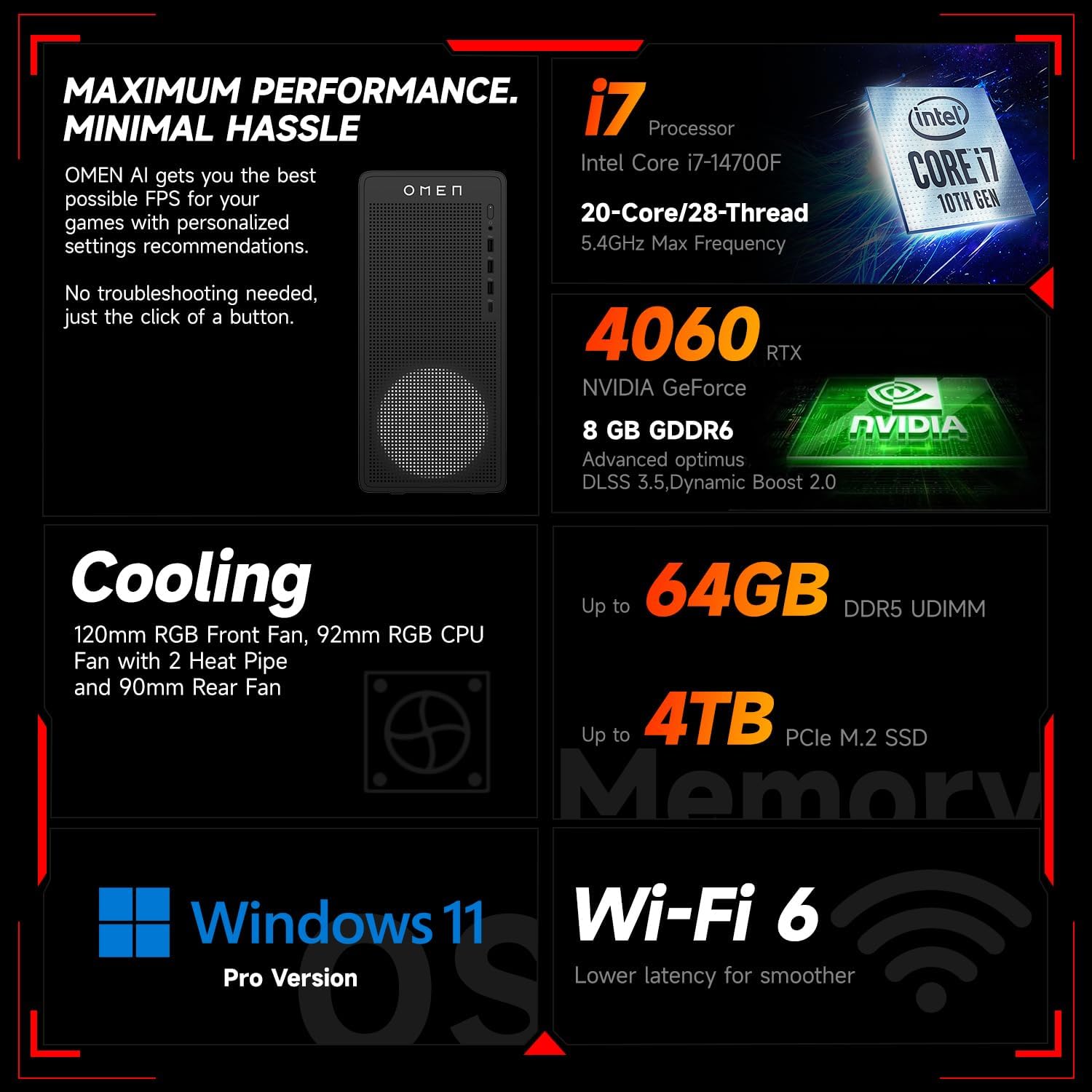
Kuva 6.1: ohiview of key performance and cooling specifications.
| Komponentti | Erittely |
|---|---|
| Merkki | HP |
| Mallinumero | TG03 |
| Käyttöjärjestelmä | Windows 11 Pro |
| CPU malli | Intel Core i7-14700F (20 Cores, 28 Threads, up to 5.4 GHz) |
| Grafiikka rinnakkaisprosessori | NVIDIA GeForce RTX 4060 (8 Gt GDDR6) |
| Asennetun RAM-muistin koko | 64GB DDR5 RAM |
| Muistin tallennuskapasiteetti | 2 TB PCIe NVMe M.2 Solid State Drive |
| Langaton yhteys | Wi-Fi 6, Bluetooth |
| Etuportit | 3x USB Type-A (5Gbps), 1x USB Type-C (10Gbps), Headphone/Mic Combo |
| Takaportit | 4x USB Type-A 2.0, 1x RJ-45, 1x HDMI, 3x DisplayPort, 2x Audio Port |
| Mitat (P x L x K) | 13.26 x 6.1 x 12.12 tuumaa |
| Tuotteen paino | 13.14 puntaa |
| Väri | Musta |
| Mukana toimitettava lisävaruste | Thunderobot KG3089R Gaming Keyboard |

Image 6.2: Details of the Intel Core i7-14700F processor.

Image 6.3: Information on the NVIDIA GeForce RTX 4060 graphics card.
7. Takuutiedot
Your HP OMEN 16L Gaming Desktop comes with a standard manufacturer's warranty. The specific terms and duration of the warranty are provided with your purchase documentation and are subject to HP's official warranty policy.
Tärkeä huomautus: Modifications to the system, such as upgrading components (e.g., RAM) with non-HP certified parts or by unauthorized personnel, may void the manufacturer's warranty. Always consult HP's official support or authorized service providers before making any internal hardware changes.
The Thunderobot KG3089R Gaming Keyboard bundled with this desktop may have a separate warranty provided by its manufacturer. Please refer to the documentation included with the keyboard for its specific warranty terms.
8. Tukea
For further assistance, technical support, or warranty claims, please contact HP Customer Support through the following channels:
- HP:n tuki Websivusto: Vierailla www.hp.com/support ajureita, käyttöoppaita ja vianmääritysoppaita varten.
- HP Support Assistant: Use the pre-installed HP Support Assistant software on your desktop for diagnostics, updates, and direct access to support.
- Puhelintuki: Refer to your product documentation or the HP support webalueellisten puhelinnumeroiden sivusto.