
KOFIRE UG-09
KOFIRE UG-09 langattomat pelikuulokkeet
Käyttöopas
Johdanto
This manual provides detailed instructions for the setup, operation, maintenance, and troubleshooting of your KOFIRE UG-09 Wireless Gaming Headset. Please read this manual thoroughly before using the product to ensure optimal performance and longevity.

Image: The KOFIRE UG-09 Wireless Gaming Headset displayed with its charging cable, detachable microphone, and USB/Type-C 2-in-1 transmitter.
Pakkauksen sisältö
Varmista, että pakkauksessasi on kaikki tarvittavat osat:
- 1 x KOFIRE Wireless Gaming Headset (Model: UG-09)
- 1 x USB & Type-C 2-in-1 Transmitter
- 1 x Type-C latauskaapeli
- 1 x irrotettava mikrofoni
- 1 x 3.5 mm audiokaapeli
- 1 x Käyttöohje (tämä asiakirja)
Tuote loppuview
Tutustu kuulokkeiden osiin ja säätimiin.
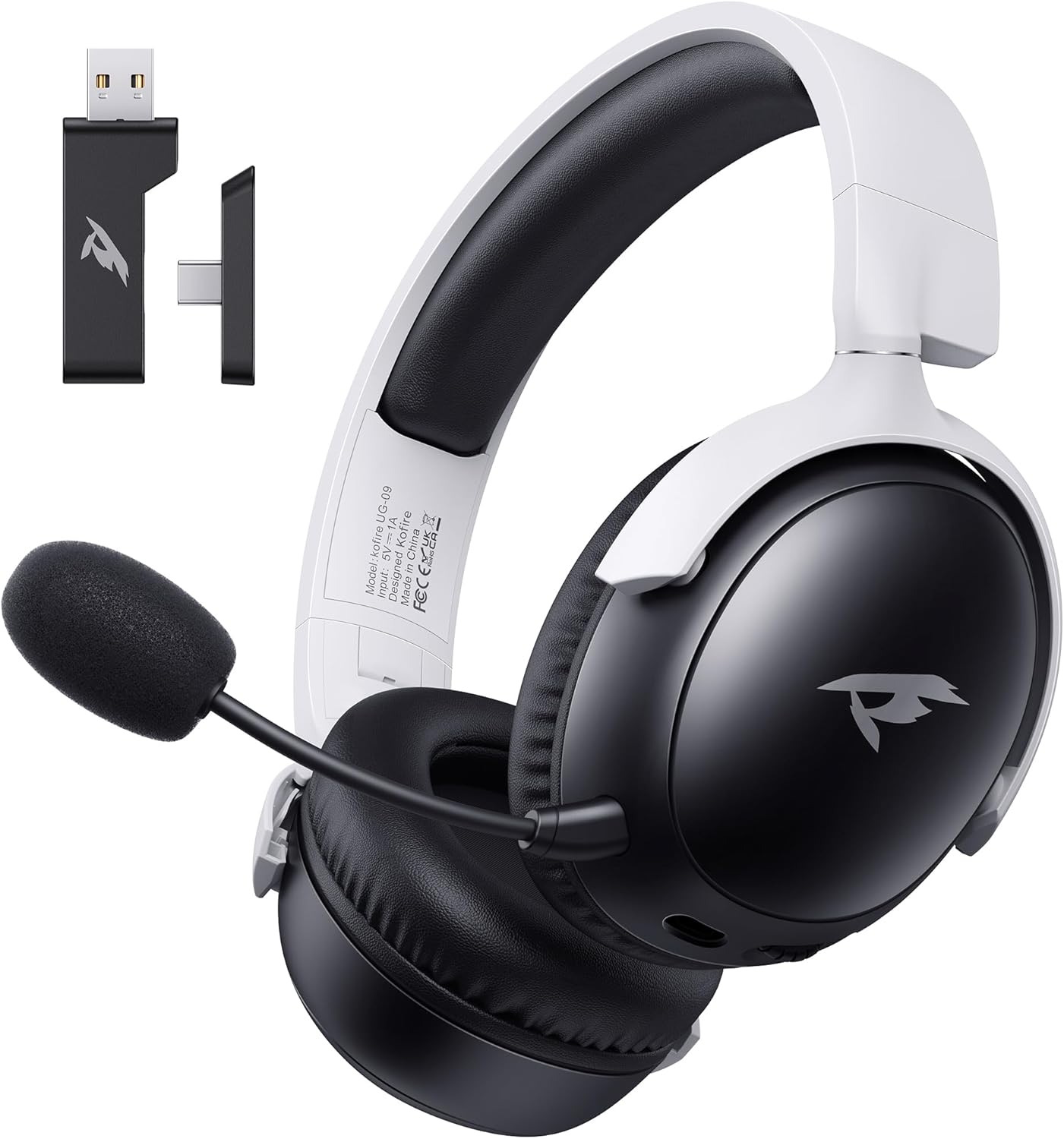
Kuva: Edessä view of the KOFIRE UG-09 Wireless Gaming Headset in black and white, showing the detachable microphone and the USB/Type-C 2-in-1 transmitter.
Tärkeimmät ominaisuudet:
- Monitilayhteys: 2.4GHz Wireless, Bluetooth 5.4, and 3.5mm Wired options.
- Pitkä akun käyttöikä: Jopa 65 tuntia soittoaikaa.
- 53 mm:n dynaamiset ajurit: For immersive 3D stereo sound.
- ENC Noise-Canceling Microphone: Detachable and omnidirectional for clear communication.
- Ergonominen muotoilu: Lightweight with rotatable ear cups, adjustable headband, and soft memory foam cushions for comfort.
Asennusohjeet
1. Kuulokkeen lataaminen
Before first use, fully charge the headset. Connect the supplied Type-C charging cable to the headset's charging port and the other end to a USB power source (e.g., computer USB port, USB wall adapter). The LED indicator will show charging status. A full charge takes approximately 2-2.5 hours. The headset supports simultaneous charging and use.
2. Connecting via 2.4GHz Wireless (USB Dongle)
This mode offers ultra-low latency (≤20ms) for gaming on compatible devices like PC, Mac, PS4, PS5, and Nintendo Switch (audio only).
- Insert the USB & Type-C 2-in-1 transmitter into an available USB-A or USB-C port on your device.
- Kytke virta kuulokkeisiin.
- Press and hold the microphone button on the headset to switch to 2.4G mode. You will hear an audio prompt "dongle mode."
- On your connected device, navigate to sound settings and select "Kofire UG-09" as the audio output/input device to complete pairing.

Image: Illustration of the 2.4GHz wireless connection, showing the USB dongle plugged into a gaming handheld device, emphasizing stable and low-latency performance.
3. Yhdistäminen Bluetoothin kautta 5.4
Use Bluetooth for mobile devices such as phones, tablets, and Nintendo Switch (audio only).
- Kytke virta kuulokkeisiin.
- Press and hold the microphone button for 3 seconds to switch to Bluetooth mode. You will hear an audio prompt "Bluetooth mode." The LED indicator will flash, indicating pairing mode.
- On your mobile device, go to Bluetooth settings and search for "Kofire UG-09." Select it to complete the pairing process.

Image: Depicts the versatility of the headset, showing one user connected via Bluetooth to a phone and another connected wirelessly to a PC, highlighting dual connectivity options.
4. Connecting via 3.5mm Wired
For universal compatibility or when the battery is depleted, use the 3.5mm audio cable.
- Liitä 3.5 mm:n äänikaapelin toinen pää kuulokkeiden 3.5 mm:n liitäntään.
- Connect the other end to the 3.5mm audio port on your gaming device or console.
- Kuulokkeet siirtyvät automaattisesti langalliseen tilaan.
Huomautus: The microphone function is not supported on Nintendo Switch when using any wireless mode. For Xbox, only wired mode is supported.
Käyttöohjeet
Virta päälle/pois
- Virta päälle: Paina virtapainiketta ja pidä sitä painettuna, kunnes LED-merkkivalo syttyy.
- Virta pois: Paina virtapainiketta ja pidä sitä painettuna, kunnes LED-merkkivalo sammuu.
Äänenvoimakkuuden säätö
- Lisää äänenvoimakkuutta: Rotate the volume wheel upwards.
- Vähennä äänenvoimakkuutta: Rotate the volume wheel downwards.
Mikrofonin käyttö
The headset features a detachable ENC (Environmental Noise Canceling) omnidirectional microphone.
- Kiinnitä/Irrota: Insert the microphone into the dedicated port on the left earcup or remove it when not needed.
- Mykistä/Poista mykistys: Press the dedicated microphone mute button for one-touch muting. The LED indicator on the microphone will show its status.

Kuva: Yksityiskohtainen view of the ENC noise reduction microphone, highlighting its internal components and detachable design for clear voice transmission.
Tilan vaihto
To switch between 2.4GHz wireless and Bluetooth modes, press and hold the microphone button for approximately 3 seconds until you hear the corresponding audio prompt ("dongle mode" or "Bluetooth mode").
Akun kesto ja varoitukset
The headset provides up to 65 hours of playtime in Bluetooth mode (microphone off) and 50 hours in 2.4GHz dongle mode (microphone on). A low battery alert will notify you when recharging is needed.
Huolto
Puhdistus
- Pyyhi kuulokkeet pehmeällä, kuivalla liinalla.
- Älä käytä vahvoja kemikaaleja, puhdistusliuottimia tai vahvoja pesuaineita.
- Ensure no moisture enters the earcups or control buttons.
Varastointi
- Säilytä kuulokkeita viileässä, kuivassa paikassa, poissa suorasta auringonvalosta ja äärimmäisistä lämpötiloista.
- When storing for extended periods, ensure the headset is partially charged (around 50%) to preserve battery health.
- The rotatable and foldable ear cups allow for compact storage.

Image: Illustrates the ergonomic design elements of the headset, including rotatable earcups, soft sponge cushioning, adjustable angle, and a retractable headband for comfortable wear and storage.
Akun hoito
- Vältä akun usein toistuvaa täydellistä tyhjentymistä.
- Älä altista akkua korkeille lämpötiloille.
- Käytä ainoastaan laitteen mukana toimitettua latauskaapelia tai vastaavaa sertifioitua kaapelia.
Vianetsintä
| Ongelma | Mahdollinen syy | Ratkaisu |
|---|---|---|
| Kuulokkeista ei kuulu ääntä. |
|
|
| Mikrofoni ei toimi. |
|
|
| Langaton yhteys ei onnistu. |
|
|
| Kuulokemikrofoni ei lataudu. |
|
|

Image: Illustrates the universal compatibility of the headset with a range of gaming and mobile devices, including PlayStation consoles, PC, Mac, Nintendo Switch, and smartphones.
Tekniset tiedot
| Ominaisuus | Yksityiskohta |
|---|---|
| Mallin nimi | UG-09 |
| Yhteystekniikka | 2.4 GHz:n langaton, Bluetooth 5.4, 3.5 mm:n langallinen |
| Langaton viestintätekniikka | 2.4GHz USB-A & Type-C 2-in-1 Dongle, Bluetooth 5.4 |
| Ääniohjaimen tyyppi | 53mm dynaaminen ohjain |
| Taajuusvaste | 20 kHz (maksimi) |
| Impedanssi | 32 ohmia |
| Bluetooth-alue | 10 metriä |
| Äänen latenssi (2.4 GHz) | ≤20 Milliseconds |
| Akun kesto | Up to 65 hours (Bluetooth, mic off); 50 hours (2.4GHz, mic on) |
| Latausaika | 2-2.5 tuntia |
| Mikrofoni | Detachable ENC Noise-Canceling Omnidirectional |
| Paino | 14.4 unssia (0.41 kiloa) |
| Materiaali | ABS, Faux Leather, PC, Soft Memory Sponge Cushions |
| Yhteensopivat laitteet | PC, Mac, Laptop, Desktop, Phone, Pad, Tablet, PlayStation 5/4/Pro/Slim, Gaming Consoles, Switch (audio only), Xbox (wired only) |
Takuu ja tuki
KOFIRE is committed to providing professional service and expert support for your wireless gaming headset. If you encounter any issues or have questions regarding your product, please do not hesitate to contact us.
- Asiakaspalvelu: Our team of experienced engineers and support staff are available to assist you.
- Vastausaika: We aim to respond to all inquiries within 0-24 hours.
- Yhteystiedot: Please refer to the contact details provided on the product packaging or the official KOFIRE webavun sivusto.
Ask a question about this manual
Ask about setup, troubleshooting, compatibility, parts, safety, or missing instructions. Manuals+ will review the question and use this page’s manual context to help answer it.