
1. Johdanto
Thank you for choosing the Ctronics CTIPC-980 4K 8MP PTZ Outdoor WiFi Security Camera. This manual provides detailed instructions for the installation, operation, and maintenance of your new security camera. Please read this manual thoroughly before use to ensure proper functionality and safety.
The CTIPC-980 camera offers advanced surveillance features including 4K Ultra HD resolution, intelligent human, vehicle, and animal detection, dual-band WiFi connectivity, and comprehensive 360° panoramic coverage. Its robust IP66 weatherproof design ensures reliable performance in various outdoor conditions.
2. Pakkauksen sisältö
Please check the package contents upon receipt. If any items are missing or damaged, contact Ctronics customer support.
- Ctronics CTIPC-980 4K 8MP PTZ Outdoor WiFi Security Camera
- Virtalähde
- Kiinnitysruuvisarja
- Vedenpitävä sarja
- Käyttöopas

Image: The Ctronics CTIPC-980 camera with its included accessories, such as the power adapter and mounting kit.
3. Tuotteen ominaisuudet
- 4K Ultra HD -resoluutio: Captures clear and detailed images at 3840x2160P (8 Megapixels) with a 3.6mm Starlight lens.
- Edistynyt yönäkö: Offers three modes:
- IR Night Vision: Black and white images using infrared LEDs.
- Värillinen yönäkö: Full-color images in low light conditions using the built-in spotlight.
- Smart Night Vision: Automatically switches from IR to color night vision upon detection of motion.
- Älykäs tunnistus: Accurately identifies humans, vehicles, and animals, reducing false alarms by up to 95%.
- Aktiivinen pelote: Built-in siren and spotlights activate automatically upon detection to deter intruders.
- Kaksikaistainen WiFi-yhteys: Supports both 2.4GHz and 5GHz WiFi for stable and faster network connection.
- 360° panoraamakuvaus: Pan 355° horizontally and Tilt 90° vertically for comprehensive area monitoring.
- Kaksisuuntainen ääni: Communicate directly through the camera using the integrated microphone and speaker.
- Joustavat säilytysvaihtoehdot: Supports local storage via a MicroSD card (up to 256GB), Ctronics Cloud storage, and FTP.
- Laaja yhteensopivuus: Accessible via the Ctronics Pro app on iOS and Android devices, and HiP2P client on Windows and Mac.
- IP66 Säänkestävä: Suunniteltu kestämään ankaria ulkoilmaolosuhteita.

Image: The camera's intelligent detection feature identifying a child, a dog, and a car in a driveway, with a notification showing "Human Recognition Warning".

Image: Comparison of IR night vision (black and white), color night vision (full color with spotlight), and smart night vision (activates spotlight on motion) from the Ctronics camera.
4. Asennus
4.1 Fyysinen asennus
- Valitse sijainti: Select a suitable outdoor location with a clear view of the area you wish to monitor. Ensure it is within range of your WiFi network and has access to a power outlet.
- Asennus: Use the provided mounting screw kit to securely attach the camera to a wall or ceiling. The camera supports both wall and ceiling installation.
- Virtaliitäntä: Connect the camera to the power adapter and plug it into a power outlet. Ensure the power cable is routed safely and protected from the elements using the waterproof kit.
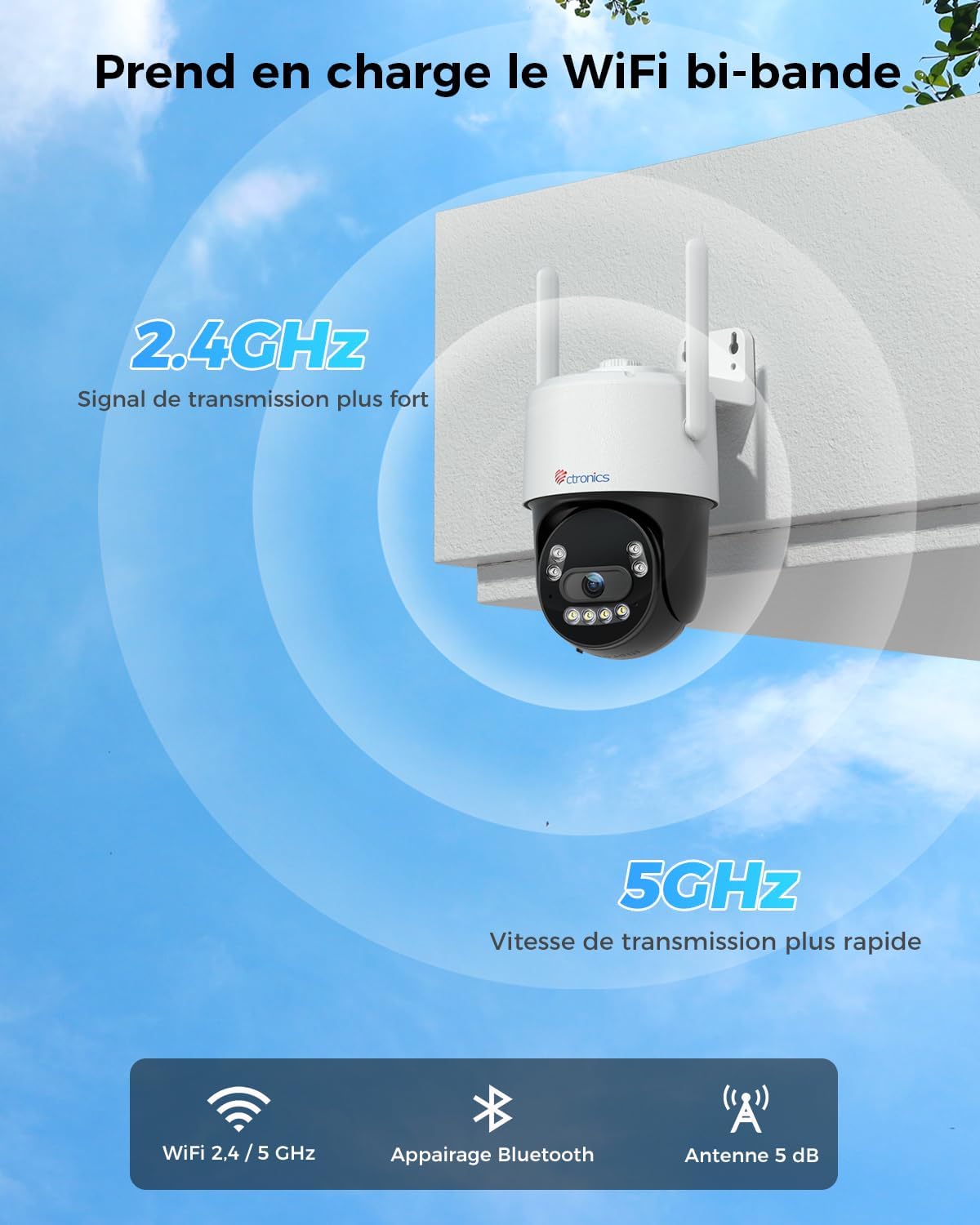
Image: The Ctronics camera securely mounted on an exterior wall of a building, demonstrating a typical installation scenario.
4.2 Sovelluksen asennus ja verkkoyhteys
- Lataa sovellus: Etsi "Ctronics Pro" in your mobile device's app store (iOS or Android) and download the application.
- Luo tili: Open the Ctronics Pro app and follow the on-screen instructions to create a new user account.
- Lisää kamera:
- Kytke kameraan virta.
- Lisää uusi laite napauttamalla sovelluksessa "+"-kuvaketta.
- Select your camera model or scan the QR code on the camera.
- Follow the in-app instructions for Bluetooth pairing for quick setup.
- Connect the camera to your WiFi network. The CTIPC-980 supports both 2.4GHz and 5GHz bands. Choose the appropriate network and enter the password.
- Kun yhteys on muodostettu, kamera näkyy laiteluettelossasi.

Image: The Ctronics camera illustrating its dual-band WiFi capability, showing stronger 2.4GHz signal and faster 5GHz speed.
5. Käyttöohjeet
5.1 Livenä View
Open the Ctronics Pro app and tap on your camera from the device list to access the live video feed. You can view reaaliaikaista syötettä mistä tahansa, jossa on internetyhteys.
5.2 PTZ-ohjaus
Livenä view screen, use the directional controls to pan (rotate horizontally up to 355°) and tilt (rotate vertically up to 90°) the camera lens to adjust your viewkulma.
5.3 Kaksisuuntainen ääni
Tap the microphone icon in the app to speak through the camera's built-in speaker. Tap the speaker icon to listen to audio from the camera's surroundings. This allows for real-time communication with visitors or to deter unwanted guests.

Image: A person using the Ctronics Pro app on a smartphone to communicate via the camera, showing a live feed of a child and a car with speech bubbles indicating two-way conversation.
5.4 Tallennus ja toisto
The camera can record continuously or based on motion detection. Recorded footage can be accessed and played back through the Ctronics Pro app. Navigate to the playback section to view historical recordings.
5.5 Yönäkötilat
You can configure the night vision mode in the camera settings:
- Infrapuna (IR) -tila: Tarjoaa selkeitä mustavalkoisia kuvia täydellisessä pimeydessä.
- Täysväritila: Utilizes the built-in spotlight to capture color images at night.
- Älykäs tila: The camera operates in IR mode and automatically switches to full-color mode with the spotlight activated when motion is detected.
5.6 Älykäs tunnistus ja hälytykset
Enable intelligent detection for humans, vehicles, or animals in the app settings. When an event is detected, the camera can:
- Lähetä push-ilmoituksia mobiililaitteeseesi.
- Aktivoi sisäänrakennettu sireeni.
- Turn on the integrated spotlights.

Image: An intruder being deterred by the camera's activated siren and spotlight, with a notification showing "Human Recognition Warning".
5.7 Tallennusvaihtoehdot
The CTIPC-980 offers multiple storage solutions for your recordings:
- MicroSD-kortti: Insert a MicroSD card (up to 256GB, not included) into the designated slot for local 24/7 recording. The oldest footage korvataan, kun kortti on täynnä.
- Ctronics Cloud Storage: Subscribe to Ctronics Cloud service for secure off-site storage. A free trial may be available.
- FTP: Configure FTP settings in the app to upload recordings to your own FTP server.

Image: The Ctronics camera with a MicroSD card being inserted, illustrating the various storage options including TF card, cloud storage, and FTP support.
6. Huolto
- Puhdistus: Puhdista kameran linssi ja kotelo säännöllisesti pehmeällä,amp liinalla selkeän kuvanlaadun varmistamiseksi. Älä käytä voimakkaita kemikaaleja.
- Laiteohjelmistopäivitykset: Check the Ctronics Pro app periodically for available firmware updates. Keeping your camera's firmware up-to-date ensures optimal performance and security.
- Tehosykli: Jos kamerassa on ongelmia, kokeile käynnistää se uudelleen irrottamalla virtalähde ja kytkemällä se uudelleen.
7. Vianmääritys
| Ongelma | Mahdollinen syy | Ratkaisu |
|---|---|---|
| Kamera offline-tilassa | No power, WiFi disconnected, poor signal. | Check power connection. Restart camera and router. Ensure camera is within WiFi range. Reconfigure WiFi in the app. |
| Huono kuvanlaatu | Likainen linssi, heikko valaistus, verkon kaistanleveys. | Clean the lens. Ensure adequate lighting or proper night vision mode. Check internet speed. |
| Väärä hälytys | Sensitivity too high, environmental factors (e.g., moving branches). | Adjust detection sensitivity in the app. Define specific detection zones to exclude irrelevant areas. |
| Cannot connect to 5GHz WiFi | Incorrect WiFi password, router settings, distance. | Verify WiFi password. Ensure your router supports 5GHz and it's enabled. Move camera closer to the router. Try 2.4GHz if 5GHz connection remains unstable. |
| Ei ääntä | Microphone/speaker disabled, app volume low. | Check audio settings in the app. Ensure your phone's volume is up. |
8. Tekniset tiedot
| Ominaisuus | Yksityiskohta |
|---|---|
| Mallinumero | CTIPC-980 |
| Merkki | Ctronics |
| Resoluutio | 4K Ultra HD (3840x2160P), 8 Megapixels |
| Linssi | 3.6mm Starlight Lens |
| Panorointi/kallistusalue | Panorointi: 355°, kallistus: 90° |
| Night Vision | IR, Color, Smart (with 4 IR LEDs) |
| WiFi-yhteys | 2.4 GHz / 5 GHz kaksikaistainen |
| Audio | Kaksisuuntainen ääni (sisäänrakennettu mikrofoni ja kaiutin) |
| Tallennusvaihtoehdot | MicroSD Card (up to 256GB), Cloud Storage, FTP |
| Havaitseminen | Ihmisten, ajoneuvojen ja eläinten havaitseminen |
| Säänkestävä luokitus | IP66 |
| Virransyöttö | 12 volttia, 12 wattia |
| Mitat (P x L x K) | 10 x 5 x 10 cm (noin) |
| Käyttöjärjestelmät | iOS, Android, Windows, Mac |

Image: Displays the Ctronics camera's compatibility with iOS, Android, Windows, and Mac operating systems, showing the app interface on a laptop, desktop monitor, tablet, and smartphone.
9. Takuu ja tuki
Ctronicsin tuotteilla on vakiotakuu. Katso tarkemmat takuutiedot pakkaukseen sisältyvästä takuukortista tai käy Ctronicsin virallisella verkkosivustolla. website. If you encounter any issues or have questions regarding your CTIPC-980 camera, please contact Ctronics customer support through their official websivustolla tai sovelluksessa annettujen yhteystietojen avulla.
Virallinen Websivusto: www.ctronics.com