
1. Johdanto
This manual provides essential instructions for setting up, operating, maintaining, and troubleshooting your HONOR 400 5G smartphone. Please read this guide thoroughly to ensure proper use and to maximize the performance of your device.
The HONOR 400 is a powerful 5G smartphone featuring a 6.55-inch AMOLED display, a Qualcomm Snapdragon 7 Gen 3 processor, 12GB of RAM, and 512GB of internal storage. It operates on Android 15 and is equipped with a 5300mAh battery, a 200MP main camera, and dual-SIM capabilities.
2. Mitä laatikossa on
Upon unboxing your HONOR 400 smartphone, verify that all items are present:
- HONOR 400 5G älypuhelin
- USB-kaapeli
- (Other accessories such as a charger, SIM ejector tool, or protective case may vary by region and package contents.)
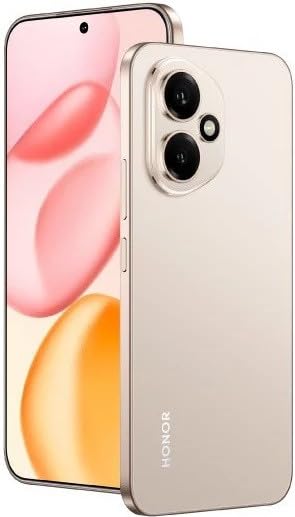
Kuva 2.1: The HONOR 400 5G Smartphone. This image displays the device's sleek design and the main screen.
3. Laite loppuview
Familiarize yourself with the physical components of your HONOR 400 smartphone.
3.1 Edessä View
- Näyttö: 6.55-inch AMOLED screen with 1264 x 2736 pixels resolution.
- Etukamera: 50 MP, f/2.0 (wide) for selfies and video calls.
- Kuuloke: Sijaitsee näytön yläreunassa.
An illustration of the front view would typically show the display, front camera, and earpiece.
3.2 Taka View
- Main Camera System:
- 200 MP, f/1.9 (wide), 1/1.4", PDAF, OIS
- 12 MP, f/2.2, 112° (ultrawide), AF
- Flash: LED-salama hämäräkuvaukseen.
- HONOR Logo: Tuotemerkin tunnistaminen.
An illustration of the rear view would typically highlight the camera module and brand logo.
3.3 Sivu Views ja portit
- Virtapainike: Yleensä oikealla puolella, käytetään laitteen käynnistämiseen/sammuttamiseen ja herättämiseen/nukkumaan.
- Äänenvoimakkuuspainikkeet: Typically on the right side, above the power button, for adjusting volume.
- USB Type-C -portti: Sijaitsee pohjassa, käytetään lataamiseen ja tiedonsiirtoon.
- SIM-korttilokero: Location varies, typically on the side or bottom, for inserting Nano-SIM cards.
- Microphones & Speakers: Strategically placed for calls and audio output.
Illustrations of the device's sides would show the placement of buttons, ports, and the SIM tray.
4. Asennus
4.1 SIM-korttien asettaminen
- Paikanna laitteesi SIM-korttikelkka.
- Aseta SIM-kortin poistotyökalu (jos sellainen on) pieneen reikään alustan vieressä ja paina varovasti, kunnes alusta ponnahtaa ulos.
- Place your Nano-SIM card(s) into the designated slots on the tray. The HONOR 400 supports Dual-SIM (Nano-SIM + ESIM OR Nano-SIM + Nano-SIM). Ensure the gold contacts face downwards.
- Aseta lokero varovasti takaisin puhelimeen.
An image demonstrating SIM card insertion would be helpful here.
Tärkeää: Ennen ostoaasing, verify network compatibility with your service provider. This device supports GSM networks (2G, 3G, 4G LTE, and 5G SA/NSA) but does not support CDMA networks.
4.2 Ensimmäinen käynnistys ja asennusohjelma
- Pidä virtapainiketta painettuna, kunnes HONOR-logo tulee näkyviin.
- Suorita alkuasetukset noudattamalla näytön ohjeita. Asennus sisältää kielen valinnan, Wi-Fi-yhteyden muodostamisen, Google-tilin määrittämisen ja suojausominaisuuksien määrittämisen.
5. Laitteen käyttö
5.1 Android 15 -käyttöjärjestelmä
Your HONOR 400 runs on Android 15, offering a user-friendly interface and access to a vast ecosystem of applications via the Google Play Store. Navigate using gestures or on-screen buttons, customize your home screen, and manage notifications.
5.2 Perustoiminnot
- Soittaminen: Napauta Puhelin-kuvaketta, anna numero ja napauta soittopainiketta.
- Viestien lähettäminen: Use the Messaging app to send SMS/MMS.
- Internetin selaaminen: Avaa a web browser (e.g., Chrome) to access the internet via Wi-Fi or mobile data.
- Sovellusten hallinta: Download, install, and uninstall apps from the Google Play Store.
5.3 Kameran käyttö
The HONOR 400 features a versatile camera system:
- Takakamera: Utilize the 200 MP main sensor for high-resolution photos and the 12 MP ultrawide lens for expansive shots. Features include PDAF and Optical Image Stabilization (OIS).
- Etukamera: The 50 MP wide-angle front camera is ideal for selfies and video conferencing.
- Videotallennus: Capture videos in up to 4K resolution at various frame rates (30, 60, 120 fps).
A diagram of the camera interface or tips for photography modes could be included here.
5.4 Yhteydet
Laitteesi tukee useita liitäntävaihtoehtoja:
- 5G/4G LTE: High-speed mobile data connectivity.
- Wi-Fi: Yhdistä langattomiin verkkoihin internetyhteyttä varten.
- Bluetooth: Yhdistä langattomiin kuulokkeisiin, kaiuttimiin ja muihin laitteisiin.
- USB Type-C: For charging and connecting to a computer for data transfer.
6. Huolto
6.1 Akun hoito
- The HONOR 400 is equipped with a 5300mAh non-removable battery.
- Akun käyttöiän pidentämiseksi vältä äärimmäisiä lämpötiloja ja pura akku usein kokonaan.
- Use the provided USB cable and a compatible charger for optimal charging.
6.2 Ohjelmistopäivitykset
Regularly check for and install software updates to ensure your device has the latest features, security patches, and performance improvements. You can usually find this option in your phone's Settings menu under "System & updates" or "About phone."
6.3 Laitteen puhdistaminen
Puhdista puhelimen näyttö ja runko pehmeällä, nukkaamattomalla liinalla. Vältä voimakkaiden kemikaalien tai hankaavien materiaalien käyttöä.
7. Vianmääritys
This section addresses common issues you might encounter with your HONOR 400 smartphone.
7.1 Laite ei käynnisty
- Varmista, että akku on ladattu. Kytke puhelin laturiin vähintään 15 minuutiksi ennen kuin yrität käynnistää sen uudelleen.
- Try a forced restart by holding the Power button for an extended period (e.g., 10-15 seconds).
7.2 Verkkoyhteysongelmat
- Tarkista, onko SIM-korttisi asetettu oikein.
- Varmista, että mobiilidata on käytössä puhelimesi asetuksissa.
- Käynnistä laite uudelleen.
- Confirm with your service provider that your plan is active and there are no network outages alueellasi.
- Ensure your device is compatible with your network's frequencies (GSM only, no CDMA).
7.3 Sovellusten kaatuminen tai jumiutuminen
- Sulje ja avaa sovellus uudelleen.
- Tyhjennä sovelluksen välimuisti ja tiedot kohdassa Asetukset > Sovellukset.
- Varmista, että sovellus on päivitetty uusimpaan versioonsa.
- Käynnistä puhelin uudelleen.
7.4 Hidas suorituskyky
- Sulje tarpeettomat taustasovellukset.
- Tyhjennä välimuisti ja väliaikainen files.
- Ensure you have sufficient free storage space (512GB internal storage).
- Käynnistä laite säännöllisesti uudelleen.
8. Tekniset tiedot
| Ominaisuus | Yksityiskohta |
|---|---|
| Mallin nimi | Kunnia 400 |
| Käyttöjärjestelmä | Android 15.0 |
| Prosessori | Qualcomm SM7550-AB Snapdragon 7 Gen 3 (4 nm), Octa-core (1x2.63 GHz Cortex-A715 & 3x2.4 GHz Cortex-A715 & 4x1.8 GHz Cortex-A510) |
| RAM | 12 Gt |
| Sisäinen tallennustila | 512 Gt (ei laajennettavissa) |
| Näyttö | 6.55 Inches AMOLED, 1B colors, 1264 x 2736 pixels |
| Takakamera | 200 MP (wide, OIS) + 12 MP (ultrawide) |
| Etukamera | 50 megapikseliä (laajakulma) |
| Videon sieppaustarkkuus | 4K (30, 60, 120 fps) |
| Akun kapasiteetti | 5300 miljoonaaamp Hours (non-removable) |
| SIM-kortti | Kaksois-SIM (Nano-SIM + ESIM TAI Nano-SIM + Nano-SIM) |
| Yhteydet | 5G, GSM, LTE, Wi-Fi, Bluetooth, USB Type-C |
| Mitat | 156.5 x 74.6 x 7.3 mm (6.16 x 2.94 x 0.29 tuumaa) |
| Paino | 202 grammaa (6.49 unssia) |
| Väri | Desert Gold (as per product listing, actual color may vary by variant) |
9. Takuu ja tuki
9.1 Valmistajan takuu
The HONOR 400 smartphone comes with a 1 vuoden valmistajan takuuTämä takuu kattaa materiaali- ja valmistusvirheet normaalissa käytössä. Säilytä ostokuitti takuuvaatimuksia varten.
For specific terms and conditions of the warranty, please refer to the warranty card included with your product or visit the official HONOR support websivusto.
9.2 Asiakastuki
Jos tarvitset lisäapua, teknistä tukea tai palvelua, ota yhteyttä HONORin asiakaspalveluun heidän virallisen websivustolla tai tuotepakkauksessa olevissa yhteystiedoissa.
You can typically find support resources, FAQs, and contact details on the official HONOR websivusto: www.hihonor.com


