
FEYA M-Y10
FEYA M-Y10 Motorcycle Helmet Headset User Manual
Model: M-Y10 | Brand: FEYA
Johdanto
Thank you for choosing the FEYA M-Y10 Motorcycle Helmet Headset. This device is designed to enhance your riding experience with wireless communication, music playback, and hands-free calling. Please read this manual carefully to ensure proper use and optimal performance of your headset.
Pakkauksen sisältö

This image displays the FEYA M-Y10 headset along with its accessories, including speakers, microphones, mounting clips, and charging cable.
- FEYA M-Y10 Headset Unit
- Helmet Speakers and Microphone (soft and hard mic options)
- Velcro Double-sided Tape for Speakers
- Base for Mounting (clip-style)
- USB Type-C -latauskaapeli
- Käyttöopas (tämä asiakirja)
Tärkeimmät ominaisuudet
- Wireless V5.3 Technology: Supports simultaneous connection to two smartphones for stable and efficient communication.
- Älykäs melunvaimennus: Features 40mm graphene diaphragm speakers and dual noise-cancelling microphones (DSP and 8.0 CVC) to reduce engine noise, wind noise, and traffic sounds, ensuring clear audio.
- Pidentynyt akun käyttöikä: Equipped with a 1000mAh battery, offering up to 80 hours of music playback and 750 hours of standby time on a 2-hour charge.
- IPX6 vedenpitävyysluokitus: Designed to withstand dust, rain, fog, and snow, operating effectively in temperatures as low as -29°C (-20°F).
- AI Voice Assistant & Auto Answer: Activate Siri or other voice assistants with a short press. Automatically answers incoming calls after 10 seconds, allowing hands-free operation.
- Easy Installation & Lightweight Design: Simple to install on various helmet types. Weighs only 45g, reducing helmet burden.
Asennus
1. Asennus
The FEYA M-Y10 headset features a detachable mounting design for easy installation on most helmet types. Before installation, measure the available space inside your helmet for the speakers (speaker thickness 15.2mm / width 45mm). If space is insufficient, some internal padding modification may be required.
- Attach the clip-style base to the side of your helmet. Ensure it is securely fastened.
- Insert the headset unit into the base until it clicks into place.
- Peel off the backing from the Velcro double-sided tape and attach it to the back of the speakers.
- Carefully position the speakers inside your helmet, aligning them with your ears for optimal sound.
- Attach the microphone to a suitable position inside the helmet, ensuring it is close to your mouth for clear voice pickup. Choose between the soft mic or hard mic based on your helmet type and preference.
- Connect the speaker and microphone cables to the headset unit.

This image illustrates the detachable mounting design, highlighting how the headset unit can be easily attached and removed from its base on the helmet.
2. Alkulataus
Before first use, fully charge the headset. Connect the provided USB Type-C charging cable to the headset's charging port and a suitable USB power source. The charging indicator will show the charging status. A full charge takes approximately 2 hours.

This image shows the headset being charged via its Type-C port, emphasizing its 1000mAh battery and fast charging capability.
3. Yhdistäminen älypuhelimeen
The FEYA M-Y10 uses Wireless V5.3 technology for stable connections.
- Varmista, että kuulokkeista on katkaistu virta.
- Press and hold the Power button for approximately 3 seconds until the indicator light flashes, indicating pairing mode.
- On your smartphone, enable Wireless (Bluetooth) and search for "FEYA M-Y10" (or similar device name).
- Select the device to connect. Once paired, the indicator light will change, and you may hear a confirmation tone.
- The headset can connect to two smartphones simultaneously. Repeat the pairing process for a second device if needed.

This image highlights the advanced V5.3 wireless chip, ensuring a stable and efficient connection for your devices.
Käyttöohjeet
1. Virta päälle/pois
- Virta päälle: Paina virtapainiketta ja pidä sitä painettuna noin 3 sekuntia, kunnes merkkivalo syttyy.
- Virta pois: Paina virtapainiketta ja pidä sitä painettuna noin neljän sekunnin ajan, kunnes merkkivalo sammuu.
2. Musiikin toisto
- Toista/tauko: Short press the "M" button.
- Seuraava kappale: Paina lyhyesti "+"-painiketta.
- Edellinen kappale: Paina lyhyesti "-"-painiketta.
- Ääni kovemmalle: Paina pitkään "+"-painiketta.
- Äänenvoimakkuutta pienemmälle: Paina pitkään "-"-painiketta.

This image depicts a rider enjoying music through the 40mm speakers, highlighting the lossless stereo sound experience.
3. Puhelunhallinta
- Vastaa puheluun: The headset will automatically answer incoming calls after 10 seconds.
- Lopeta puhelu: Short press the "M" button during a call.
- Hylkää puhelu: Long press the "M" button when a call comes in.
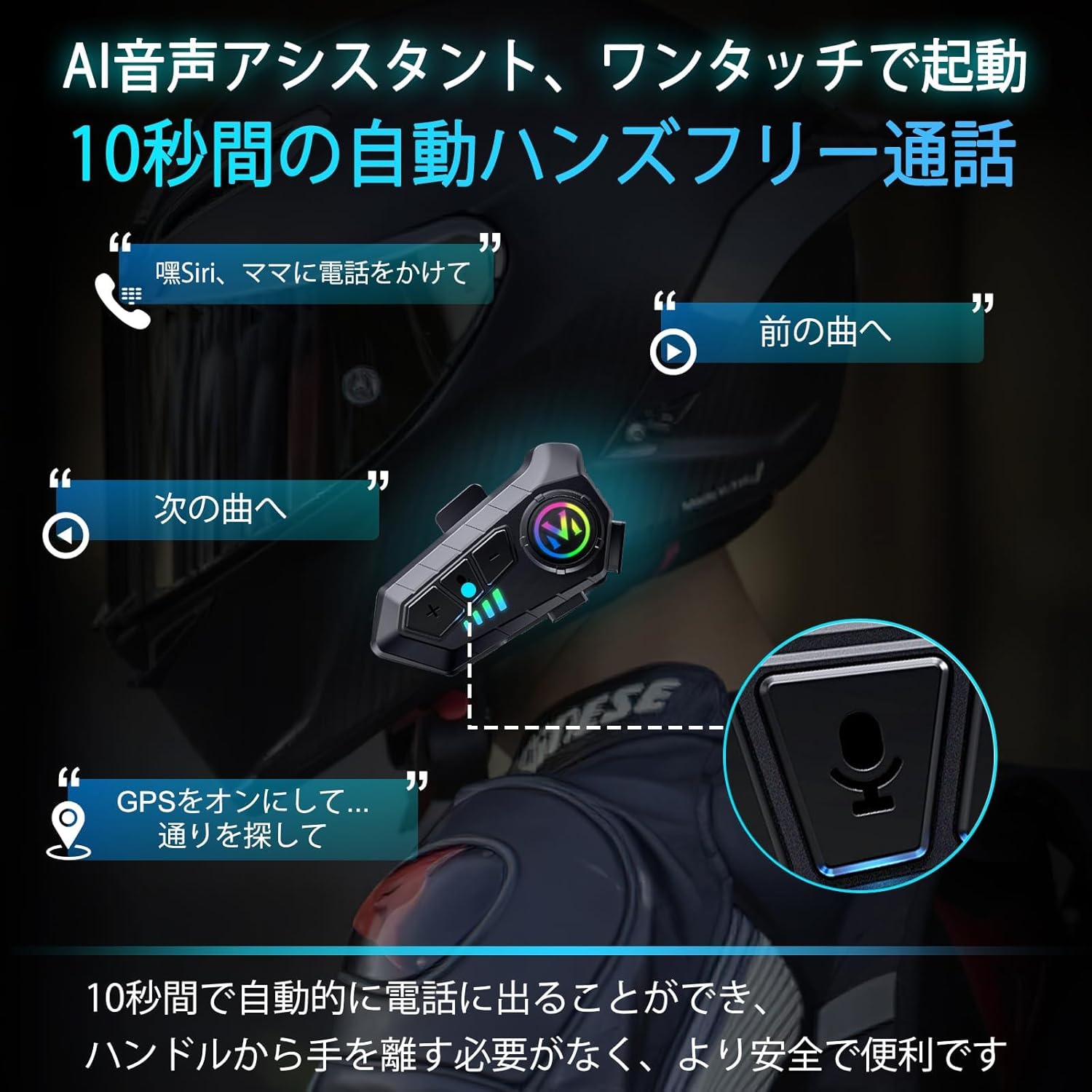
This image demonstrates the AI voice assistant and automatic call answering features, allowing riders to manage calls and navigation hands-free.
4. Ääniavustaja-aktivointi
- Activate Voice Assistant (Siri/AI): Short press the Voice Control button (often the "M" button or a dedicated button, refer to product diagram if available).
5. Kielen vaihtaminen
To switch the voice prompt language:
- Ensure the headset is powered on and disconnected from any smartphone.
- Double-click the "M" button to cycle through available languages.
Huolto
1. Lataus
Charge the headset using the provided Type-C cable. A full charge takes approximately 2 hours and provides up to 80 hours of music playback or 18 months of standby time. The battery level can be displayed on your smartphone.
2. Puhdistus ja varastointi
- Wipe the headset unit with a soft, dry cloth. Do not use harsh chemicals or abrasive cleaners.
- The headset is IPX6 waterproof, meaning it is protected against high-pressure water jets. However, avoid submerging it in water.
- Säilytä kuulokkeita viileässä, kuivassa paikassa, poissa suorasta auringonvalosta ja äärimmäisistä lämpötiloista.

This image demonstrates the IPX6 dust and waterproof performance of the headset, ensuring durability in various weather conditions.
Vianetsintä
| Ongelma | Mahdollinen syy | Ratkaisu |
|---|---|---|
| Laite ei käynnisty. | Akku vähissä. | Lataa kuulokkeet täyteen. |
| Ei voi muodostaa pariliitosta älypuhelimen kanssa. | Headset not in pairing mode; smartphone Wireless (Bluetooth) off; too far from device. | Ensure headset is in pairing mode (flashing indicator). Turn on smartphone Wireless. Keep devices within 1 meter. |
| Ei ääntä tai äänenvoimakkuus on alhainen. | Volume too low; speakers not positioned correctly; poor connection. | Increase volume on headset and smartphone. Adjust speaker position. Re-pair the device. |
| Huono puhelun laatu. | Mikrofoni on väärin sijoitettu; liikaa ympäristömelua. | Adjust microphone closer to mouth. Ensure noise cancelling features are active. |
| Automaattinen sammutus. | No smartphone connection for 5 minutes. | This is a power-saving feature. Reconnect to your smartphone to resume use. |
Tekniset tiedot
| Ominaisuus | Yksityiskohta |
|---|---|
| Mallin nimi | M-Y10 (Internal Model: B35S) |
| Langaton tekniikka | Langaton V5.3 |
| Kaiuttimen koko | 40 mm |
| Akun kapasiteetti | 1000 mAh |
| Latausportti | USB Type-C |
| Latausaika | Noin 2 tuntia |
| Musiikin toistoaika | Jopa 80 tuntia |
| Valmiusaika | Up to 750 hours (18 months) |
| Vesitiivis luokitus | IPX6 |
| Melunhallinta | Active Noise Cancellation (DSP & CVC 8.0) |
| Impedanssi | 32 ohmia |
| Käyttölämpötila | Effective down to -29°C (-20°F) |
| Paino | Noin 45 g |
| Materiaali | Muovi |
Takuu ja tuki
FEYA products are designed for durability and performance. For warranty information, please refer to the product packaging or contact your retailer. If you encounter any issues or have questions regarding your FEYA M-Y10 headset, please contact FEYA customer support through the official website or your purchase platform for assistance.
Each product is verified with a unique code before shipment to ensure authenticity and quality.
Aiheeseen liittyvät asiakirjat - M-Y10
 |
Y10-2X moottoripyöräkypärän sisäpuhelinjärjestelmä: Käyttöohje Kattava käyttöohje Y10-2X-moottoripyöräkypärän intercom-järjestelmälle, joka kattaa yli tuotteenview, puhelimen ominaisuudet, ääniavustaja, musiikin sisäpuhelinmiksaus, asennus, pariliitos, musiikin säätimet ja tekniset tiedot. Sisältää FCC-yhteensopivuustiedot ja käyttöä koskevat varotoimet. |
 |
Y10-moottoripyöräkypärän Bluetooth-kuulokkeiden pikakäyttöohje Ytimekäs opas Y10-moottoripyöräkypärän Bluetooth-kuulokkeisiin, jossa yksityiskohtaiset tiedot tuotteestaview, puhelimen ominaisuudet, musiikin toisto, lataaminen, pariliitos ja tärkeät turvallisuusohjeet. |
 |
Y10-2X moottoripyörän intercom-kuulokkeiden käyttöohje Kattava käyttöohje KEBIDUMEI:n Y10-2X-moottoripyörän intercom-kuulokkeille, joka kattaa yli tuotteenview, ominaisuudet, pariliitos, asennus ja turvaohjeet. |
 |
velev Y10 moottoripyöräkypärän kuulokkeet - Pikakäyttöohje Kattava opas velev Y10 -moottoripyöräkypäräkuulokkeisiin, joka kattaa yli tuotteenview, lataaminen, pariliitos, puhelut, musiikin toisto ja turvallisuusohjeet. Opi käyttämään Bluetooth 5.3 -kypäräviestintäjärjestelmääsi. |
 |
PHONEPACE Y10-2X moottoripyörän sisäpuhelinkuulokkeiden käyttöohje Kattava käyttöohje PHONEPACE Y10-2X -moottoripyörän intercom-kuulokkeille, joka kattaa asennuksen, ominaisuudet, pariliitoksen, musiikin ja turvallisuusohjeet. |
 |
Kebidumei Y10-2X moottoripyöräkypärän intercom-kuulokkeiden käyttöohje Kattava käyttöohje Kebidumei Y10-2X -moottoripyöräkypärän intercom-kuulokkeille, joka kattaa tuotteen yliview, ominaisuudet, käyttö, asennus ja turvaohjeet. |
Ask a question about this manual
Ask about setup, troubleshooting, compatibility, parts, safety, or missing instructions. Manuals+ will review the question and use this page’s manual context to help answer it.