
Johdanto
This manual provides essential information for setting up, operating, maintaining, and troubleshooting your Acer AL15-33P laptop. Please read this guide thoroughly to ensure proper use and to maximize the lifespan of your device.
Asennus
1. Pakkauksen purkaminen ja alkutarkastus
Carefully remove the laptop and all accessories from the packaging. Check for any visible damage. The package should include the laptop, power adapter, and this user manual.

Edessä view of the Acer AL15-33P laptop with the screen displaying the Windows desktop.
2. Virran kytkeminen
- Connect the AC adapter cable to the power adapter.
- Plug the DC output connector of the power adapter into the power input port on the side of your laptop.
- Kytke virtajohto pistorasiaan.
The battery will begin charging automatically. It is recommended to fully charge the battery before initial use.
3. Alkukäynnistys ja Windowsin asennus
- Avaa kannettavan tietokoneen kansi.
- Press the power button, typically located on the keyboard deck or side, to turn on the laptop.
- Follow the on-screen instructions to complete the Windows 11 setup process. This includes selecting your region, language, accepting terms, and setting up a user account.
Kannettavan tietokoneen käyttö
1. Näppäimistön ja kosketuslevyn käyttö
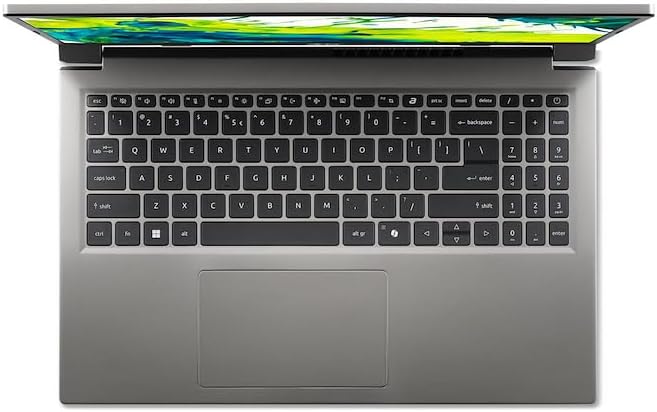
Ylhäältä alas view kannettavan tietokoneen näppäimistöstä ja kosketuslevystä.
- Näppäimistö: The laptop features a full-size keyboard. Use the function (Fn) key in combination with F-keys for special functions like adjusting brightness, volume, or enabling/disabling Wi-Fi.
- Kosketuslevy: The integrated touchpad supports multi-touch gestures. Tap to click, use two fingers to scroll, and pinch to zoom.
2. Oheislaitteiden liittäminen
Your Acer AL15-33P laptop is equipped with various ports for connecting external devices.

Right side of the laptop showing ports including USB and audio jack.

Left side of the laptop showing ports including power, USB-C, HDMI, and USB-A.
- USB-portit: Liitä USB-laitteita, kuten ulkoisia kiintolevyjä, hiiriä tai näppäimistöjä.
- HDMI-portti: Liitä ulkoinen näyttö tai televisio suurentaaksesi näyttöä.
- Ääniliitäntä: Liitä kuulokkeet tai ulkoiset kaiuttimet.
- USB-C-portti: For data transfer and potentially display output or charging, depending on the specific model configuration.
3. Langaton yhteys
- Wi-Fi: Yhdistä langattomaan verkkoon napsauttamalla tehtäväpalkin Wi-Fi-kuvaketta, valitsemalla verkkosi ja antamalla tarvittaessa salasana.
- Bluetooth: To pair Bluetooth devices, go to Windows Settings > Bluetooth & devices, and turn on Bluetooth.
4. Virranhallinta
- Nukkumismoodi: Close the lid or select 'Sleep' from the Start menu to put the laptop into a low-power state.
- Sammutus: To turn off the laptop completely, go to the Start menu, click the Power icon, and select 'Shut down'.
- Käynnistä uudelleen: To restart the laptop, go to the Start menu, click the Power icon, and select 'Restart'.
Huolto
1. Kannettavan tietokoneen puhdistaminen
- Käytä pehmeää, nukkaamatonta liinaa hieman dampvedellä tai näytönpuhdistusaineella näytön puhdistamiseksi.
- Käytä näppäimistön ja rungon puhdistukseen pehmeää liinaa. Vältä voimakkaita kemikaaleja tai hankaavia materiaaleja.
- Periodically use compressed air to clear dust from the cooling vents to prevent overheating.
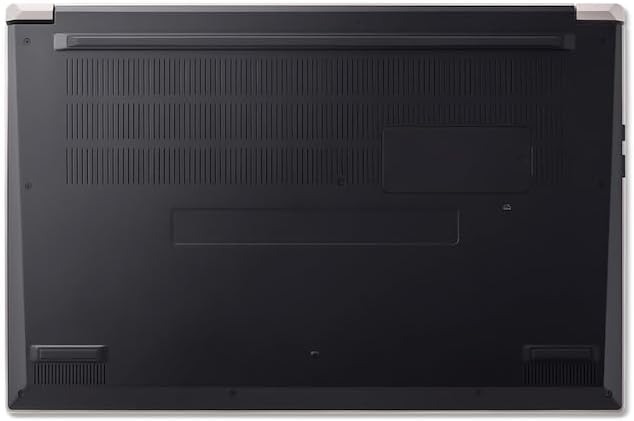
Pohja view of the laptop, highlighting the ventilation grilles.
2. Akun hoito
- Vältä akun usein toistuvaa tyhjentymistä kokonaan.
- Jos kannettavaa tietokonetta säilytetään pitkään, varmista, että akun varaus on noin 50–70 %.
- Operate the laptop in a moderate temperature environment.
3. Ohjelmistopäivitykset
Regularly update your operating system and drivers to ensure optimal performance and security. Windows Update can be accessed via Settings > Windows Update.
4. Tallennuksen hallinta
Ajoittain review ja poista tarpeettomat files to free up storage space. Utilize cloud storage or external drives for backups of important data.
Vianetsintä
This section addresses common issues you might encounter with your Acer AL15-33P laptop.
| Ongelma | Mahdollinen ratkaisu |
|---|---|
| Kannettava tietokone ei käynnisty. | Varmista, että virtalähde on kytketty kunnolla ja että pistorasia toimii. Kokeile toista pistorasiaa. Jos akku on täysin tyhjä, sen uudelleenkäynnistys voi kestää muutaman minuutin kytkemisen jälkeen. |
| Näyttö on tyhjä tai musta. | Check if the laptop is powered on. Try pressing Fn + F6 (or the corresponding display toggle key) to cycle through display modes. Connect an external monitor to check if the issue is with the laptop's screen. |
| Wi-Fi-yhteysongelmat. | Ensure Wi-Fi is enabled (Fn + F3 or check Windows settings). Restart your router and modem. Check if other devices can connect to the Wi-Fi network. Update Wi-Fi drivers. |
| Kannettava tietokone toimii hitaasti. | Close unnecessary applications. Check Task Manager for processes consuming high CPU or memory. Run a disk cleanup. Ensure Windows and drivers are up to date. |
Tekniset tiedot
The following are key specifications for the Acer AL15-33P model. Note that specific configurations may vary.
- Malli: Acer AL15-33P
- Prosessori: Intel Core i3-N355
- RAM: 8GB
- Varastointi: 512GB SSD
- Näyttö: 15.6-tuumainen
- Käyttöjärjestelmä: Windows 11
- Merkki: Acer
Takuu ja tuki
Your Acer AL15-33P laptop comes with a standard manufacturer's warranty. Please refer to the warranty card included with your product for specific terms and conditions, including the warranty period and coverage details.
Teknistä tukea, ajurilatauksia tai huoltokyselyitä varten käy Acerin virallisella tukisivustolla. website or contact Acer customer service directly. Have your laptop's serial number ready when contacting support.
Acer tuki Websivusto: www.acer.com/support