
Johdanto
This manual provides detailed instructions for the installation, operation, and maintenance of your Jennov P40 4G LTE Cellular Solar Security Camera. This camera is designed for outdoor surveillance in locations without Wi-Fi access, utilizing 4G LTE cellular networks for connectivity and solar power for continuous operation. Please read this manual thoroughly before using the product to ensure proper functionality and safety.
Mitä laatikossa on
Varmista, että pakkauksessasi on kaikki alla luetellut tuotteet:
- Jennov P40 Solar Camera
- Aurinkopaneeli
- Kameran teline
- Aurinkopaneeli
- Kiinnitysruuvit ja seinätulpat
- Latauskaapeli (C-tyyppi)
- Tweezers (for SIM/MicroSD card handling)
- Kohdistustarra
- Varoitustarrat
- Käyttöohje (tämä asiakirja)

Image: All components included in the Jennov P40 security camera package.
Tuote loppuview
The Jennov P40 is a versatile 4G LTE cellular security camera featuring 2K HD resolution, 360° PTZ (Pan-Tilt-Zoom) capabilities, and solar power for wire-free operation. It includes a built-in SIM card for cellular connectivity, eliminating the need for Wi-Fi. Key features include color night vision, PIR motion detection, two-way audio, and cloud/local storage options.

Image: Visual representation of the camera's main features, including 2K HD, full-color night vision, two-way audio, and IP65 waterproofing.
Asennus
1. Alkulataus
Before first use, ensure the camera's internal battery is fully charged. Connect the solar panel to the camera and place the solar panel in direct sunlight for several hours. Alternatively, use the provided Type-C cable to charge the camera via a standard USB power adapter (not included).

Image: The camera connected to its solar panel, demonstrating the solar charging capability.
2. SIM Card and Data Plan
The Jennov P40 comes with a built-in, non-removable SIM card preloaded with a 7-day free trial data. This camera operates exclusively on 4G LTE networks (Verizon, T-Mobile, AT&T in the US) and does not support Wi-Fi. After the trial, a subscription data plan is required for continued service. The SIM card is non-transferable.

Image: Detail of the camera's side panel, highlighting the built-in SIM card and the MicroSD card slot.

Image: Illustration of the 4G LTE cellular connectivity and available data plan options.
3. App Installation and Camera Pairing
Download the UBox APP from your smartphone's app store. Follow the in-app instructions to add your camera. This typically involves powering on the camera, scanning a QR code on the device, and completing the pairing process.

Image: A visual guide demonstrating the steps to add the camera using the UBox mobile application.
4. Kameran asentaminen
Choose a suitable location for mounting, ensuring the solar panel receives adequate sunlight and the camera has a clear view of the desired monitoring area. Use the provided mounting bracket, screws, and wall plugs to securely attach the camera and solar panel. The solar panel can be mounted separately from the camera using the extended cable for optimal sun exposure.

Image: The Jennov P40 camera and solar panel mounted on an outdoor wall.
Toiminta
1. Remote Control and Monitoring
Access live video feeds and control camera functions remotely via the UBox mobile app. The camera offers 360° panoramic coverage with 355° pan and 100° tilt capabilities, allowing you to adjust the viewing angle and zoom levels in real-time.
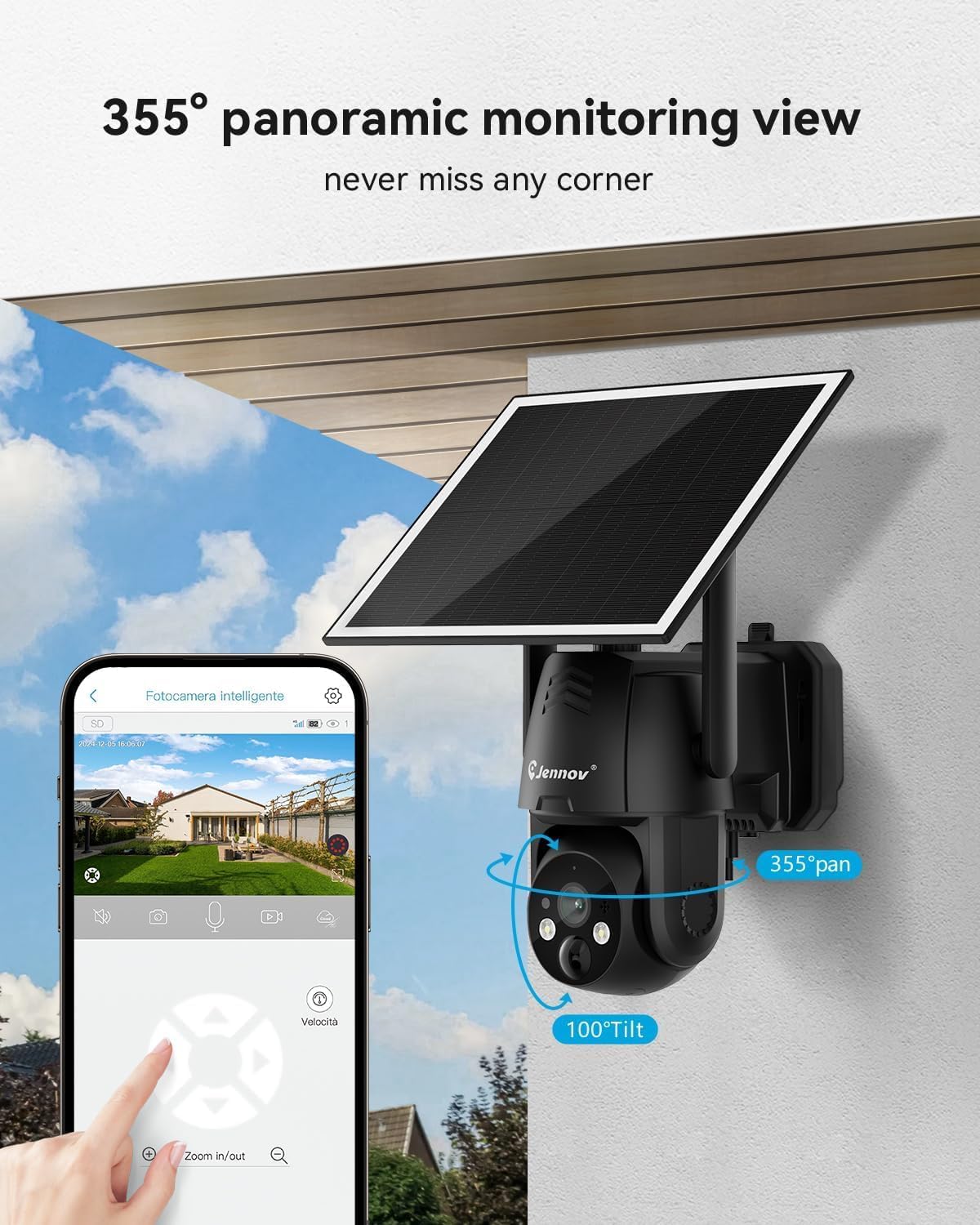
Image: The UBox app interface showing remote control of the camera's pan and tilt functions.

Image: Real-time monitoring view from the camera displayed on a smartphone.
2. 2K HD Color Night Vision
The camera provides sharp 2K HD video quality both day and night. With its color night vision feature, details are captured clearly even in low-light conditions, offering enhanced security monitoring.

Image: A split image demonstrating the clarity of 2K color night vision compared to a daytime view.
3. Smart AI Detection and Alerts
The Jennov P40 features advanced AI analysis for intelligent alerts, including PIR human body sensor and 12M AI human detection distance. This enables face recognition and object detection, reducing false alarms. Note that some advanced AI features may require a subscription fee.

Image: Diagram illustrating the PIR human body sensor and AI human detection capabilities at night.

Image: Visualizing real-time alerts, siren, spotlight, two-way audio, and human detection zones.
4. Kaksisuuntainen ääni
Engage in real-time two-way conversations through the camera's built-in microphone and speaker. This feature allows you to communicate with visitors or deter intruders from a distance of up to 20 meters.

Image: A user interacting with the camera's two-way audio function via the mobile app.
5. Tallennusvaihtoehdot
The camera supports both cloud storage for alarm event recordings (requires subscription) and local storage via a MicroSD card (not included, maximum 128GB, FAT32 format). Video uploads directly to the cloud using 4G cellular connectivity.
Image: Diagram showing the dual storage options: cloud storage and local MicroSD card storage.
Huolto
- Aurinkopaneelien sijoitus: Ensure the solar panel is positioned to receive maximum direct sunlight throughout the day for optimal charging. Adjust its angle seasonally if necessary.
- Puhdistus: Puhdista kameran linssi ja aurinkopaneeli säännöllisesti pehmeällä, kuivalla liinalla.amp liinalla poistaaksesi pölyn, lian tai roskat, jotka saattavat tukkia view tai heikentää lataustehokkuutta. Älä käytä voimakkaita kemikaaleja.
- Laiteohjelmistopäivitykset: Check the UBox app periodically for firmware updates to ensure your camera has the latest features and security enhancements.
- Akun kunto: While solar-powered, prolonged periods of low sunlight may require occasional manual charging via the Type-C port to maintain battery health.
Vianetsintä
| Ongelma | Mahdollinen syy | Ratkaisu |
|---|---|---|
| Kamera ei muodosta yhteyttä 4G-verkkoon. | No active data plan, poor 4G signal, SIM card issue. | Ensure your data plan is active and sufficient. Check 4G signal strength at the camera's location. If issues persist, contact customer support. |
| Battery not charging or low power. | Insufficient sunlight on solar panel, dirty solar panel, prolonged cloudy weather. | Reposition the solar panel for maximum sun exposure. Clean the solar panel. Manually charge the camera using the Type-C cable if solar charging is inadequate. |
| Ei voi view live feed or receive alerts. | No data plan, app issues, camera offline. | Verify active data plan. Restart the UBox app. Check camera status in the app. Ensure camera has power and 4G signal. |
| PTZ control unresponsive. | Network delay, app issue, camera malfunction. | Check 4G signal strength. Restart the UBox app. If the problem persists, try restarting the camera. |
Tekniset tiedot
| Ominaisuus | Yksityiskohta |
|---|---|
| Mallin nimi | P40 |
| Yhteydet | 4G LTE Cellular (Built-in SIM), No Wi-Fi Support |
| Videon resoluutio | 2K HD (3 MP Photo Sensor) |
| Night Vision | Color Night Vision, 15 Meters Range, 2 IR LEDs |
| PTZ (Pan-kallistus-zoom) | 355° Viewkulma |
| Liiketunnistus | PIR Motion Sensor, AI Human Detection (12M distance) |
| Audio | Kaksisuuntainen puhe |
| Virtalähde | Aurinkokäyttöinen (ladattava akku) |
| Varastointi | Cloud Storage (Subscription Required), MicroSD Card (up to 128GB, FAT32, not included) |
| Säänkestävä luokitus | IP65 |
| Mitat | 7 x 6 x 5 tuumaa |
| Paino | 2.4 puntaa |
Takuu ja tuki
For warranty information, technical support, or any inquiries regarding your Jennov P40 camera, please refer to the contact details provided on the product packaging or visit the official Jennov websivusto. Säilytä ostokuitti takuuvaatimuksia varten.
Valmistaja: Shenzhen Dianchen Industrial Co.,Ltd
Viralliset tuotevideot
Video: Yliview of the Jennov 4G LTE Cellular Solar Security Camera, highlighting its key features and benefits.