
Tärkeitä turvallisuusohjeita
Lue ja ymmärrä kaikki turvallisuusohjeet ennen tuotteen käyttöä. Säilytä tämä käyttöohje myöhempää tarvetta varten.
- Ilmanvaihto: Varmista riittävä ilmanvaihto. Älä tuki tuuletusaukkoja.
- Vesi ja kosteus: Älä altista laitetta sateelle tai kosteudelle. Älä aseta laitteen päälle nesteitä sisältäviä esineitä, kuten maljakoita.
- Lämmönlähteet: Älä asenna lähelle mitään lämmönlähteitä, kuten lämpöpattereita, lämpöpattereita, liesiä tai muita laitteita (mukaan lukien ampnostimet), jotka tuottavat lämpöä.
- Virtalähteet: Use only power supplies specified by the manufacturer. Ensure the power cord is protected from being walked on or pinched.
- Puhdistus: Puhdista vain kuivalla liinalla.
- Huolto: Älä yritä huoltaa tätä tuotetta itse. Anna kaikki huoltotoimenpiteet pätevän huoltohenkilöstön tehtäväksi.
Pakkauksen sisältö
Varmista, että pakkauksessasi on kaikki alla luetellut tuotteet:
- Kuephom CD-X2A Boombox
- AC virtajohto
- Käyttöopas (tämä asiakirja)
- Kaukosäädin
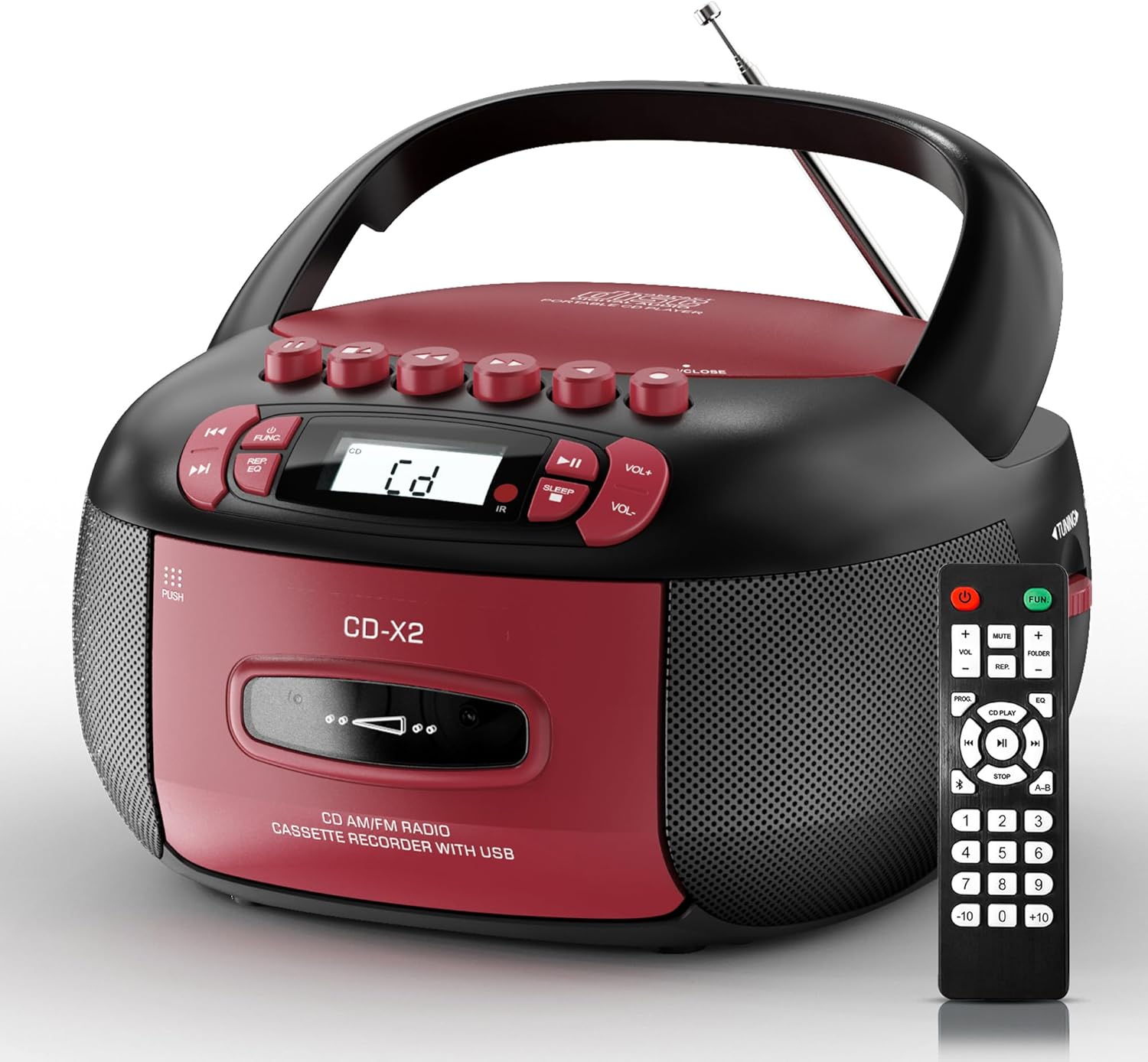
Image: The Kuephom CD-X2A Boombox with its included remote control, showcasinsen kompaktin muotoilun ja punaisen/mustan värimaailman ansiosta.
Tuote loppuview
Familiarize yourself with the various components and controls of your Kuephom CD-X2A Boombox.
Etupaneelin säätimet
- Virta/toimintopainike: Press and hold to power on/off. Press to cycle through modes (CD, USB, Bluetooth, Radio, AUX, Tape).
- Äänenvoimakkuuden +/- painikkeet: Säädä toiston äänenvoimakkuutta.
- Toisto/tauko-painike: Start or pause playback for CD, USB, Bluetooth, or Tape.
- Stop-painike: Lopeta toisto.
- Ohita/Haku-painikkeet: Navigate between tracks on CD/USB or fast forward/rewind on tape.
- EQ-painike: Valitse taajuuskorjaimen esiasetukset.
- Uniajastimen painike: Aseta uniajastin.
Sivupaneelin säätimet
- Viritysnuppi: Manually tune AM/FM radio stations.
- Kuulokeliitäntä: Liitä kuulokkeet yksityiseen kuunteluun.
- AUX-tuloportti: Liitä ulkoiset äänilaitteet.
- USB-portti: Insert USB drives for MP3/WMA playback.
Yläpaneelin ominaisuudet
- CD-lokero: Top-loading compartment for CDs.
- Kasettilokero: Front-loading compartment for cassette tapes.
- Teleskooppiantenni: Levitä parantaaksesi radiovastaanottoa.

Image: The boombox highlighting its multiple functions including CD/MP3, Bluetooth, Type I/II tape, USB, FM/AM Radios, Sleep timer, Remote, Phone jack, AUX, and Tape recording.

Kuva: Lähikuva views of the boombox's phone jack, top-loading CD player, telescopic antenna, and tape play/record buttons.
Asennus
Boomboxin virransyöttö
AC virta
- Connect the supplied AC power cord to the AC IN jack on the back of the boombox.
- Plug the other end of the power cord into a standard AC wall outlet (120V~60Hz).
Akun teho
- Open the battery compartment cover located on the bottom of the boombox.
- Insert 6 x 'C' size batteries (not included), ensuring correct polarity (+/-).
- Sulje paristolokeron kansi kunnolla.
- When operating on battery power, disconnect the AC power cord.

Image: The boombox demonstrating both AC power connection and the use of 6 C-size batteries for portable operation.
Kaukosäädin
- Insert 2 x 'AAA' batteries (not included) into the remote control, observing polarity.
- Point the remote control towards the boombox's IR sensor for optimal operation.

Image: An individual comfortably operating the boombox using the remote control from a distance.
Käyttöohjeet
Yleinen toiminta
- Virta päälle/pois: Press and hold the Power/Function button to turn the unit on or off.
- Toiminnon valinta: Press the Power/Function button repeatedly to switch between CD, USB, Bluetooth, Radio (AM/FM), AUX, and Tape modes.
CD-toisto
- Avaa CD-lokeron kansi.
- Place a CD (CD, CD-R, MP3, WMA compatible) onto the spindle with the label side facing up.
- Sulje CD-lokeron kansi.
- Press the Power/Function button to select 'CD' mode.
- Aloita toisto painamalla Toisto/Tauko-painiketta.
- Use the Skip/Search buttons to navigate tracks.
- Press the Repeat button to repeat a single track, folder, or all tracks.
- Press the Program button to program a custom playback sequence.

Image: The boombox's display showing 'CD' mode, with icons indicating compatibility with CD, CD-R, CD-RW, WMA, and MP3 formats, along with single cycle, repeat folder, repeat all, random play, and play in order options.
Kasetin toisto ja tallennus
- Press the 'OPEN/CLOSE' button on the cassette compartment to open it.
- Aseta kasetti.
- Sulje kasettipesä.
- Press the Power/Function button to select 'TAPE' mode.
- Aloita toisto painamalla toistopainiketta.
- Use the Fast Forward/Rewind buttons to navigate the tape.
- Tallennus: In TAPE mode, select the desired source (CD, Bluetooth, USB, or AM/FM radio). Press the Record button to begin recording onto the cassette. The unit features an auto-stop function when the tape reaches its end.

Image: A hand inserting a cassette tape into the boombox's front-loading compartment, with controls for tape operation visible.
AM/FM-radio
- Press the Power/Function button to select 'RADIO' mode. Press again to switch between AM and FM bands.
- Extend the telescopic antenna for better FM reception. For AM, rotate the unit for best reception.
- Use the Tuning knob on the side to manually tune to your desired station. The frequency will be displayed on the screen.

Image: A man relaxing on a couch with the boombox, which displays various FM/AM radio frequencies, indicating good reception.
Bluetooth-yhteys
- Press the Power/Function button to select 'BT' (Bluetooth) mode. The display will show 'BT' and flash, indicating it's in pairing mode.
- On your mobile device, enable Bluetooth and search for 'CD-X2A'.
- Select 'CD-X2A' to pair. Once paired, the 'BT' indicator will stop flashing.
- You can now stream audio wirelessly from your device to the boombox.

Image: A woman in a living room wirelessly streaming audio from her smartphone to the boombox via Bluetooth 5.1, indicating a stable connection.
USB-toisto
- Insert a USB flash drive into the USB port on the side of the boombox.
- Press the Power/Function button to select 'USB' mode.
- The boombox will automatically detect and play compatible MP3/WMA files.
- Use the Play/Pause, Stop, and Skip/Search buttons to control playback.
AUX-tulo
- Connect an external audio device (e.g., smartphone, MP3 player) to the AUX-in port using a 3.5mm audio cable (not included).
- Press the Power/Function button to select 'AUX' mode.
- Ohjaa toistoa suoraan liitetystä ulkoisesta laitteesta.
Uniajastin
- While the unit is playing, press the Sleep Timer button.
- Repeatedly press the button to cycle through available sleep timer durations (e.g., 15, 30, 60, 90 minutes).
- Laite sammuu automaattisesti valitun ajan kuluttua.

Image: A man sleeping in bed with the boombox on his nightstand, illustrating the sleep timer feature which allows the device to turn off automatically.
Huolto
- Puhdistus: Puhdista boomboxin ulkopinta pehmeällä, kuivalla liinalla. Älä käytä hankaavia puhdistusaineita tai liuottimia.
- CD:n hoito: Käsittele CD-levyjä reunoista. Puhdista likaiset CD-levyt pehmeällä, nukkaamattomalla liinalla pyyhkimällä keskeltä ulospäin.
- Kasetin hoito: Keep cassette tapes away from direct sunlight and heat. Periodically clean the tape heads with a specialized cassette head cleaner.
- Varastointi: Kun laitetta ei käytetä pitkään aikaan, irrota virtajohto ja poista paristot. Säilytä laitetta viileässä ja kuivassa paikassa.
Vianetsintä
Jos kohtaat ongelmia, katso alla olevasta taulukosta yleisiä ongelmia ja ratkaisuja.
| Ongelma | Mahdollinen syy | Ratkaisu |
|---|---|---|
| Ei virtaa | Verkkojohtoa ei ole kytketty; Paristot ovat tyhjentyneet tai asetettu väärin. | Check AC connection; Replace or correctly insert batteries. |
| Ei ääntä | Äänenvoimakkuus liian alhainen; Väärä toimintatila valittu; Kuulokkeet kytketty. | Increase volume; Select correct mode; Disconnect headphones. |
| CD-levy hyppii tai ei soi | CD dirty or scratched; CD inserted incorrectly; Incompatible CD format. | Clean or replace CD; Insert CD correctly; Ensure CD is compatible (CD, CD-R, MP3, WMA). |
| Radion kohinaa/heikko kuuluvuus | Antennia ei ole ojennettu/asennettu; Heikko signaali. | Extend and adjust telescopic antenna; Try repositioning the unit. |
| Bluetooth ei muodosta pariliitosta | Boombox ei ole pariliitostilassa; Laitteen Bluetooth pois päältä; Laite liian kaukana. | Ensure boombox is in 'BT' mode and flashing; Enable Bluetooth on device; Move device closer. |
| Kasetti ei soita/tallenna | Tape inserted incorrectly; Tape heads dirty; Auto-stop engaged. | Insert tape correctly; Clean tape heads; Check tape end. |
Tekniset tiedot
| Ominaisuus | Yksityiskohta |
|---|---|
| Mallinumero | CD-X2A |
| Tuotteen mitat (P x L x K) | 8.39 x 4.8 x 8.54 tuumaa |
| Tuotteen paino | 3.45 kiloa |
| Virtalähde | AC 120V~60Hz or 6 x 'C' size batteries |
| Yhteystekniikka | Lisälaite, Bluetooth, USB |
| Kaiuttimen tyyppi | Stereo (2W+2W output) |
| Tuetut levymuodot | CD, CD-R, MP3, WMA |
| Supported Tape Types | Type I/II Cassette |
| Radiobändit | AM/FM |
| Erikoisominaisuudet | Tape Recording, Sleep Timer, Earphone Jack, Remote Control |
Takuu ja tuki
Kuephom products are designed for reliability and performance. This product comes with a standard manufacturer's warranty against defects in materials and workmanship under normal use.
For warranty claims, technical assistance, or any questions regarding your Kuephom CD-X2A Boombox, please contact Kuephom customer support. Refer to the contact information provided with your purchase documentation or visit the official Kuephom websivusto tukitietojen saamiseksi.
We are committed to providing lifetime service support and 7/24 customer assistance for our products.