
1. Johdanto
Thank you for choosing the Camtro M6 Outdoor Security Camera. This battery-powered wireless camera is designed to provide reliable outdoor surveillance with features such as 1080p video resolution, color night vision, two-way audio, and smart AI motion detection. This manual provides essential information for setting up, operating, and maintaining your camera to ensure optimal performance.
2. Pakkauksen sisältö
Varmista, että pakkauksessasi on kaikki tarvittavat osat:
- Camtro M6 Outdoor Security Camera
- Käyttöohje
- Kiinnitysruuvit
3. Tuote ohiview
Familiarize yourself with the components of your Camtro M6 camera.

Kuva 3.1: Edessä view of the Camtro M6 Outdoor Security Camera, showing the lens, light, and motion sensor.
The Camtro M6 features a durable, weather-resistant design suitable for outdoor use. Key components include:
- Kameran linssi: Tallentaa 1080p teräväpiirtovideota.
- Infrared LED / Spotlight: Provides illumination for night vision and color night vision.
- Liiketunnistin: Detects movement for smart alerts.
- Mikrofoni: Kaksisuuntaiseen ääniviestintään.
- Kaiutin: Kaksisuuntaiseen ääniviestintään ja hälytyksiin.
- Asennusalusta: Turvalliseen asennukseen seinille tai muille pinnoille.

Kuva 3.2: Yliview of Camtro M6 features including AI Human Detection, Color Night Vision, Two-way Talk, and Cloud Storage.
4. Asennus
Follow these steps to set up your Camtro M6 camera:
- Lataa kamera: Before initial use, fully charge the camera battery using the provided charging cable. A full charge ensures optimal battery life.
- Lataa sovellus: Etsi the official Camtro security camera app on your smartphone's app store (iOS or Android) and install it.
- Luo tili: Avaa sovellus ja luo uusi käyttäjätili noudattamalla näytön ohjeita.
- Lisää laite: In the app, select the option to add a new device. Follow the prompts to connect your camera to your 2.4 GHz: n Wi-Fi-verkko. Ensure your phone is connected to a 2.4GHz network during setup. 5GHz Wi-Fi is not supported.
- Kiinnitä kamera: Choose a suitable outdoor location for mounting. Use the included mounting screws to securely attach the camera to a wall or other stable surface. Ensure the camera has a clear field of view and is within range of your Wi-Fi signal.
5. Käyttöohjeet
Once set up, you can access and control your camera through the mobile app.
5.1 Livenä View
Avaa sovellus ja valitse kamerasi view the live feed. This allows you to monitor your property in real-time from anywhere.
5.2 Kaksisuuntainen ääni

Kuva 5.1: Illustration of the two-way audio function, allowing communication through the camera.
Napauta mikrofonikuvaketta live-lähetyksessä view to enable two-way audio. You can speak through your phone, and your voice will be projected through the camera's speaker. Similarly, you can hear audio from the camera's location.
5.3 Smart AI Motion Detection

Kuva 5.2: The camera's AI Human Detection feature distinguishing between human movement and other objects.
The camera features AI-powered motion detection that can distinguish between humans, animals, and other moving objects. This reduces false alarms. You will receive push notifications on your smartphone when motion is detected. Adjust sensitivity settings within the app.
5.4 Värillinen yönäkö
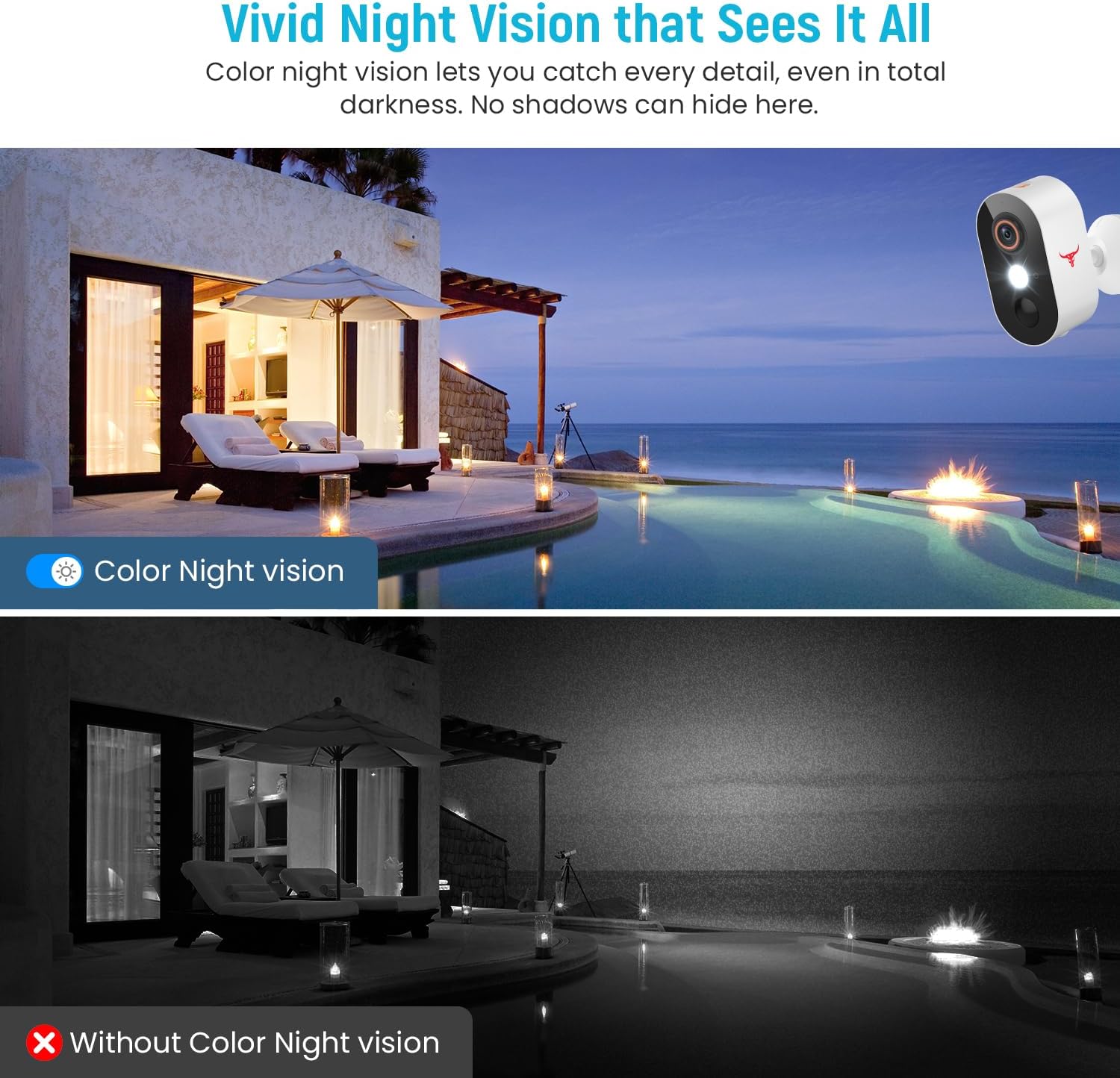
Kuva 5.3: Comparison of color night vision and standard black and white night vision.
The Camtro M6 provides vivid color night vision, allowing you to see details in low-light conditions. The camera automatically switches to night vision mode when ambient light is insufficient.
5.5 Pilvitallennustila

Kuva 5.4: Visual representation of cloud storage for recorded video events.
The camera supports cloud storage for recording and reviewing video events. A subscription is required to access recorded footage. Please refer to the app for subscription options and details.
6. Huolto
Säännöllinen huolto varmistaa kamerasi pitkän käyttöiän ja optimaalisen suorituskyvyn.
- Akun lataus: The camera is battery-powered. Monitor the battery level in the app and recharge the camera as needed. Battery life can vary based on usage and environmental factors.
- Puhdistus: Puhdista kameran linssi ja kotelo säännöllisesti pehmeällä,amp liinalla pölyn ja roskien poistamiseen. Älä käytä voimakkaita kemikaaleja.
- Laiteohjelmistopäivitykset: Keep the camera's firmware updated through the app to access new features and improvements.

Kuva 6.1: The Camtro M6 camera demonstrating its weather resistance against shine, rain, snow, and dust.
The camera is designed to withstand various weather conditions, operating effectively in temperatures ranging from 14°F to 140°F.
7. Vianmääritys
If you encounter issues with your Camtro M6 camera, refer to the following common problems and solutions:
| Ongelma | Mahdollinen syy | Ratkaisu |
|---|---|---|
| Kamera ei muodosta yhteyttä Wi-Fi-verkkoon | Incorrect Wi-Fi password, 5GHz Wi-Fi network, weak signal | Ensure correct 2.4GHz Wi-Fi password. Confirm your router is broadcasting a 2.4GHz network. Move camera closer to the router. |
| Huono videon laatu | Heikko Wi-Fi-signaali, likainen linssi | Improve Wi-Fi signal strength. Clean the camera lens. |
| Liiketunnistus ei toimi tai liikaa vääriä hälytyksiä | Incorrect sensitivity settings, camera placement | Adjust motion detection sensitivity in the app. Ensure camera is positioned to avoid unnecessary triggers (e.g., swaying branches). |
| Akku tyhjenee nopeasti | Frequent motion events, continuous live view, low temperature | Reduce motion detection sensitivity. Limit continuous live viewing. Ensure camera is fully charged. |
| Kaksisuuntainen ääni on epäselvä | Weak Wi-Fi signal, microphone/speaker obstruction | Check Wi-Fi connection. Ensure microphone and speaker are clear of obstructions. |
8. Tekniset tiedot
Detailed technical specifications for the Camtro M6 Outdoor Security Camera:
- Malli: M6
- Sisä-/ulkokäyttö: Ulkona
- Yhteensopivat laitteet: Älypuhelin (iOS, Android)
- Virtalähde: Paristokäyttöinen
- Yhteysprotokolla: Wi-Fi (vain 2.4 GHz)
- Asennustyyppi: Seinäteline
- Videokaappauksen resoluutio: 1080p
- Tuotteen mitat (P x L x K): 2.8 x 1.7 x 3.4 tuumaa
- Tuotteen paino: 6.6 unssia (0.41 puntaa)
- Akut: 2 epästandardi akku (sisältyy toimitukseen)
- Videokaappausmuoto: MP4
- Erikoisominaisuus: Motion Sensor, Color Night Vision, 2-Way Audio
- Tuotteelle suositellut käyttötavat: Ulkoinen turvallisuus
9. Takuu ja tuki
For warranty information and technical support, please refer to the contact details provided with your purchase or visit the official Camtro websivusto. Asiakaspalvelutiimimme on käytettävissäsi auttamassa sinua kaikissa kysymyksissäsi tai ongelmissasi.