
Tärkeitä turvallisuustietoja
- Caution: Keep charging cords away from water and other liquids.
- Do not overload compartments.
- Always unplug the power supply before inserting or removing items.
- Keep hands and fingers away from moving parts when opening and closing compartments.
- Älä käytä, jos se on vaurioitunut tai rikki.
Tuote loppuview
The Bpatoimsx BPMP-10 Steel Tablet Charging Cabinet provides a secure and efficient solution for storing and charging up to 10 tablets or similar devices. Each compartment features an independent combination lock and built-in charging cables (Type-C and Apple Lightning) for convenience and security.
Tärkeimmät ominaisuudet:
- 10 Independent Compartments: Each with a 3-digit combination lock for privacy and security.
- Built-in Charging: Each compartment includes Type-C and Apple charging heads, supporting 10-20W fast charging.
- Kestävä rakenne: Full steel frame for long-lasting use.
- No Complex Installation: Käyttövalmis suoraan pakkauksesta.

Kuva 1: Etuosa view of the Bpatoimsx BPMP-10 Steel Tablet Charging Cabinet with all 10 compartments closed.

Kuva 2: Sisäinen view of the charging cabinet, illustrating the metal welding structure, Type-C and Apple charging heads, and the combination lock mechanism.
Video 1: Ylilyöntiview of the Bpatoimsx Tablet Charging Locker, demonstrating its features and general use.
Asennusohjeet
1. Pakkauksen purkaminen ja sijoittaminen
- Carefully remove the charging cabinet from its packaging.
- Place the cabinet on a stable, flat surface, such as a desktop. Ensure adequate ventilation around the unit.
2. Virtaliitäntä
- Locate the power input port at the rear of the cabinet.
- Connect the provided power cord to the cabinet and then plug it into a standard electrical outlet.
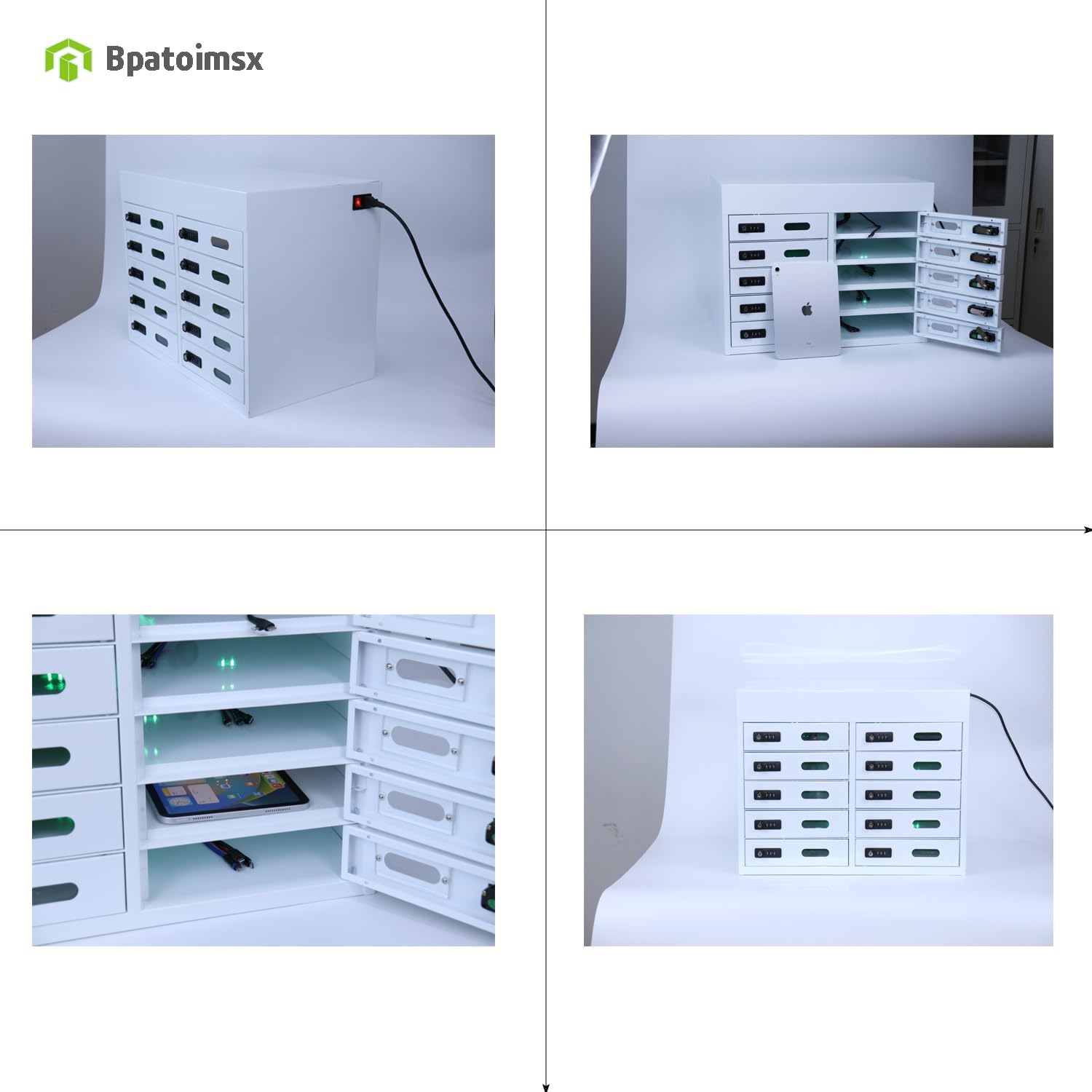
Kuva 3: Takaosa view of the charging cabinet with the power cord connected, ready for use.
3. Initial Lock Setup (Setting Your Combination)
Each compartment comes with a 3-digit combination lock. The factory default code is typically 0-0-0. To set your personal combination:
- Ensure the lock is open (set to the current combination, e.g., 0-0-0).
- Locate the small reset button or lever on the side or bottom of the lock mechanism (refer to the lock itself for exact location).
- Pidä nollauspainiketta/vipua pohjassa ja aseta haluamasi nelinumeroinen yhdistelmä kiertämällä nuppeja.
- Vapauta nollauspainike/vipu. Uusi yhdistelmäsi on nyt asetettu.
- Tärkeää: Remember your new combination. There is an administrator key provided for emergency access if the code is forgotten.
Käyttöohjeet
1. Opening a Compartment
- Rotate the dials on the combination lock to your set 3-digit code.
- Pull the compartment door open.
2. Laitteen lataaminen
- Open the desired compartment.
- Inside, you will find a Type-C and an Apple Lightning charging cable.
- Select the appropriate cable for your device (tablet, smartphone, etc.).
- Connect your device to the charging cable. The device should begin charging automatically.
- Place your device securely within the compartment.

Figure 4: A compartment opened, showing a tablet being charged by the internal cable.
3. Closing and Locking a Compartment
- Ensure your device is properly placed and connected (if charging).
- Close the compartment door firmly.
- Scramble the dials on the combination lock to secure the compartment.
Huolto
Puhdistus
- Before cleaning, always unplug the cabinet from the power outlet.
- Pyyhi ulkopinnat pehmeällä, damp liinalla. Vältä hankaavia puhdistusaineita tai liuottimia, jotka voivat vahingoittaa pintaa.
- Ensure no liquid enters the charging ports or electrical components.
- Clean the interior of the compartments as needed with a dry or slightly damp kangas.
Yleinen hoito
- Regularly inspect the power cord for any signs of damage. If damaged, discontinue use and contact support.
- Check charging cables inside compartments for wear and tear.
- Ensure the cabinet is placed in a dry environment, away from direct sunlight or extreme temperatures.
Vianetsintä
Laite ei lataudu
- Tarkista virtaliitäntä: Ensure the cabinet is securely plugged into a working power outlet.
- Tarkista kaapeliyhteys: Make sure the device is properly connected to the charging cable inside the compartment.
- Try Another Compartment: If one compartment is not charging, try another to determine if the issue is with the compartment or the device.
- Tarkista kaapelit: Check the internal charging cables for any visible damage.
Combination Lock Not Opening
- Vahvista yhdistelmä: Double-check that you are entering the correct 3-digit combination.
- Administrator Key: If the combination is forgotten, use the provided administrator key to open the compartment. Once open, you can reset the combination following the 'Initial Lock Setup' instructions.
Video 2: Instructions on how to retrieve or reset the code for the combination locks if it has been forgotten.
Tekniset tiedot

Figure 5: Detailed dimensions of the Bpatoimsx BPMP-10 cabinet and its individual compartments.
| Ominaisuus | Yksityiskohta |
|---|---|
| Merkki | Bpatoimsx |
| Mallinumero | BPMP-10 |
| Materiaali | Hiiliteräs (Runko: Seosteräs) |
| Väri | Valkoinen |
| Kokonaismitat (L x S x K) | 23" x 15" x 18" (noin 58.4 cm x 38.1 cm x 45.7 cm) |
| Individual Compartment Dimensions (W x D x H) | 10.5" x 13.7" x 3" (noin 26.7 cm x 34.8 cm x 7.6 cm) |
| Osien lukumäärä | 10 |
| Lukon tyyppi | 3-numeroinen yhdistelmälukko |
| Latauksen yhteensopivuus | Type-C and Apple Lightning (built-in) |
| Single Compartment Charging Power | 10-20W (supports fast charging) |
| Maximum Tablet Size | Jopa 13 tuumaa |
| Tuotteen paino | 40 kiloa |
| Mukana olevat komponentit | Cabinet body, power cords, Administrator key, Instruction Manual |
Takuu ja tuki
Takuutiedot
This Bpatoimsx product is covered by a 1 vuoden takuu from the date of purchase, ensuring protection against manufacturing defects. Please retain your proof of purchase for warranty claims.
Asiakastuki
For any questions, technical assistance, or warranty claims, please contact Bpatoimsx customer support through the retailer where the product was purchased or refer to the contact information provided with your product packaging.