
1. Johdanto
This manual provides detailed instructions for the installation, operation, and maintenance of your ZSUS X79 VG2 Motherboard Bundle. This bundle includes the ZSUS X79 VG2 Motherboard, an Intel Xeon E5 2689 C2 processor, and 16GB of DDR3 1600MHz ECC RAM. Please read this manual thoroughly before proceeding with installation to ensure proper setup and optimal performance.
2. Tuote ohiview
The ZSUS X79 VG2 Motherboard is designed to support LGA2011 V1/V2 series processors, offering a robust platform for demanding computing tasks. It features dual-channel DDR3 memory support, NVMe M.2 storage capabilities, and multiple expansion slots.
2.1. Tärkeimmät komponentit
- ZSUS X79 VG2 Motherboard: Features an LGA2011 socket, H61 chipset, 4 DDR3 memory slots, 2 PCIe x16 slots, 1 PCIe x1 slot, 1 NVMe M.2 port, and 4 SATA2.0 ports.
- Intel Xeon E5 2689 C2 CPU: An 8-core, 16-thread processor with a base frequency of 2.6GHz (up to 3.6GHz turbo), 20MB L3 Cache, and LGA2011 socket compatibility.
- 16GB DDR3 1600MHz ECC RAM: High-performance Error-Correcting Code (ECC) memory, suitable for server and workstation environments, ensuring data integrity.
2.2. Emolevyn asettelu
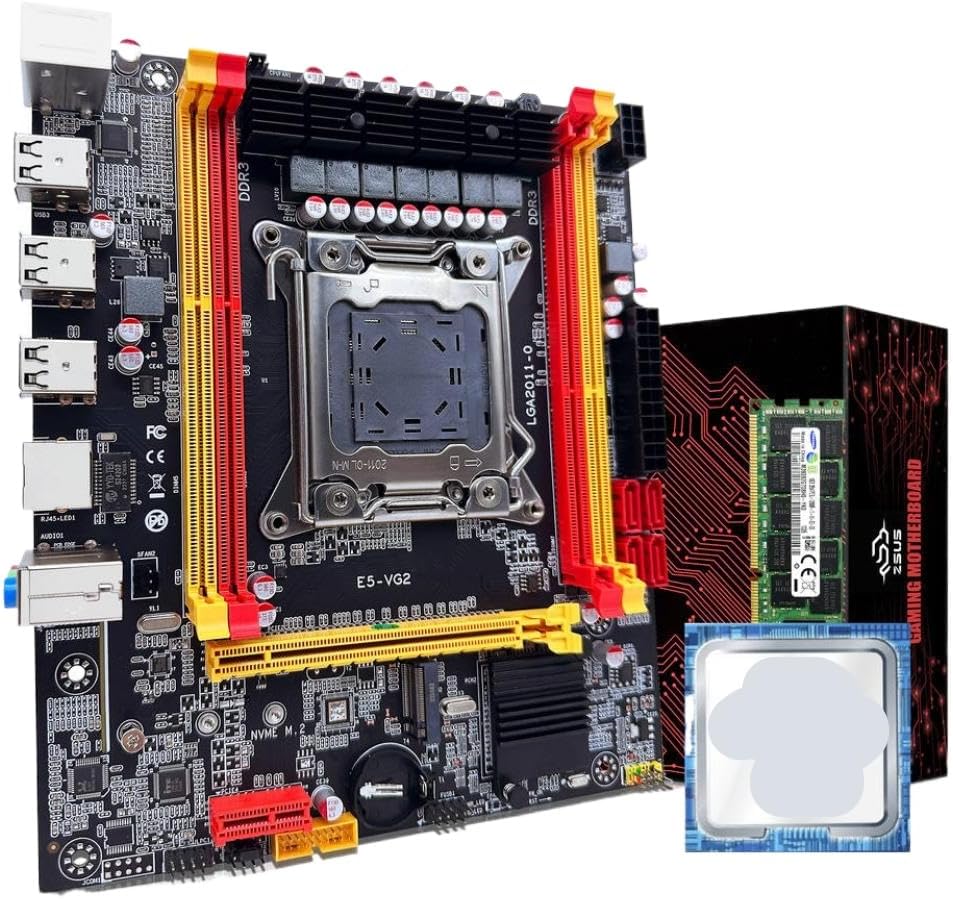
Kuva 1: ZSUS X79 VG2 Motherboard Bundle. This image displays the motherboard with its LGA2011 CPU socket, four DDR3 RAM slots, PCIe slots, and various connectors. The included Xeon E5 2689 C2 CPU and 16GB DDR3 ECC RAM module are also visible alongside the product packaging.
Familiarize yourself with the various components and connectors on the motherboard before installation. Key areas include the CPU socket, RAM slots, PCIe expansion slots, SATA ports, M.2 slot, and I/O panel connectors.
3. Asennus ja asennus
Before beginning installation, ensure your workspace is clean, well-lit, and free of static electricity. Use an anti-static wrist strap if available. Handle components by their edges to avoid touching sensitive contacts.
3.1. Suorittimen asennus
- Valmistele pistorasia: Gently lift the CPU retention lever on the LGA2011 socket. Open the metal load plate.
- Aseta suoritin: Carefully align the Intel Xeon E5 2689 C2 CPU with the LGA2011 socket. Ensure the triangular marker on the CPU matches the marker on the socket. Lower the CPU straight down without forcing it.
- Suojattu prosessori: Close the metal load plate and push the retention lever back into its locked position until it clicks.
- Levitä lämpötahnaa: Apply a small amount of thermal paste (not included) to the center of the CPU's integrated heat spreader (IHS).
- Asenna CPU-jäähdytin: Mount a compatible LGA2011 CPU cooler (not included) according to its manufacturer's instructions. Ensure it makes firm contact with the CPU.
3.2. RAM-muistin asennus
- Open Latches: Open the retention clips at both ends of the DDR3 memory slots.
- Kohdista RAM-muisti: Align the 16GB DDR3 1600MHz ECC RAM module with a memory slot, ensuring the notch on the module matches the key in the slot. For dual-channel operation, refer to the motherboard's silkscreen for recommended slot pairing (typically alternating slots).
- Aseta RAM-muistia: Press down firmly on both ends of the RAM module until the retention clips snap into place.
- Vahvista: Ensure both clips are fully closed and the RAM module is securely seated.
3.3. NVMe M.2 SSD Installation (Optional)
- Paikanna M.2-paikka: Identify the NVMe M.2 slot on the motherboard.
- Irrota tukiruuvi: Unscrew the small standoff screw from the M.2 slot.
- Aseta M.2 SSD-levy: Insert your NVMe M.2 SSD (not included) into the slot at a 30-degree angle, ensuring the gold contacts are fully seated.
- Suojattu SSD-levy: Gently push the SSD down and secure it with the standoff screw.
3.4. SATA Device Installation (Optional)
- Liitä datakaapeli: Connect one end of a SATA data cable (not included) to a SATA2.0 port on the motherboard and the other end to your SATA hard drive or SSD (not included).
- Liitä virtajohto: Connect a SATA power cable from your power supply (not included) to the SATA device.
3.5. Virtalähteen liitännät
- 24-nastainen ATX-virtalähde: Connect the main 24-pin ATX power connector from your power supply to the corresponding port on the motherboard.
- 8-pin EPS/CPU Power: Connect the 8-pin EPS (CPU) power connector from your power supply to the 1x8PIN port near the CPU socket.
3.6. Etupaneelin ja oheislaitteiden liitännät
- Etupaneelin liittimet: Connect the power switch, reset switch, HDD LED, and power LED cables from your PC case to the front panel header on the motherboard. Refer to the motherboard's silkscreen for correct pin assignments.
- USB-otsikot: Connect front panel USB 2.0 cables to the USB 2.0 headers on the motherboard.
- Ääniotsikko: Kytke etupaneelin äänikaapeli ääniliitäntään.
- Laajennuskortit: Install any PCIe expansion cards (e.g., graphics card, network card) into the available PCIe x16 or PCIe x1 slots.
4. Käyttöohjeet
After completing all hardware installations, you can proceed with powering on your system.
- Ensimmäinen käynnistys: Ensure all cables are securely connected. Connect your monitor, keyboard, and mouse. Turn on the power supply switch, then press the power button on your PC case.
- BIOS/UEFI-asetukset: Käynnistyksen aikana paina toistuvasti määritettyä näppäintä (yleensä DEL, F2, tai F10 XNUMX) to enter the BIOS/UEFI setup utility. Here you can configure boot order, system time, and other hardware settings.
- Käyttöjärjestelmän asennus: Insert your operating system installation media (USB drive or DVD) and follow the on-screen prompts to install your preferred operating system.
- Ohjaimen asennus: After OS installation, install all necessary drivers for the motherboard chipset, network, audio, and any other installed components. Drivers are typically available on the manufacturer's websivusto.
5. Huolto
Regular maintenance helps ensure the longevity and stable operation of your system.
- Pölynpoisto: Periodically clean dust from inside your PC case, especially from CPU coolers, case fans, and heatsinks, using compressed air. Ensure the system is powered off and unplugged before cleaning.
- BIOS/laiteohjelmistopäivitykset: Tarkista valmistajalta website for updated BIOS/firmware versions. Follow their instructions carefully when performing updates.
- Ohjaimen päivitykset: Keep your system drivers updated to ensure compatibility and optimal performance.
- Kaapelin hallinta: Varmista, että sisäiset kaapelit on reititetty siististi ilmavirran parantamiseksi ja häiriöiden estämiseksi.
6. Vianmääritys
Jos kohtaat ongelmia, katso seuraavat yleiset vianmääritysvaiheet:
- Ei virtaa:
- Check if the power supply is switched on and properly connected to the motherboard (24-pin and 8-pin connectors).
- Varmista, että etupaneelin virtakytkimen kaapeli on kytketty oikein emolevyn liittimeen.
- Ei näyttöä:
- Verify that the monitor is connected to the graphics card (if installed) or the motherboard's integrated graphics port (if applicable and CPU supports it).
- Reseat the RAM modules. Incorrectly seated RAM is a common cause of no display.
- Ensure the graphics card is properly seated in its PCIe slot and has adequate power connections.
- Järjestelmän epävakaus/kaatumiset:
- Tarkista suorittimen ja näytönohjaimen lämpötilat. Ylikuumeneminen voi aiheuttaa epävakautta.
- Ensure RAM modules are compatible and correctly installed.
- Suorita muistidiagnostiikkatyökalut RAM-virheiden tarkistamiseksi.
- Varmista, että kaikki virtaliitännät ovat tukevasti kiinni.
- Käyttöjärjestelmä ei käynnisty:
- Check BIOS/UEFI settings for correct boot order.
- Ensure the storage drive (SSD/HDD) containing the OS is properly connected and detected.
- If using an NVMe M.2 drive, ensure it is correctly installed and recognized in BIOS.
7. Tekniset tiedot
| Komponentti | Erittely |
|---|---|
| Emolevyn malli | ZSUS X79-VG2 |
| CPU-liitäntä | LGA2011 V1/V2 series processor |
| Piirisarja | H61-sarja |
| Mukana suoritin | Intel Xeon E5 2689 C2 (8 Cores / 16 Threads) |
| CPU Base Frequency | 2.6GHz (up to 3.6GHz Turbo) |
| CPU:n L3-välimuisti | 20 Mt |
| Muistin tyyppi | DDR3 ECC REG (Server Memory) |
| Muistin taajuus | 1600MHz (Supports 1066/1333/1600/1866MHz) |
| Muistin kapasiteetti | 1 x 16GB (Max 128GB across 4 slots) |
| Muistipaikkoja | 4 x DDR3 (kaksikanavainen) |
| Ääniliitäntä | 1 (MIC-IN, LINE OUT, LINE IN) |
| Ethernet | Realtek Gigabit Ethernet |
| USB Interfaces (Rear) | 6 x USB 2.0 |
| USB Headers (Internal) | 1 (supports 2 x USB 2.0 ports) |
| PCIe-paikat | 2 x PCIe x16, 1 x PCIe x1 |
| SATA-portit | 4 x SATA2.0 |
| M.2 Port | 1 x NVMe M.2 |
| Virtaliitäntä | 1 x 8-pin EPS, 1 x 24-pin ATX |
| Mitat | 217mm x 187mm |
8. Takuu ja tuki
For warranty information and technical support, please refer to the documentation provided with your purchase or contact the manufacturer, TJKTSLVA, directly. Keep your proof of purchase for warranty claims.
Manufacturer: TJKTSLVA