
Pisichen 21.5INTS-White-NEW
Pisichen 21.5 tuuman kosketusnäytön käyttöohje
Model: 21.5INTS-White-NEW
Johdanto
This user manual provides comprehensive instructions for the setup, operation, maintenance, and troubleshooting of your Pisichen 21.5-Inch Touchscreen Monitor. Please read this manual thoroughly before using the product to ensure proper functionality and to prevent damage.
The Pisichen 21.5-inch touch monitor is designed to enhance your work efficiency and provide an interactive experience with its responsive 10-point capacitive touchscreen. It features a Full HD 1920x1080 resolution display, built-in speakers, and versatile connectivity options including HDMI, VGA, and USB for touch functionality.
Tärkeimmät ominaisuudet
- Sensitive 10-Point Capacitive Touchscreen: Offers seamless and responsive interaction, allowing direct engagement with content and simultaneous multi-finger input.
- Stunning FHD 1080P Display: A 21.5-inch Full HD (1920x1080) resolution screen with a 1000:1 contrast ratio, 250cd/㎡ brightness, 170° viewing angle, and 60Hz refresh rate for clear and smooth visuals. Includes low-blue-light and eye-care technology.
- Laaja laiteyhteensopivuus: Equipped with USB2.0 (for touch), HDMI, VGA, and DC ports for easy connection to PCs, laptops, PS3/4, and gaming consoles.
- Monipuoliset näyttötilat: Supports duplicate, extend, and second-screen modes to enhance productivity and workspace.
- Built-in Speakers and VESA Mounting: Integrated speakers provide audio, and the 75x75mm VESA mount allows for flexible installation options.
Pakkauksen sisältö
Varmista, että pakkauksessa on kaikki tarvittavat osat ennen asennuksen jatkamista.

The package includes the Pisichen 21.5-inch touchscreen monitor, a user manual, an HDMI cable, a USB cable, and a power adapter, ensuring it is ready for immediate use.
- Pisichen 21.5-Inch Touchscreen Monitor
- Virtalähde
- HDMI kaapeli
- USB Cable (for touch function)
- Käyttöopas
Asennusohjeet
1. Näytön liittäminen
The monitor offers various connection options to suit your needs. Ensure all connections are secure before powering on the device.

Yksityiskohtainen view of the monitor's input/output ports, including HDMI, VGA, headphone, DC power, and USB 2.0 touch ports.
- Virtaliitäntä: Connect the provided power adapter to the DC power port on the monitor and then plug it into a wall outlet.
- Videoliitäntä (HDMI): Use the HDMI cable to connect the monitor's HDMI port to the HDMI output port on your computer, laptop, or gaming console.
- Videoliitäntä (VGA): Alternatively, use a VGA cable to connect the monitor's VGA port to the VGA output port on your computer or laptop.
- Touch Function Connection: To enable the touch function, connect the included USB cable from the monitor's USB 2.0 touch port to an available USB port on your computer. This step is crucial for touch signal transmission.
- Äänilähtö (valinnainen): If you prefer external audio, you can connect headphones or external speakers to the headphone jack. The monitor also has built-in speakers.
2. Asennusvaihtoehdot
The Pisichen monitor supports both desktop placement and VESA wall mounting for flexible setup.
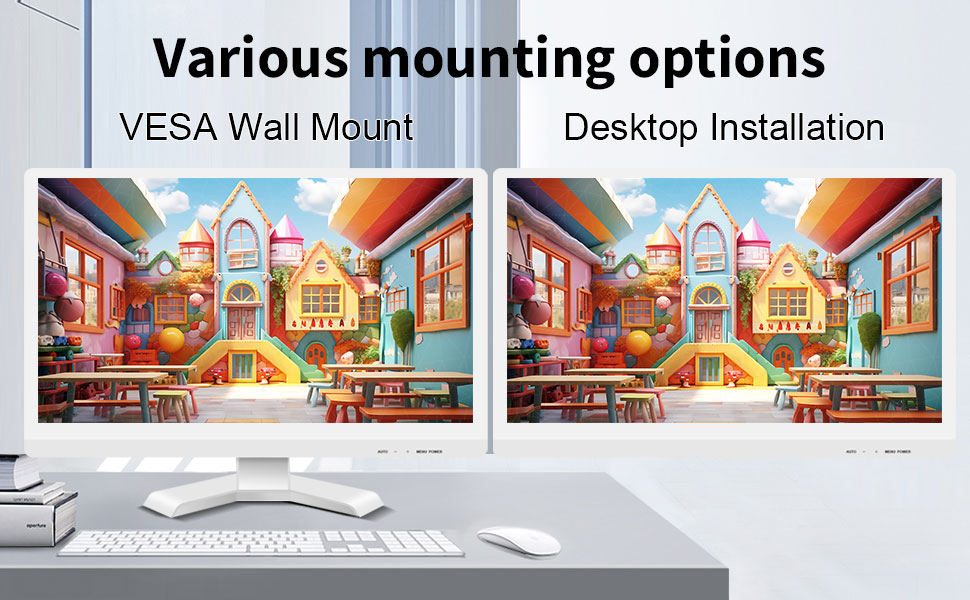
The monitor can be set up on a desktop stand or mounted on a wall using a VESA compatible bracket.
- Työpöytäasennus: Attach the provided stand to the monitor base and place it on a stable, flat surface.
- VESA seinäteline: The monitor features a 75x75mm VESA mounting pattern. Use a compatible VESA bracket (not included) to mount the monitor on a wall or an adjustable arm. Ensure the mount can support the monitor's weight (9.88 pounds).

Takaosa view of the monitor highlighting the VESA 75x75mm mounting pattern and overall dimensions.
Käyttöohjeet
1. Virta päälle / pois
Locate the power button on the monitor. Press it to turn the monitor on or off. The power indicator light will illuminate when the monitor is on.
2. Using the Touchscreen Function
Once the USB cable is connected to your computer, the 10-point capacitive touch function will be active. You can interact with the screen using your fingers or a passive capacitive stylus.

The monitor supports direct touch interaction for intuitive control.
- Yksi kosketus: Vastaa hiiren napsautusta.
- Napauta ja pidä: Vastaa hiiren kakkospainikkeen napsautusta.
- Raahata: Move items by touching and dragging.
- Nipistys zoomaukseen: Lähennä tai loitonna sisältöä kahdella sormella.
- Monikosketus: The monitor supports up to 10 simultaneous touch points, enabling collaborative work or complex gestures.

The 10-point multi-touch feature allows for multiple users or complex interactions simultaneously.
Tärkeä huomautus: The touch functionality is disabled on Mac OS, iPad OS, and iOS. This monitor only supports passive capacitive styluses.
3. Näyttötilat
Näyttö tukee useita näyttötiloja, kun se on kytketty tietokoneeseen:
- Kopiointitila: Displays the same content on both your primary screen and the Pisichen monitor.
- Laajenna tila: Laajentaa työpöytäsi molemmille näytöille, mikä tarjoaa enemmän työtilaa.
- Vain toinen näyttö -tila: Displays content only on the Pisichen monitor, turning off your primary screen.
You can typically switch between these modes through your operating system's display settings (e.g., Windows Display Settings).
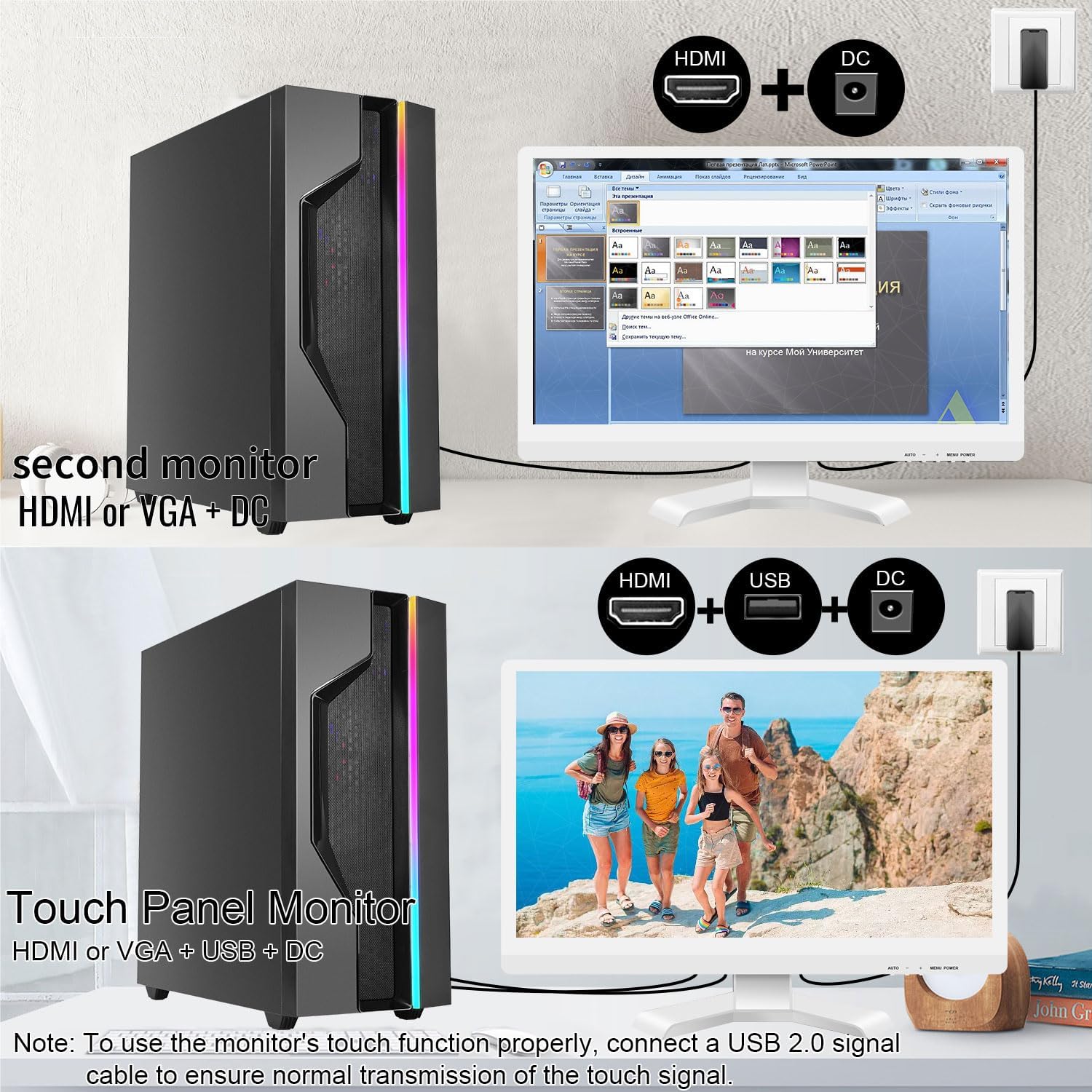
Illustrations of connecting the monitor as a secondary display or as a touch-enabled display.
4. On-Screen Display (OSD) -valikko
The monitor features an OSD menu for adjusting display settings. Use the buttons located on the monitor's frame (usually on the bottom right) to navigate and select options.
- Valikkopainike: Avaa OSD-valikon.
- Ylös/alas -painikkeet: Selaa valikon vaihtoehtoja.
- Enter/Valitse-painike: Vahvistaa valinnan tai siirtyy alivalikkoon.
- Poistu-painike: Poistuu nykyisestä valikosta tai kuvaruutunäytöstä.
Common OSD settings include brightness, contrast, color temperature, input source selection, and aspect ratio.
Huolto ja hoito
- Näytön puhdistaminen:
Always power off the monitor and unplug it before cleaning. Use a soft, lint-free cloth lightly dampened with water or a non-abrasive, monitor-specific cleaning solution. Do not spray liquid directly onto the screen. Avoid using alcohol, ammonia, or abrasive cleaners, as they can damage the screen surface.
- C:n puhdistaminenasing:
Pyyhi näyttö casing pehmeällä, kuivalla liinalla. Tarvittaessa hieman damp cloth can be used, but ensure no moisture enters the vents or ports.
- Varastointi:
Kun näyttöä ei käytetä pitkään aikaan, säilytä sitä viileässä ja kuivassa paikassa, poissa suorasta auringonvalosta ja äärimmäisistä lämpötiloista. Käytä mahdollisuuksien mukaan alkuperäistä pakkausta suojataksesi sitä.
- Ilmanvaihto:
Ensure the monitor's ventilation openings are not blocked. Proper airflow is essential to prevent overheating.
- Käsittely:
Käsittele näyttöä varoen. Vältä sen pudottamista tai voimakkaiden iskujen kohteeksi asettamista. Älä aseta raskaita esineitä näytön päälle.
Vianetsintä
| Ongelma | Mahdollinen syy | Ratkaisu |
|---|---|---|
| Ei kuvaa näytöllä |
|
|
| Kosketusnäyttö ei vastaa |
|
|
| Kuva on epäselvä tai vääristynyt |
|
|
| Ei ääntä sisäänrakennetuista kaiuttimista |
|
|
Tekniset tiedot
| Mallinumero | 21.5INTS-White-NEW |
| Näytön koko | 21.5 tuumaa |
| Resoluutio | 1920 x 1080 pikseliä (FHD 1080p) |
| Kuvasuhde | 16:9 |
| Kirkkaus | 250 Candela (cd/㎡) |
| Kontrastisuhde | 1000:1 |
| Viewkulma | 170° |
| Päivitystaajuus | 60 Hz |
| Kosketa tekniikkaa | 10 pisteen kapasitiivinen kosketus |
| Tuloportit | HDMI, VGA, USB 2.0 (for touch), DC Power |
| Audio | Built-in Speakers, Headphone Jack |
| Yhteensopivuus VESA-kiinnikkeen kanssa | 75x75mm |
| Tuotteen mitat (P x L x K) | 0.78 x 20.4 x 14.9 tuumaa |
| Tuotteen paino | 9.88 kiloa |
| Valmistaja | Shenzhen Konowa Electronics Co., LTD |
| Alkuperämaa | Kiina |
Takuu ja tuki
For warranty information and technical support, please refer to the official Pisichen website or contact their customer service directly. Details are typically provided on the product packaging or the manufacturer's official support channels.
Voit vierailla Pisichen Store on Amazon for more product information and potential support contacts.
Ask a question about this manual
Ask about setup, troubleshooting, compatibility, parts, safety, or missing instructions. Manuals+ will review the question and use this page’s manual context to help answer it.