
1. Tärkeitä turvallisuusohjeita
Please read these instructions carefully before using the Audizio Canzo DAB+ Internet Radio. Keep this manual for future reference.
- Älä altista laitetta sateelle tai kosteudelle tulipalon tai sähköiskun välttämiseksi.
- Älä avaa c:täasing. Laitteen sisällä ei ole käyttäjän huollettavia osia. Jätä kaikki huoltotoimenpiteet pätevän henkilöstön tehtäväksi.
- Käytä vain laitteen mukana toimitettua verkkolaitetta.
- Varmista laitteen ympärillä oleva asianmukainen ilmanvaihto. Älä tuki tuuletusaukkoja.
- Vältä laitteen sijoittamista lämmönlähteiden lähelle tai suoraan auringonvaloon.
- Clean the unit only with a dry, soft cloth. Do not use liquid cleaners.
2. Tuote ohiview
The Audizio Canzo is a versatile DAB+ Internet Radio designed for high-quality audio reception and playback. It features multiple connectivity options including Wi-Fi, Bluetooth 5.3, AUX, and USB, along with a remote control for convenient operation. The elegant wooden finish and clear display make it suitable for various home environments.
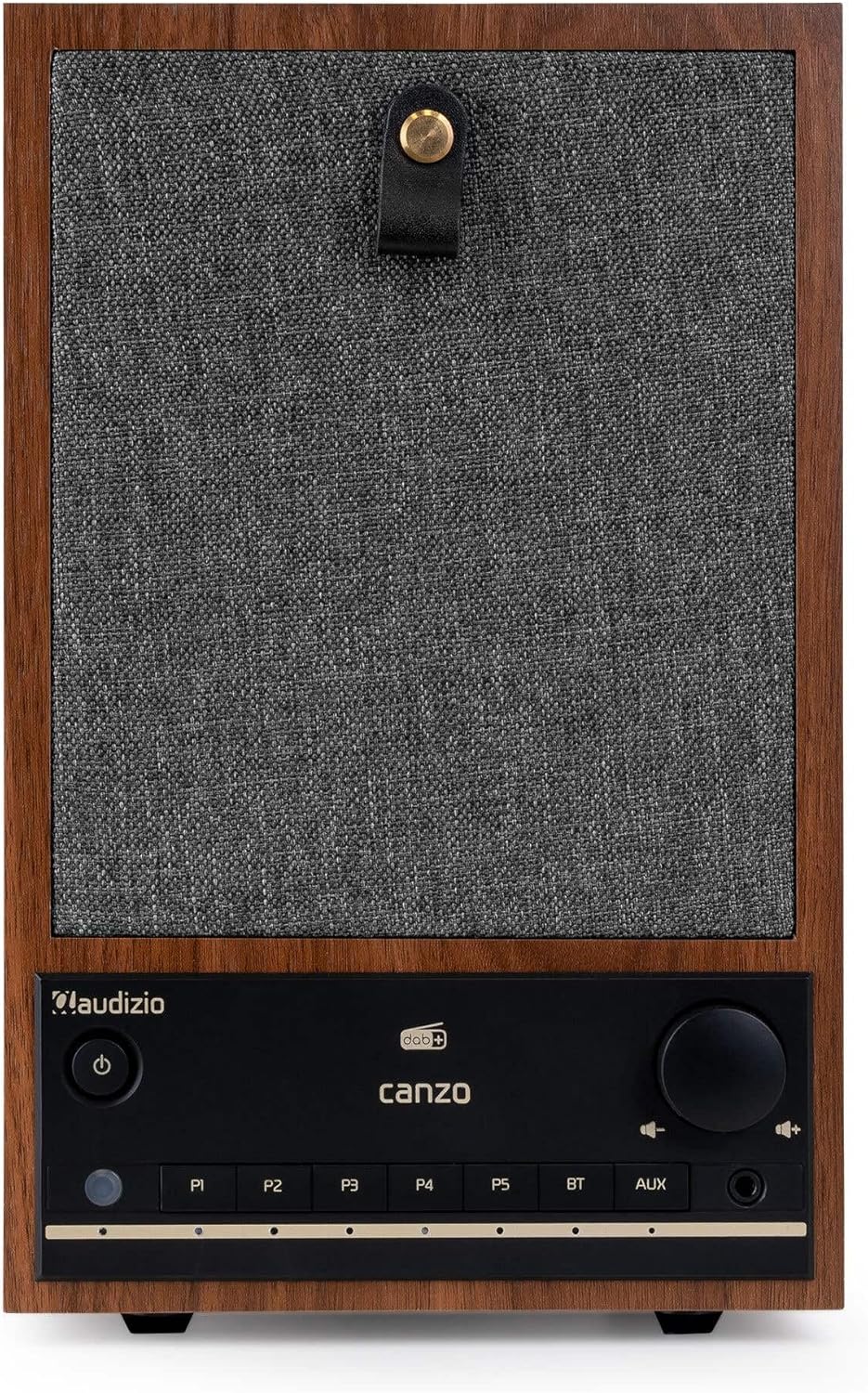
Kuva 2.1: Etuosa view of the Audizio Canzo DAB+ Internet Radio in walnut finish.

Kuva 2.2: Etuosa view with speaker grille removed, highlighting the speaker, display, and control panel.
3. Mitä laatikossa on
Pura laatikko varovasti pakkauksesta ja varmista, että kaikki osat ovat mukana:
- Audizio Canzo DAB+ Internet Radio
- Virtalähde
- Kaukosäädin
- Pika-aloitusopas
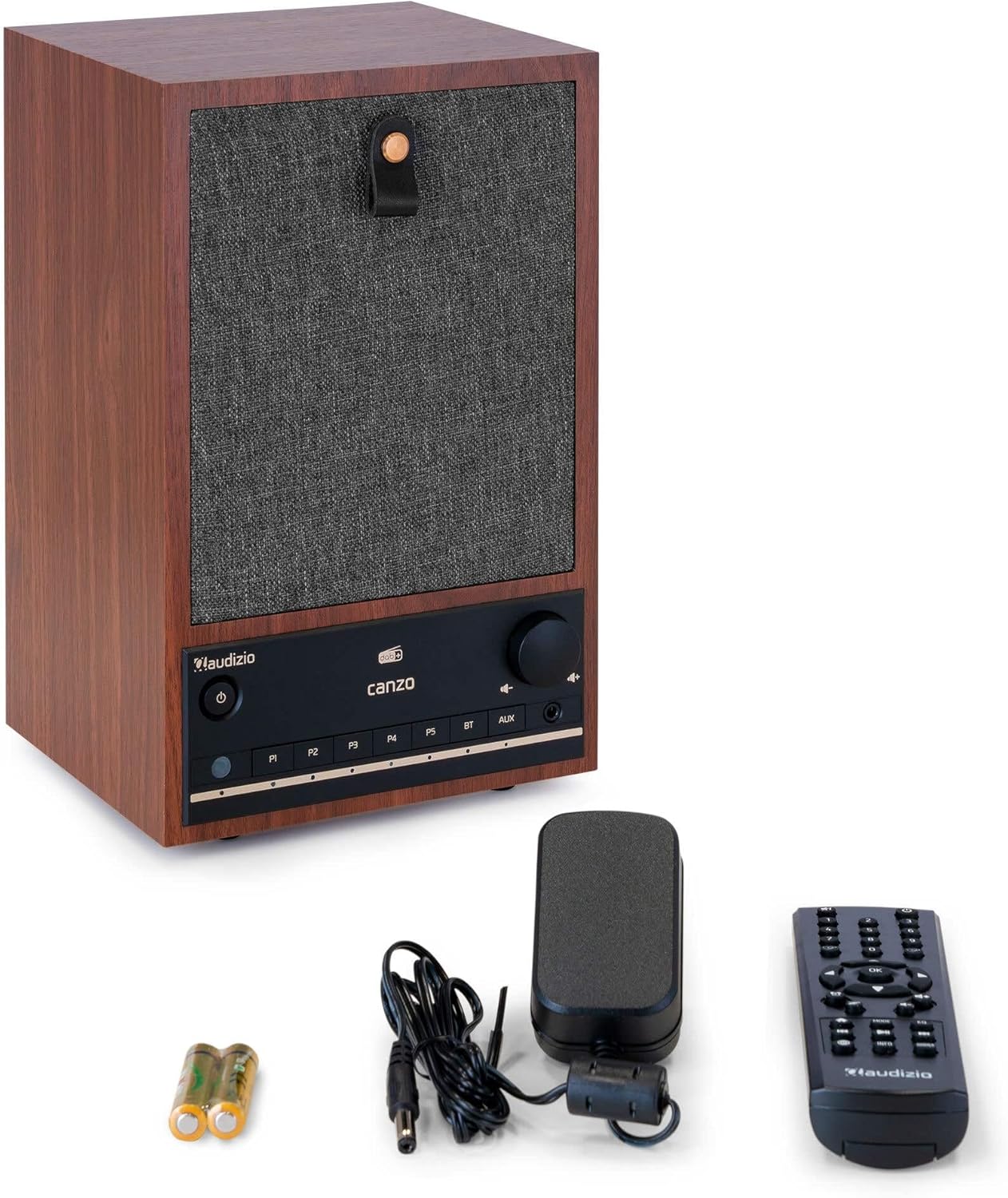
Figure 3.1: Audizio Canzo radio with its accessories.
4. Asennus
4.1 Virran kytkeminen
- Insert the DC plug of the power adapter into the DC IN port on the back of the radio.
- Plug the power adapter into a standard wall outlet (220V).
- Käännä ON/OFF switch on the back of the unit to the ON asema.
4.2 Antenniliitäntä
For optimal DAB+ and FM reception, extend the telescopic antenna located on the back of the unit. Adjust its position for the best signal.

Figure 4.1: Rear panel with power input, audio ports, USB, LAN, and antenna.
4.3 Ensimmäinen käynnistys ja verkon asennus
- Paina Tehoa button on the front panel or remote control to turn on the radio.
- The display will show the Audizio logo and then guide you through the initial setup wizard.
- Valitse haluamasi kieli.
- The radio will prompt you to connect to a network. Choose Wi-Fi or LAN.
- Wi-Fi: Select your Wi-Fi network from the list and enter the password using the navigation buttons and OK -painiketta.
- For LAN: Liitä Ethernet-kaapeli reitittimestäsi tietokoneeseen. LAN port on the back of the radio. The connection should be established automatically.
- Once connected, the radio will update the time and date automatically.
5. Käyttöohjeet
5.1 Perusohjaimet
The front panel features a power button, preset buttons (P1-P5), Bluetooth (BT) and AUX input buttons, a volume knob, and navigation controls. The remote control provides full access to all functions.
5.2 Tilan valinta
Paina MODE button on the radio or remote control to cycle through available modes: Internet Radio, DAB+, FM, Bluetooth, AUX, and USB Playback.
5.3 Internet-radio
- Valitse Internet-radio tila.
- Navigointipainikkeilla voit selata asemia sijainnin, tyylilajin tai haun mukaan.
- Paina OK aseman valitsemiseksi.
- Voit tallentaa aseman esiasetukseksi pitämällä yhtä painikkeista painettuna. P1-P5 buttons until the display confirms.
5.4 DAB+ -radio
- Valitse DAB+ tila.
- Radio hakee automaattisesti saatavilla olevia DAB+-asemia.
- Use the navigation buttons to scroll through the list of found stations.
- Paina OK aseman valitsemiseksi.
- Voit tallentaa aseman esiasetukseksi pitämällä yhtä painikkeista painettuna. P1-P5 painikkeita.
5.5 FM -radio
- Valitse FM tila.
- Paina ja pidä painettuna Skannata button (usually on the remote or via menu) to auto-scan for FM stations.
- Use the navigation buttons to tune manually or select from scanned stations.
- Voit tallentaa aseman esiasetukseksi pitämällä yhtä painikkeista painettuna. P1-P5 painikkeita.
5.6 Bluetooth-toisto
- Valitse Bluetooth mode. The radio will enter pairing mode, indicated on the display.
- Ota Bluetooth käyttöön älypuhelimessa tai tabletissa ja etsi käytettävissä olevia laitteita.
- Select "Audizio Canzo" from the list to pair.
- Kun pariliitos on muodostettu, voit toistaa laitteesi ääntä radion kautta.
5.7 AUX-tulo
- Liitä ulkoinen äänilaite (esim. MP3-soitin) AUX IN port on the back of the radio using a 3.5mm audio cable.
- Valitse AUX tila.
- Audio from the connected device will now play through the radio.
5.8 USB-toisto
- Aseta ääntä sisältävä USB-muistitikku files osaksi USB-TOISTON port on the back of the radio.
- Valitse USB tila.
- Use the navigation buttons to browse and select audio files toistoa varten.
5.9 Herätyskello ja uniajastin
- Hälytys: Access the Alarm settings via the menu. Set up to two alarms with desired time, source (buzzer, radio), and volume.
- Uniajastin: Access the Sleep Timer settings via the menu. Set a duration (e.g., 15, 30, 60 minutes) after which the radio will automatically turn off.
- torkku: Kun hälytys soi, paina Torkku button on the remote or radio to temporarily silence it.
6. Huolto
6.1 Puhdistus
To clean the radio, use a soft, dry, lint-free cloth. Do not use abrasive cleaners, waxes, or solvents as they may damage the finish or internal components.
6.2 Varastointi
Jos laitetta säilytetään pitkään, irrota se pistorasiasta ja säilytä sitä viileässä, kuivassa paikassa, poissa suorasta auringonvalosta ja äärimmäisistä lämpötiloista.
7. Vianmääritys
| Ongelma | Mahdollinen syy | Ratkaisu |
|---|---|---|
| Ei virtaa | Virtasovitinta ei ole kytketty; ON/OFF-kytkin on OFF-asennossa. | Ensure power adapter is securely connected and ON/OFF switch is ON. |
| Ei ääntä | Äänenvoimakkuus liian alhainen; väärä lähde valittu; kuulokkeet kytketty. | Lisää äänenvoimakkuutta; valitse oikea syöttötila; irrota kuulokkeet. |
| Ei voi muodostaa yhteyttä Wi-Fi-verkkoon | Väärä salasana; reititin liian kaukana; verkko-ongelma. | Verify Wi-Fi password; move radio closer to router; restart router. |
| Huono DAB+/FM-vastaanotto | Antennia ei ole ojennettuna; heikko signaalialue. | Fully extend and adjust the telescopic antenna; try repositioning the radio. |
| Kaukosäädin ei toimi | Batteries depleted; obstruction between remote and radio. | Replace remote control batteries; ensure clear line of sight to the radio's sensor. |
8. Tekniset tiedot
| Ominaisuus | Erittely |
|---|---|
| Mallinumero | Canzo |
| Tuotteen mitat | 22.5 x 20.5 x 34 cm |
| Tuotteen paino | 2.9 kiloa |
| Väri | Pähkinä |
| Näytön koko | 2.4 tuumaa |
| Yhteystekniikka | Aux, Bluetooth, Wi-Fi, LAN |
| Bluetooth-versio | 5.3 |
| Tuetut radiotaajuusalueet | DAB+, FM, internetradio |
| Virtalähde | Johdollinen sähkölaite (220 volttia) |
| Erikoisominaisuudet | Integrated Clock, Sleep Timer, Alarm, Remote Control, Preset Stations |
| Yhteensopivat laitteet | Smartphone, Tablet, Headphones, MP3 Player, USB Storage Device |
9. Takuu ja tuki
For warranty information and technical support, please refer to the warranty card included with your product or contact your retailer. Keep your proof of purchase for any warranty claims.