
1. Johdanto
This manual provides detailed instructions for the safe and effective operation of your TOOLTOP ET120M 120MHz Handheld Digital Oscilloscope. Please read this manual thoroughly before using the device to ensure proper functionality and to prevent damage.
2. Turvallisuustiedot
Always observe the following safety precautions when using the ET120M oscilloscope:
- Älä käytä laitetta märässä tai damp ehdot.
- Ensure the device is powered off before connecting or disconnecting probes.
- Käytä ainoastaan toimitettuja lisävarusteita tai hyväksyttyjä varaosia.
- Do not attempt to open or modify the device; refer all servicing to qualified personnel.
- Pidä laite poissa vahvoista sähkömagneettisista kentistä.
3. Pakkauksen sisältö
Varmista, että pakkauksessasi on kaikki alla luetellut tuotteet:
- TOOLTOP ET120M Handheld Digital Oscilloscope
- 100MHz Oscilloscope Probe
- USB-latauskaapeli
- Käyttöopas
- Kangaskassi

Kuva 3.1: Pakkauksen sisältö
4. Tuote ohiview
4.1. Laitteen ominaisuudet
The TOOLTOP ET120M is a compact and portable handheld digital oscilloscope designed for various electrical testing and repair applications. Key features include:
- 120MHz analog bandwidth and 500MS/s real-time sampling korko.
- 2.4-inch 320x240 clear color LCD screen.
- Integrated square wave signal output (1kHz, 10KHz, 100KHz, 1MHz).
- 12 types of automatic parameter measurements (Vpp, Vrms, Vavg, Vp, Vmax, Vmin, F, T, T+, T-, Du+, Du-).
- Three scan modes: Auto, Normal, and Single.
- Ability to store 2500 DSO waveforms with thumbnail browsing.
- Built-in rechargeable lithium battery for up to 6 hours of continuous use.
- Durable design with a silicone protective cover.

Kuva 4.1: Keskeiset ominaisuudetview
4.2. Komponenttien tunnistaminen
Familiarize yourself with the main components and controls of the ET120M oscilloscope:

Kuva 4.2: Etuosa View of ET120M Oscilloscope
- Näyttö: 2.4-inch LCD for waveform display and menu navigation.
- Input BNC Connector: For connecting the oscilloscope probe.
- Ohjauspainikkeet: Including MENU, F1, F2, SAVE, AC/DC, 1X/10X, 50%, TRIG, EDGE, STOP, AUTO, and directional/OK buttons for navigation and settings adjustment.
- USB-portti: Laitteen lataamiseen.
5. Asennus
5.1. Alkulataus
Before first use, fully charge the built-in lithium battery using the provided USB charging cable and a standard USB power adapter (not included). The charging indicator will show the charging status.
5.2. Mittapään liitäntä
Connect the oscilloscope probe to the BNC input connector on the top of the device. Ensure the connection is secure. Set the probe attenuation switch (if applicable) to the desired setting (e.g., 1X or 10X) and match this setting on the oscilloscope via the 1X/10X button.
6. Käyttöohjeet
6.1. Virta päälle/pois
Käynnistä tai sammuta laite pitämällä virtapainiketta (yleensä sivussa tai päällä) painettuna.
6.2. Basic Waveform Acquisition
After powering on, connect the probe to the circuit under test. The oscilloscope will display the waveform. Use the directional buttons to navigate menus and adjust settings.
6.3. Waveform Acquisition Modes
The ET120M supports three scan modes:
- Auto: Automatically adjusts time base and vertical amplitude for a stable waveform display. Press the AUTO button for one-key waveform adaptation.
- Normaali: Displays a waveform only when a trigger condition is met.
- Yksittäinen: Captures and displays a single waveform when a trigger condition is met, then stops.

Figure 6.1: Auto Waveform Adaptation
6.4. Parameter Measurement
The device can automatically measure 12 different waveform parameters. Access these measurements through the menu system. Parameters include Peak-to-Peak Voltage (Vpp), Root Mean Square Voltage (Vrms), Average Voltage (Vavg), Peak Voltage (Vp), Maximum Voltage (Vmax), Minimum Voltage (Vmin), Frequency (F), Period (T), Positive Pulse Width (T+), Negative Pulse Width (T-), Positive Duty Cycle (Du+), and Negative Duty Cycle (Du-).
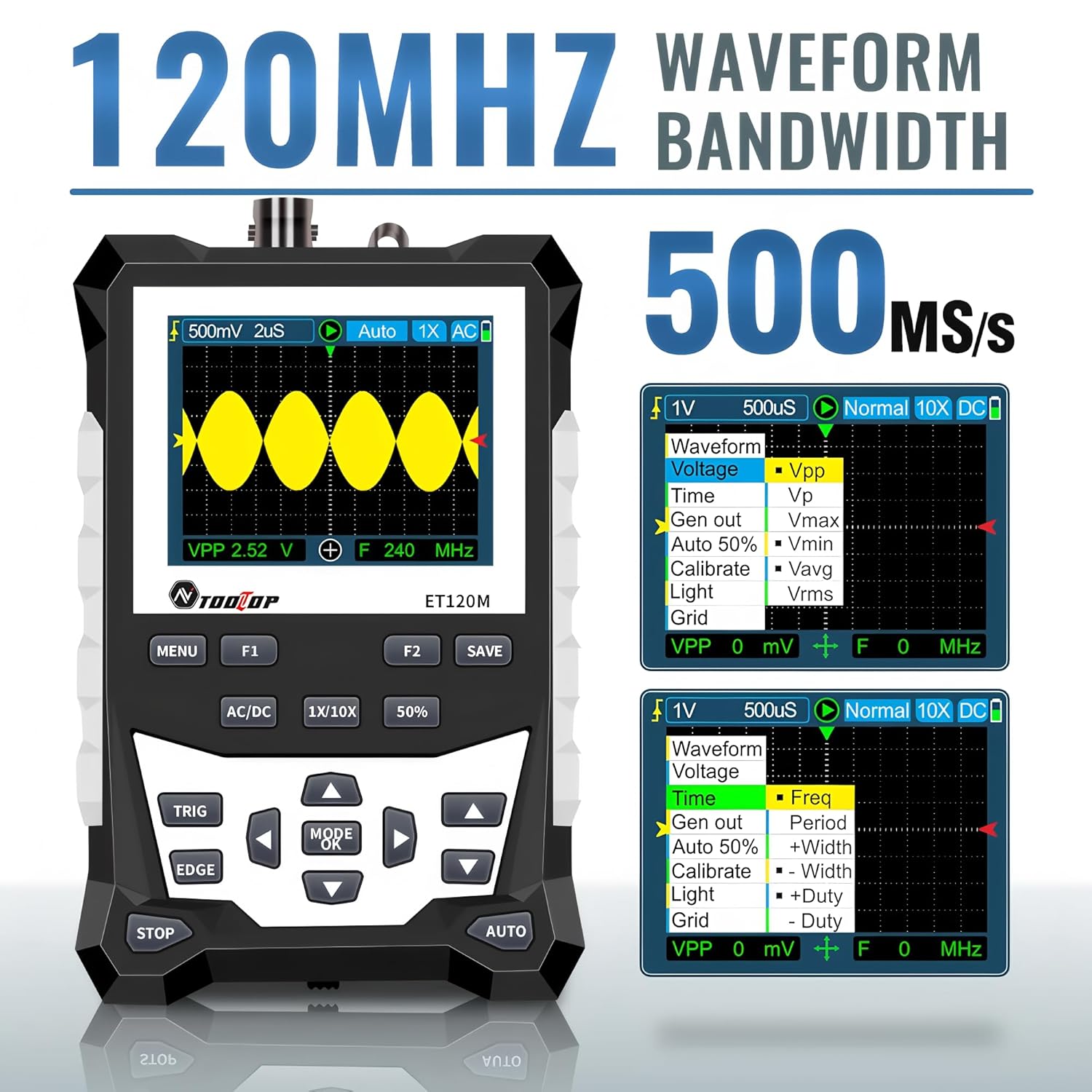
Figure 6.2: Automatic Measurement Functions
6.5. Square Wave Signal Output
The ET120M can generate square wave signals at specific frequencies. Navigate to the signal output function in the menu to select between 1kHz, 10KHz, 100KHz, and 1MHz output frequencies. This feature is useful for testing circuits.

Figure 6.3: Square Wave Signal Output Function
6.6. Waveform Storage and Recall
The device can store up to 2500 DSO waveforms. Use the TALLENTAA button to store the current waveform. Stored waveforms can be browsed via thumbnails for easy recall and analysis.

Figure 6.4: Waveform Storage and Browsing
6.7. Adjusting Waveform Parameters
You can manually adjust various waveform display parameters to fine-tune your measurements:
- Aikapohja: Säätää vaakasuuntaista skaalausta (aikaa jakoa kohden).
- Amplitude (Vertical Sensitivity): Säätää pystysuuntaista asteikkoa (volttia jakoa kohden).
- Liipaisimen kulmakerroin: Sets the trigger to rising or falling edge.
- Liipaisutaso: Asettaa voltage level at which the waveform is triggered.

Figure 6.5: Adjusting Waveform Display Parameters
7. Huolto
7.1. Puhdistus
Puhdista laite pehmeällä, kuivalla liinalla. Pinttyneeseen likaan käytä hieman kuivaa liinaa.amp voi käyttää miedolla pesuaineella kostutettua liinaa varmistaen, ettei nestettä pääse laitteeseen. Älä käytä hankaavia puhdistusaineita tai liuottimia.
7.2. Varastointi
When not in use for extended periods, store the oscilloscope in a cool, dry place, away from direct sunlight and extreme temperatures. It is recommended to store it in the provided cloth bag to protect it from dust and scratches.
7.3. Akun hoito
Akun käyttöiän pidentämiseksi vältä akun usein tapahtuvaa täydellistä purkamista. Jos säilytät akkua pitkään, lataa se noin 50 %:iin muutaman kuukauden välein.
8. Vianmääritys
If you encounter issues with your ET120M oscilloscope, refer to the following common problems and solutions:
- Laite ei käynnisty: Varmista, että akku on ladattu. Liitä USB-latauskaapeli ja yritä uudelleen.
- Ei aaltomuotoa näytössä: Check probe connection. Ensure the probe is properly connected to the circuit under test. Adjust vertical sensitivity and time base settings. Try the AUTO function.
- Epävakaa aaltomuoto: Adjust the trigger level and trigger slope. Ensure the trigger mode is appropriate for the signal.
- Epätarkkoja mittauksia: Verify probe attenuation setting (1X/10X) matches the device setting. Perform a probe compensation if necessary (refer to advanced operation in a full manual).
For persistent issues, contact TOOLTOP customer support.
9. Tekniset tiedot
9.1. Yleiset tiedot
| Näyttö | 320x240 LCD screen |
| Näyttöalue | 50mm x 40mm |
| Taustavalo | White, brightness adjustable |
| Impedanssi | x1: 1MΩ / x10: 10MΩ |
| Akku | 18650 lithium battery (built-in) |
| Automaattinen sammutus | Ei operaatiota 15 minuuttiin |
| Aaltomuodon tallennus | 2500 DSO waveforms |
| Koko | 124mm x 80mm x 35mm |
| Käyttöolosuhteet | 0°C ~ +40°C; <75%RH |
| Varastointiolosuhteet | -10°C ~ +60°C; <90%RH |
9.2. Oskilloskoopin tekniset tiedot
| Analoginen kaistanleveys | 120 MHz |
| Suurin reaaliaikainen Sampling korko | 500MSps |
| Pystysuora resoluutio | 8 bittiä |
| Pystysuuntainen tarkkuus | ± (5% + 0.2osio) |
| Auto Zero Reference | DC-mittauksen aikana |
| Liipaisutaso | ±3.8div (0.1div per step) |
| Liipaisimen asento | ±6div (0.1div per step) |
| Cursor Function | ΔV, Δt, 1/Δt |
| Epälineaarisuus | ±1 bits |
| Kytkentämenetelmä | DC/AC |
| Division Vertical | ±3.8 Horizontal: 12 |
| Aikaperusalue | 6ns / div ~ 50s / div |
| Aikapohjan tarkkuus | ±(0.01 %+0.1 divv.) |
| Skannaustila | Automaattinen/Yksittäiskuva/Normaali |
| Liipaisimen kaltevuus | Nouseva / Laskeva |
| Ennätyspituus | 12div |
| Automaattinen määritys | Automatically set time base and vertical ampleveyttä |
| Automatic Measurement Functions | Vpp, Vrms, Vavg, Vp, Vmax, Vmin, F, T, T+, T-, Du+, Du- |
| Pystysuuntainen herkkyysalue | x1: 50mV/div ~ 10V/div; x10: 500mV/div ~ 100V/div |
10. Takuu ja tuki
For warranty information or technical support, please refer to the documentation provided with your purchase or contact TOOLTOP customer service directly. Keep your purchase receipt as proof of purchase.