
TOOLTOP TT-ET14S+Macro lens
TOOLTOP ET14S 2-in-1 Thermal Imager & Multimeter User Manual
Model: TT-ET14S+Macro lens
Johdanto
This user manual provides comprehensive instructions for the safe and effective operation of your TOOLTOP ET14S 2-in-1 Thermal Imager and Multimeter. This device integrates a high-resolution thermal camera with a full-featured digital multimeter, offering a versatile tool for various diagnostic and inspection tasks. Please read this manual thoroughly before use and retain it for future reference.
Turvallisuustiedot
Noudata aina seuraavia turvaohjeita välttääksesi loukkaantumiset tai laitteen vaurioitumisen:
- Älä yritä purkaa tai muokata laitetta.
- Ensure the device is turned off before connecting or disconnecting test leads.
- Älä ylitä äänenvoimakkuuden enimmäistuloarvojatage, virta tai lämpötila.
- Use appropriate personal protective equipment (PPE) when working with electrical circuits or high temperatures.
- Keep the device away from water, dust, and extreme temperatures.
- Refer to the warning label on the back of the device for additional safety instructions.
Mitä laatikossa on
Varmista, että pakkauksessasi on kaikki alla luetellut tuotteet:
- ET14S Thermal Imager & Multimeter
- Makro-objektiivi
- Instrument Storage Bag
- Multimeter Probes (Test Leads)
- Datalinja (USB-kaapeli)
- Tuoteopas
- Pakkauslaatikko

Image: Components included in the ET14S package, showing the main unit, macro lens, storage bag, multimeter probes, data cable, and product manual.
Tuote loppuview
The TOOLTOP ET14S combines a high-resolution thermal imager with a precise digital multimeter. It features a 2.8-inch IPS high-definition screen for clear display of both thermal images and electrical measurements.
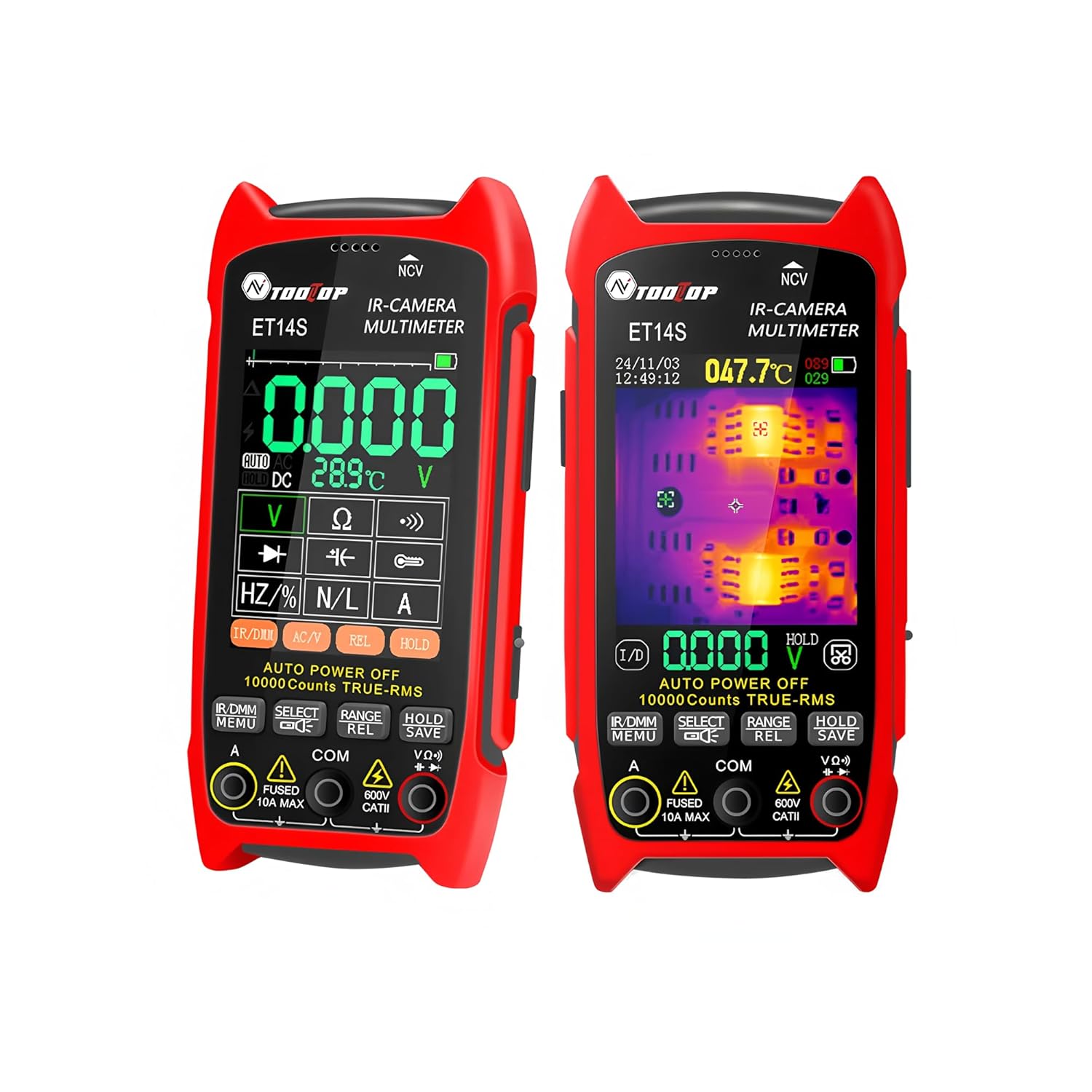
Kuva: Edessä view of the ET14S device, illustrating its dual functionality as a thermal imager and multimeter with its display screen and control buttons.
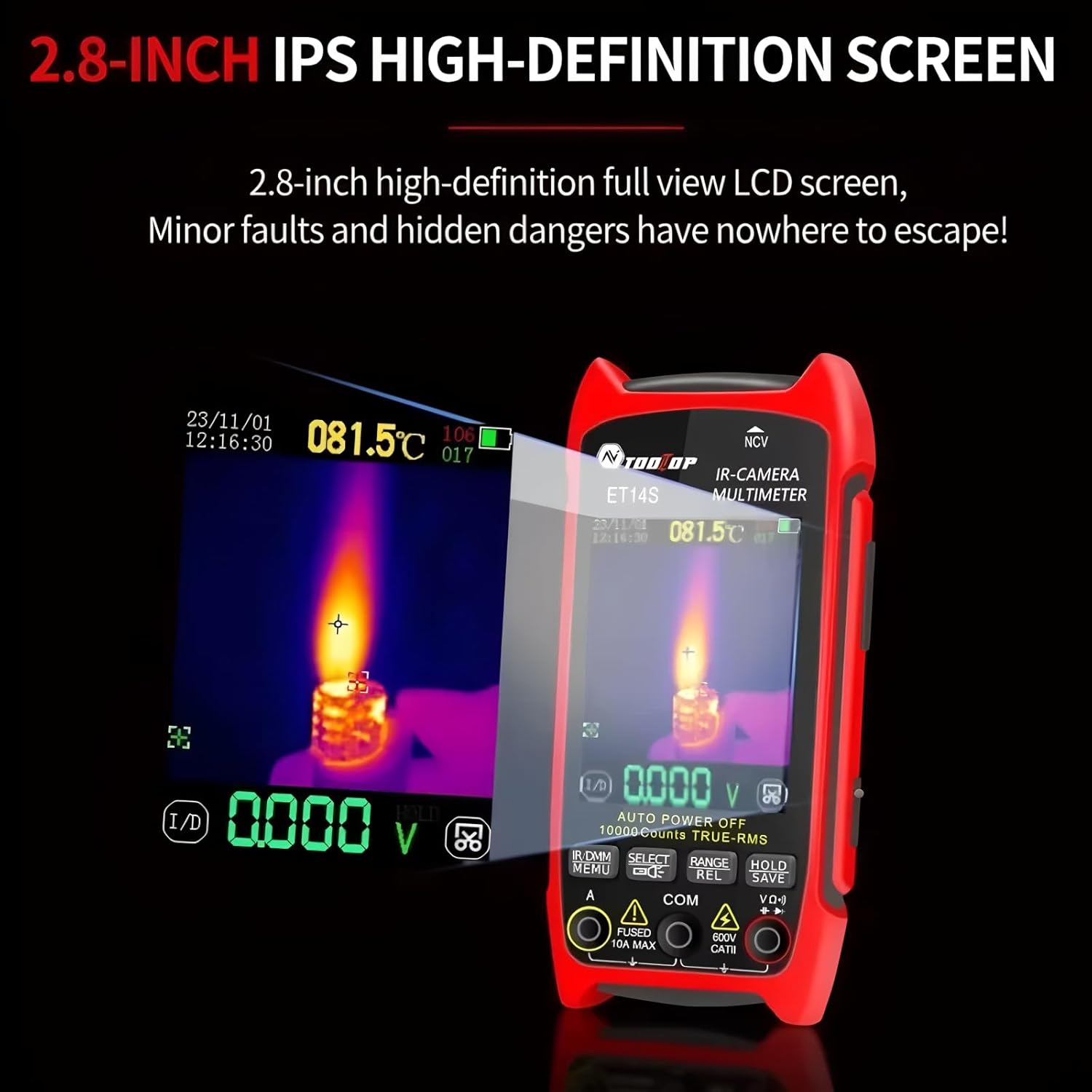
Kuva: Yksityiskohtainen view of the ET14S screen, showing both a thermal image overlay and digital multimeter readings simultaneously.
Tärkeimmät ominaisuudet:
- ISR240x240 Thermal Camera: Upgraded imaging pixels of 240x240 and 25Hz image capture frequency for detailed thermal analysis.
- High-precision Multimeter: 9999 counts True RMS multimeter for accurate electrical measurements.
- Pitkä akun käyttöikä: Up to 8 hours of continuous use with a universal 18650 rechargeable battery.
- Kompakti ja kannettava: Ergonomic design with a 2.8-inch screen and innovative stand.
- Laaja lämpötila-alue: -20℃ to +550℃ with ±2℃ or ±2% accuracy.
- Valinnainen makro-objektiivi: For detailed inspection of small components like PCBs.
Asennus
1. Akun asennus ja lataus:
The ET14S uses a rechargeable 18650 lithium battery. Ensure the battery is properly installed and charged before first use.
- Paikanna paristolokero laitteen takana.
- Avaa lokeron kansi.
- Insert the 18650 battery, observing the correct polarity (+/-).
- Sulje paristolokeron kansi kunnolla.
- Connect the device to a power source using the provided USB data line for charging. The charging indicator will show the charging status.
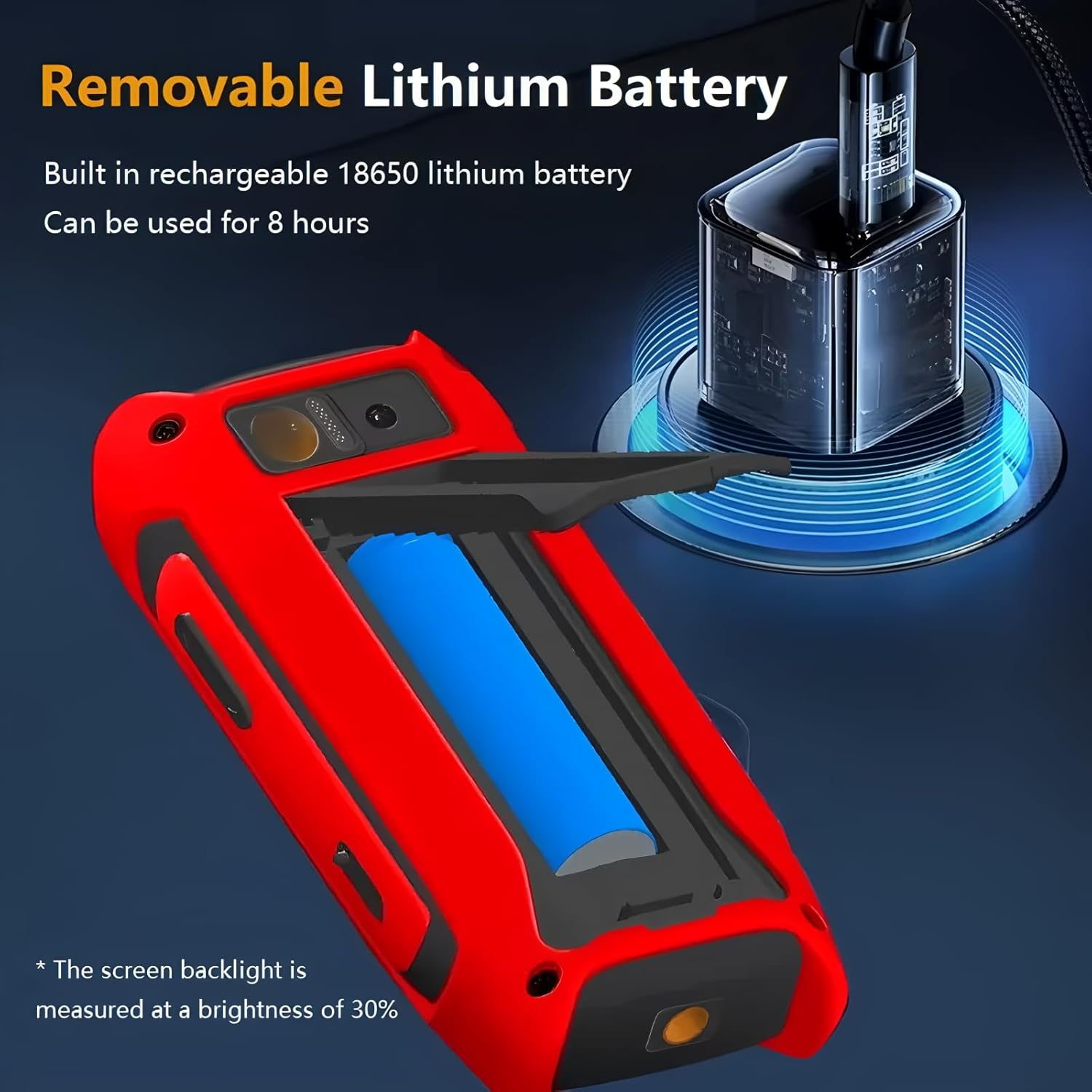
Image: The ET14S with its battery compartment open, illustrating the removable 18650 lithium battery and the USB charging port.
2. Attaching the Macro Lens (Optional):
For detailed inspection of small objects or PCB boards, attach the included macro lens.
- Locate the macro lens attachment point on the top of the device, near the thermal camera lens.
- Align the macro lens with the attachment mechanism.
- Slide or clip the macro lens into place until it is securely fastened over the thermal camera lens.
- To remove, gently slide or unclip the macro lens.
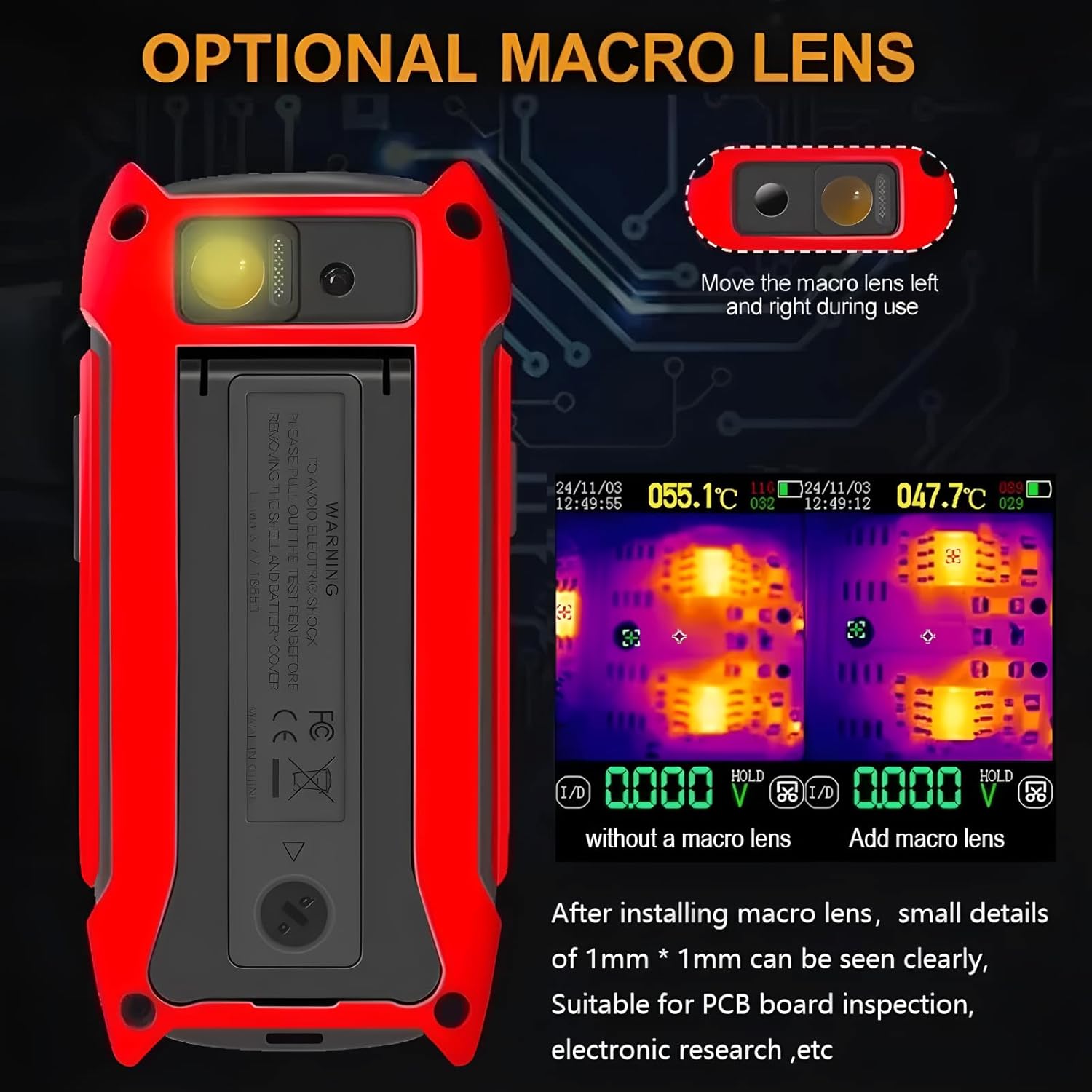
Image: The ET14S device highlighting the optional macro lens and demonstrating its capability for detailed thermal inspection of small components like PCBs.
Käyttöohjeet
1. Virran kytkeminen päälle/pois:
Press and hold the power button (usually located on the side or front panel) to turn the device on or off.
2. Navigating the Interface:
The ET14S features a user-friendly interface with dedicated buttons for different functions. Use the navigation buttons (up, down, left, right, OK/Enter) to move through menus and select options.
3. Lämpökuvaustila:
In thermal imaging mode, the screen displays a real-time infrared image. The device automatically detects and displays temperature readings for the hottest and coldest points, as well as a central spot temperature.

Image: The ET14S screen showing a thermal image with temperature distribution and specific temperature readings for analysis.
- Paletin valinta: Use the menu to select different color palettes (e.g., Iron, Rainbow, Gray) to visualize temperature differences.
- Emissiivisuuden säätö: Adjust emissivity settings based on the material being inspected for accurate temperature measurements.
- Kuvanotto: Press the designated button to capture and save thermal images.
4. Multimeter Mode:
The ET14S functions as a full-featured True RMS multimeter. Connect the test leads to the appropriate input jacks (COM, VΩHz, A) and select the desired measurement function using the rotary dial or function buttons.
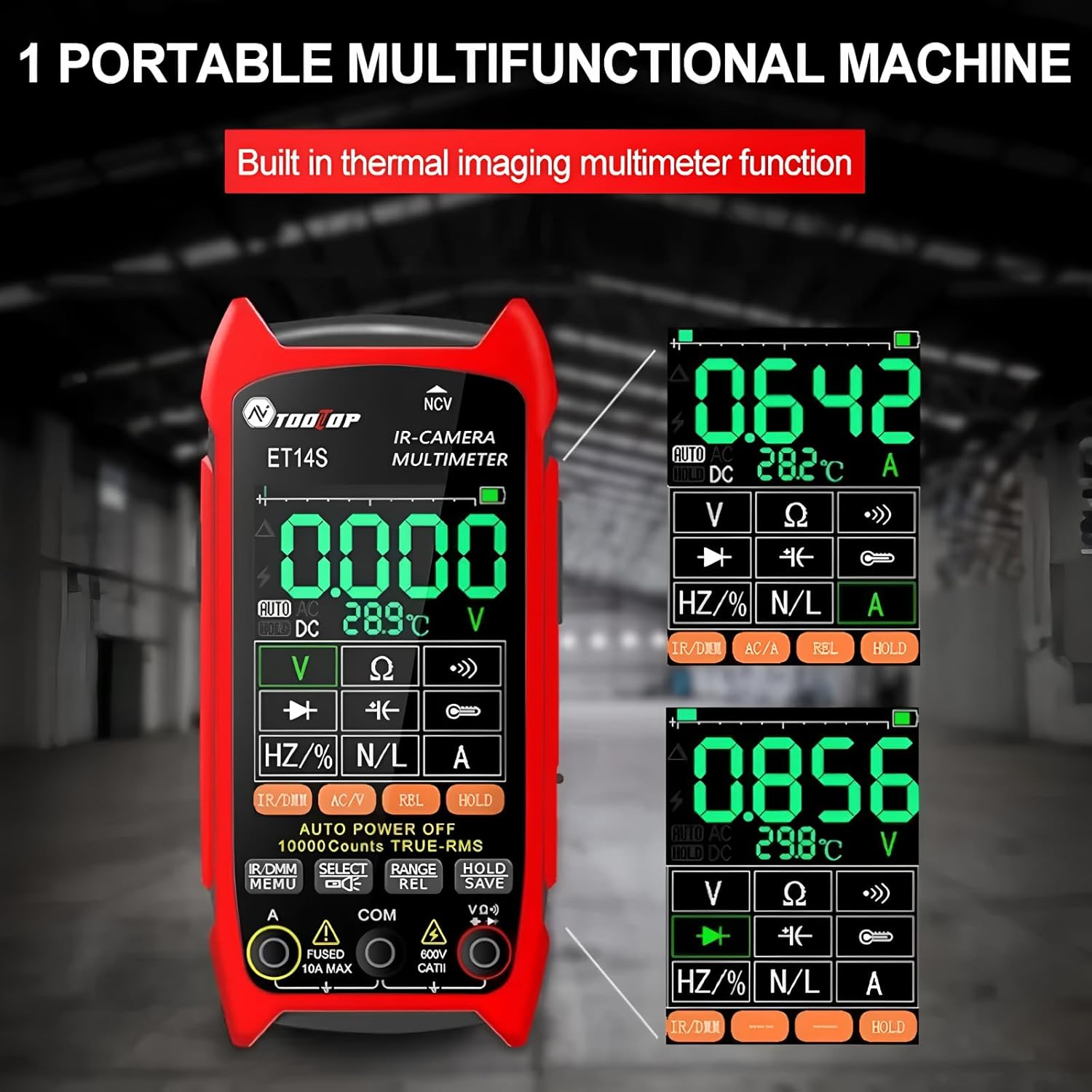
Image: The ET14S screen displaying various multimeter readings, including voltage, resistance, and frequency, demonstrating its electrical measurement capabilities.
- VoitagMittaus (AC/DC): Select V~ for AC voltage or V- for DC voltage.
- Virran mittaus (AC/DC): Select A~ for AC current or A- for DC current. Ensure correct lead connection for current measurements.
- Resistance (Ω), Continuity, Diode: Select the Ω symbol for resistance, continuity buzzer, or diode test.
- Capacitance (F), Frequency (Hz), Duty Cycle (%): Select the appropriate symbols for these measurements.
- Non-Contact Voltage (arvoarvo): Käytä NCV-toimintoa vaihtovirtajännitteen mittaamiseentage ilman suoraa yhteyttä.
- Tietojen pito: Paina HOLD-painiketta pysäyttääksesi nykyisen lukeman näytölle.
- Alueen valinta: The device typically features auto-ranging, but manual range selection may be available.
Sovellukset
The TOOLTOP ET14S is a versatile tool suitable for a wide range of applications, including but not limited to:
- Power System Maintenance: Identifying overheating components in electrical panels, circuit breakers, and wiring.
- Underfloor Heating Inspection: Locating heating elements and identifying blockages or leaks in radiant heating systems.
- Auton huolto: Diagnosing engine overheating, checking brake temperatures, and inspecting electrical systems.
- PCB Board Repair and Electronic Inspection: Pinpointing hot spots on circuit boards, identifying faulty components, and verifying thermal performance.
- Pipeline Heating Inspection: Detecting insulation failures or blockages in industrial pipelines.
- Kotitarkastus: Identifying insulation gaps, moisture intrusion, and HVAC issues.
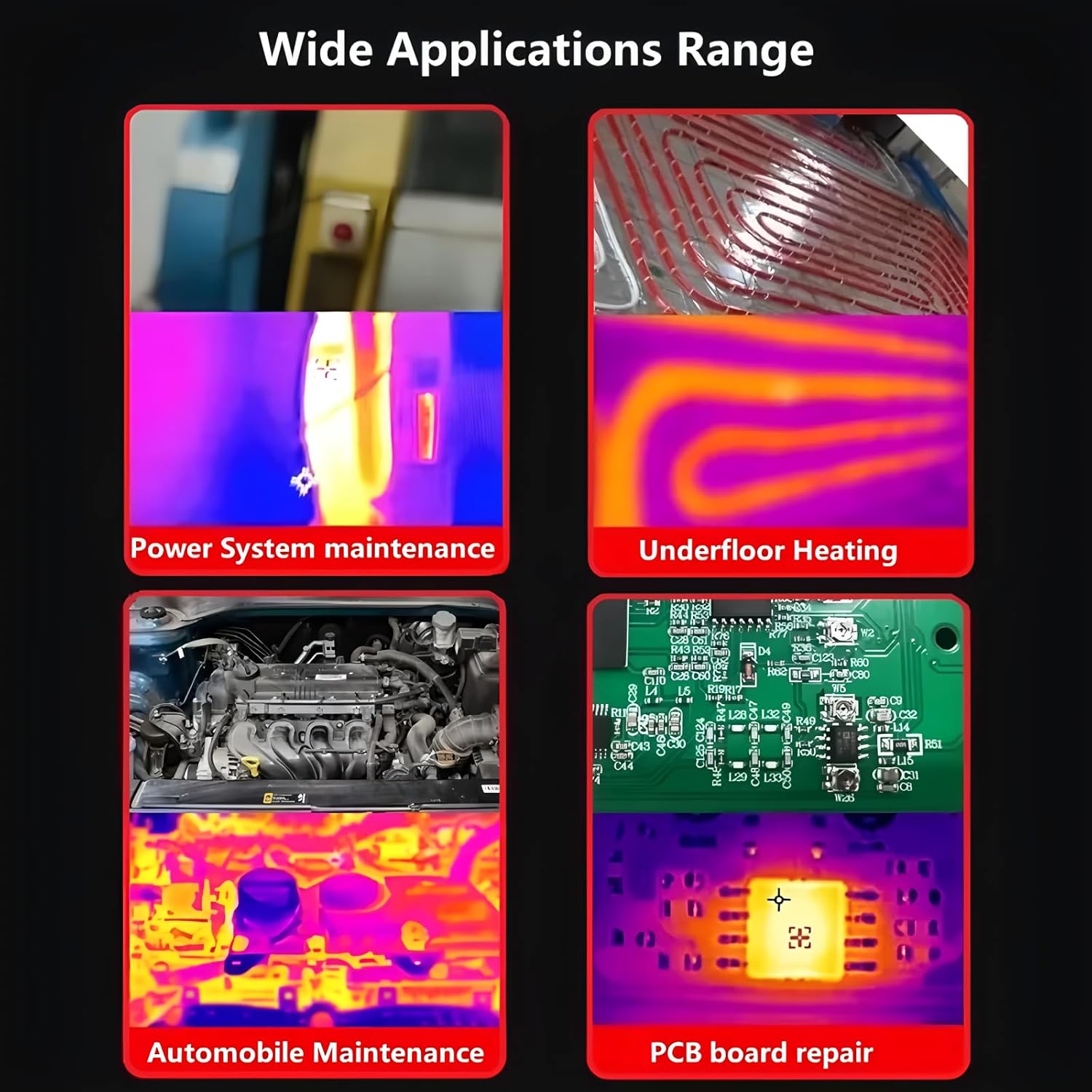
Image: A visual representation of the wide range of applications for the ET14S, including power system maintenance, underfloor heating, automobile diagnostics, and PCB board repair.
Huolto
1. Puhdistus:
Pyyhi laite pehmeällä, damp cloth. Do not use abrasive cleaners or solvents. Ensure the lenses are clean and free of dust or smudges for optimal thermal imaging performance.
2. Akun hoito:
To prolong battery life, charge the device regularly and avoid completely draining the battery. If storing for extended periods, charge the battery to approximately 50% and store in a cool, dry place.
3. Varastointi:
Store the ET14S in its provided storage bag or a protective case when not in use to prevent damage from impacts or dust. Avoid storing in areas with extreme temperatures or high humidity.
Vianetsintä
| Ongelma | Mahdollinen syy | Ratkaisu |
|---|---|---|
| Laite ei käynnisty. | Akun varaus on heikko tai se on tyhjä. Akun virheellinen asennus. | Lataa akku. Varmista, että akku on asetettu paikalleen oikean napaisuuden mukaisesti. |
| Epätarkat lämpötilalukemat. | Incorrect emissivity setting. Lens is dirty. Object is too far or too close. | Adjust emissivity for the target material. Clean the thermal lens. Ensure proper measurement distance. |
| Multimeter readings are unstable or incorrect. | Loose test lead connections. Incorrect function selected. Battery low. | Check and secure test lead connections. Verify the correct measurement function is selected. Charge the battery. |
| Näyttö on tyhjä tai jumiutunut. | Ohjelmistohäiriö. | Perform a hard reset by holding the power button for 10-15 seconds, or remove and reinsert the battery. |
Tekniset tiedot
| Ominaisuus | Erittely |
|---|---|
| Terminen resoluutio | 240x240 pikseliä |
| Kuvataajuus | 25 Hz |
| Lämpötila-alue | -20 ℃ - +550 ℃ (-4 ℉ - +1022 ℉) |
| Lämpötilan tarkkuus | ±2 ℃ tai ±2 % (kumpi tahansa on suurempi) |
| Mittaustarkkuus | 0.1℃ / 0.1℉ |
| Yleismittarin lukemat | 20 000 lukemaa (todellinen RMS) |
| Näyttöruutu | 2.8-inch IPS High-Definition LCD |
| Akun tyyppi | Ladattava 18650 litiumparisto |
| Akun kesto | Jopa 8 tuntia (jatkuva käyttö) |
| Tuotteen paino | 1 kilogramma (2.2 paunaa) |
| Mitat | 7.87 x 5.91 x 3.94 tuumaa (pakkauksen mitat) |
| Sertifikaatit | CE, RoHS |
Takuu ja tuki
For warranty information and technical support, please refer to the documentation provided with your purchase or contact TOOLTOP customer service directly. The EU spare part availability duration is 1 year.
Valmistaja: TOOLTOP
Tuotteen mallinumero: TT-ET14S+Macro lens
For further assistance, please visit the official TOOLTOP websivustolla tai ota yhteyttä heidän valtuutettuihin huoltokeskuksiinsa.
Ask a question about this manual
Ask about setup, troubleshooting, compatibility, parts, safety, or missing instructions. Manuals+ will review the question and use this page’s manual context to help answer it.