
1. Johdanto
This manual provides essential information for the safe and efficient operation of your Voltcraft DOV704 Digital Oscilloscope. The DOV704 is a high-quality, innovative, and compact 4-channel digital storage oscilloscope featuring a 70 MHz bandwidth, 1.25 GSa/s maximum sampling rate, and a 12-bit analog-to-digital converter. It is equipped with a 7-inch touchscreen display supporting gesture control, USB, LAN, and HDMI interfaces. Please read this manual thoroughly before using the device.
2. Turvallisuustiedot
Noudata aina seuraavia turvaohjeita loukkaantumisten ja laitteen vaurioitumisen välttämiseksi:
- Varmista virtalähteen voltage vastaa laitteessa määritettyjä vaatimuksia.
- Älä käytä oskilloskooppia märässä tai kylmässä paikassaamp ehdot.
- Vältä altistamasta laitetta suoralle auringonvalolle tai äärilämpötiloille.
- Käytä vain mukana toimitettua virtalähdettä ja lisävarusteita.
- Älä yritä avata tai muokata laitetta. Jätä kaikki huoltotyöt pätevän henkilöstön tehtäväksi.
- Before making any connections, ensure the device is powered off.
3. Pakkauksen sisältö
Varmista, että pakkauksessasi on kaikki alla luetellut tuotteet:
- Voltcraft DOV704 Digital Oscilloscope
- USB Type-C -virtalähde
- USB-kaapeli
- Four (4) Test Probes
- Two (2) Probe Adjustment Kits
- Software with English Manual (on CD)
- Pika-aloitusopas
- Tuotetiedot
4. Tuote ohiview
The Voltcraft DOV704 is designed for precise signal analysis. Below are key features and a visual representation of the device.
4.1 Tärkeimmät ominaisuudet
- 70 MHz kaistanleveys
- 4 Analog Input Channels
- 7-inch (17.78 cm) Touchscreen Display with Gesture Control (1024 x 600 pixels)
- 12-bit Analog-to-Digital Converter
- Suurin Sampling Rate: 1.25 GSa/s
- Real-time Waveform Capture Rate: 50,000 wfms/s
- Segmented Waveform Capture Rate: 700,000 wfms/s
- Record Length: 50 Mpts
- Horizontal Scan Speed: 1 ns/div to 1000 s/div (1-2-5 steps)
- Vertical Sensitivity: 500 µV/div to 10 V/div
- Multiple Trigger Functions: Edge, Video, Pulse, Slope, Runt, Window, Timeout, Nth, Logic, RS232/UART, I2C, SPI, CAN, LIN
- Connectivity: USB, LAN, HDMI
4.2 Laitteen asettelu
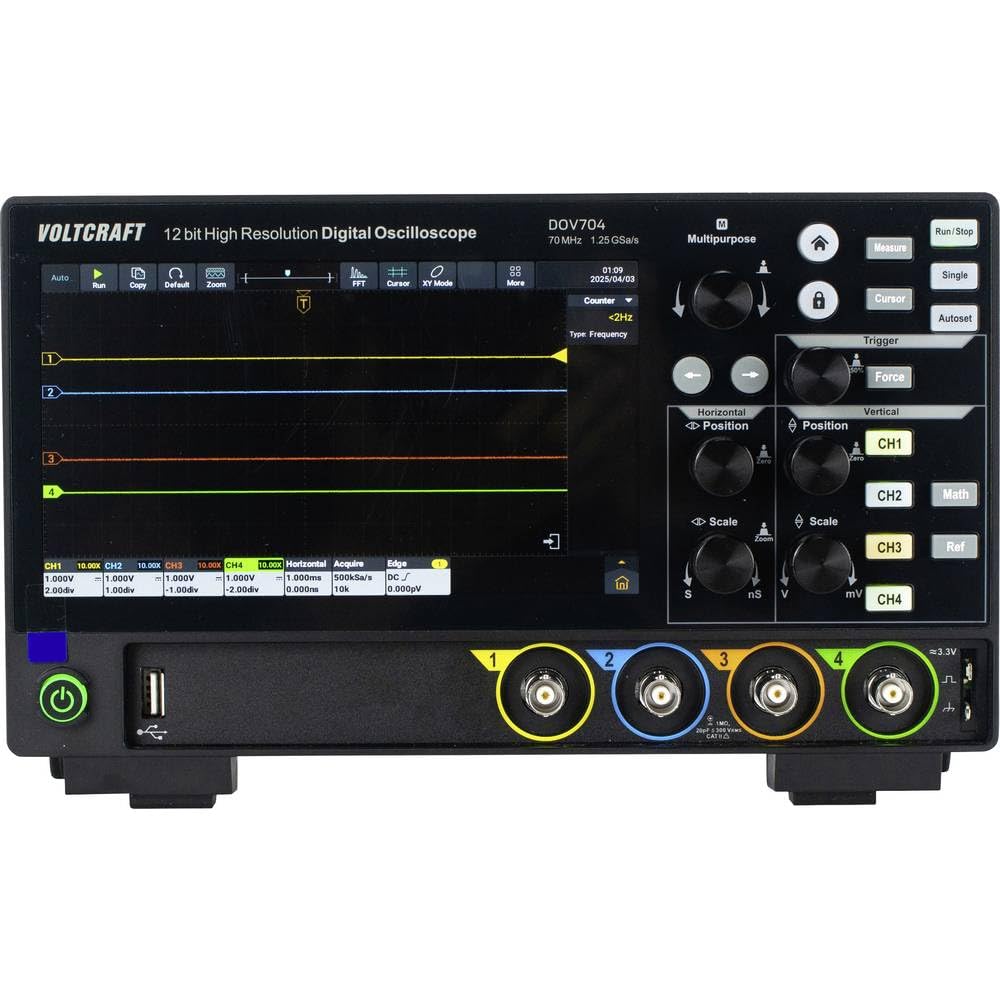
Kuva 1: Edessä view of the Voltcraft DOV704 Digital Oscilloscope, showing the 7-inch touchscreen display, control knobs, buttons, and four BNC input connectors at the bottom. The power button and USB ports are also visible.

Kuva 2: Kulmikas etuosa view of the Voltcraft DOV704 Digital Oscilloscope, providing a clearer perspective of the control panel and input ports. The screen displays a waveform.

Kuva 3: Sivu view of the Voltcraft DOV704 Digital Oscilloscope, illustrating its compact profile ja tuuletusritilät.
5. Asennus
5.1 Laitteen käynnistäminen
- Connect the USB Type-C power adapter to the oscilloscope's power input port.
- Liitä verkkolaite sopivaan pistorasiaan.
- Press the power button located on the front panel to turn on the oscilloscope. The display will illuminate.
5.2 Mittapään liitäntä ja kompensointi
- Connect a test probe to one of the BNC input channels (CH1-CH4) on the front panel.
- Attach the probe tip to the probe compensation output (usually a square wave signal output on the front or side).
- Adjust the probe compensation screw (located on the probe body) until the square wave displayed on the screen has flat tops and bottoms, without overshoot or undershoot.
- Repeat this process for all probes you intend to use.
6. Käyttöohjeet
6.1 Aaltomuodon perusnäyttö
- Kanavan valinta: Press the CH1, CH2, CH3, or CH4 buttons to enable or disable a channel.
- Pystysuuntainen skaalaus: Käytä Pystysuora asteikko knob to adjust the volts per division (V/div) for the selected channel.
- Pystysuuntainen sijainti: Käytä Pystyasento knob to move the waveform up or down on the screen.
- Vaakasuuntainen skaala: Käytä Vaaka-asteikko knob to adjust the time per division (s/div).
- Horizontal Position: Käytä Vaaka-asento knob to shift the waveform left or right.
6.2 Liipaisutoiminnot
The oscilloscope offers various trigger types to stabilize and capture specific parts of a waveform.
- Paina Laukaista -painiketta päästäksesi liipaisimen asetuksiin.
- Select the desired trigger type (e.g., Edge, Pulse, Video) from the menu.
- Adjust the trigger level using the dedicated Liipaisutaso knob or via the touchscreen.
- Choose the trigger source (CH1-CH4) as needed.
6.3 Touchscreen and Gesture Control
The 7-inch touchscreen allows for intuitive control.
- Napauta: Select menu items, buttons, or adjust settings.
- Nipistys zoomaukseen: Use two fingers to zoom in or out on waveforms (horizontal and vertical scaling).
- Raahata: Move waveforms or menu elements across the screen.
6.4 Tiedon tallennus ja liitettävyys
The DOV704 supports various methods for data storage and external connectivity.
- USB: Connect a USB flash drive to save waveform data, screenshots, or settings. Use the USB cable to connect to a computer for data transfer.
- LAN: Connect the oscilloscope to a network for remote control and data access using the provided software.
- HDMI: Connect an external display via the HDMI port for larger viewing of waveforms.
7. Huolto
7.1 Puhdistus
- Katkaise virta ennen puhdistusta.
- Pyyhi laitteen ulkopuoli pehmeällä, kuivalla liinalla.
- For the touchscreen, use a soft, lint-free cloth slightly dampened with a screen cleaner. Avoid abrasive cleaners.
- Älä päästä nesteitä laitteeseen.
7.2 Varastointi
Kun oskilloskooppia ei käytetä, säilytä sitä puhtaassa ja kuivassa paikassa, poissa suorasta auringonvalosta ja äärimmäisistä lämpötiloista.
8. Vianmääritys
| Ongelma | Mahdollinen syy | Ratkaisu |
|---|---|---|
| Laite ei käynnisty. | Virtajohto ei ole kytketty tai on viallinen. | Check power cable connection. Ensure power outlet is functional. Use the provided power adapter. |
| Ei aaltomuotoa näytössä. | Channel disabled, probe not connected, or signal too weak/strong. | Ensure the desired channel is enabled. Check probe connection. Adjust vertical scale (V/div) and horizontal scale (s/div). Check trigger settings. |
| Aaltomuoto on epävakaa. | Incorrect trigger settings. | Adjust trigger level and trigger type. Ensure trigger source is correctly selected. |
| Kosketusnäyttö ei reagoi. | Väliaikainen ohjelmistohäiriö. | Käynnistä laite uudelleen. Jos ongelma jatkuu, ota yhteyttä tukeen. |
9. Tekniset tiedot
| Parametri | Arvo |
|---|---|
| Mallinumero | VC-16753910 |
| Kaistanleveys | 70 MHz |
| Analogiset kanavat | 4 |
| Max. Sampling korko | 1.25 GSa/s |
| Ennätyspituus | 50 Mpts |
| ADC-päätöslauselma | 12-bittinen |
| Waveform Capture Rate (Real-time) | 50,000 XNUMX wfms/s |
| Waveform Capture Rate (Segmented) | 700,000 XNUMX wfms/s |
| Näyttö | 7-inch Touchscreen (1024 x 600 pixels) |
| Horizontal Scan Speed | 1 ns/div to 1000 s/div |
| Pystysuuntainen herkkyys | 500 µV/div to 10 V/div |
| Liitännät | USB, LAN, HDMI |
| Tuotteen mitat (L x S x K) | 26 x 7.8 x 16 cm |
| Paino | 2.71 kg |
10. Takuu ja tuki
For warranty information, please refer to the product data sheet included in your package or visit the official VOLTCRAFT website. For technical support, troubleshooting assistance beyond this manual, or service inquiries, please contact VOLTCRAFT customer service. Contact details can typically be found on the manufacturer's websivustolla tai tuotteen mukana toimitetuissa dokumenteissa.