
1. Johdanto
This manual provides essential instructions for the safe and efficient operation of your VOLTCRAFT DOV1004 Digital Oscilloscope. The DOV1004 is a compact, high-performance digital storage oscilloscope featuring a 12-bit analog-to-digital converter (ADC), a 7-inch touchscreen with gesture control, and multiple connectivity options including USB, LAN, and HDMI. It is designed for precise measurement and analysis of electronic signals in various applications. Please read this manual thoroughly before using the device and keep it for future reference.
2. Turvallisuustiedot
Noudata aina seuraavia turvaohjeita loukkaantumisten ja laitteen vaurioitumisen välttämiseksi.
- Virtalähde: Use only the provided USB Type-C power adapter. Ensure the voltage vastaa laitteen vaatimuksia (12 volttia).
- Ympäristö: Operate the oscilloscope in a dry, well-ventilated area, away from direct sunlight, extreme temperatures, and high humidity. Avoid dusty or corrosive environments.
- Koettimet: Always use properly rated probes for the voltage and frequency being measured. Ensure probes are correctly connected before taking measurements.
- Maadoitus: Ensure the oscilloscope is properly grounded to prevent electric shock.
- Huolto: Älä yritä avata tai korjata laitetta itse. Jätä kaikki huoltotyöt pätevän henkilöstön tehtäväksi.
- Puhdistus: Katkaise virta ennen puhdistamista. Käytä pehmeää, kuivaa liinaa. Älä käytä nestemäisiä tai aerosolipuhdistusaineita.
3. Pakkauksen sisältö
Verify that all items listed below are present in your package. If any items are missing or damaged, contact your supplier.
- VOLTCRAFT DOV1004 Digital Oscilloscope (1 unit)
- USB Type-C -virtalähde
- USB-kaapeli
- Probe Tips (4 units)
- SampLe Voltage Sets (2 units)
- Software CD with English User Manual
- Tiivis käyttöopas
4. Tuote ohiview
The VOLTCRAFT DOV1004 features a user-friendly interface and robust design for accurate signal analysis.
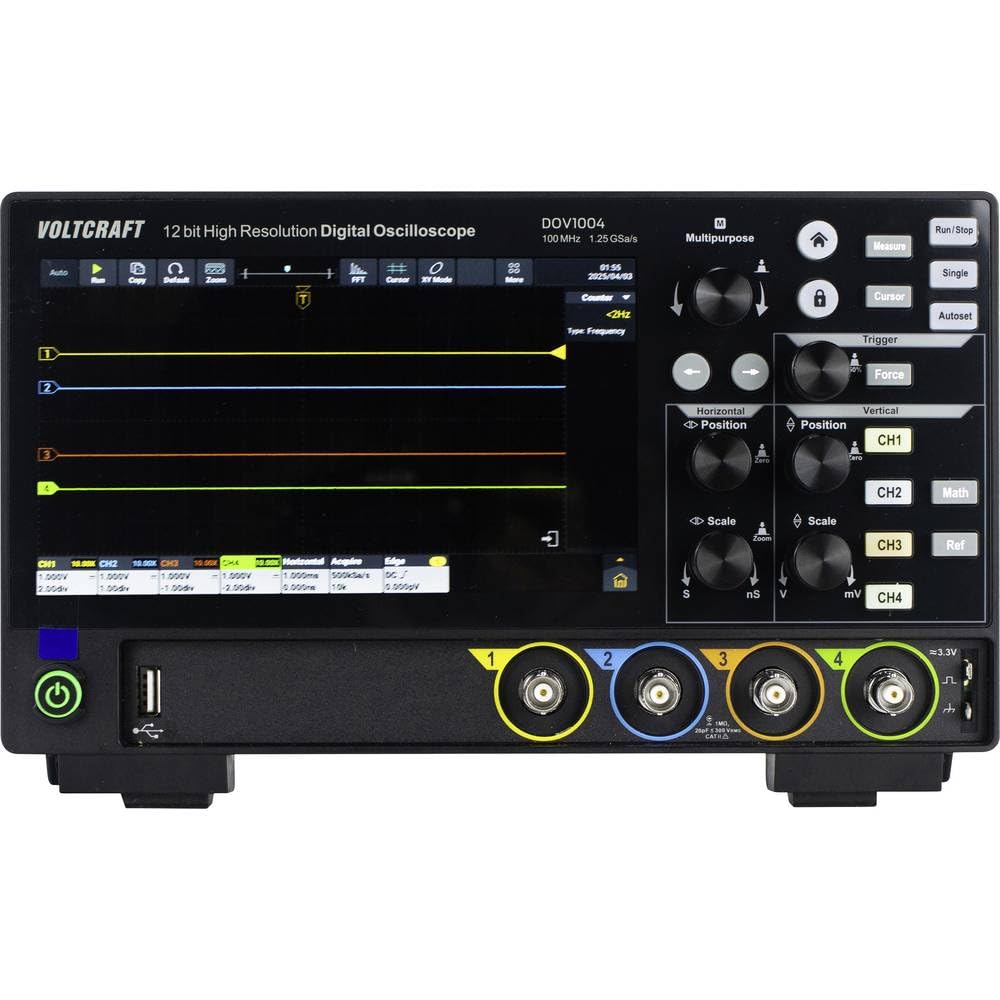
Kuva 4.1: Etuosa View of DOV1004 Oscilloscope
This image displays the front panel of the VOLTCRAFT DOV1004 Digital Oscilloscope. Key features visible include the large 7-inch touchscreen display, various control knobs for horizontal and vertical adjustments, trigger settings, and the four analog input channels (CH1 to CH4) at the bottom right. A USB port is also visible on the front.
4.1 Front Panel Controls and Connectors
- 7-tuumainen kosketusnäyttö: High-resolution (1024 x 600 pixels) interface for waveform visualization and menu navigation. Supports touch and gesture control.
- Vaakasuuntaiset säätimet: Knobs for adjusting horizontal position and scale (time/div).
- Pystysuuntaiset säätimet: Knobs for adjusting vertical position and scale (volts/div) for each channel.
- Liipaisinsäätimet: Buttons and knobs for setting trigger type, level, and mode.
- Channel Inputs (CH1-CH4): BNC-liittimet oskilloskoopin antureiden kytkemiseen.
- USB-portit: Tiedonsiirtoon ja oheislaitteiden liittämiseen.
- Virtapainike: Laitteen kytkeminen päälle/pois.

Kuva 4.2: Sivu View of DOV1004 Oscilloscope
Tässä kuvassa näkyy sivuprofiili.file of the VOLTCRAFT DOV1004 Digital Oscilloscope. Visible features include ventilation grilles for heat dissipation and potential side-mounted connectivity ports (though not clearly visible in this specific angle, typical for such devices).
4.2 Takapaneeli ja liitännät
The rear panel typically houses additional connectivity options for advanced functionality.
- USB Type-C Power Input: Virtalähteen liittämiseen.
- LAN-portti: For network connectivity and remote control.
- HDMI-lähtö: Ulkoisen näytön liittämistä varten.
- USB Host/Device Ports: Additional USB ports for connecting to a PC or external storage.
5. Asennus
Follow these steps to set up your VOLTCRAFT DOV1004 oscilloscope for the first time.
- Purkaminen: Carefully remove the oscilloscope and all accessories from the packaging. Retain the packaging for future transport or storage.
- Virtaliitäntä: Connect the USB Type-C power adapter to the power input port on the rear of the oscilloscope and then plug the adapter into a suitable power outlet.
- Virta päälle: Press the power button on the front panel to turn on the oscilloscope. The display should illuminate.
- Anturin liitäntä: Connect the oscilloscope probes to the desired input channels (CH1-CH4) using the BNC connectors. Ensure a secure connection.
- Koetinkorvaus: Before taking measurements, it is recommended to compensate your probes. Connect the probe to the probe compensation output (usually a dedicated terminal on the front panel, often labeled "Probe Comp" or similar, or use a known square wave source). Adjust the probe's compensation trimmer until a flat-top square wave is displayed on the screen.
- Alkuasetukset: The oscilloscope may perform an automatic self-calibration upon first power-on. You can adjust basic settings like language, date, and time through the system menu on the touchscreen.
6. Käyttö
This section covers the basic operation and key features of the VOLTCRAFT DOV1004 oscilloscope.
6.1 Perusmittaus
- Yhdistä signaali: Connect the compensated probe to the circuit point you wish to measure.
- Automaattinen asetus: Paina Auto button (if available) to automatically adjust horizontal and vertical settings for a stable waveform display.
- Manuaalinen säätö:
- Käytä Vertical Scale (V/div) nupit säätämään ampaaltomuodon leveysaste.
- Käytä Pystyasento knobs to move the waveform up or down.
- Käytä Vaakasuuntainen skaalaus (s/div) knob to adjust the time base.
- Käytä Vaaka-asento knob to move the waveform left or right.
- Liipaisimen asetukset:
- Select the trigger source (e.g., CH1, CH2).
- Choose the trigger type (e.g., Edge, Pulse, Video).
- Adjust the trigger level to stabilize the waveform.
6.2 Lisäominaisuudet
- Touchscreen and Gesture Control: Utilize the 7-inch touchscreen for intuitive navigation. Pinch-to-zoom and swipe gestures can be used for waveform manipulation, eliminating tedious menu navigation.
- High-Resolution ADC: The 12-bit ADC provides enhanced vertical resolution for more precise measurements.
- Korkea Sampling hinta: With a maximum sampling rate of 1.25 GSa/s (single channel), the oscilloscope can capture fast-changing signals accurately.
- Deep Memory: A record length of 50 Mpts allows for capturing long signal durations at high sample hinnat.
- Aaltomuodon sieppausnopeus: Real-time waveform capture of 50,000 wfms/s and segment capture of 700,000 wfms/s enable the observation of infrequent events.
- Multiple Trigger Types: Supports a wide range of trigger types including Edge, Video, Pulse, Slope, Runt, Window, Timeout, Nth, Logic, RS232/UART, I2C, SPI, CAN, and LIN for isolating specific events.
- Liitettävyys: USB, LAN, and HDMI interfaces allow for data transfer, remote control, and external display connection. Real-time signal display on a computer is possible.
7. Huolto
Proper maintenance ensures the longevity and optimal performance of your oscilloscope.
- Puhdistus: Regularly clean the exterior of the oscilloscope with a soft, dry, lint-free cloth. For stubborn dirt, slightly dampfi liina vedellä. Do not use abrasive cleaners, solvents, or alcohol. Varmista, että laitteen virta on katkaistu ja irrotettu pistorasiasta ennen puhdistamista.
- Näytön hoito: The touchscreen is a sensitive component. Clean it gently with a microfiber cloth. Avoid pressing too hard or using sharp objects.
- Varastointi: When not in use for extended periods, store the oscilloscope in a cool, dry place, away from direct sunlight and extreme temperatures. Use the original packaging if available.
- Anturin hoito: Tarkista mittapäät säännöllisesti kaapeleiden tai liittimien vaurioiden varalta. Vaihda vaurioituneet mittapäät välittömästi.
- Ilmanvaihto: Varmista, että tuuletusritilät ovat pölyttömiä ja vapaina esteistä ylikuumenemisen estämiseksi.
8. Vianmääritys
Tässä osiossa on ratkaisuja yleisiin ongelmiin, joita saatat kohdata.
| Ongelma | Mahdollinen syy | Ratkaisu |
|---|---|---|
| Ei Virtaa | Power adapter not connected or faulty. Power outlet not working. | Ensure the power adapter is securely connected to the oscilloscope and a working power outlet. Test the outlet with another device. |
| No Waveform Displayed | Probe not connected. Signal too small or too large. Incorrect trigger settings. Channel turned off. | Check probe connections. Adjust Vertical Scale (V/div) and Horizontal Scale (s/div). Press the Auto button. Verify trigger source and level. Ensure the channel is enabled. |
| Unstable Waveform | Incorrect trigger level or mode. No trigger source selected. | Adjust the trigger level. Select an appropriate trigger source and type (e.g., Edge trigger for repetitive signals). |
| Distorted Waveform | Probe compensation incorrect. Probe faulty. Signal exceeding input limits. | Perform probe compensation. Try a different probe. Ensure the input signal voltage does not exceed the oscilloscope's maximum input rating. |
| Kosketusnäyttö ei reagoi | Temporary software glitch. Screen dirty. | Restart the oscilloscope. Clean the screen with a soft, dry cloth. If the issue persists, contact support. |
9. Tekniset tiedot
Detailed technical specifications for the VOLTCRAFT DOV1004 Digital Oscilloscope.
| Ominaisuus | Erittely |
|---|---|
| Mallinumero | DOV1004 (VC-16753920) |
| Merkki | VOLTCRAFT |
| Kaistanleveys | 100 MHz |
| Analogiset kanavat | 4 |
| Max. Real-time Sample Korko | 1.25 GSa/s (single channel), 625 MSa/s (two channels or all channels) |
| Ennätyspituus | 50 Mpts |
| Pystysuora resoluutio | 12-bittinen ADC |
| Aaltomuodon sieppausnopeus | 50,000 wfms/s (real-time), 700,000 wfms/s (segment) |
| Vaakasuuntainen pyyhkäisyalue | 1 ns/div to 1000 s/div (1-2-5 steps) |
| Pystysuuntainen herkkyys | 500 µV/div to 10 V/div |
| Näyttö | 7-inch Touchscreen, 1024 x 600 pixels, gesture control |
| Liipaisintyypit | Edge, Video, Pulse, Slope, Runt, Window, Timeout, Nth, Logic, RS232/UART, I2C, SPI, CAN, LIN |
| Liitännät | USB, LAN, HDMI |
| Virtalähde | 12 Volts (via USB Type-C adapter) |
| Mitat (P x L x K) | 16 x 26 x 7.8 cm |
10. Tuki ja takuu
For technical assistance, troubleshooting beyond this manual, or warranty inquiries, please refer to the following resources:
- Included Software CD: Contains a comprehensive English user manual and additional software.
- Valmistaja Websivusto: Visit the official VOLTCRAFT websivustolta löydät uusimmat dokumentit, ohjelmistopäivitykset ja tuen yhteystiedot.
- Asiakaspalvelu: Contact your point of purchase or VOLTCRAFT customer service for direct support.
Warranty information is typically provided with the product documentation or available on the manufacturer's websivusto. Säilytä ostokuitti takuuvaatimuksia varten.