
1. Johdanto
Kiitos ostoksestasiasing the JVC XS-N1154B Bluetooth Speaker. This manual provides essential information for the safe and efficient operation of your device. Please read it thoroughly before use and retain it for future reference.
2. Turvallisuustiedot
- Älä altista kaiutinta äärimmäisille lämpötiloille, suoralle auringonvalolle tai korkealle kosteudelle.
- Vältä pudottamasta kaiutinta tai altistamasta sitä voimakkaille iskuille.
- Älä yritä purkaa tai muokata kaiutinta. Tämä mitätöi takuun.
- Pidä kaiutin poissa vedestä ja nesteistä sen vedenpitävyysluokituksesta huolimatta, jotta sen sisäiset komponentit eivät vahingoitu.
- Käytä vain määritettyä latauskaapelia ja virtalähdettä.
- Puhdista kaiutin pehmeällä, kuivalla liinalla. Älä käytä hankaavia puhdistusaineita tai liuottimia.
3. Pakkauksen sisältö
Varmista, että pakkauksessa on kaikki tarvittavat osat:
- JVC XS-N1154B Bluetooth Speaker
- Latauskaapeli
- Käyttöopas
- Kaukosäädin (jos mukana)
4. Tuote ohiview
Tutustu kaiuttimen osiin ja säätimiin.
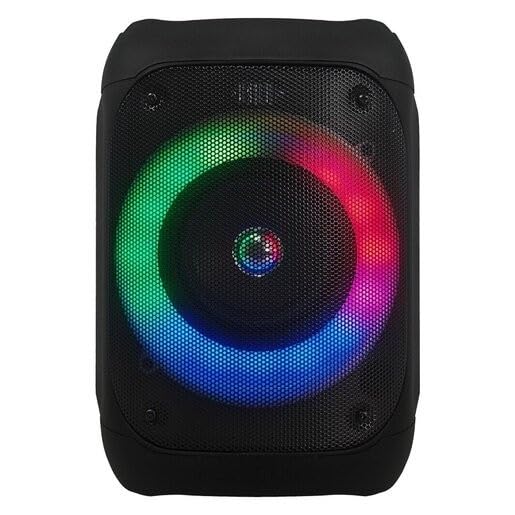
Kuva 1: Edessä view of the JVC XS-N1154B Bluetooth Speaker, showcasing the speaker grille and integrated music-activated LED lights.
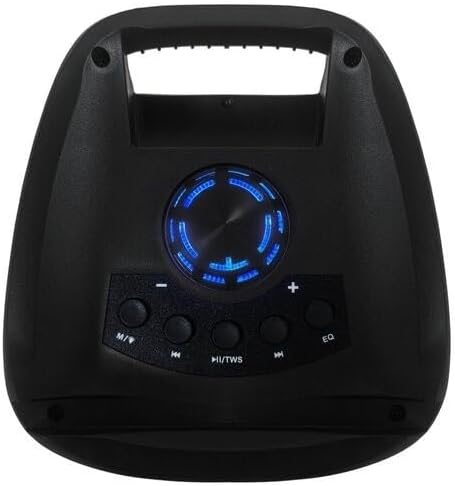
Kuva 2: Yläosa view of the JVC XS-N1154B Bluetooth Speaker, displaying the control panel with various buttons and the volume knob.
Ohjauspaneelin toiminnot:
- Virtapainike: Kytkee kaiuttimen päälle tai pois päältä.
- Tilapainike (M): Switches between Bluetooth, USB, SD Card, and FM Radio modes.
- Play/Pause (►||) / TWS Button: Plays or pauses audio. Long press for TWS (True Wireless Stereo) pairing.
- Previous Track (◀◀) Button: Skips to the previous track or tunes down in FM mode.
- Next Track (►►) Button: Skips to the next track or tunes up in FM mode.
- EQ-painike: Selaa taajuuskorjaimen esiasetuksia.
- Äänenvoimakkuuden säädin: Rotates to adjust the volume level.
5. Asennus
5.1 Kaiuttimen lataaminen
- Liitä latauskaapeli kaiuttimen latausporttiin.
- Plug the other end of the cable into a suitable USB power adapter (not included) or a powered USB port.
- Latauksen merkkivalo palaa latauksen aikana, yleensä punaisena.
- Once fully charged, the indicator light may change color (e.g., turn off or turn blue/green). Disconnect the speaker from the power source.
5.2 Virran kytkeminen päälle/pois
- Virran kytkeminen: Press and hold the Power button until the speaker powers on and you hear an audible prompt.
- Virran sammuttaminen: Paina virtapainiketta uudelleen ja pidä sitä painettuna, kunnes kaiutin sammuu.
6. Käyttöohjeet
6.1 Bluetooth -pariliitos
- Ensure the speaker is powered on and in Bluetooth mode. If not, press the Mode (M) button to switch to Bluetooth mode. The speaker will indicate it is ready for pairing (e.g., a blinking LED or audible prompt).
- Ota mobiililaitteellasi (älypuhelin, tabletti, kannettava tietokone) käyttöön Bluetooth ja hae käytettävissä olevia laitteita.
- Select "JVC XS-N1154B" from the list of devices.
- Kun pariliitos on muodostettu, kaiutin antaa äänimerkin ja Bluetooth-merkkivalo palaa tasaisesti.
- Voit nyt toistaa ääntä laitteestasi kaiuttimen kautta.
6.2 USB/SD-kortin toisto
- Insert a USB flash drive or an SD card (with supported audio files) kaiuttimen vastaavaan porttiin.
- The speaker will automatically switch to USB or SD card mode and begin playing audio. If not, press the Mode (M) button to select the correct input.
- Use the Previous Track (◀◀), Next Track (►►), and Play/Pause (►||) buttons to control playback.
6.3 FM-radion käyttö
- Press the Mode (M) button to switch to FM Radio mode.
- To auto-scan and save available stations, press and hold the Play/Pause (►||) button. The speaker will scan and store stations automatically.
- Use the Previous Track (◀◀) and Next Track (►►) buttons to navigate between saved FM stations.
6.4 LED-valotilaa
The speaker features music-activated LED lights. These lights typically synchronize with the audio playback. There may be an additional button or a combination of buttons to cycle through different light modes or to turn them off. Refer to the remote control section for specific controls if available.
6.5 Äänenvoimakkuuden säätö
Rotate the Volume Knob on the top panel clockwise to increase volume and counter-clockwise to decrease volume.
6.6 Kaukosäätimen käyttö
If your package includes a remote control, it provides convenient access to various functions:
- Teho: Päälle/Pois
- Tila: Switch input sources (Bluetooth, USB, SD, FM)
- Äänenvoimakkuus +/-: Säädä äänenvoimakkuutta
- Toista/tauko: Ohjaa toistoa
- Edellinen Seuraava: Skip tracks/stations
- EQ: Change equalizer presets
- LED: Control LED light modes (if applicable)
7. Huolto
7.1 Puhdistus
Wipe the speaker's exterior with a soft, dry, lint-free cloth. Do not use liquid cleaners, sprays, or solvents, as these may damage the finish or internal components. Ensure all ports are dry before use, especially given its waterproof nature.
7.2 Varastointi
When not in use for extended periods, store the speaker in a cool, dry place, away from direct sunlight and extreme temperatures. It is recommended to charge the battery periodically to maintain its lifespan.
8. Vianmääritys
| Ongelma | Mahdollinen syy | Ratkaisu |
|---|---|---|
| Kaiutin ei käynnisty. | Akku on tyhjä. | Lataa kaiutin täyteen. |
| Ei ääntä. | Volume is too low or muted. Device not paired correctly. | Increase volume. Re-pair Bluetooth device. Check audio source. |
| Bluetooth-pariliitos epäonnistuu. | Kaiutin ei ole pariliitostilassa. Laite on liian kaukana. Häiriöitä. | Varmista, että kaiutin on Bluetooth-pariliitostilassa. Siirrä laite lähemmäs. Sammuta muut Bluetooth-laitteet. |
| USB/SD-kortti ei toista. | Väärin file alustus. Kortti/asema ei ole asetettu oikein. | Varmista ääni files are in a supported format. Reinsert the USB drive/SD card. Press Mode button to select correct input. |
| FM-radion kuuluvuus on heikko. | Heikko signaali. | Siirrä kaiutin alueelle, jossa on parempi kuuluvuus. |
9. Tekniset tiedot
- Malli: XS-N1154B
- Merkki: JVC
- Liitettävyys: Bluetooth, USB, SD-kortti
- Radio: Digitaalinen FM-radio
- Teholähtö: 4 wattia
- Äänilähtötila: Stereot
- Valvontamenetelmä: Kauko
- Materiaali: Muovi
- Vedenpitävä: Kyllä
- Virtalähde: Paristokäyttöinen
- Mitat: Approximately 18.6D x 18.9W x 25.5H cm
- Paino: Noin 1.2 kg
- Yhteensopivat laitteet: Kannettava tietokone, älypuhelin
10. Takuu ja tuki
10.1 Takuutiedot
This JVC XS-N1154B Bluetooth Speaker comes with a 1 vuoden takuu ostopäivästä lukien. Tämä takuu kattaa valmistusvirheet ja työn laadun normaalissa käytössä. Se ei kata väärinkäytöstä, onnettomuuksista, luvattomista muutoksista tai normaalista kulumisesta aiheutuneita vahinkoja.
10.2 Asiakastuki
Jos tarvitset teknistä tukea, takuuvaatimuksia tai sinulla on kysyttävää, ota yhteyttä JVC:n asiakaspalveluun heidän virallisen website or the retailer where the product was purchased. Please have your product model number (XS-N1154B) and proof of purchase ready when contacting support.