
1. Johdanto
This manual provides essential information for setting up, operating, maintaining, and troubleshooting your GIGABYTE AORUS Elite 16 BWH gaming laptop. The AORUS Elite 16 BWH is designed for high-performance gaming and demanding applications, featuring an Intel Core Ultra 9 processor, NVIDIA GeForce RTX 5070 laptop GPU, a 16-inch WQXGA 165Hz display, and Windows 11 Pro.
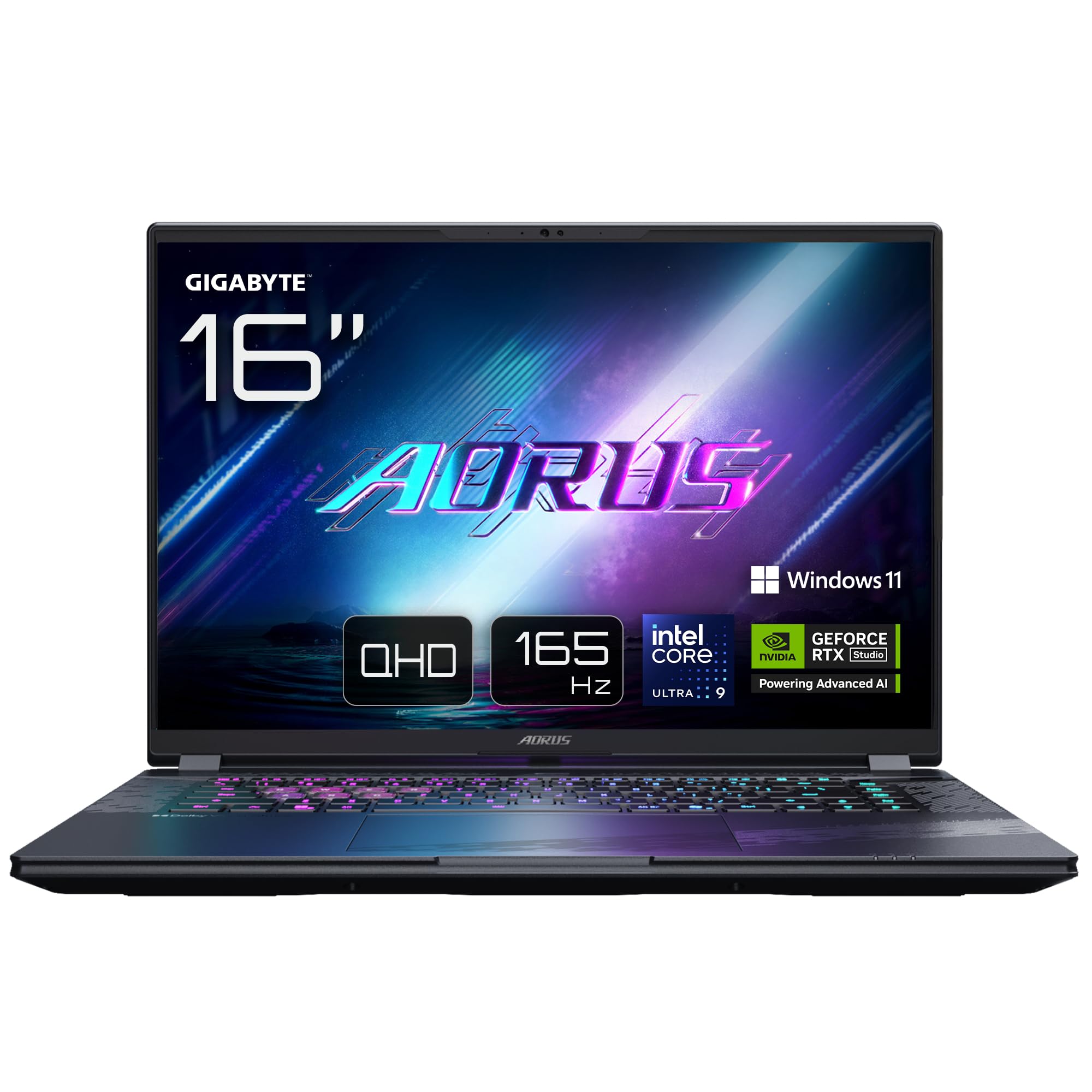
Image: The GIGABYTE AORUS Elite 16 BWH gaming laptop, showcasing its open display and keyboard.
2. Asennus
2.1 Laatikon purkaminen ja alkutarkastus
Poista kannettava tietokone ja kaikki lisävarusteet varovasti pakkauksesta. Varmista, että kaikki "Mitä paketissa" -osiossa luetellut osat ovat mukana ja vahingoittumattomia.
- GIGABYTE AORUS ELITE 16 BWHC3FRC65SP Laptop
- Virtalähde ja kaapeli
- Dokumentaatio (tämä käyttöohje, takuukortti)
2.2 Virran kytkeminen
Connect the power adapter to the laptop's power input port and then plug the power cable into an electrical outlet. It is recommended to fully charge the battery before initial use.
2.3 Ensimmäinen käynnistys
Press the power button to turn on the laptop. Follow the on-screen instructions to complete the Windows 11 Pro setup process, including language selection, network connection, and user account creation.
2.4 Oheislaitteiden ja verkon kytkeminen
The laptop features various ports for connecting external devices and networks.
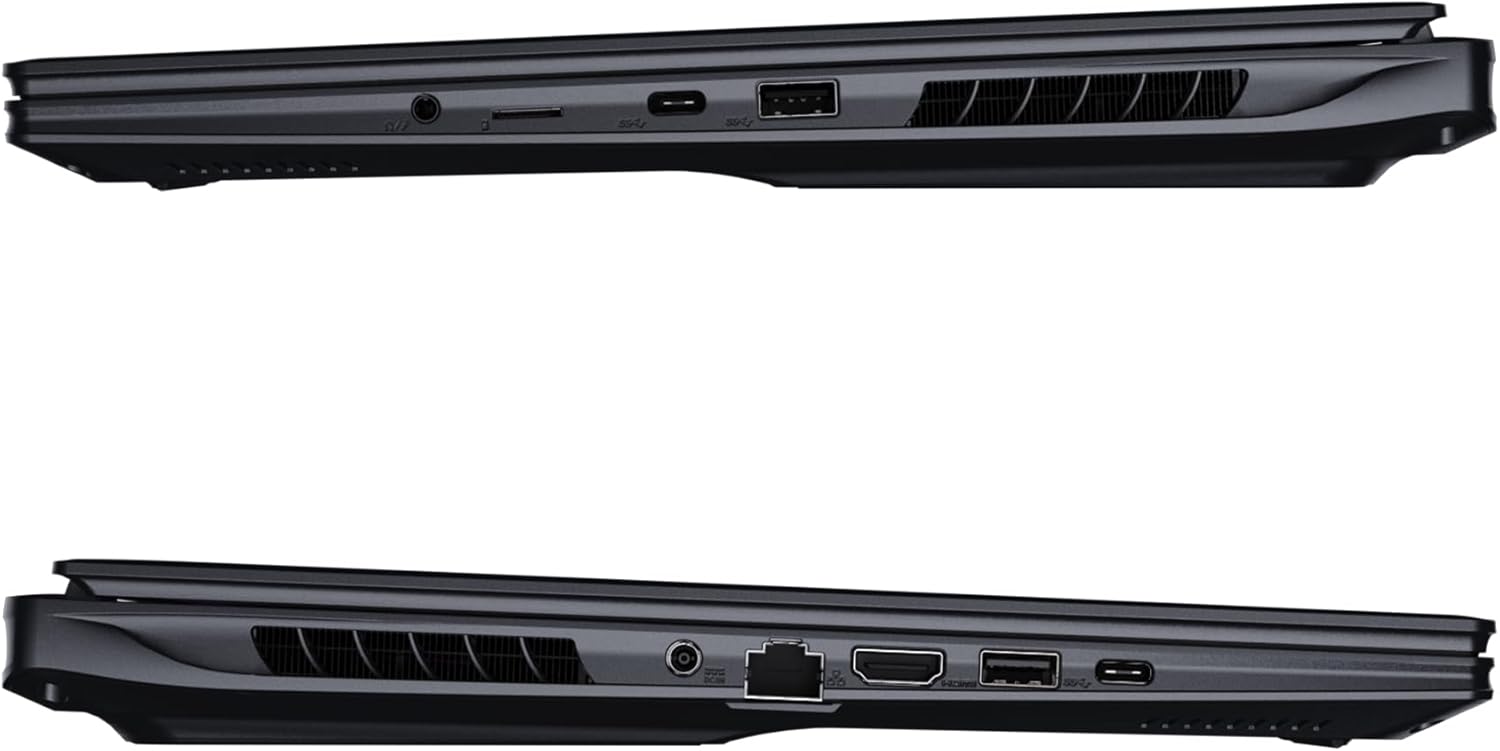
Kuva: Sivu view of the laptop illustrating the available ports for connectivity.
- USB-portit: Connect USB devices such as mice, keyboards, or external storage.
- HDMI-portti: Connect to an external display or TV.
- Thunderbolt 4 -portti: Nopeaan tiedonsiirtoon ja näyttöön.
- Ethernet-portti: Kiinteää verkkoyhteyttä varten.
- Kuulokeliitäntä: Äänen ulostulo kuulokkeisiin tai ulkoisiin kaiuttimiin.
- Wi-Fi 7: Connect to wireless networks via the integrated Wi-Fi 7 module.
- Bluetooth 5.4: Yhdistä Bluetooth-laitteisiin.
3. Kannettavan tietokoneen käyttö
3.1 Näytön ominaisuudet
Your AORUS Elite 16 BWH features a 16-inch WQXGA (2560x1600) IPS display with a 165Hz refresh rate and 16:10 aspect ratio, offering a wide viewing experience. It supports Dolby Vision for enhanced visual quality and is Pantone validated for color accuracy.

Image: The laptop's 16:10 aspect ratio display, highlighting its IPS panel and Pantone validation.
3.2 Näppäimistö ja kosketuslevy
The laptop is equipped with a backlit keyboard for comfortable typing in various lighting conditions and a responsive touchpad for navigation.
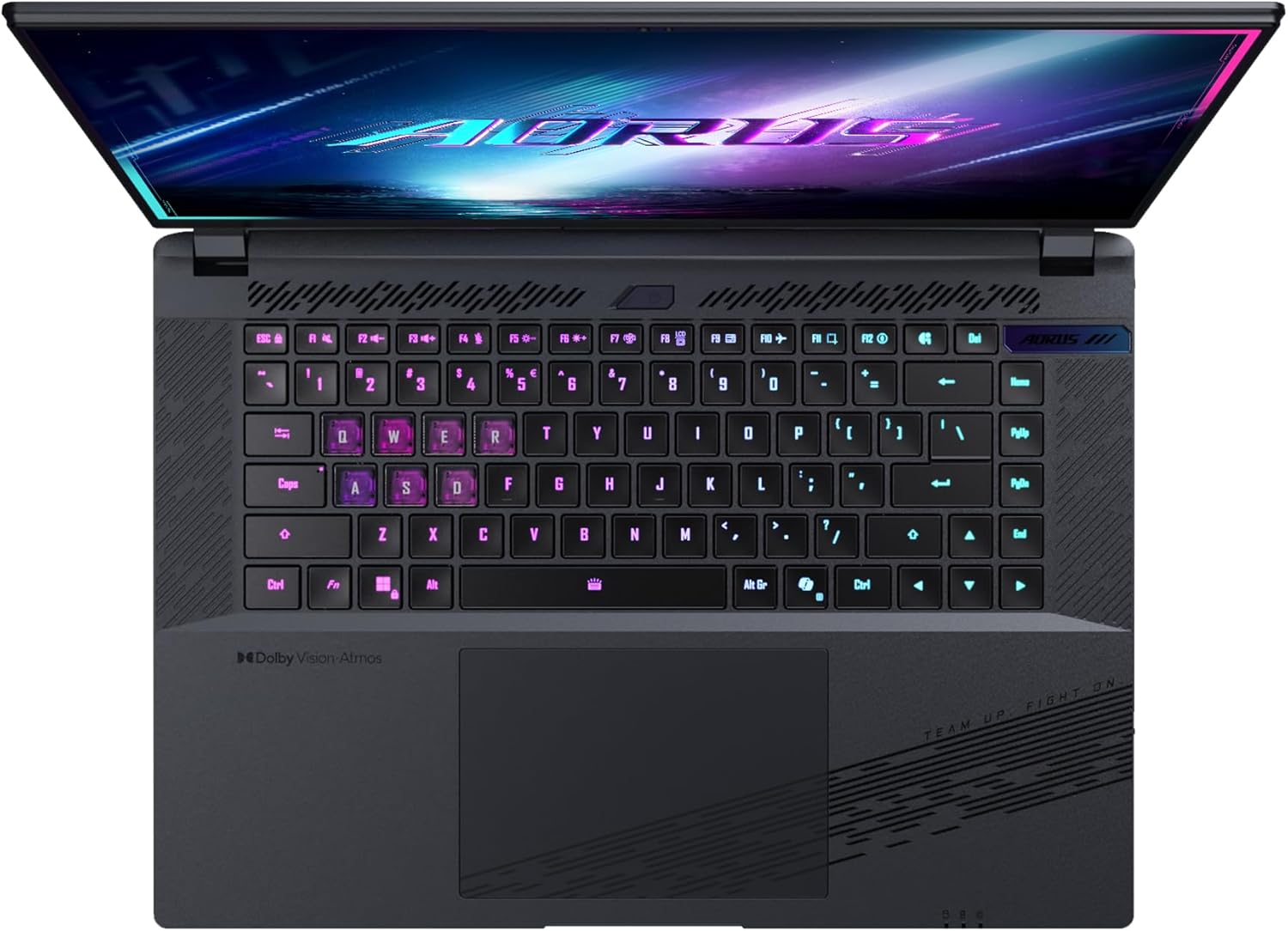
Kuva: Ylhäältä alas view kannettavan tietokoneen näppäimistöstä, näytäasing its backlit keys.
The keyboard also features a dedicated Copilot Key for quick access to AI functionalities in Windows 11.

Image: Close-up of the keyboard, highlighting the Copilot Key for AI features.
3.3 Äänijärjestelmä
Experience immersive audio with Dolby Atmos support and integrated 2W speakers. The laptop also includes a built-in microphone for communication.

Image: Visual representation of Dolby Atmos and Dolby Vision audio and visual enhancements.
3.4 Suorituskykyominaisuudet
The AORUS Elite 16 BWH is powered by an Intel Core Ultra 9 processor with an integrated NPU for AI acceleration and an NVIDIA GeForce RTX 5070 laptop GPU, ensuring high performance for gaming and demanding tasks. It also features Advanced Optimus with DDS Technology for optimized graphics performance.

Kuva: Yksityiskohtainen view of the Intel Core Ultra 9 processor chip.

Kuva: Yksityiskohtainen view of the NVIDIA GeForce RTX 50 Series laptop GPU chip.
3.5 GiMATE AI Agent
Utilize GiMATE, your personal AI agent, to optimize performance, manage smart cooling, enhance privacy, control power settings, and improve audio and voice functionalities.

Image: GiMATE AI Agent interface showing various optimization features.
4. Huolto
4.1 Jäähdytysjärjestelmä
The laptop features the WINDFORCE Infinity cooling system to maintain optimal temperatures during intensive use. Ensure the vents are clear of obstructions to allow proper airflow.

Image: Representation of the WINDFORCE Infinity cooling system.
4.2 Puhdistus
Puhdista näyttö ja ulkopinnat pehmeällä, nukkaamattomalla liinalla. Pinttyneiden tahrojen poistamiseksiampKostuta liinaa kevyesti vedellä tai näytönpuhdistusliuoksella. Vältä voimakkaita kemikaaleja.
4.3 Akun hoito
Akun käyttöiän pidentämiseksi vältä äärimmäisiä lämpötiloja äläkä jätä kannettavaa täyteen ladattua tai täysin tyhjää pitkäksi aikaa.
4.4 Ohjelmistopäivitykset
Regularly update your Windows operating system, drivers, and GIGABYTE software to ensure optimal performance and security.
5. Vianmääritys
5.1 Virtaongelmat
- Kannettava tietokone ei käynnisty: Ensure the power adapter is securely connected and the outlet is functional. Check the battery charge level.
- Akku ei lataudu: Varmista, että virtalähde ja kaapeli eivät ole vaurioituneet. Kokeile toista pistorasiaa.
5.2 Näyttöongelmat
- Ei näyttöä: Connect an external monitor to check if the issue is with the laptop's screen. Ensure the laptop is powered on.
- Välkkyvä tai vääristynyt näyttö: Päivitä näytönohjaimen ajurit. Tarkista näyttökaapelin liitännät, jos käytät ulkoista näyttöä.
5.3 Yhteysongelmat
- Wi-Fi-yhteyttä ei muodosteta: Tarkista Windowsin asetuksista, onko Wi-Fi käytössä. Käynnistä reititin ja kannettava tietokone uudelleen.
- Bluetooth-laite ei pariliitu: Varmista, että laite on pariliitostilassa ja kantaman sisällä. Päivitä Bluetooth-ajurit.
5.4 Yleiset suorituskykyongelmat
- Hidas suorituskyky: Sulje tarpeettomat sovellukset. Tarkista haittaohjelmat. Varmista, että levyllä on riittävästi vapaata tilaa.
- Ylikuumeneminen: Ensure cooling vents are clear. Use the laptop on a hard, flat surface.
For more complex issues, refer to the GIGABYTE support websivustolla tai ota yhteyttä asiakaspalveluun.
6. Tekniset tiedot
| Ominaisuus | Yksityiskohta |
|---|---|
| Merkki | GIGABYTE |
| Mallin nimi | AORUS ELITE 16 BWHC3FRC65SP |
| Näytön koko | 16 tuumaa |
| Väri | Harmaa |
| Kiintolevyn koko | 2000 GB (2x 1TB SSD Gen4) |
| CPU malli | Intel Core Ultra 9 275HX |
| Asennetun RAM-muistin koko | 32GB DDR5 |
| Käyttöjärjestelmä | Windows 11 Pro |
| Erikoisominaisuus | Backlit Keyboard, Memory Card Slot |
| Grafiikkakortin kuvaus | Omistettu |
| Grafiikka rinnakkaisprosessori | NVIDIA GeForce RTX 5070 |
| Kiintolevytekniikka | SSD |
| Tuotteen paino | 2300 grammaa |
| Webnokka-ominaisuus | Yes (Frontal) |
| Näytönohjaimen RAM-koko | 8GB GDDR6 |
| Tuettu enimmäisRAM-muisti | 64 Gt |
| Akun energiasisältö | 99 Watt-hours (Lithium-polymer, 4 cells) |
| Yhteydet | Bluetooth 5.4, Ethernet (10/1000 Mbit/s), HDMI (1 port), Thunderbolt 4 (1 port), USB 3.2 Gen 2 (2 ports), Wi-Fi 7 (802.11.be) |
| Prosessorin nopeus | 2.7 GHz (Max 5.4 GHz) |
| Prosessorien määrä | 24 |
| Näytön resoluutio | 2560 x 1600 pikseliä (WQXGA) |
| Näytön tyyppi | IPS LCD |
| Ääniominaisuudet | Dolby Atmos, 2x 2W Integrated Speakers, Integrated Microphone |
7. Takuutiedot
Your GIGABYTE AORUS Elite 16 BWH laptop comes with a 2 vuoden rajoitettu takuu. This warranty covers manufacturing defects and hardware malfunctions under normal use. Please retain your proof of purchase for warranty claims. For detailed terms and conditions, refer to the warranty card included with your product or visit the official GIGABYTE websivusto.
8. Tukea
For technical assistance, driver downloads, and further product information, please visit the official GIGABYTE support websivusto. Löydät sieltä myös usein kysyttyjä kysymyksiä ja yhteisöfoorumeita.
- GIGABYTEN virallinen Websivusto: www.gigabyte.com
- Asiakaspalvelu: Refer to your regional GIGABYTE webpaikallisten yhteystietojen sivusto.