
Element Element 2023
Element 43" kehyksetön 4K UHD HDR XUMO TV:n käyttöopas
Model: Element 2023
1. Johdanto
This manual provides essential information for setting up, operating, and maintaining your Element 43-inch Frameless 4K UHD HDR XUMO TV. Please read it thoroughly before using your television to ensure proper functionality and safety.
The Element XUMO TV offers a breathtaking viewing experience with its 4K Ultra HD resolution, delivering clear and detailed images. Enhanced color and contrast are provided by Dolby Vision and HDR technology, ensuring an immersive experience even in dark scenes. Dolby Audio contributes to superior sound quality for movies and games. A 120Hz effective refresh rate ensures smooth motion during fast-paced content.

Kuva 1.1: Edessä view of the Element 43" XUMO TV.
2. Mitä laatikossa on
Tarkista pakkauksen sisältö varmistaaksesi, että kaikki osat ovat mukana:
- 1 Element Xumo TV 43"
- 1 Xumo TV remote control (batteries included)
- 1 Pikaopas
- 1 TV stand + hardware
3. Asennus
3.1 Pakkauksesta purkaminen
- Carefully remove the TV from its packaging. It is recommended to have two people for this step due to the size and weight of the television.
- Aseta televisio näyttö alaspäin pehmeälle ja tasaiselle alustalle naarmuuntumisen välttämiseksi.
- Poista kaikki suojakalvot ja pakkausmateriaalit.
3.2 Jalustan kiinnitys
TV-telineen kiinnittäminen:
- Tunnista vasen ja oikea jalustan jalka.
- Kohdista jokainen jalustan jalka television pohjassa oleviin vastaaviin ruuvinreikiin.
- Secure the stand legs using the provided hardware (screws). Do not overtighten.
- Nosta televisio varovasti pystyasentoon vakaalle ja tasaiselle alustalle.
3.3 Oheislaitteiden liittäminen
Connect your external devices (e.g., cable box, gaming console, Blu-ray player) to the appropriate ports on the back of the TV. Refer to the Quick Start Guide for port locations.
3.4 Ensimmäinen käynnistys
- Kytke virtajohto televisioon ja sitten pistorasiaan.
- Paina kaukosäätimen tai itse television virtapainiketta.
- Suorita alkuasetukset, mukaan lukien verkkoyhteys ja kanavien skannaus, noudattamalla näytön ohjeita.
4. Käyttöohjeet
4.1 Kaukosäätimen toiminnot
The included XUMO TV remote control allows you to navigate the TV's features. It includes an advanced voice remote function for easy content search.
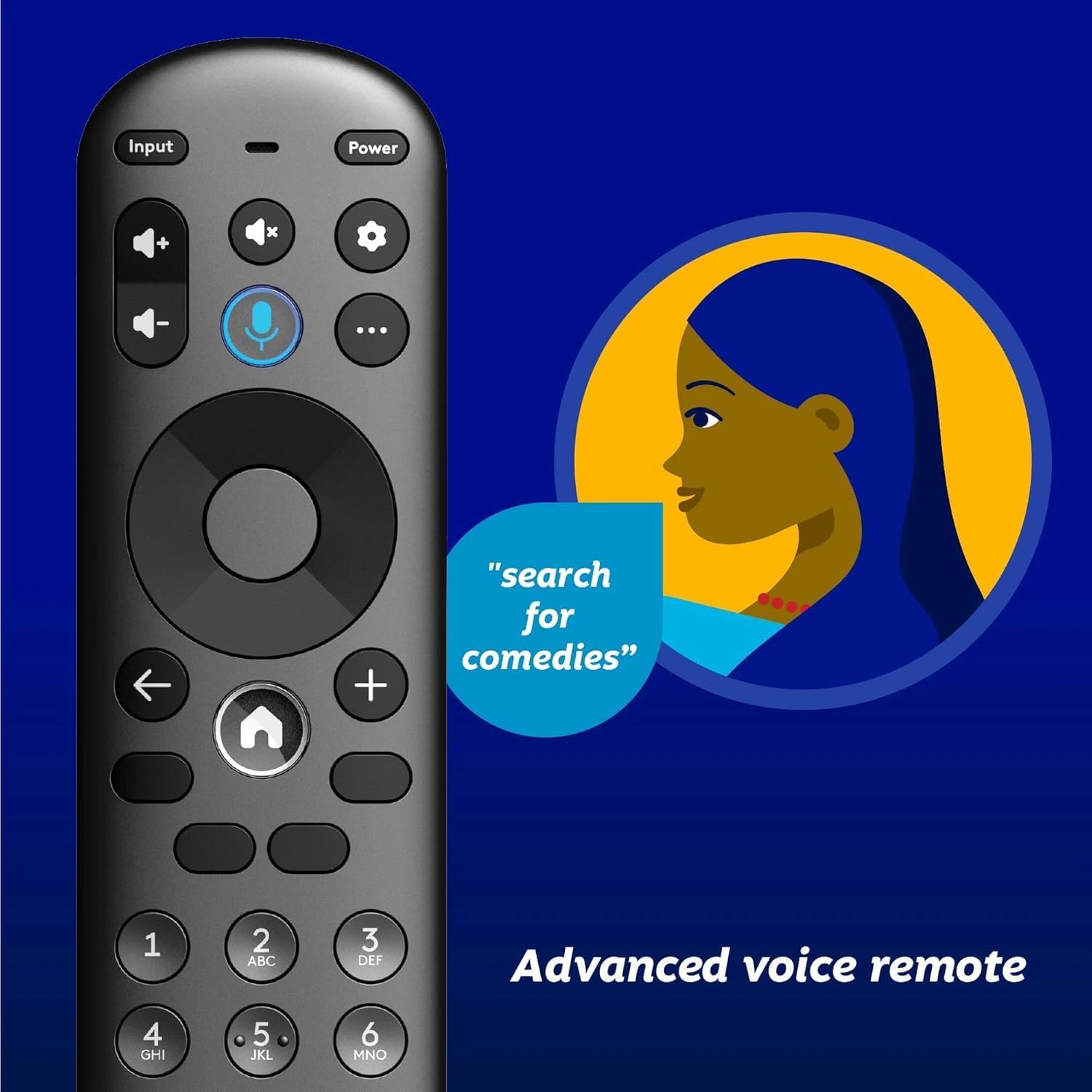
Image 4.1: Element XUMO TV advanced voice remote control.
- Teho: Kytkee television päälle tai pois päältä.
- Syöte: Valitsee tulolähteen (HDMI, AV jne.).
- Äänipainike: Activates voice commands for searching content or controlling the TV.
- Navigointialusta: Käytetään valikoissa liikkumiseen ja vaihtoehtojen valitsemiseen.
- Koti näppäin: Returns to the XUMO TV home screen.
- Äänenvoimakkuus +/-: Säätää äänenvoimakkuutta.
- Kanava +/-: Vaihtaa TV-kanavia.
4.2 Smart TV Features (XUMO)
Your Element TV features a built-in XUMO TV experience, providing access to over 250 pre-loaded apps and streaming services.

Image 4.2: XUMO TV smart interface with streaming applications.
- Suoratoistosovellukset: Access thousands of movies, TV shows, and music from platforms like Netflix, YouTube, Disney+, Prime Video, Peacock, and more.
- Live -kanavat: Explore over 750 free live channels, including news, sports, and kids' programming, from Xumo Play, Tubi, Pluto TV, and others.
- Personalized Content: The XUMO interface is designed to help you stream easily, bringing together content in one simple view.
4.3 Yhteydet
- Wi-Fi: Yhdistä langattomaan kotiverkkoosi käyttääksesi internetiä ja suoratoistoa.
- Bluetooth: Easily pair your TV with compatible Bluetooth devices such as speakers, headphones, or game controllers.
- Apple AirPlay ja koti: Mirror your smartphone, iPad, or Mac screen to the TV, stream media, and control your TV directly from Apple devices.
5. Huolto
5.1 Näytön puhdistaminen
- Sammuta televisio ja irrota se pistorasiasta.
- Pyyhi näyttö varovasti pehmeällä, kuivalla ja nukkaamattomalla liinalla.
- Pinttyneisiin tahroihin, dörzsöi kevyestiampKostuta liina vedellä tai erikoisnäytönpuhdistusaineella (älä suihkuta suoraan näytölle).
- Vältä voimakkaiden kemikaalien, hankaavien aineiden tai alkoholipohjaisten puhdistusaineiden käyttöä.
5.2 Yleishoito
- Pidä televisio poissa suorasta auringonvalosta, lämmönlähteistä ja liiallisesta pölystä.
- Varmista TV:n ympärillä asianmukainen ilmanvaihto ylikuumenemisen estämiseksi.
- Älä aseta raskaita esineitä television päälle.
6. Vianmääritys
Jos televisiossasi on ongelmia, katso seuraavat yleiset ongelmat ja ratkaisut:
- Ei virtaa:
- Varmista, että virtajohto on kytketty kunnolla sekä televisioon että toimivaan pistorasiaan.
- Tarkista pistorasian toiminta kytkemällä siihen toinen laite.
- Kokeile painaa television virtapainiketta, äläkä pelkästään kaukosäätimen virtapainiketta.
- No Picture, But Has Sound:
- Varmista, että oikea tulolähde on valittu (esim. HDMI 1, AV).
- Tarkista kaikki television ja ulkoisten laitteiden väliset kaapeliliitännät.
- Käynnistä televisio ja kaikki siihen liitetyt laitteet uudelleen.
- No Sound, But Has Picture:
- Tarkista äänenvoimakkuus ja varmista, ettei televisio ole mykistetty.
- Jos käytät ulkoisia kaiuttimia, varmista, että ne on kytketty oikein ja että ne on kytketty päälle.
- Tarkista äänilähdön asetukset television valikosta.
- Kaukosäädin ei toimi:
- Vaihda kaukosäätimen paristot.
- Varmista, ettei kaukosäätimen ja television infrapunatunnistimen välissä ole esteitä.
- Re-pair the remote if it's a Bluetooth remote (refer to the Quick Start Guide for pairing instructions).
- Verkkoyhteysongelmat:
- Käynnistä Wi-Fi-reititin ja modeemi uudelleen.
- Check the Wi-Fi settings on the TV to ensure it's connected to the correct network.
- If possible, try connecting the TV to the internet via an Ethernet cable.
7. Tekniset tiedot
Key technical specifications for the Element 43" Frameless 4K UHD HDR XUMO TV:
| Ominaisuus | Kuvaus |
|---|---|
| Tuotemerkki | Elementti |
| Mallin nimi | Elementti 2023 |
| Näytön koko | 43 tuumaa (110 cm) |
| Näyttötekniikka | LED |
| Resoluutio | 4K Ultra HD |
| Erikoisominaisuudet | 4K High Definition, HDR (High Dynamic Range), Vibrant Colors, 60 Hz, Dolby Vision, HDR10+ |
| Tehokas virkistystaajuus | 120 Hz |
| Äänitekniikka | Dolby Audio |
| Tuetut Internet-palvelut | Netflix, Prime Video, Max, Disney Plus, YouTube TV, Paramount+, Apple TV+, Crunchyroll, Xumo Play, Tubi, Pluto TV |
| Yhteystekniikka | Wired, Wireless (Wi-Fi, Bluetooth, Apple AirPlay) |
| Kuvasuhde | 16:9 |
| Tuotteen paino | 22 kiloa |
| Tuotteen mitat | 3.3 x 37 x 225 tuumaa |
7.1 Kuvanlaatuominaisuudet

Image 7.1: Dolby Vision technology enhances highlights and darks for superior contrast.

Image 7.2: 120Hz Effective Refresh Rate for smooth motion.

Image 7.3: 4K resolution delivers vivid colors and remarkable detail.
8. Takuu ja tuki
This product is an Amazon Renewed item. Amazon Renewed products are backed by the Amazon Renewed Guarantee. This means your purchase is eligible for a replacement or refund within 90 days of receipt if it does not work as expected.
For specific warranty details or support inquiries, please refer to the documentation provided with your Amazon Renewed purchase or visit the Amazon Renewed support page.