
SEMIER SM-136
SEMIER SM-136 Kasettisoitin ja Digitaalimuunnin Käyttöohje
Malli: SM-136
Johdanto
Kiitos ostoksestasiasing the SEMIER SM-136 Cassette Player & Digital Converter. This versatile device allows you to play and record audio cassettes, play music from an SD card, and convert your cherished cassette tapes into digital MP3 files, either directly to an SD card or to your computer using the included software. Please read this manual carefully to ensure proper operation and to maximize your enjoyment of this product.
Mitä laatikossa on
- Cassette Recorder Converter x 1
- 16GB SD-kortti x 1
- USB-lukija x 1
- Software CD-ROM x 1
- Käyttöohje x 1
- Type-C Charging and Data Cable x 1

Kuva: Kaikki tuotepakkaukseen sisältyvät tuotteet.
Asennus
Laitteen virran kytkeminen
The SEMIER SM-136 can be powered by two methods:
- USB-C-kaapeli: Connect the included USB-C cable to the device's USB-C port and the other end to a USB power adapter (not included) or a computer's USB port.
- AA-paristot: Avaa laitteen takana oleva paristolokero ja aseta sisään neljä (4) AA-paristoa (eivät sisälly toimitukseen) varmistaen oikean napaisuuden.
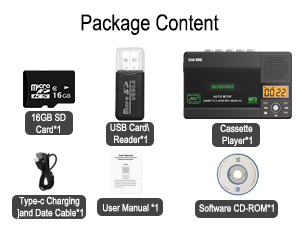
Image: Illustration of inserting AA batteries into the device.
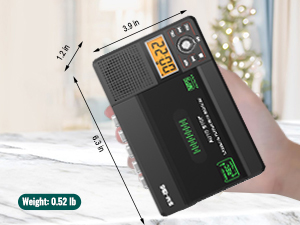
Image: Connecting the USB-C power cable to the device.
Kasetin asettaminen paikalleen
Gently open the cassette compartment door. Insert your cassette tape with the open edge facing upwards and the tape side facing the device. Close the door firmly until it clicks.

Image: Proper insertion of a cassette tape into the player.
SD-kortin asettaminen paikalleen
Locate the SD card slot on the side of the device. Insert the included 16GB SD card (or another compatible SD card, up to 32GB) into the slot until it clicks into place. Ensure the card is inserted in the correct orientation.

Image: Proper insertion of an SD card into the device's dedicated slot.
Käyttöohjeet
Kasettien kuuntelu
- Varmista, että kasetti on asetettu paikalleen.
- Slide the "TAPE/OFF/Micro SD" switch to the "TAPE" position.
- Paina PELATA painike (►) aloittaaksesi toiston.
- Säädä äänenvoimakkuutta VOL nuppi.
- Pysäytä toisto painamalla STOP painike (■).
- Käytä FWD (►►) ja REW (◄◄) buttons for fast-forward and rewind.
Playing Music from SD Card
- Varmista, että SD-kortilla on MP3-tiedostoja files lisätään.
- Slide the "TAPE/OFF/Micro SD" switch to the "Micro SD" position. The LCD display will show "SD" and the current track time.
- Paina TOISTA/TAUKO painike (►⏺) aloittaaksesi tai keskeyttääksesi toiston.
- Käytä PREV (◄◄) ja SEURAAVA (►►) -painikkeita kappaleiden välillä navigointiin.
- Paina TASAVALTA -painiketta toistaaksesi nykyisen kappaleen tai kaikki kappaleet uudelleen.
- Paina DEL button to delete the current track.
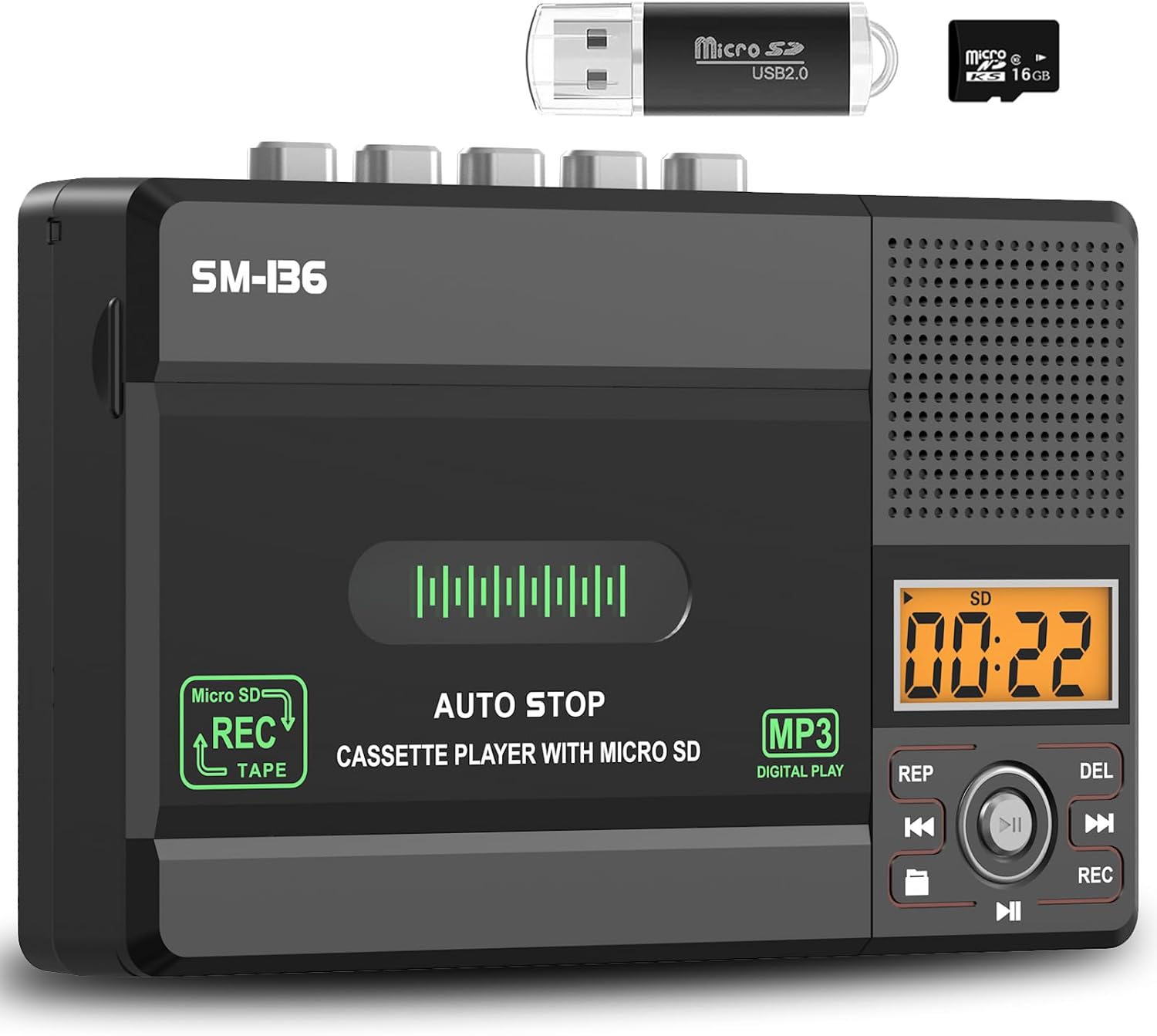
Kuva: Yliview of the device's control panel and LCD screen.
Recording to Cassette Tape (from built-in microphone)
- Aseta tyhjä tai äänitettävä kasetti.
- Slide the "TAPE/OFF/Micro SD" switch to the "TAPE" position.
- Paina REC button (red button) to begin recording from the built-in microphone.
- Lopeta nauhoitus painamalla STOP painike (■).

Image: Demonstrates recording audio to a cassette tape using the built-in microphone.
Kasetin muuntaminen MP3-muotoon (SD-kortille)
Tämä menetelmä mahdollistaa suoran muuntamisen ilman tietokonetta.
- Aseta kasetti, jonka haluat muuntaa, paikalleen.
- Insert the 16GB SD card (or another compatible SD card) into the SD card slot.
- Slide the "TAPE/OFF/Micro SD" switch to the "TAPE" position.
- Paina PELATA painike (►) on the cassette player.
- While the tape is playing, press and hold the REC button (red button) on the digital control panel until the LCD display shows "REC". This will start recording the cassette audio directly to the SD card as an MP3 file.
- Lopeta nauhoitus painamalla REC -painiketta uudelleen tai paina -painiketta STOP painike (■) on the cassette player.
- The converted MP3 files will be saved on the SD card. You can then play them back on the device by switching to "Micro SD" mode or transfer them to a computer using the included USB reader.

Image: Visual steps for direct cassette to SD card MP3 conversion.
Kasetin muuntaminen MP3-muotoon (tietokoneelle Audacityn kautta)
This method requires a computer and the included Audacity software.
- Install Audacity: Insert the included Software CD-ROM into your computer's CD drive and follow the installation instructions for Audacity. Alternatively, you can download the latest version of Audacity from its official websivusto.
- Yhdistä laite: Connect the SEMIER SM-136 to your computer using the included USB-C data cable.
- Prepare Audacity: Open Audacity. Ensure the correct input device (usually "USB Audio CODEC" or similar) is selected in Audacity's audio settings.
- Aloita tallennus: Insert the cassette tape you wish to convert into the player. Press the PELATA painike (►) on the cassette player. Then, click the Tallentaa button in Audacity to begin capturing the audio.
- Seuranta ja pysäytys: Monitor the audio levels in Audacity. Once the tape has finished playing, click the Stop button in Audacity and the STOP painike (■) on the cassette player.
- Export MP3: In Audacity, you can edit the recorded audio (e.g., trim silence, remove noise). Once satisfied, go to File > Export > Export as MP3 to save your digital audio file.

Image: Illustrates connecting the device to a computer and using Audacity for digital conversion.
Huolto
- Puhdistus: Puhdista laitteen ulkopinta pehmeällä, kuivalla liinalla. Älä käytä nestemäisiä puhdistusaineita tai hankaavia aineita.
- Nauhapään puhdistus: Puhdista teippipäät ja puristusrullat säännöllisesti kevyesti vanupuikolla.ampkäsitelty isopropyylialkoholilla optimaalisen äänenlaadun varmistamiseksi ja nauhojen vahingoittumisen estämiseksi.
- Varastointi: Säilytä laitetta viileässä, kuivassa paikassa, poissa suorasta auringonvalosta ja äärimmäisistä lämpötiloista.
- Akun irrotus: Jos laitetta ei käytetä pitkään aikaan, poista AA-paristot vuotojen estämiseksi.
Vianetsintä
| Ongelma | Mahdollinen syy | Ratkaisu |
|---|---|---|
| Laite ei käynnisty. | No power source; batteries dead or incorrectly inserted; USB-C cable not connected properly. | Check battery polarity and charge; ensure USB-C cable is securely connected to a working power source. |
| Ei ääntä kasetin toiston aikana. | Volume too low; "TAPE/OFF/Micro SD" switch in wrong position; tape head dirty. | Increase volume; ensure switch is on "TAPE"; clean tape head. |
| Poor sound quality during playback/recording. | Dirty tape heads; worn-out tape; low battery power. | Clean tape heads; try a different tape; replace batteries or use USB-C power. |
| SD card not recognized or "No SD" message. | SD card incorrectly inserted; unsupported SD card format/size; faulty SD card. | Reinsert SD card; ensure it's formatted to FAT32 and is 32GB or less; try a different SD card. |
| SD-kortille tallentaminen ei onnistu. | SD card full; SD card write-protected; incorrect recording procedure. | Poistaa files from SD card; check SD card's physical write-protect switch; follow "Converting Cassette to MP3 (to SD Card)" steps carefully. |
| Audacity not detecting device for conversion. | USB-C cable issue; incorrect audio input selected in Audacity; driver issue. | Try a different USB port/cable; ensure "USB Audio CODEC" is selected in Audacity; restart computer and device. |
Tekniset tiedot
- Malli: SM-136
- Toiminnot: Cassette Player, Cassette Recorder (via Mic), SD Card MP3 Player, Cassette to MP3 Converter (to SD Card / PC)
- Virtalähde: DC 5V (USB-C) or 4 x AA Batteries
- Kaiuttimen lähtö: 2W
- Kuulokeliitäntä: 3.5 mm stereo
- SD-kortin tuki: Jopa 32 Gt, FAT32-muoto
- Mitat: 6.3 x 3.9 x 1.2 tuumaa (16 x 9.9 x 3 cm)
- Paino: 0.52 lbs (0.24 kg)

Image: Detailed dimensions and weight of the product.
Takuu ja tuki
SEMIER products are designed for reliability and performance. This product comes with a standard manufacturer's warranty. For detailed warranty information, technical support, or customer service inquiries, please refer to the contact information provided on the product packaging or visit the official SEMIER website. Our dedicated customer support team is available to assist you with any questions or concerns.
Voit myös vierailla SEMIER Store on Amazon saadaksesi lisätietoja ja tukiresursseja.
Ask a question about this manual
Ask about setup, troubleshooting, compatibility, parts, safety, or missing instructions. Manuals+ will review the question and use this page’s manual context to help answer it.