
Epico Epico Keyboard Case
Epico iPad -näppäimistökotelon käyttöohje
Model: Epico Keyboard Case
Johdanto
Transform your iPad into a versatile workstation with the Epico iPad Keyboard Case. This innovative accessory features a detachable keyboard with seven-colour backlighting, a multi-finger gesture touchpad, and comprehensive iPadOS shortcuts. Designed for both functionality and protection, it enhances your iPad experience for typing, watching, and browsing.

Image: The Epico iPad Keyboard Case with an iPad inserted, shown in a tilted typing position.
Ominaisuudet
- Taustavalaistu näppäimistö: Seven distinct backlight colours with adjustable brightness levels for comfortable typing in any lighting condition.
- Kosketuslevyn toiminnallisuus: Multi-finger gesture touchpad provides precise control and enhanced navigation capabilities.
- Shortcut Integration: Comprehensive range of iPadOS shortcuts built into the keyboard for efficient device control and workflow optimisation.
- Monipuolinen muotoilu: Includes detachable keyboard and tilted backside stand for multiple viewing angles and usage modes.
- Virtaratkaisu: Equipped with Li-ion battery and USB-C charging capability, operating independently from iPad's power source.
Pakkauksen sisältö
- Epico iPad Keyboard Case
- USB-C - USB-C-latauskaapeli
- Käyttöopas (tämä asiakirja)
Asennus
1. Näppäimistön lataaminen
Before first use, fully charge the keyboard. Connect the provided USB-C to USB-C charging cable to the keyboard's USB-C port and the other end to a compatible USB-C power adapter (not included).
Kuva: Sivu view of the keyboard case, highlighting the USB-C charging port.
2. iPadin asettaminen
- Gently align your iPad with the case's frame.
- Press firmly but carefully to secure the iPad into the protective shell. Ensure all edges are properly seated.

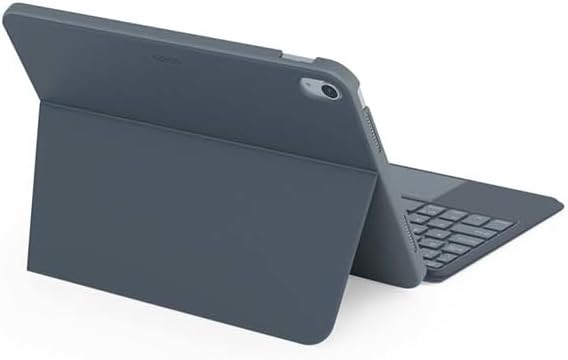
Kuva: Takaosa view of the Epico iPad Keyboard Case, demonstrating the secure fit of the iPad.
3. Pairing with iPad
- Turn on the keyboard by sliding the power switch (usually located on the side or back of the keyboard).
- Siirry iPadillasi osoitteeseen Asetukset > Bluetooth.
- Enable Bluetooth. The keyboard should appear in the "Other Devices" list as "Epico Keyboard" or similar.
- Tap on the keyboard name to pair. Follow any on-screen prompts.
- Once paired, the keyboard's indicator light will change, and it will be ready for use.
Käyttöohjeet
Näppäimistön käyttö
The keyboard functions like a standard QWERTY keyboard. Ensure the keyboard is paired with your iPad before typing.

Kuva: Edessä view of the Epico iPad Keyboard Case, displaying the full keyboard layout and touchpad.
Taustavalon ohjaus
- Paina Lamppu key (often near the function keys) to cycle through backlight colours.
- Paina Fn + lamppu key to adjust backlight brightness levels.
Kosketuslevyn eleet
The integrated touchpad supports multi-finger gestures for enhanced navigation:
- Napautus yhdellä sormella: Vasen painallus.
- Kahden sormen napautus: Napsauta hiiren kakkospainikkeella (pikavalikko).
- Kahden sormen vieritys: Vieritä ylös/alas tai vasemmalle/oikealle.
- Nipistä zoomataksesi: Lähennä/loitonna sisältöä.
- Refer to iPadOS settings for additional gesture customization.
iPadOS Shortcuts
The keyboard includes dedicated function keys for common iPadOS shortcuts. These may vary slightly by iPadOS version, but typically include:
- Kotiin: Palaa aloitusnäyttöön.
- Haku: Activate Spotlight search.
- Kirkkauden säätö: Säädä näytön kirkkautta.
- Median hallinta: Play/Pause, Previous/Next track.
- Äänenvoimakkuuden säätö: Säädä järjestelmän äänenvoimakkuutta.
- Lukitusnäyttö: Lock your iPad.
Huolto
Puhdistus
- Use a soft, lint-free cloth to wipe the exterior of the case and keyboard.
- Pinttyneisiin tahroihin, hieman dampfi pyyhi liina vedellä tai miedolla, hankaamattomalla puhdistusaineella.
- Avoid getting moisture into the keyboard keys or ports.
- Älä käytä voimakkaita kemikaaleja, liuottimia tai hankaavia materiaaleja.
Varastointi
Kun näppäimistökoteloa ei käytetä pitkään aikaan, säilytä sitä viileässä ja kuivassa paikassa. Varmista, että näppäimistö on sammutettu akun säästämiseksi.
Vianetsintä
- Näppäimistö ei muodosta yhteyttä:
Ensure the keyboard is charged and turned on. Check iPad's Bluetooth settings to confirm it's enabled and the keyboard is paired. Try unpairing and re-pairing the keyboard.
- Näppäimet eivät vastaa:
Check battery level. Restart both the keyboard and your iPad. Ensure no debris is lodged under the keys.
- Taustavalo ei toimi:
Ensure the keyboard is on and charged. Cycle through backlight settings using the dedicated key.
- Kosketuslevy ei vastaa:
Ensure the touchpad is enabled (some keyboards have a function key to toggle it). Check iPadOS settings for touchpad functionality.
Tekniset tiedot
| Merkki | Eeppinen |
| Mallin nimi | Epico Keyboard Case |
| Yhteensopivat laitteet | Apple iPad |
| Yhteydet | Bluetooth |
| Taustavalo | 7-Colour, Adjustable Brightness |
| Kosketuslevy | Multi-finger Gesture Support |
| Latausportti | USB-C |
| Virtalähde | Sisäänrakennettu Li-ion-akku |
| Tuotteen paino | 15.9 unssia (noin 450 g) |
| Tuotteen mitat (PxLxK) | 9.94 x 7.24 x 0.48 tuumaa (noin 25.25 x 18.39 x 1.22 cm) |
| Materiaali | Muovia, metallia |
Takuu ja tuki
This Epico product is covered by a manufacturer's warranty. Please refer to the warranty card included with your purchase or visit the official Epico websivustolta tarkemmat takuuehdot.
For technical support, troubleshooting assistance, or inquiries about your product, please contact Epico customer service through their official websivustolla tai ostokuittisi yhteystiedoissa.
Asiaan liittyvät asiakirjatEpico Keyboard Case


Ask a question about this manual
Ask about setup, troubleshooting, compatibility, parts, safety, or missing instructions. Manuals+ will review the question and use this page’s manual context to help answer it.