
1. Johdanto
This manual provides detailed instructions for the setup, operation, maintenance, and troubleshooting of your Yeabomy Smart Bluetooth Glasses E13C. Please read this manual thoroughly before using the product to ensure proper function and longevity.

A pair of black smart Bluetooth sunglasses, viewkulmasta katsottuna, näytäasing the integrated technology in the temples.
2. Tuote ohiview
2.1 Pakkauksen sisältö
Varmista, että pakkauksessa on kaikki tarvittavat osat:
- Smart Bluetooth Glasses (E13C)
- Magneettinen latauskaapeli
- Puhdistusliina
- Eyeglasses Storage Bag
- Silmälasikotelo
- Käyttöopas (tämä asiakirja)
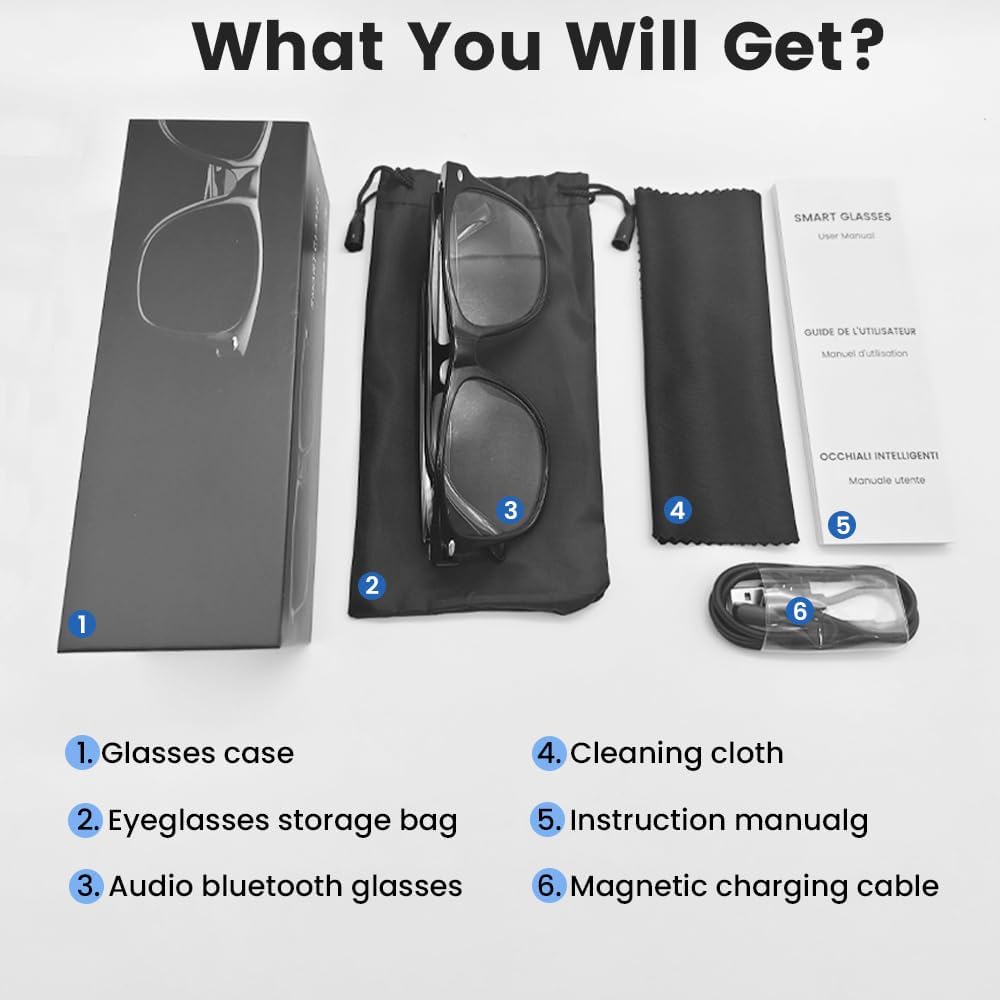
An image displaying the package contents: a glasses case, an eyeglasses storage bag, the audio Bluetooth glasses, a cleaning cloth, an instruction manual, and a magnetic charging cable.
2.2 Tärkeimmät ominaisuudet
- Älykäs ääniohjaus: Käytä toimintoja äänikomennoilla.
- Polarisoidut linssit: Effective blue light filtering and 100% UV protection. Lenses are replaceable with prescription lenses.
- Laaja yhteensopivuus: Connects with various devices including smartphones (Android, iOS) and computers via Bluetooth 5.4.
- Yksivaiheinen pariliitos: Automatic reconnection to the last paired device.
- Vedenpitävä (IPX5): Resistant to sweat and rain.
- Kevyt muotoilu: Weighs approximately 27g for comfortable extended wear.
- Dual Magnetic Charging: Efficient and secure charging.
- Intuitiiviset kosketusohjaimet: For media playback, calls, and voice assistant activation.
3. Asennus
3.1 Lasien lataaminen
Before first use, fully charge the smart glasses. Use the provided magnetic charging cable.
- Connect the magnetic charging cable to the charging contacts on the temple of the glasses.
- Liitä kaapelin USB-pää tavalliseen USB-virtalähteeseen (ei sisälly toimitukseen) tai tietokoneen USB-porttiin.
- The indicator light will show yellow during charging.
- Charging is complete when the indicator light turns green. A full charge takes approximately 1.5 hours.
The glasses provide approximately 4-6 hours of media playback and over 300 hours of standby time on a full charge.

An illustration showing the magnetic charging cable connecting to the glasses' temple, with indicators for charging (yellow light) and fully charged (green light). Battery capacity, charging time, playback time, and calling time are also displayed.
3.2 Bluetooth -pariliitos
To connect your smart glasses to a device:
- Varmista, että lasit on ladattu ja kytketty päälle.
- Ota Bluetooth käyttöön älypuhelimessa tai muussa laitteessa.
- Etsi available Bluetooth devices. The glasses will appear as "E13".
- Select "E13" to pair. Once paired, the glasses will automatically reconnect to this device when powered on and within range (up to 33 feet).

A person wearing the smart glasses while running, with a smartphone screen showing Bluetooth settings and the glasses (E13) connected. The image highlights the 33ft Bluetooth 5.4 transmission range and voice control functionality.
4. Käyttöohjeet
4.1 Virta päälle/pois
- Virta päälle: Long touch the control area for 5 seconds.
- Virta pois: Long touch the control area for 5 seconds.
4.2 Kosketusohjaimet
The smart glasses feature intuitive touch controls located on the temples:
- Toista/keskeytä musiikki: Once-Tap
- Seuraava kappale: Twice-Tap
- Edellinen kappale: Twice-Tap
- Vastaa puheluun: Once-Tap
- Lopeta puhelu: Once-Tap
- Aktivoi Voice Assistant: Long Touch for 2 seconds
- Etävalokuvaus: Double click to control your smartphone's camera.

A diagram illustrating the touch control gestures on the smart glasses for various functions: pick up calls, turn on music, open navigation, take photos, previous/next track, play/pause, voice assistant, answer/hang up calls, and power on/off.
4.3 Ääniohjaus
After activating the voice assistant (Long Touch for 2 seconds), you can use voice commands for various functions, such as:
- Making calls (e.g., "Call [Contact Name]")
- Playing music (e.g., "Play [Song Title]")
- Viestien lähettäminen
- Opening navigation
5. Huolto
- Puhdistus: Pyyhi linssit ja kehys varovasti mukana toimitetulla puhdistusliinalla. Vältä voimakkaita kemikaaleja tai hankaavia materiaaleja.
- Vedenkestävyys: The glasses are IPX5 water-resistant, meaning they can withstand sweat and light rain. Do not submerge them in water or expose them to strong jets of water.
- Varastointi: When not in use, store the glasses in the provided eyeglasses storage bag or glasses case to protect them from scratches and dust.
- Lämpötila: Avoid exposing the glasses to extreme temperatures (hot or cold) as this can affect battery life and electronic components.

A pair of smart glasses resting on a surface, emphasizing their lightweight design (27g) and comfort for extended wear. A magnified inset shows the dual magnetic charging contacts.
6. Vianmääritys
- Ei voi käynnistää: Ensure the glasses are fully charged. Connect to the magnetic charging cable and check the indicator light.
- Ei voida yhdistää laitteeseen:
- Varmista, että Bluetooth on käytössä laitteessasi.
- Make sure the glasses are within the 33-foot Bluetooth range.
- Turn the glasses off and on again, then try pairing.
- Unohda laite puhelimesi Bluetooth-asetuksista ja yritä pariliitosta uudelleen.
- Ei ääntä/Hiljainen äänenvoimakkuus:
- Check the volume settings on both the glasses (if applicable via touch control) and your connected device.
- Varmista, että lasit on yhdistetty oikein Bluetoothin kautta.
- Confirm that the audio output on your device is set to the smart glasses.
- Kosketusohjaimet eivät vastaa: Ensure the glasses are powered on and connected. Try restarting the glasses.
7. Tekniset tiedot
| Malli | E13C |
| Merkki | Yeabomy |
| Yhteystekniikka | Bluetooth 5.4 |
| Käyttöjärjestelmän yhteensopivuus | Android, iOS Devices |
| Erikoisominaisuudet | Music Player, Phone Call, Voice Control, UV Protection, Polarized Lenses, Remote Photography |
| Akun kapasiteetti | 1 Amp Hours (80mAh per temple) |
| Latausaika | Noin 1.5 tuntia |
| Continuous Playback Time (Music) | Noin 5 tuntia |
| Continuous Calling Time | Noin 4 tuntia |
| Valmiusaika | Yli 300 tuntia |
| Tuotteen paino | 0.07 paunaa (noin 27 g) |
| Vedenkestävyys | IPX5 |
| Pakkauksen mitat | 6.65 x 2.4 x 2.24 tuumaa |
| Näytön koko | 1.96 Inches (Visible screen diagonal) |
| Muistin tallennuskapasiteetti | 128 Mt |
| GPS | Ei GPS:ää |

An image detailing the physical dimensions of the smart glasses, including lens width, frame width, and temple length. It also shows various face shapes (oval, triangle, round, square, diamond) indicating suitability.
8. Takuu ja tuki
For warranty information or technical support, please refer to the contact details provided with your purchase documentation or visit the official Yeabomy websivusto. Säilytä ostokuittisi mahdollisten takuuvaatimusten varalta.