
Johgee YZD03-T
Johgee 3-vyöhykkeinen vesiajastin, messinkinen sisääntulo - käyttöohje (malli YZD03-T)
Programmable Garden Hose Timer with Rain Delay, Manual, and Automatic Watering System
1. Johdanto
Thank you for choosing the Johgee 3 Zones Water Timer. This device is designed to automate your garden watering, providing flexible and efficient irrigation for lawns, plants, and other areas. It features three independently programmable outlets, rain delay functionality, and manual watering options. Please read this manual thoroughly before installation and operation to ensure proper use and longevity of the product.
2. Turvallisuustiedot
- This product is intended for outdoor use with cold water only. Do not use with hot water or in freezing conditions.
- Do not immerse the timer in water. The unit is IPX5 waterproof, meaning it is protected against low-pressure water jets, but not submersion.
- Use only 2x 1.5V AA alkaline batteries. Do not mix old and new batteries, or different types of batteries.
- Remove batteries if the timer will not be used for an extended period to prevent leakage.
- Pidä laite poissa lasten ja lemmikkien ulottuvilta vahingossa tapahtuvan aktivoitumisen tai vaurioitumisen estämiseksi.
- Ensure all connections are tight to prevent leaks. Use the provided sealing washer and thread seal tape.
3. Pakkauksen sisältö
Varmista, että pakkauksessasi on kaikki tarvittavat osat:
- Johgee 3 Zones Water Timer Unit
- Käyttöopas
- Sealing Washers (pre-installed or separate)
- Kierretiivistenauha
4. Tuote ohiview
Familiarize yourself with the components of your Johgee Water Timer:

Kuva: Edessä view of the Johgee 3 Zones Water Timer, showing the LCD display, control buttons, and rotary dial.
- LCD-näyttö: Shows current time, program settings, and battery status.
- Pyörivä valitsin: Used to select different programming modes (OFF, AUTO, Set Clock, Start Time, How Long, How Often).
- Vyöhykepainike: Selects which of the three output zones to program or operate manually.
- OK -painike: Vahvistaa valinnat ja asetukset.
- +/- Delay Buttons: Adjusts values (time, duration, frequency) and activates rain delay.
- Manuaalinen painike: Initiates temporary manual watering.
- Messinkiliitäntä: Connects to your garden faucet (3/4" external thread). Features a reinforced design and integrated filter.
- Water Outlets (x3): Connect to garden hoses for individual watering zones.
5. Asennus
5.1 Akun asennus
- Paikanna ajastimen takaa oleva paristolokero.
- Avaa lokeron kansi.
- Insert two (2) new 1.5V AA alkaline batteries, ensuring correct polarity (+/-).
- Sulje paristolokeron kansi tiiviisti, jotta vedenpitävä tiivistys säilyy.
The timer features a low battery warning and an automatic shut-off valve to prevent water waste when battery levels are critically low.
5.2 Connecting the Water Timer
- Ensure your garden faucet is turned off.
- Inspect the brass inlet for the pre-installed sealing washer. If missing, insert one.
- Apply thread seal tape (provided) to the threads of your garden faucet for an extra secure, leak-proof connection.
- Screw the Johgee Water Timer onto your standard 3/4" garden faucet. Hand-tighten firmly. Do not overtighten.
- Connect your garden hoses to the three independent water outlets at the bottom of the timer. Ensure these connections are also tight.

Image: The Johgee Water Timer connected to a garden faucet, with three hoses attached to its outlets, ready for use.

Kuva: Yksityiskohtainen view of the reinforced brass inlet, highlighting its robust construction and integrated metal filter for preventing debris from entering the timer.
6. Käyttöohjeet
6.1 Setting the Current Time (Clock)
- Käännä kiertonuppi asentoon ASETA KELLO.
- The hour digit will flash. Use the + or - -painikkeita säätääksesi tuntia. Paina OK vahvistaaksesi.
- The minute digit will flash. Use the + or - -painikkeita minuuttien säätämiseksi. Paina OK vahvistaaksesi.
- Kello on nyt asetettu.
6.2 Automaattisen kastelun ohjelmointi
The timer allows for independent programming of each of its three zones.

Image: The Johgee Water Timer connected to a faucet, with three hoses extending to different garden areas labeled Zone 1, Zone 2, and Zone 3, illustrating its multi-zone capability.
- Käännä kiertonuppi asentoon AUTO.
- Paina VYÖHYKE button to select the desired watering zone (1, 2, or 3) you wish to program.
- Käännä kiertonuppi asentoon ALOITUSAIKA. Käyttää + or - Aseta haluttu kastelun aloitusaika painamalla OK vahvistaaksesi.
- Käännä kiertonuppi asentoon KUINKA KAUAN. Käyttää + or - to set the watering duration (1 to 360 minutes). Press OK vahvistaaksesi.
- Käännä kiertonuppi asentoon KUINKA USEIN. Käyttää + or - to set the watering frequency (e.g., every 1, 3, 6, 12 hours, or every 1 to 30 days). Press OK vahvistaaksesi.
- Repeat steps 2-5 for each zone you wish to program.
- Once programming is complete, turn the rotary dial back to AUTO automaattista toimintaa varten.

Image: The LCD screen displaying options for setting start time, watering duration, and frequency, indicating the timer's programmable capabilities.

Image: An infographic detailing the customizable settings for automatic watering schedules, including setting the clock, start time, watering duration (1-360 minutes), and frequency (1 hour to 30 days).
6.3 Manuaalinen kastelu
Manual watering allows you to water immediately without interrupting your preset automatic schedule.
- Ensure the rotary dial is set to AUTO or POIS.
- Paina MANUAALINEN -painiketta.
- Käytä + or - buttons to set the desired manual watering duration (1 to 360 minutes).
- Paina OK aloittaaksesi manuaalisen kastelun.
- Manuaalisen kastelun lopettamiseksi paina MANUAALINEN uudelleen tai käännä valitsinta asentoon POIS.

Image: A person using a hose to manually water a garden, demonstrating the manual watering feature of the Johgee Water Timer. The timer's display shows a manual watering countdown.
6.4 Sadeviivetoiminto
The rain delay function allows you to temporarily suspend your watering schedule for a specified period, conserving water during rainy weather.
- Ensure the rotary dial is set to AUTO.
- Paina ja pidä painettuna VIIVE button (part of the + painike).
- Käytä + or - -painikkeita valitaksesi halutun viiveen keston (1–15 päivää).
- Paina OK to activate the rain delay. The display will show the remaining delay time.
- To cancel the rain delay, press and hold the VIIVE -painiketta uudelleen, kunnes viive on poistettu.

Image: The Johgee Water Timer shown during rainfall, with its display indicating an active rain delay. This feature helps conserve water by pausing scheduled watering during wet conditions.
6.5 Lapsilukkotila
The child lock feature prevents accidental changes to your watering schedule by children or pets.
- Aktivoimiseksi: Pidä painettuna OK button for 3 seconds until a lock icon appears on the display.
- Deaktivointi: Pidä painettuna OK button for 3 seconds until the lock icon disappears.

Image: A child's hand interacting with the Johgee Water Timer, illustrating the child lock function designed to prevent unintended changes to settings.
7. Huolto
7.1 Pariston vaihto
When the low battery indicator flashes on the display, replace the batteries promptly to ensure continuous operation and prevent the timer from shutting off unexpectedly. Follow the battery installation steps in Section 5.1.
7.2 Suodattimen puhdistaminen
The brass inlet contains an integrated metal filter to prevent debris from entering the timer. Periodically check and clean this filter to maintain optimal water flow. To clean:
- Turn off the water supply and disconnect the timer from the faucet.
- Carefully remove the filter screen from the brass inlet.
- Huuhtele suodatin juoksevan veden alla poistaaksesi mahdolliset kertyneet roskat.
- Reinsert the clean filter and reconnect the timer to the faucet.
7.3 Talvisäilytys
Irrota ajastin hanasta ja letkuista ennen ensimmäisiä pakkasia. Poista paristot. Säilytä ajastinta sisätiloissa kuivassa ja pakkaselta suojatussa paikassa, jotta jäätynyt vesi ei vahingoita sitä.
8. Vianmääritys
| Ongelma | Mahdollinen syy | Ratkaisu |
|---|---|---|
| Ajastin ei käynnisty / LCD-näyttö on tyhjä. | Tyhjät tai väärin asennetut paristot. | Vaihda paristot uusiin 1.5 V:n AA-alkaliparistoihin varmistaen oikean napaisuuden. |
| Water is leaking from the faucet connection. | Loose connection, missing/damaged washer, or insufficient thread seal tape. | Ensure the timer is tightly screwed onto the faucet. Check that the sealing washer is properly seated. Apply more thread seal tape if necessary. |
| Water is leaking from hose connections. | Loose hose connection or damaged hose washer. | Tighten hose connections. Replace hose washers if they are worn or damaged. |
| Watering does not start at the programmed time. | Timer is in OFF mode, rain delay is active, or program is incorrect. | Ensure the dial is set to AUTO. Check if rain delay is active and cancel if needed. Verify program settings for start time, duration, and frequency. |
| One or more valves run continuously / will not shut off. | Internal valve issue, possibly due to debris or a temporary malfunction. | Remove batteries for 30 seconds to reset the unit, then reinsert. If the problem persists, contact customer support. |
| No water flow from an outlet. | Water supply off, clogged filter, or hose kinked. | Ensure the faucet is fully open. Check and clean the inlet filter (Section 7.2). Inspect hoses for kinks or blockages. |
9. Tekniset tiedot
- Mallinumero: YZD03-T
- Käyttölämpötila: 4.5–45 °C (40.1–113 °F)
- Työpaine: 0.05Mpa - 0.8Mpa (7.25 psi - 116 psi)
- Vedenpitävyysluokitus: IPX5
- Virtalähde: 2 x 1.5 V AA-alkaliparistoa (eivät sisälly toimitukseen)
- Letkun liitäntä: 3/4" ulkokierre
- Tuotteen mitat: 7 x 15 x 12 cm
- Tuotteen paino: 600 g
- Materiaali: Metallia, Muovia
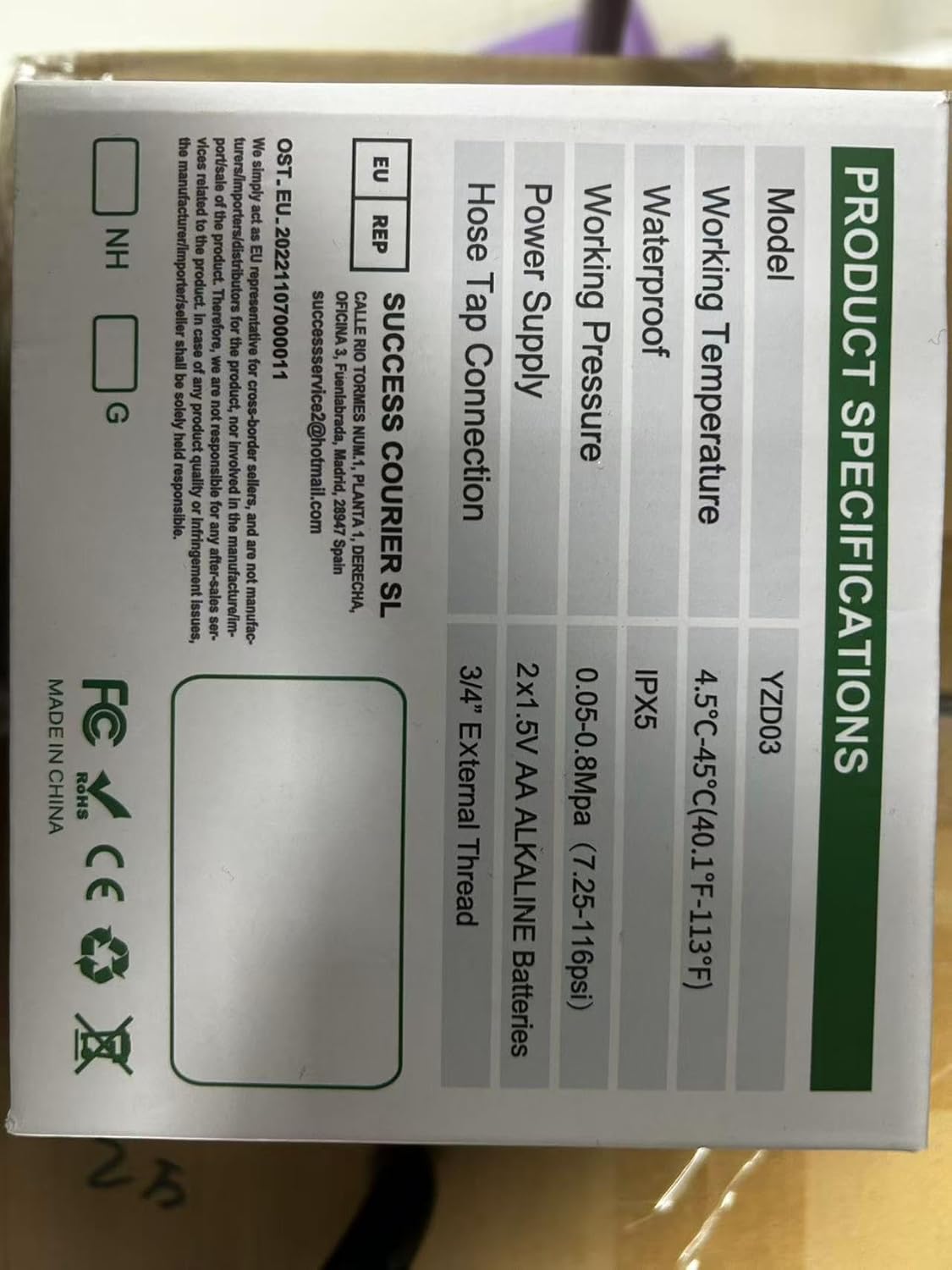
Image: A technical diagram illustrating the dimensions of the Johgee Water Timer, including its height (133mm) and width (155mm).
10. Takuu ja tuki
The Johgee 3 Zones Water Timer is backed by a manufacturer's warranty. For specific warranty details, including duration and coverage, please refer to the product packaging or contact the seller directly. If you encounter any issues or require technical assistance, please reach out to Johgee customer support through the retailer's platform or the contact information provided on the product packaging.
For online support and additional resources, you may visit the Johgee Store on Amazon.