
Johdanto
Kiitos ostoksestasiasing the Sharp Digital Alarm Clock, Model SPC5148AMZ. This alarm clock features a large, easy-to-read red LED display, dual alarms, adjustable alarm volume, and a convenient snooze function. It is designed for simple operation and includes a battery backup feature to maintain time and alarm settings during power outages.
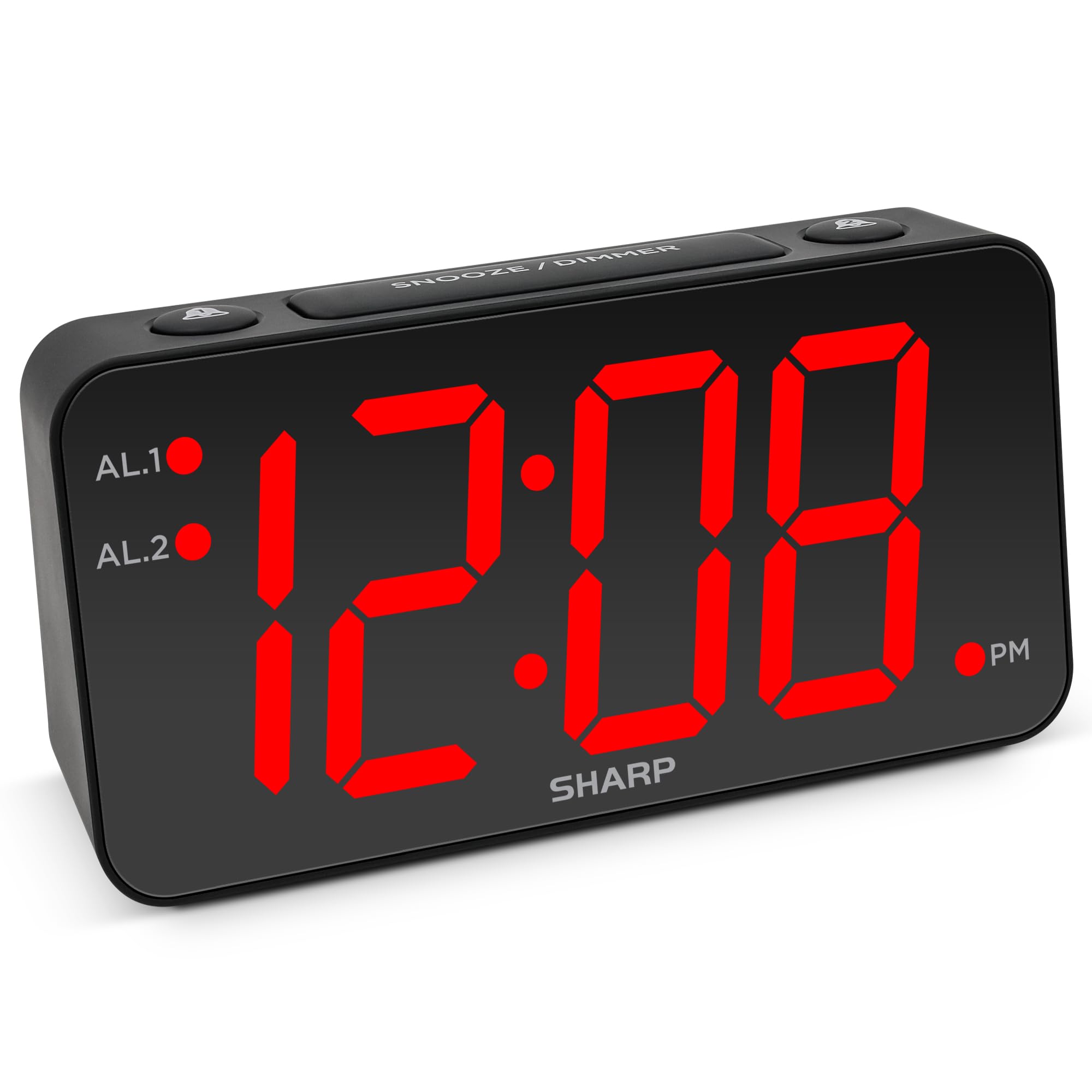
Kuva: Edessä view of the Sharp Digital Alarm Clock, Model SPC5148AMZ, showcasing its large red LED time display.
Tuotteen osat ja säätimet
Familiarize yourself with the various parts and controls of your alarm clock.
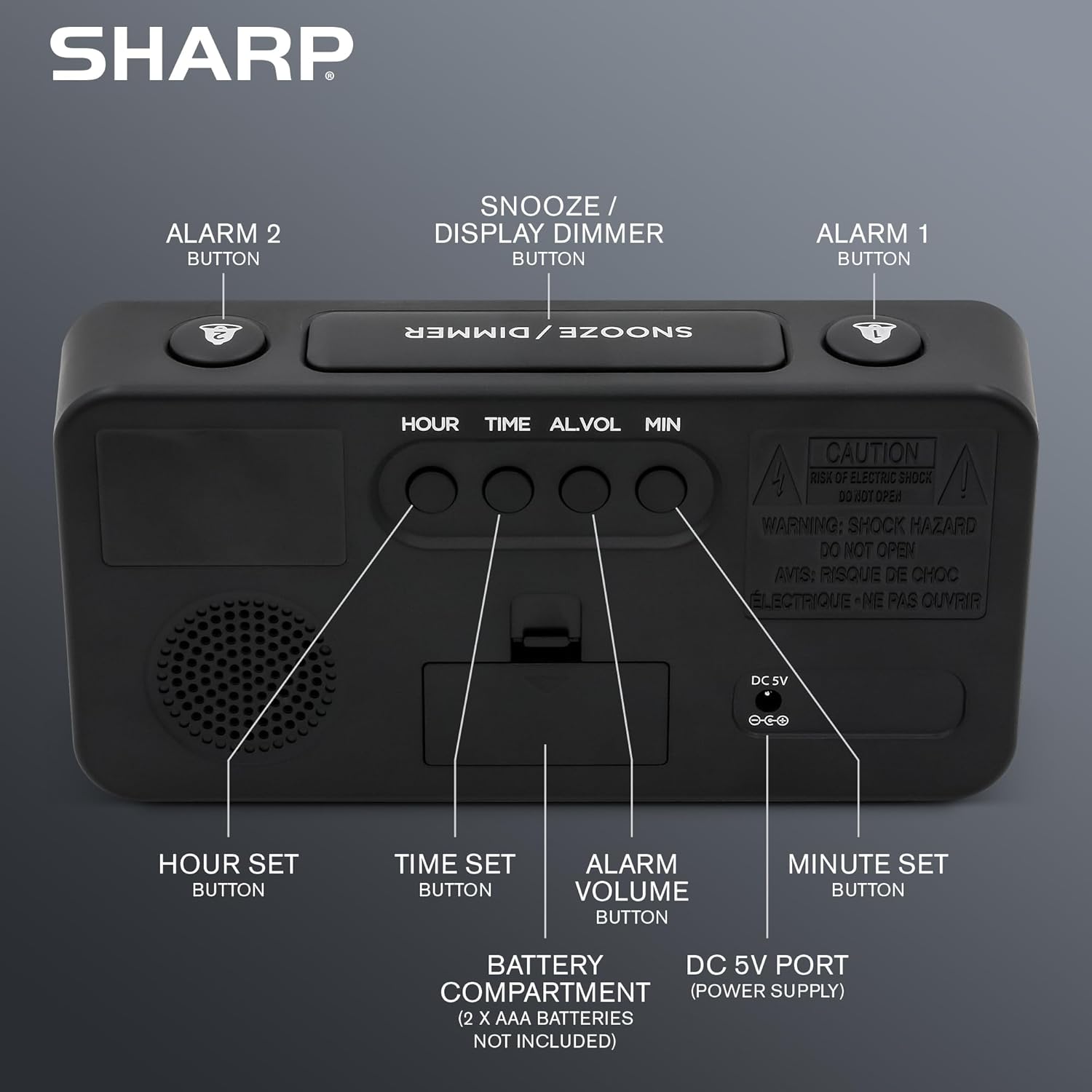
Kuva: Takaosa view of the alarm clock, highlighting the Hour Set, Time Set, Alarm Volume, Minute Set buttons, Battery Compartment, and DC 5V Power Port.
- TORKKU-/HIMMENNYS-painike: Located on top. Press to snooze alarm or adjust display brightness.
- ALARM 1 Button: Located on top. Activates/deactivates Alarm 1.
- ALARM 2 Button: Located on top. Activates/deactivates Alarm 2.
- HOUR SET Button: Located on the back. Used to set the hour for time or alarm.
- AIKA-ASETUS-painike: Located on the back. Used to enter time setting mode.
- ALARM VOLUME Button: Located on the back. Adjusts the alarm loudness.
- MINUTE SET Button: Located on the back. Used to set the minute for time or alarm.
- DC 5V portti: Power input for the clock.
- Akkulokero: Holds 2 x AAA batteries (not included) for backup.
Asennus
Virtaliitäntä
- Liitä mukana toimitettu virtalähde herätyskellon takana olevaan DC 5V -porttiin.
- Plug the adapter into a standard 110V/120V AC power outlet. The display will illuminate.
Akun varmuuskopion asennus
For battery backup, which retains time and alarm settings during a power outage (display will be blank), install batteries:
- Avaa laitteen takana oleva paristolokeron kansi.
- Insert 2 new AAA batteries (not included), observing the correct polarity (+ and -).
- Sulje paristolokeron kansi kunnolla.
Tärkeää: Batteries are for backup only. The clock requires AC power for the display to function and for the alarm to sound at full volume.
Käyttöohjeet
Kellonajan asettaminen
- Paina ja pidä painettuna AJAN ASETUS -painiketta kellon takana, kunnes tuntinumerot alkavat vilkkua.
- Paina TUNNIT SET button repeatedly to adjust the hour. Pay attention to the PM indicator light.
- Paina MINUUTISET -painiketta toistuvasti minuuttien säätämiseksi.
- Kun haluttu aika on asetettu, paina AJAN ASETUS -painiketta uudelleen vahvistaaksesi ja poistuaksesi ajan asetustilasta.
Herätyksen asettaminen (herätys 1 ja herätys 2)
This clock features dual alarms. The procedure is the same for both Alarm 1 and Alarm 2.
- Paina ja pidä painettuna HÄLYTYS 1 or HÄLYTYS 2 button on the top of the clock until the alarm hour digits begin to flash.
- Paina TUNNIT SET button repeatedly to adjust the alarm hour. Ensure the correct AM/PM is selected.
- Paina MINUUTISET -painiketta toistuvasti säätääksesi hälytyksen minuutteja.
- Paina HÄLYTYS 1 or HÄLYTYS 2 button again to confirm the alarm time. The corresponding alarm indicator light (AL.1 or AL.2) will illuminate on the display, indicating the alarm is active.
Hälytysten aktivointi/deaktivointi
- To activate an alarm: Press the HÄLYTYS 1 or HÄLYTYS 2 button once. The corresponding indicator light will turn on.
- To deactivate an alarm: Press the HÄLYTYS 1 or HÄLYTYS 2 button again. The corresponding indicator light will turn off.
Torkkutoiminto
Kun hälytys soi, paina isoa TORKKU / DIMMER button on top of the clock. The alarm will pause for 9 minutes and then sound again. You can repeat this process until the alarm is manually turned off.
Adjusting Display Brightness (Dimmer)
Paina TORKKU / DIMMER button (when the alarm is not sounding) to cycle through the display brightness levels: High, Medium, Low, or OFF.
Hälytyksen äänenvoimakkuuden säätäminen
Paina HÄLYTYSVOIMAKKUUS button on the back of the clock to cycle through the alarm loudness levels: High, Medium, Low.
Huolto
- Puhdistus: Pyyhi kello pehmeällä, kuivalla liinalla. Älä käytä hankaavia puhdistusaineita tai liuottimia.
- Akun vaihto: Replace backup batteries annually or when the clock experiences frequent power outages to ensure settings are retained.
- Sijoitus: Place the clock on a stable, flat surface. Avoid direct sunlight, extreme temperatures, and high humidity.
Vianetsintä
| Ongelma | Ratkaisu |
|---|---|
| Kellon näyttö on tyhjä. | Ensure the AC power adapter is securely plugged into both the clock and a working electrical outlet. Check if there's a power outage. If using battery backup, the display will be blank during an outage, but timekeeping continues. |
| Hälytys ei soi. |
|
| Aikaa tai hälytystä ei voi asettaa. | Ensure you are pressing and holding the correct SET button until the digits flash. Release the button, then use HOUR SET and MINUTE SET to adjust. Press the SET button again to confirm. |
| Näyttö on liian kirkas/himmeä. | Paina TORKKU / DIMMER button (when alarm is not sounding) to cycle through brightness levels. |
Tekniset tiedot
- Malli: SPC5148AMZ
- Merkki: Terävä
- Näyttötyyppi: Digitaalinen LED (punainen)
- Näytön koko: 3 inches (Jumbo Numbers)
- Virtalähde: Corded Electric (110V/120V AC)
- Akun varmuuskopiointi: 2 x AAA paristot (eivät sisälly)
- Mitat (L x K): 8.27 cm x 4.13 cm
- Paino: 0.41 kiloa
- Erikoisominaisuudet: Dual Alarms, Adjustable Brightness (High, Medium, Low, OFF), Adjustable Alarm Volume (High, Medium, Low), 9-minute Snooze.
Takuutiedot
Sharp products are manufactured and sold by M.Z. Berger & Co. Inc. This product comes with a limited warranty against defects in materials and workmanship. For specific warranty details, including duration and terms, please refer to the warranty card included in your product packaging or contact customer support.
Asiakastuki
For assistance with your Sharp Digital Alarm Clock, please contact the manufacturer's customer support. Contact information can typically be found on the product packaging or the manufacturer's official websivusto.
Manufacturer: Sharp (M.Z. Berger & Co. Inc.)
Tuote loppuview Video
Video: An official Sharp video showcasing various Sharp clocks, including features like alarm, decor, charging, precision, and specialty functions. This video provides a general overview of Sharp's clock offerings.