
1. Johdanto
The dockteck M.2 NVMe SATA SSD Enclosure Adapter (Model DH0005) provides a convenient and efficient solution for converting your M.2 NVMe or SATA SSD into a portable external storage device. Featuring a tool-free design and high-speed USB 3.2 Gen 2 interface, this enclosure supports data transfer rates up to 10Gbps for NVMe SSDs and 6Gbps for SATA SSDs. It is compatible with various M.2 SSD sizes (2230, 2242, 2260, 2280) and operating systems, making it a versatile accessory for data management and expansion.
2. Pakkauksen sisältö
Varmista, että pakkauksessasi on kaikki tarvittavat osat:
- 1 x dockteck M.2 SSD Enclosure Adapter
- 1 x USB-C to C Cable (approx. 9.8 inches / 25 cm)
- 1 x USB-A to C Cable (approx. 9.8 inches / 25 cm)
- 1 x lämpöalusta
- 1 x Spare Mounting Pin
- 1 x Käyttöohje (tämä asiakirja)
3. Ominaisuudet
- Nopea tiedonsiirto: USB 3.2 Gen 2 Type-C interface supports up to 10Gbps for NVMe SSDs and 6Gbps for SATA SSDs.
- UASP/TRIM Protocol Support: Enhances SSD read and write speeds for efficient large file siirrot.
- Asennus ilman työkaluja: Easy slide-open design for quick SSD insertion and removal without tools.
- Tehokas lämmönpoisto: Constructed with an aluminum alloy shell and includes a silicone thermal pad to maintain optimal operating temperatures and ensure data stability.
- Laaja yhteensopivuus: Supports M-Key and B+M Key M.2 NVMe and SATA SSDs of sizes 2230, 2242, 2260, and 2280, up to 4TB capacity.
- Laaja laitetuki: Compatible with Windows, Mac OS, Linux, and Android systems, connecting to PCs, laptops, tablets, smartphones, game consoles, and smart TVs.
- Automaattinen lepotila: Enters sleep mode after 15 minutes of inactivity to protect your SSD and conserve power.
4. Asennus ja asennus
Asenna M.2 SSD -levy koteloon seuraavasti:
- Avaa kotelo: Press the button on the end of the enclosure and slide the internal tray out.
- Aseta SSD-levy paikalleen: Gently insert your M.2 SSD into the slot at a 45-degree angle. Ensure the key type (M-Key or B+M Key) matches the enclosure's slot.
- SSD-levyn suojaaminen: Push the SSD down until it is flat, then secure it with the provided rubber mounting pin at the end of the SSD.
- Lämpötyynyn levittäminen: Peel off the protective films from both sides of the thermal pad and place it onto the SSD chip. This helps dissipate heat to the aluminum casing.
- Sulje kotelo: Slide the internal tray back into the aluminum shell until it clicks into place.

Figure 1: Easy Installation Steps for M.2 SSD
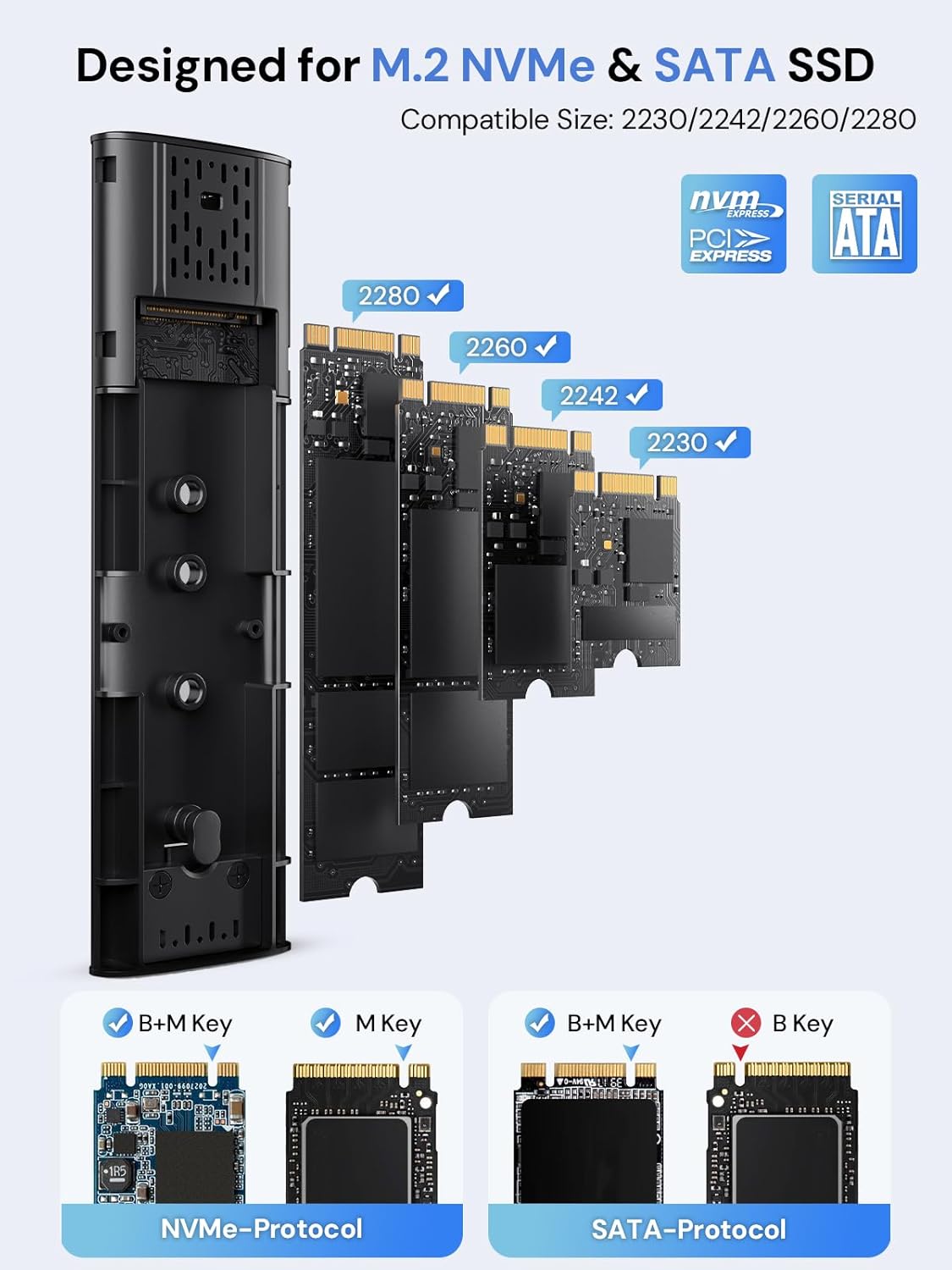
Figure 2: Compatible M.2 SSD Sizes and Key Types
5. Käyttöohjeet
Once your SSD is installed, connect the enclosure to your device using one of the provided USB cables. The enclosure is plug-and-play, requiring no additional drivers for most operating systems.
- Yhteys: Use the USB-C to C cable for devices with a USB-C port, or the USB-A to C cable for devices with a standard USB-A port.
- Tiedonsiirto: The enclosure will appear as an external drive on your computer or compatible device. You can drag and drop files, tai käytä järjestelmäsi file hallintatyökalut tiedonsiirtoon.
- LED-ilmaisin: A clear LED indicator on the enclosure will show activity during data transfer.
- Automaattinen lepotila: To protect your SSD and conserve power, the enclosure will automatically enter sleep mode after 15 minutes of no read/write activity.
Video 1: Demonstration of M.2 SSD Enclosure Adapter usage, including tool-free installation, high-speed data transfer, heat dissipation features, and connectivity with various devices like smartphones and laptops.
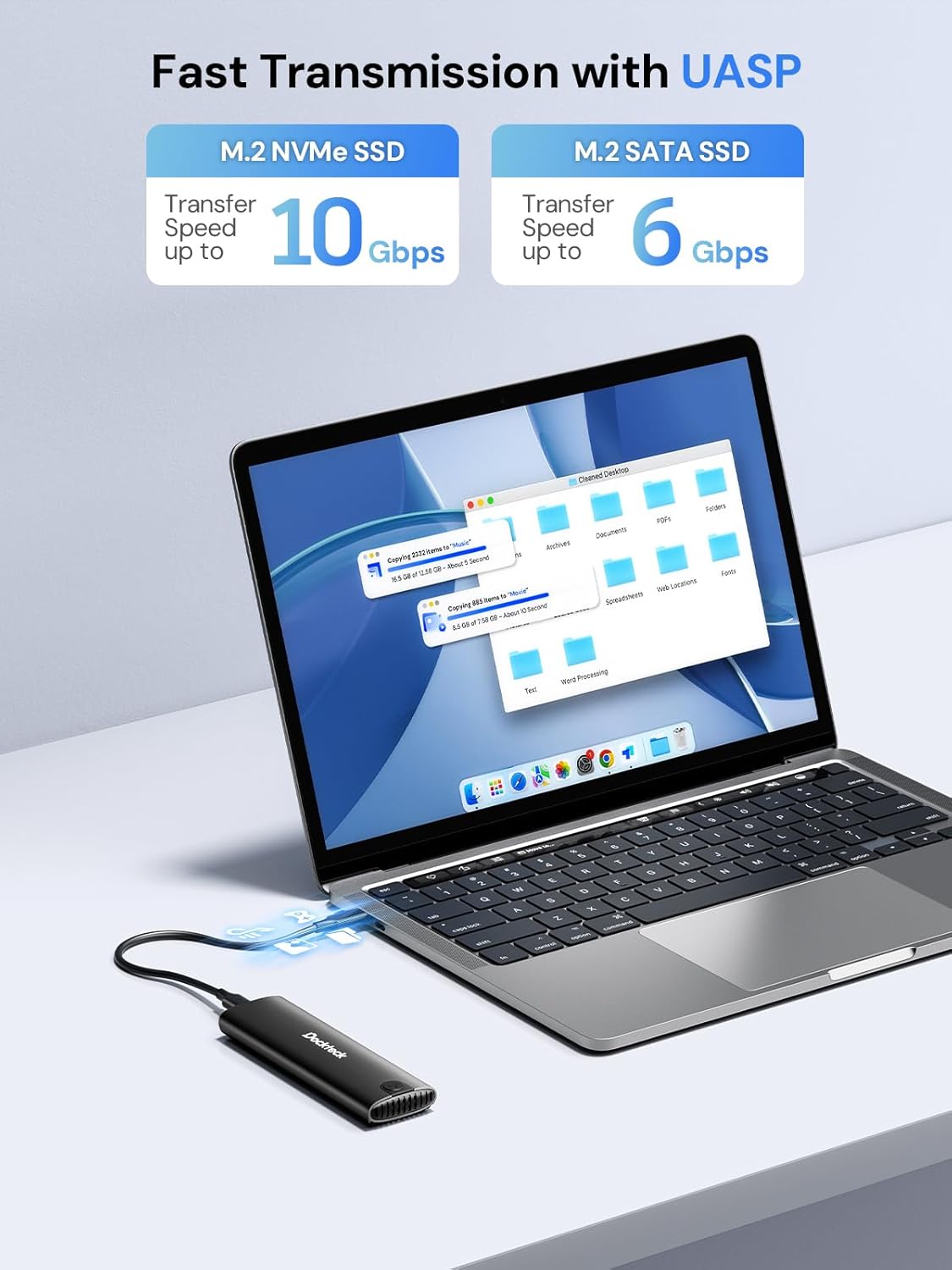
Figure 3: Fast Data Transmission with UASP
6. Lämmön hajoaminen
The dockteck M.2 SSD Enclosure is designed with effective heat dissipation in mind to ensure stable performance and prolong the life of your SSD.
- Alumiiniseoskuori: Kestävä alumiininen casing acts as a heatsink, drawing heat away from the SSD.
- Silicone Thermal Pad: The included thermal pad creates efficient contact between the SSD and the aluminum shell, further enhancing heat transfer.
- Lämmönpoistoreiät: Strategically placed holes on the enclosure facilitate airflow and heat release.

Figure 4: Effective Heat Dissipation Design
7. Yhteensopivuus
This enclosure offers broad compatibility with various M.2 SSDs and host devices.
- SSD Protocols: Supports both NVMe (PCIe) and SATA protocols.
- SSD Key Types: Compatible with M-Key and B+M Key M.2 SSDs. (Note: B-Key only SATA SSDs are not supported).
- SSD-levyjen koot: Supports M.2 SSDs of form factors 2230, 2242, 2260, and 2280.
- Suurin kapasiteetti: Tukee jopa 4 Tt:n M.2 SSD -levyjä.
- Käyttöjärjestelmät: Works with Windows, Mac OS, Linux, and Android systems.
- Yhteensopivat laitteet: Can be connected to PCs, laptops, tablets, smartphones (with USB-C), game consoles, and smart TVs.

Kuva 5: Laitteiden ja järjestelmien laaja yhteensopivuus
8. Vianmääritys
Jos kohtaat ongelmia, katso seuraavat yleiset vianmääritysvaiheet:
- SSD-levyä ei havaittu:
- Ensure the M.2 SSD is correctly inserted and secured within the enclosure.
- Verify that your SSD is either NVMe (M-Key or B+M Key) or SATA (B+M Key). B-Key only SATA SSDs are not supported.
- Check if the SSD is initialized and formatted. New SSDs typically need to be initialized and formatted in Disk Management (Windows) or Disk Utility (Mac OS) before use.
- Kokeile kytkeä kotelo laitteesi toiseen USB-porttiin.
- Testaa eri USB-kaapelilla, jos sellainen on saatavilla.
- Hitaat siirtonopeudet:
- Ensure your device's USB port supports USB 3.2 Gen 2 (10Gbps) for optimal performance. Older USB 2.0 or 3.0 ports will result in lower speeds.
- Varmista, että käyttöjärjestelmäsi ja ajurit ovat ajan tasalla.
- Confirm that the SSD itself is capable of high speeds (e.g., NVMe SSDs are faster than SATA SSDs).
- Vältä useiden pienten filesamanaikaisesti, koska tämä voi hidastaa kokonaissiirtonopeutta.
- Enclosure Gets Warm:
- It is normal for the aluminum enclosure to become warm during heavy use, as it is designed to dissipate heat from the SSD.
- Ensure the thermal pad is correctly installed on the SSD to facilitate heat transfer to the enclosure.
- Vältä kotelon sijoittamista suljettuihin tiloihin, jotka rajoittavat ilmanvaihtoa.
- Ajoittaiset katkokset:
- Ensure the USB cable is securely connected to both the enclosure and your device.
- Kokeile toista USB-porttia tai -kaapelia.
- Check for power management settings on your computer that might be turning off USB ports to save power.
9. Tekniset tiedot
| Ominaisuus | Yksityiskohta |
|---|---|
| Mallinumero | DH0005 |
| Tuotteen mitat | 4.9 x 1.5 x 0.6 tuumaa (12.4 x 3.8 x 1.5 cm) |
| Tuotteen paino | 1.92 unssia (54.4 g) |
| Käyttöliittymä | USB 3.2 Gen 2 Type-C |
| Tiedonsiirtonopeus | Up to 10Gbps (NVMe), Up to 6Gbps (SATA) |
| Tuetut SSD-protokollat | NVMe (PCIe) and SATA |
| Supported SSD Key Types | M-Key, B+M Key |
| Tuetut SSD-koot | 2230, 2242, 2260, 2280 |
| SSD-levyn enimmäiskapasiteetti | 4TB |
| Yhteensopivat käyttöjärjestelmät | Windows, Mac OS, Linux, Android |
| Materiaali | Alumiiniseos |
| Väri | Musta |
| Valmistaja | dockteck |
10. Takuu ja tuki
dockteck products are designed for reliability and performance. For warranty information, technical support, or any inquiries regarding your M.2 NVMe SATA SSD Enclosure Adapter, please contact dockteck customer service through their official websivusto tai jälleenmyyjä, josta tuote ostettiin.
You can visit the official dockteck store for more information: dockteck Store on Amazon.