
1. Johdanto
This manual provides detailed instructions for the proper use and maintenance of your Oakcastle HIFI500 Remote Control. This remote is designed as a replacement or spare for the Oakcastle HIFI500 audio system, ensuring seamless control over its functions. Please read this manual thoroughly before use to ensure optimal performance and longevity of your remote control.
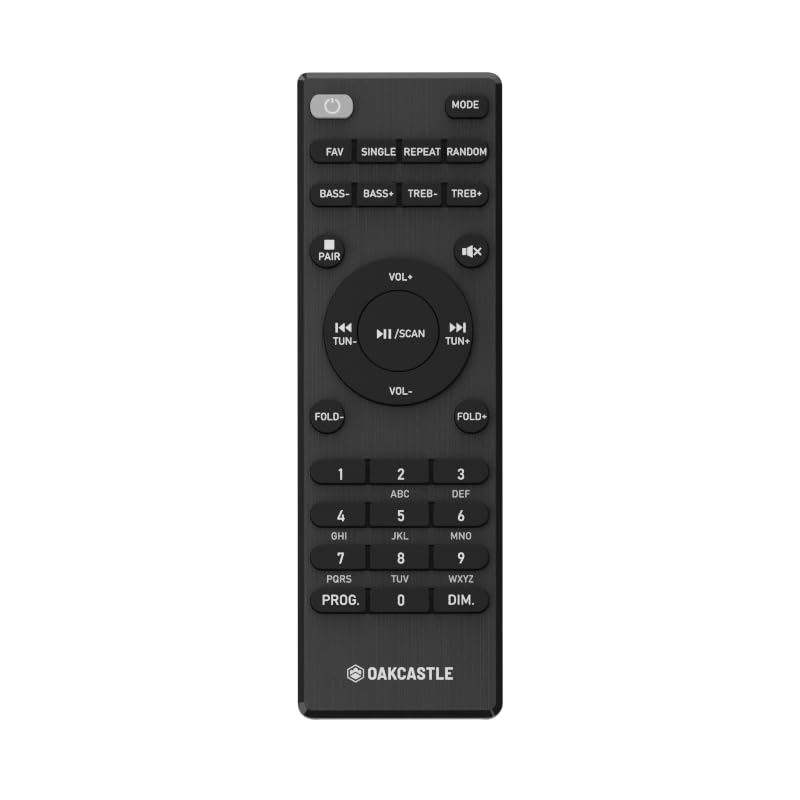
Kuva 1.1: Edessä view of the Oakcastle HIFI500 Remote Control. This image displays the compact design and button layout, including power, volume, source selection, and playback controls, typical for operating the HIFI500 audio system.
2. Asennus
2.1. Akun asennus
The Oakcastle HIFI500 Remote Control requires two AAA batteries (not included) for operation. Follow these steps to install the batteries:
- Paikanna paristolokero kaukosäätimen takana.
- Paina kielekettä alas ja liu'uta akkukotelon kantta alaspäin avataksesi sen.
- Aseta kaksi AAA-paristoa paikoilleen varmistaen, että positiiviset (+) ja negatiiviset (-) navat ovat oikein lokeron sisällä olevien merkintöjen kanssa.
- Liu'uta akun kansi takaisin paikalleen, kunnes se napsahtaa tukevasti.
Huomautus: Käytä aina uusia paristoja ja hävitä vanhat paristot vastuullisesti. Älä sekoita vanhoja ja uusia paristoja tai erityyppisiä paristoja.
2.2. Ensimmäinen käyttökerta
Once batteries are installed, the remote control is ready for use with your Oakcastle HIFI500 audio system. Point the remote directly at the infrared (IR) receiver on your HIFI500 system. No additional pairing is typically required for this replacement remote.
3. Kaukosäätimen käyttö
The Oakcastle HIFI500 Remote Control provides full functionality for your HIFI500 audio system. Below is a general guide to common button functions:
- Virtanappi (⏻): Turns the HIFI500 system on or off.
- Äänenvoimakkuus ylös/alas (Vol+ / Vol-): Säätää äänen ulostulon tasoa.
- Mykistä (🔇): Mykistää äänentoiston väliaikaisesti.
- Source/Input (Lähde): Cycles through available audio inputs (e.g., CD, FM, Bluetooth, AUX).
- Toiston ohjaimet (▶ / ⏸ / ⏹ / ⏪ / ⏩): Controls media playback (Play, Pause, Stop, Rewind, Fast Forward) for compatible sources like CD or USB.
- Navigointipainikkeet (▲ / ▼ / ◀ / ▶): Used to navigate menus and selections on the HIFI500 system display.
- OK/Enter-painike: Vahvistaa valinnat.
- Numeronäppäimistö (0-9): For direct input of radio frequencies, track numbers, or other numerical data.
Refer to your Oakcastle HIFI500 audio system's main user manual for specific functions and advanced operations.
4. Huolto
4.1. Puhdistus
Puhdista kaukosäädin pyyhkimällä pinta varovasti pehmeällä, kuivalla liinalla. Pinttyneeseen likaan pyyhi kevyestiampPyyhi liina vedellä tai miedolla, hankaamattomalla puhdistusaineella. Vältä voimakkaiden kemikaalien, liuottimien tai hankaavien materiaalien käyttöä, sillä ne voivat vahingoittaa kaukosäätimen pintakäsittelyä tai sisäisiä komponentteja.
4.2. Pariston vaihto
Replace batteries when the remote's response becomes sluggish or stops working. Follow the battery installation steps outlined in Section 2.1. Always replace both batteries simultaneously with new ones.
4.3. Varastointi
When not in use for extended periods, it is recommended to remove the batteries from the remote control to prevent leakage, which can cause damage. Store the remote in a cool, dry place away from direct sunlight and extreme temperatures.
5. Vianmääritys
If you encounter issues with your Oakcastle HIFI500 Remote Control, please refer to the following common problems and solutions:
- Kaukosäädin ei vastaa:
- Tarkista, että paristot on asennettu oikein ja oikea napaisuus.
- Vaihda paristot uusiin.
- Ensure there are no obstructions between the remote control and the HIFI500 system's IR receiver.
- Make sure you are within the effective range and pointing the remote directly at the HIFI500 system.
- Jaksottainen toiminto:
- Tämä viittaa usein paristojen alhaiseen varaukseen. Vaihda paristot.
- Ensure the remote's IR emitter is clean and free from dirt or smudges.
If the problem persists after trying these solutions, please contact Oakcastle customer support.
6. Tekniset tiedot
| Ominaisuus | Erittely |
|---|---|
| Malli | HIFI500 Remote Control |
| Merkki | Oakcastle |
| Yhteystekniikka | Infrapuna (IR) |
| Virtalähde | 2 x AAA paristot (ei mukana) |
| Tuettujen laitteiden enimmäismäärä | 1 (Oakcastle HIFI500 Audio System) |
| Erikoisominaisuus | Kevyt |
| Tuotteen paino | 2.82 unssia (noin 80 grammaa) |
| Pakkauksen mitat | 8 x 3.2 x 2.5 tuumaa (noin 20.3 x 8.1 x 6.3 cm) |
| Valmistaja | ENEMMISTÖ |
7. Takuu ja tuki
7.1. Takuutiedot
This Oakcastle HIFI500 Remote Control is covered by a manufacturer's warranty. Please refer to the warranty card included with your original Oakcastle HIFI500 audio system or visit the official Oakcastle webTarkemmat takuuehdot löytyvät sivustolta. Säilytä ostokuitti takuuvaatimuksia varten.
7.2. Asiakastuki
For technical assistance, troubleshooting beyond this manual, or warranty inquiries, please contact Oakcastle customer support. You can typically find contact information, including phone numbers, email addresses, and support portals, on the official Oakcastle websivusto.
Please have your product model (HIFI500 Remote Control) and purchase details ready when contacting support.