
1. Johdanto
This manual provides detailed instructions for the safe and efficient use of your Tera P06 EV Charger. Please read this manual thoroughly before operating the device and retain it for future reference.
1.1 Tuote ohiview
The Tera P06 is a portable EV charger designed for Tesla vehicles, offering both Level 1 (110V 12A) and Level 2 (240V 40A) charging capabilities. It features a compact design, a large 2.8-inch display, and advanced safety protections, including IP66 waterproofing.

Figure 1.1: Tera P06 EV Charger with its NACS connector and NEMA 14-50 plug, alongside a smartphone displaying the charging app interface.
1.2 Turvallisuustiedot
Your Tera P06 EV Charger is ETL and FCC certified, ensuring compliance with safety standards. It incorporates multiple protection mechanisms for safe operation:
- Under/Over-voltage suojaus
- Ylikuormitussuoja
- Ylikuumenemissuoja
- Maadoitus
- Maavuotosuojaus
- Emergency stop safeguards
The charger is designed with an IP66 waterproof rating, allowing it to function reliably even when exposed to water. It operates effectively in temperatures ranging from -22°F to +122°F.

Figure 1.2: The Tera P06 EV Charger undergoing a waterproof test, highlighting its IP66 rating and robust design.
2. Mitä laatikossa on
Pura pakkausta pakkauksesta ja varmista, että kaikki seuraavat osat ovat mukana:
- EV Charger P06 x1
- NEMA 5-15P to 14-50R Adapter Cord x1
- Käyttöohje x1
- Kaapelin pidike x1
- Wall Mount Box Holder x1
- Cable Holder Screw Kit x1

Figure 2.1: All components included in the Tera P06 EV Charger package, such as the charger unit, NEMA adapter, and mounting accessories.
3. Asennus
3.1 Yhteensopivuus
The Tera P06 EV Charger is designed for seamless compatibility with all Tesla models, including Model Y, Model 3, Model S, and Model X.

Figure 3.1: The Tera P06 EV Charger is compatible with various Tesla models, including the Model Y, Model 3, Model S, and Model X.
3.2 Virtaliitäntä
The charger supports both Level 1 and Level 2 charging:
- Tason 2 lataus: Use the NEMA 14-50 plug for 240V 40A charging. This provides up to 9.6kW of power, significantly reducing charging times.
- Tason 1 lataus: Utilize the included NEMA 5-15P to 14-50R adapter cable for 110V 12A charging. This option is suitable for standard household outlets.
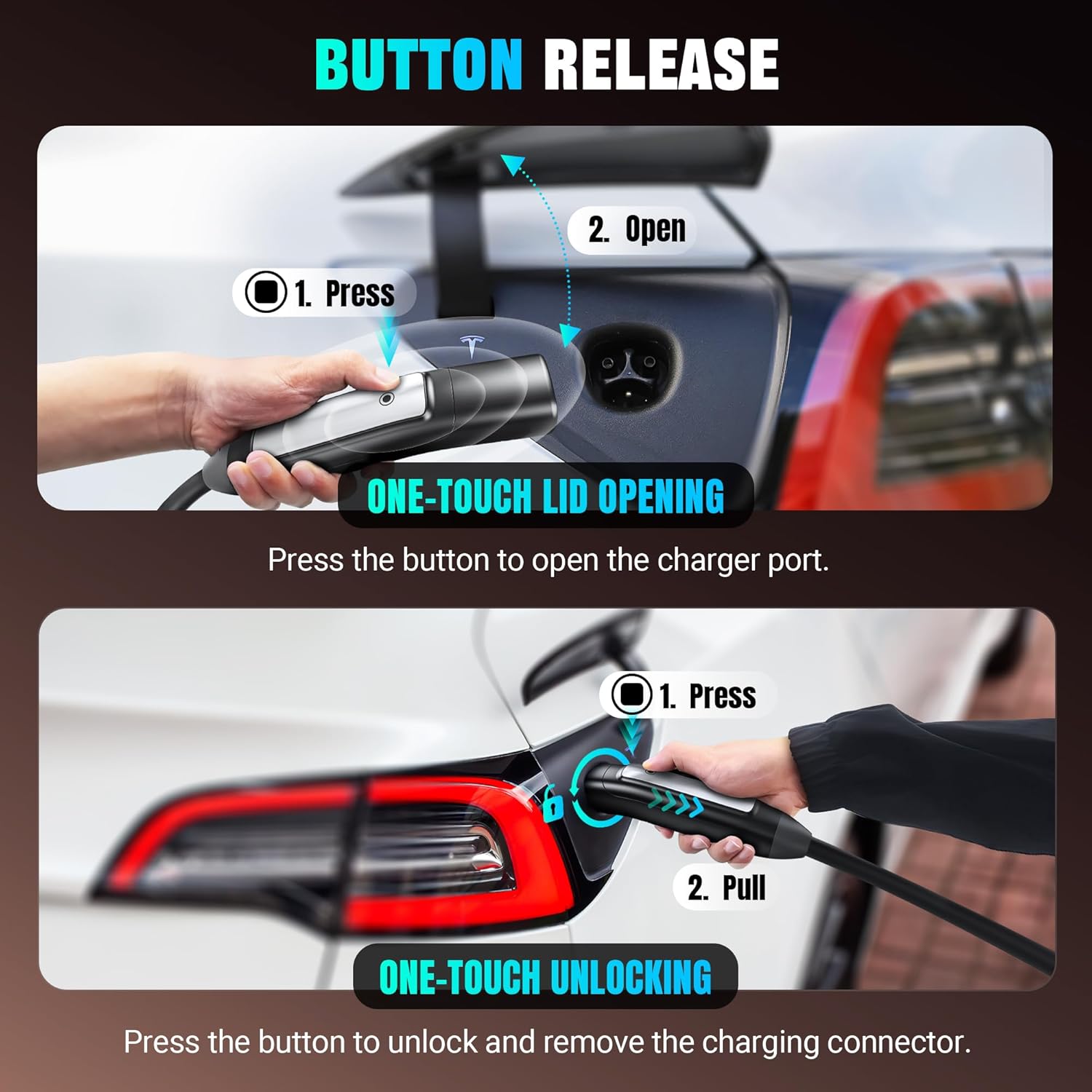
Figure 3.2: The charger's versatility is shown with its support for both NEMA 5-15P (Level 1) and NEMA 14-50P (Level 2) power connections.
3.3 Kiinnitys (valinnainen)
For convenient storage and access, use the provided Cable Holder and Wall Mount Box Holder with the Cable Holder Screw Kit to secure the charger and cable near your charging location.
4. Käyttöohjeet
4.1 Yhdistäminen ajoneuvoosi
Insert the NACS connector into your Tesla's charging port. The charger features a button on the handle for one-touch lid opening and unlocking of the charging connector.

Figure 4.1: Demonstrating the one-touch button release feature for opening the Tesla charge port and subsequently unlocking the charging connector.
4.2 Using the Display and Controls
The 2.8-inch display provides real-time charging data, including current, time, and power. Use the integrated buttons to adjust settings.

Figure 4.2: The charger's 2.8-inch LCD screen, showing options for adjusting charging current (16A, 24A, 32A, 40A) and setting delayed charging times.
- Säädettävä virta: Select charging current from 16A, 24A, 32A, or 40A to match your vehicle's needs and power source capacity.
- Delayed Charging: Schedule charging sessions for 1H, 4H, 8H, or 12H to take advantage sähkön ruuhka-ajan ulkopuolella.
4.3 Smart App Control
The Tera P06 supports control via a smart app (e.g., Smart Life app). This allows for:
- Scheduling charging sessions.
- Real-time monitoring of charging status.
- Tracking charging expenses.
- Receiving charge notifications.
- Accessing historical charging records.

Figure 4.3: Screenshots of the Smart Life app, illustrating features like schedule charging, current adjustment, and charging records.
5. Huolto
The Tera P06 EV Charger is designed for durability and minimal maintenance. Its IP66 waterproof rating ensures protection against dust and water ingress.
5.1 Yleishoito
- Keep the charging cable neatly coiled when not in use to prevent kinks or damage.
- Regularly inspect the cable and connectors for any signs of wear, damage, or corrosion.
- Clean the charger unit and cable with a soft, damp kangas. Vältä kovien kemikaalien tai hankaavien materiaalien käyttöä.
- Ensure the charging port on your vehicle is clean and free of debris before connecting the charger.
5.2 Durability Test
The charger's robust construction is demonstrated through rigorous testing, including resistance to physical impact.
Video 5.1: A demonstration of the Tera P06 EV Charger's durability, showing its ability to withstand a vehicle crush test.
6. Vianmääritys
If you encounter issues with your Tera P06 EV Charger, refer to the following common scenarios. The charger's display provides visual indicators for different operational states and potential errors.

Figure 6.1: The charger's display indicates various states: Standby (blue light), Charging (green light, flashing when charging), and Error (red light, indicating an issue like 'Adhesion').
6.1 Yleiset ongelmat ja ratkaisut
- Laturi ei käynnisty: Ensure the NEMA 14-50 or 5-15P plug is securely connected to a live outlet. Check the circuit breaker.
- Ajoneuvo ei lataudu: Verify the NACS connector is fully inserted into the vehicle's charging port. Check the charger's display for error messages (e.g., 'Adhesion' or 'Charging equipment not recognized'). Try disconnecting and reconnecting.
- Hidas lataus: Confirm the selected current setting on the charger's display or via the app. Ensure your power outlet can support the desired ampkorotus.
- Ylikuumenemissuoja: If the charger feels excessively hot and stops charging, it may have activated over-temperature protection. Allow it to cool down in a well-ventilated area before resuming use.
- Sovellusten yhteysongelmat: Ensure your smartphone has a stable internet connection and Bluetooth is enabled. Restart the app and the charger if necessary.
Jatkuvien ongelmien osalta katso tukiosiota.
7. Tekniset tiedot
| Ominaisuus | Yksityiskohta |
|---|---|
| Mallinumero | P06 |
| Charging Levels Supported | Level 1 (110V 12A), Level 2 (240V 40A) |
| Suurin teho | 9.6 kW (Level 2) |
| Liittimen tyyppi | NACS |
| Pistoketyyppi | NEMA 14-50 (with NEMA 5-15P to 14-50R adapter) |
| Kaapelin pituus | 25 jalkaa |
| Näytön koko | 2.8 tuumaa |
| Vesitiivis luokitus | IP66 |
| Käyttölämpötila | -22°F - +122°F |
| Sertifikaatit | ETL, FCC |
| Mitat (P x L x K) | 10.2 cm x 3.96 cm x 2.07 cm |
| Tuotteen paino | 8 lbs (charger unit), 13.04 lbs (package) |
8. Takuu ja tuki
Tera is a US-based brand with over 20 years of legacy, committed to providing reliable products and excellent customer service.
8.1 Tekninen tuki
For any technical assistance, troubleshooting, or inquiries, Tera offers local email and phone support within the United States. Please refer to the product packaging or the official Tera websivustolta ajantasaisimmat yhteystiedot.
8.2 Takuutiedot
Specific warranty details, including coverage period and terms, are provided with your product documentation. Please retain your proof of purchase for warranty claims.