
1. Johdanto
This manual provides detailed instructions for the installation, operation, and maintenance of your ANNKE AU-DT81DX200-V1 4K 8-Channel Digital Video Recorder (DVR). This DVR is designed for security surveillance systems, offering 4K (8MP) high-definition live viewing and recording capabilities. It features advanced H.265+ video compression, AI human/vehicle detection, and supports various camera types for flexible integration.

Image 1.1: The ANNKE 4K 8CH DVR connected to a display, illustrating its 4K Ultra HD video capability.
2. Pakkauksen sisältö
Verify that all items listed below are included in your package. If any items are missing or damaged, contact ANNKE customer support.
- 1x ANNKE 4K 8CH DVR with 2TB Hard Drive
- 1x 5.9 ft/1.8 m HDMI Cable
- 1x 3.2 ft/1 m Ethernet Cable
- 1x virtalähde
- 1x USB-hiiri
- 1x Käyttöohje (tämä asiakirja)
- 1x Wall Sticker

Image 2.1: Visual representation of all components included in the ANNKE 4K 8CH DVR package.
3. Järjestelmä ohiview
The ANNKE AU-DT81DX200-V1 DVR is a hybrid 5-in-1 system, supporting various camera technologies. It can operate in two primary modes:
- DVR-tila: Supports up to 8 BNC (TVI/AHD/CVI/CVBS) cameras and an additional 4 IP cameras.
- NVR Mode: Can be configured to support up to 12 IP cameras exclusively.
This flexibility allows for integration with existing analog systems while providing options for future IP camera expansion.
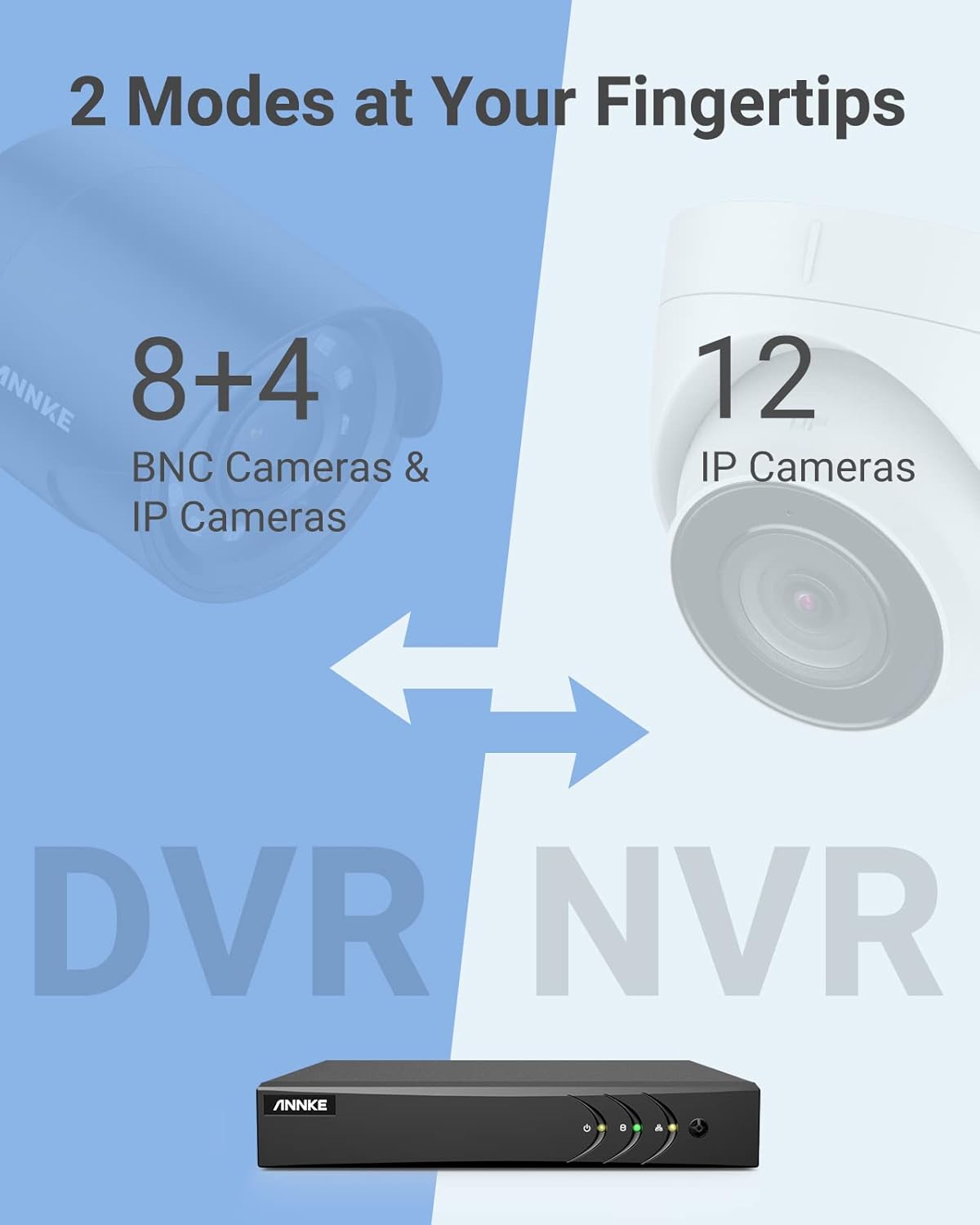
Image 3.1: Illustration of the DVR's dual operational modes, supporting both BNC and IP cameras or IP cameras exclusively.
4. Asennusopas
4.1 Fyysinen kokoonpano
- Yhdistä kamerat: Connect your security cameras to the BNC video input ports on the back of the DVR. For IP cameras, connect them to your network switch/router, and ensure the DVR is also connected to the same network via the Ethernet cable.
- Yhdistä näyttö: Liitä näyttö DVR-tallentimen HDMI- tai VGA-lähtöporttiin mukana toimitetulla HDMI-kaapelilla tai VGA-kaapelilla (ei sisälly toimitukseen).
- Liitä USB-hiiri: Kytke USB-hiiri johonkin DVR-tallentimen USB-porteista.
- Liitä virta: Kytke virtalähde DVR-tallentimen virtalähteeseen ja kytke se sitten pistorasiaan. DVR käynnistyy automaattisesti.
4.2 Alkukokoonpano
Ensimmäisen käynnistyksen yhteydessä DVR opastaa sinua alkuasennustoiminnon läpi. Noudata näytön ohjeita seuraavasti:
- Määritä vahva salasana järjestelmänvalvojan tilille.
- Configure network settings (DHCP is recommended for most users).
- Aseta päivämäärä ja aika.
- Scan and add IP cameras if applicable.
5. DVR:n käyttö
5.1 Livenä View
Alkuasetusten jälkeen DVR näyttää reaaliaikaista kuvaa view from connected cameras. Use the USB mouse to navigate the interface. Right-click to access the main menu.
5.2 Tallennus
The DVR is pre-configured for continuous recording. You can customize recording schedules, motion-triggered recording, or alarm-triggered recording via the main menu under Tallenna > Aikataulu.
5.3 Toisto
Uudelleenview tallennettu footage:
- Livenä view, napsauta hiiren kakkospainikkeella ja valitse Toisto.
- Select the desired camera(s) and date.
- Use the timeline to navigate through recordings. Events (like motion detection) are often marked on the timeline for quick access.

Image 5.1: The DVR's playback interface, demonstrating how to locate and review recorded events on a timeline.
6. Lisäominaisuudet
6.1 AI Human/Vehicle Detection
The DVR incorporates deep learning-based motion detection 2.0, which can differentiate between human and vehicle movements. This significantly reduces false alarms caused by environmental factors such as leaves or light changes.
- Kokoonpano: Enable and configure AI detection for each analog channel via the main menu under AI > Motion Detection 2.0.
- Smart Events: Supports line crossing and intrusion detection for specific areas.
- Hälytykset: Configure the DVR to send app push notifications, email alerts, or trigger a buzzer when human or vehicle motion is detected.
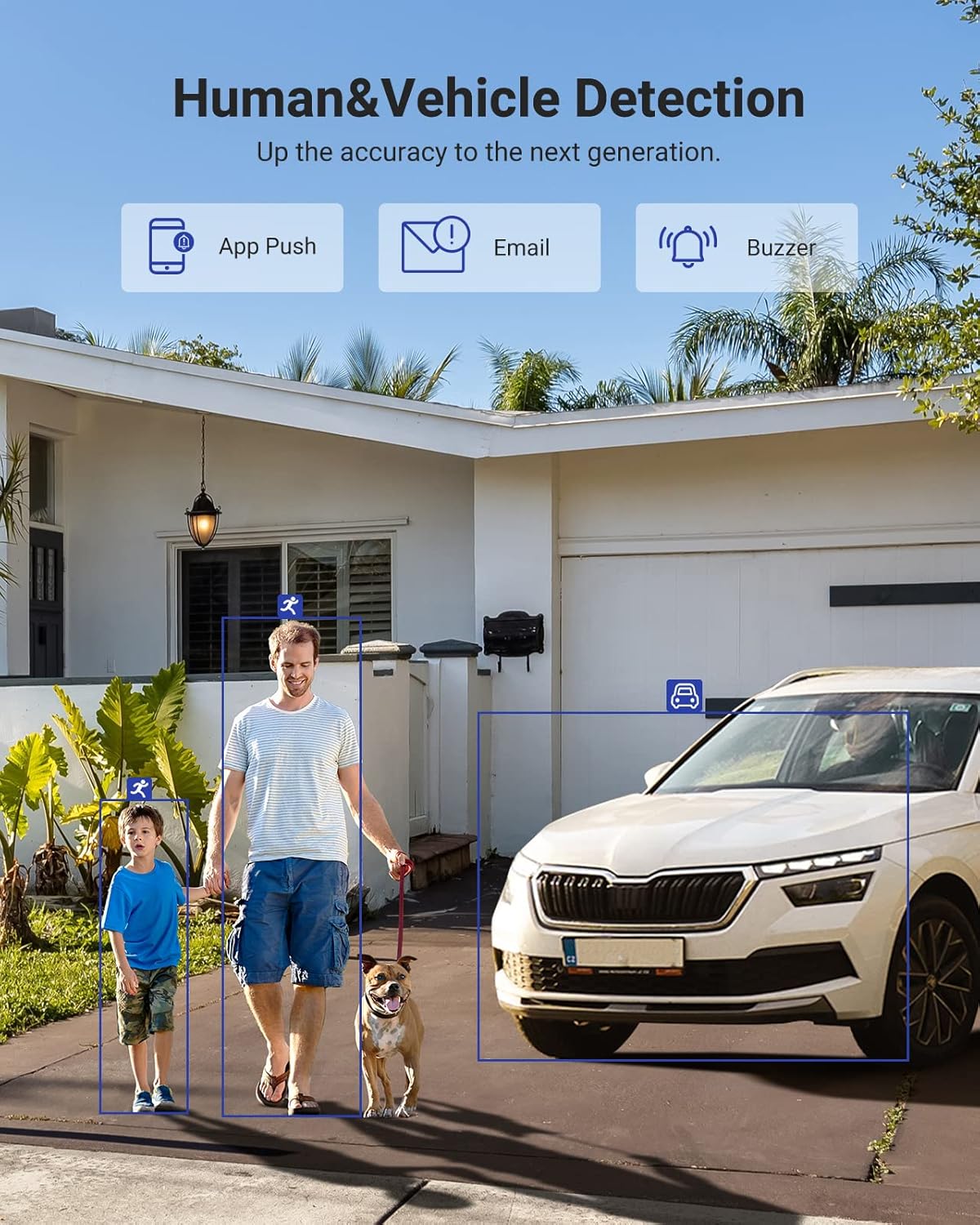
Image 6.1: Visual demonstration of the AI human and vehicle detection capability, showing how the system identifies and distinguishes between people and vehicles.
6.2 Etäkäyttö
Access your DVR remotely from anywhere using the ANNKE Vision App or a web selain.
- ANNKE Vision App: Download the app from the App Store (iOS) or Google Play Store (Android). Register an account and add your DVR by scanning the QR code or entering its serial number.
- Web Selain: Access the DVR's web käyttöliittymä syöttämällä sen IP-osoite kohtaan a web selain tietokoneellasi.
- Yhteensopivuus: The system is compatible with various devices including smartphones, tablets, laptops, and personal computers. It also supports integration with Alexa for voice control.

Image 6.2: Remote access via the ANNKE Vision App, showing compatibility with mobile devices and Alexa.
7. Videonhallinta
7.1 H.265+ Video Compression
The DVR utilizes advanced H.265+ video compression technology. This technology significantly reduces file sizes, saving up to 80% of storage space compared to H.264 compression, while maintaining video quality. This allows for longer recording durations on the same 2TB hard drive.

Image 7.1: Comparison illustrating the storage efficiency of H.265+ compression versus H.264.
8. Yhteensopivuus
The ANNKE AU-DT81DX200-V1 is a versatile 5-in-1 hybrid DVR, designed to be compatible with a wide range of security cameras:
- HD TVI Input: Supports 8 MP@15 fps, 5 MP@20 fps, 3K@20 fps, 4 MP@30 fps.
- AHD Input: Supports 5 MP@20 fps, 4 MP@30 fps, 1080p@25 fps, 1080p@30 fps.
- HD CVI Input: Supports 4 MP@30 fps, 4 MP@25 fps, 1080p@25 fps, 1080p@30 fps.
- CVBS-tulo: Supports PAL/NTSC standards.
- IPC Input: Supports up to 8MP IP cameras.
This broad compatibility ensures that the DVR can integrate with both older analog cameras and modern IP cameras, providing a flexible upgrade path for existing surveillance systems.

Image 8.1: The DVR's compatibility with various camera technologies, including TVI, CVI, AHD, and IP cameras.
9. Tekniset tiedot
| Ominaisuus | Erittely |
|---|---|
| Merkki | ANNKE |
| Mallinumero | AU-DT81DX200-V1 |
| Yhteystekniikka | Langallinen |
| Videon sieppaustarkkuus | 4K (8MP) |
| Kanavien lukumäärä | 8 (Analog) + 4 (IP) or 12 (IP) |
| Videon pakkaus | H.265 Pro+/H.265 Pro/H.265/H.264+/H.264 |
| Tuetut kameratyypit | TVI, AHD, CVI, CVBS, IPC |
| AI-ominaisuudet | Human Detection, Vehicle Detection, Line Crossing, Intrusion Detection |
| Muistin tallennuskapasiteetti | 2 TB HDD (Up to 10 TB supported) |
| Etäkäyttö | ANNKE Vision App, Web Selain |
| Yhteensopivat laitteet | Cameras, Laptops, Personal Computers, Smartphones, Tablets |
| Virtalähde | Johdollinen sähkö |
| Väri | Musta |
| Tuotteen mitat | 17.13 x 12.4 x 3.86 tuumaa |
10. Huolto
Regular maintenance ensures optimal performance and longevity of your DVR system.
- Puhdistus: Pidä DVR-laite pölyttömänä. Puhdista ulkopinta pehmeällä, kuivalla liinalla. Älä käytä nestemäisiä puhdistusaineita.
- Ilmanvaihto: Ensure the DVR is placed in a well-ventilated area to prevent overheating. Do not block ventilation openings.
- Laiteohjelmistopäivitykset: Periodically check the ANNKE official website for firmware updates. Keeping your DVR's firmware updated can improve performance, add new features, and enhance security.
- Tietojen varmuuskopiointi: Varmuuskopioi säännöllisesti tärkeät videotiedostottage to an external storage device.
- Kiintolevyn kunto: The DVR's menu may offer options to check the health status of the installed hard drive. Monitor this periodically.
11. Vianmääritys
Tässä osiossa käsitellään yleisiä ongelmia, joita saatat kohdata DVR-tallentimen kanssa.
- Ei videolähtöä:
- Tarkista sekä DVR:n että näytön HDMI/VGA-kaapeliliitännät.
- Varmista, että näyttö on asetettu oikealle tulolähteelle.
- Verify the DVR is powered on (power indicator light should be active).
- Ei kameranäyttöä:
- Check camera power supply and video cable connections.
- For IP cameras, ensure they are on the same network as the DVR and properly added in the DVR's camera management settings.
- Varmista kameran yhteensopivuus digitaalisen tallentimen kanssa (katso kohta 8).
- Etäkäyttö ei toimi:
- Varmista, että DVR on yhteydessä internetiin.
- Check network settings on the DVR (e.g., DHCP enabled, correct IP address).
- Verify the ANNKE Vision App is updated to the latest version.
- Ensure the DVR is properly added to your ANNKE Vision account.
- Väärä liiketunnistushälytykset:
- Adjust the sensitivity of motion detection in the DVR settings.
- Utilize the AI Human/Vehicle Detection feature (Section 6.1) to filter out irrelevant movements.
- Define specific detection zones to exclude areas with frequent non-threatening movement.
If you continue to experience issues, please contact ANNKE customer support.
12. Takuu ja tuki
ANNKE products typically come with a limited warranty. Please refer to the warranty card included in your package or visit the official ANNKE websivustolta tarkemmat takuuehdot omalle alueellesi.
For technical support, product inquiries, or warranty claims, please contact ANNKE customer service through their official website or the contact information provided in your product documentation. Have your model number (AU-DT81DX200-V1) and purchase details ready when contacting support.
ANNKE Official Websivusto: www.annke.com