
Johdanto
The KZ AN01 5.4 Bluetooth Module Earhook Adapter is designed to transform your compatible wired in-ear monitors (IEMs) into wireless Bluetooth earphones. It integrates advanced features such as Active Noise Cancellation (ANC), Transparency Mode, Bluetooth 5.4 connectivity, and high-definition LDAC audio decoding to provide an enhanced and versatile listening experience. This manual provides comprehensive instructions for the setup, operation, and maintenance of your device to ensure optimal performance and longevity.
Pakkauksen sisältö
- KZ AN01 Bluetooth Earhook Adapters (Left and Right)
- Langaton latauskotelo
- Käyttöopas
Asennus
1. Attaching to Earphones
Carefully connect your compatible wired in-ear monitors (IEMs) to the KZ AN01 earhook adapters. Ensure the connectors are aligned correctly and gently push them into place to avoid damage. The earhook design is intended to provide a secure and comfortable fit over your ears.
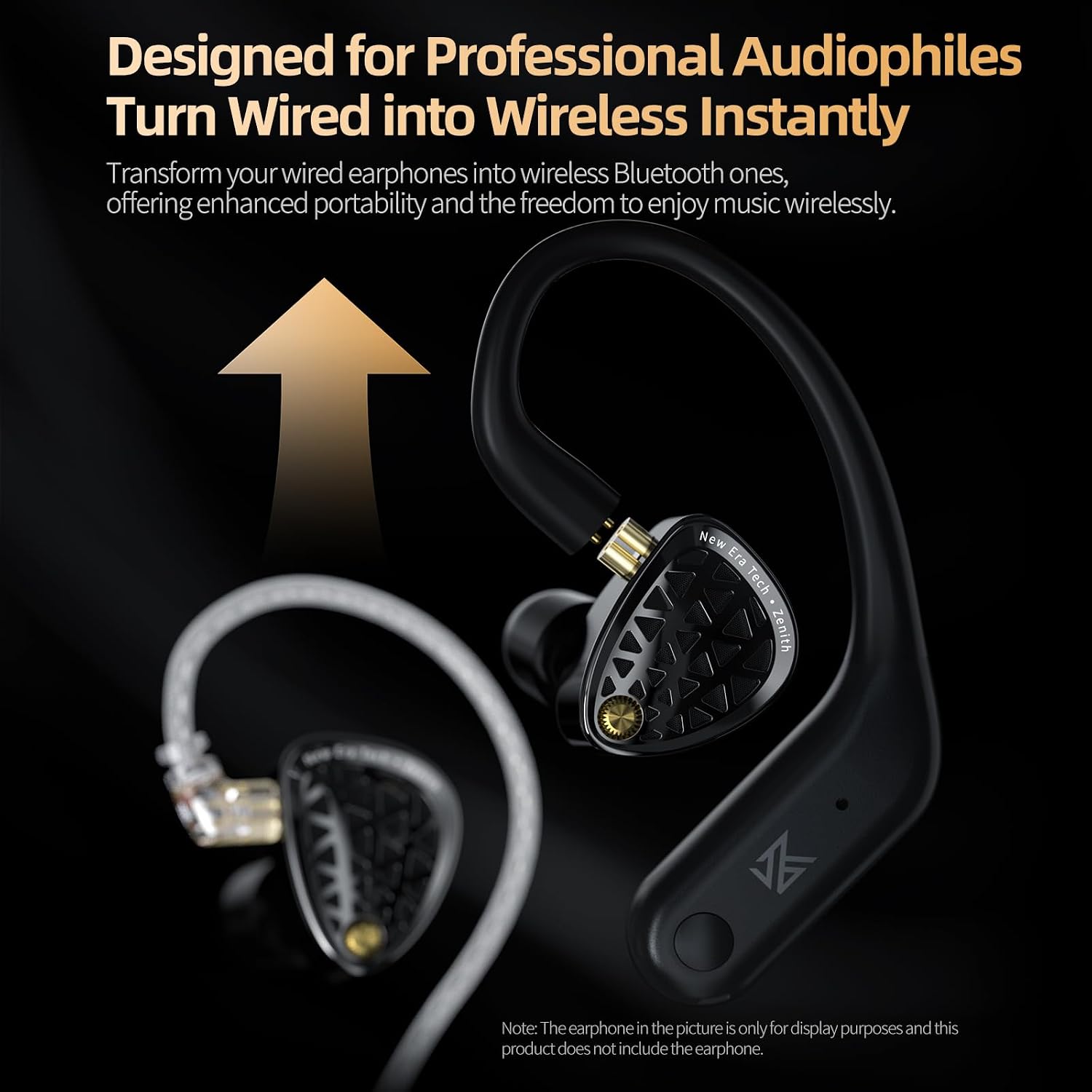
Image: The KZ AN01 earhook adapter shown connected to an in-ear monitor, illustrating how to transform wired earphones into wireless ones.
2. Alkulataus
Before the first use, place both earhook adapters into the charging case. Connect the charging case to a compatible USB power source using the provided cable. Allow the case and adapters to charge fully. The LED indicator on the charging case will illuminate to show the charging status and turn off or change color when fully charged.

Image: The KZ AN01 earhook adapters resting in their charging case, with a green light indicating charging or full battery.
Käyttöohjeet
Virta päälle/pois
- Virta päälle: Open the charging case, or press and hold the touch area on each earhook adapter for approximately 3 seconds until you hear a power-on prompt.
- Virta pois: Place the earhook adapters back into the charging case and close the lid, or press and hold the touch area on each earhook adapter for approximately 5 seconds until you hear a power-off prompt.
Bluetooth-pariliitos
- Ensure the earhook adapters are powered on and in pairing mode (typically indicated by a flashing LED).
- On your device (smartphone, tablet, computer, etc.), enable Bluetooth and search for available devices.
- Select "KZ AN01" from the list of found devices to initiate the connection.
- Once successfully connected, you will hear an audible confirmation tone, and the LED indicator on the earhook adapters will stop flashing.
Kosketa Ohjaustoiminnot
The KZ AN01 features intuitive touch controls located on each earhook adapter. Please note that some functions may vary slightly depending on the operating system and specific capabilities of your connected device.
| Toiminta | Toiminto |
|---|---|
| Yksi napautus (vasen tai oikea) | Toista/keskeytä musiikki, vastaa/lopeta puhelu |
| Double Tap Left Earhook | Edellinen kappale |
| Double Tap Right Earhook | Seuraava kappale |
| Triple Tap (Left or Right) | Switch between Game Mode / Standard Mode |
| Press and Hold Left Earhook (2 seconds) | Switch between Transparency Mode / ANC Mode |
| Press and Hold Right Earhook (2 seconds) | Aktivoi ääniapuri (Siri, Google Assistant) |
| Press and Hold (during incoming call) | Hylkää puhelu |

Image: A visual representation of the touch control areas and their corresponding functions on the KZ AN01 earhook adapters.
ANC (Active Noise Cancellation) Mode
Activate ANC mode to significantly reduce ambient noise. This mode is particularly effective in environments with continuous low-frequency sounds, such as during air travel, train commutes, or in busy offices. The AN01 utilizes a dedicated DSP chip and four microphones to precisely capture and counteract unwanted background noise, providing a more immersive audio experience.

Image: The KZ AN01 earhook adapters and charging case, emphasizing the Active Noise Cancellation (ANC) feature.
Läpinäkyvyystila
Switch to Transparency Mode to allow external sounds to be heard clearly through your earphones without needing to remove them. This feature enhances situational awareness and safety, making it ideal for activities like cycling, walking in urban areas, or engaging in quick conversations without interruption to your audio playback.

Image: Illustrations of individuals using the KZ AN01 earhook adapters in different settings (commuting, cycling, conversing), demonstrating the utility of Transparency Mode.
Puhelutoiminnot
The KZ AN01 is equipped with four high-quality microphones and AI-powered noise reduction technology to ensure crystal-clear calls, even in challenging noisy environments. Use the single tap function to answer or end calls, and press and hold to reject incoming calls. This system filters out background noise, allowing your voice to be transmitted clearly.

Image: An internal diagram of the KZ AN01 earhook adapter, highlighting the placement of its four microphones and the Bluetooth 5.4 chip, which contribute to clear call quality.
Ominaisuudet yliview
- Langaton vapaus: Effortlessly converts your wired earphones to wireless, providing unparalleled convenience and freedom of movement without compromising audio quality.
- Advanced Active Noise Cancellation (ANC): Features a dedicated DSP chip and four high-quality microphones to effectively block unwanted background noise, ensuring an immersive and undisturbed audio experience.
- Bluetooth 5.4 -yhteydet: Offers a stable, fast, and energy-efficient wireless connection with minimal latency and a reliable operating range of up to 15 meters, suitable for music, gaming, and voice calls.
- Läpinäkyvyystila: Allows you to hear external sounds clearly, enhancing situational awareness and safety in various environments, and facilitating easy conversations.
- Kristallinkirkkaat puhelut: Equipped with four microphones and AI-powered noise reduction, ensuring your voice is transmitted clearly and naturally, even in noisy surroundings.
- LDAC High-Definition Audio Decoding: Supports LDAC for lossless-quality sound transmission, delivering a superior audio experience with rich detail and fidelity compared to standard Bluetooth codecs.

Image: A graphic explaining LDAC High-Definition Audio Decoding and its benefit of delivering lossless-quality sound.
Tekniset tiedot
| Ominaisuus | Yksityiskohta |
|---|---|
| Mallin nimi | AN01 |
| Bluetooth-versio | 5.4 |
| Bluetooth-alue | Jopa 15 metriä |
| Korvakoukun akun kapasiteetti | 50mAh (kukin) |
| Latauskotelon akun kapasiteetti | 400 mAh |
| Toistoaika | Approximately 8 hours (earhooks), up to 40 hours with charging case |
| Valvontamenetelmä | Kosketa |
| Melunhallinta | Aktiivinen melunvaimennus |
| Erikoisominaisuudet | Active Noise Cancellation, Transparency Mode, LDAC Audio |
| Mikrofonit | 4 (with AI Noise Reduction for calls) |
| Impedanssi | 16 ohmia |
| Taajuusalue | 20 Hz–20,000 XNUMX Hz |
| Vedenkestävyys | Vedenpitävä |
| Materiaali | Muovinen silikoni |
| Pakkauksen mitat | 8 x 8 x 5 cm; 60 g |

Image: A diagram detailing the product specifications, including model number, Bluetooth version, range, battery capacities for earhooks and charging case, and physical dimensions.
Huolto
- Puhdistus: Use a soft, dry, lint-free cloth to clean the earhook adapters and charging case. Avoid using harsh chemicals, solvents, or abrasive materials, as these can damage the finish or internal components.
- Varastointi: When not in use, always store the earhook adapters in their charging case. This protects them from dust, physical damage, and ensures they remain charged for your next use. Store in a cool, dry place away from direct sunlight and extreme temperatures.
- Akun hoito: To maximize battery lifespan, avoid fully discharging the battery frequently. It is recommended to charge the device regularly, even if it has not been used for an extended period.
- Vedenkestävyys: The device is designed to be waterproof. However, it is not intended for prolonged submersion. Always ensure the charging ports are completely dry before connecting any charging cables to prevent electrical damage.
Vianetsintä
| Ongelma | Mahdollinen ratkaisu |
|---|---|
| Virtaa ei voi käynnistää | Ensure the earhook adapters and charging case are sufficiently charged. Place the adapters in the case and charge the case fully. |
| Laitteen pariliitos ei onnistu. |
|
| Ei ääntä tai matala äänenvoimakkuus |
|
| ANC ei ole tehokas |
|
| Puhelun laatuongelmat |
|
Viralliset tuotevideot
Below are official product videos from the seller demonstrating various features and aspects of KZ products. Please note that some videos may feature related in-ear monitors (IEMs) rather than the exact AN01 adapter itself, but they provide useful context on KZ's product ecosystem and compatible devices.
KZ ZS10 PRO X Earphones Overview
Video: Tämä video tarjoaa yleiskuvanview of the KZ ZS10 PRO X earphones, showcasing their design and features. While not the AN01 adapter itself, it demonstrates compatible earphones from the same brand that the AN01 can make wireless.
KZ ZS12 PRO X IEM Earphones
Video: A presentation of the KZ ZS12 PRO X In-Ear Monitor earphones, offering insights into the quality and design of KZ's audio products, which are compatible with the AN01 adapter.
KZ EDX PRO Unboxing Video
Video: An unboxing video for the KZ EDX PRO earphones, showing the packaging and components typically included with KZ products, demonstrating the type of earphones the AN01 adapter is designed for.
Takuu ja tuki
This product is covered by a standard manufacturer's warranty. For specific warranty details, including coverage period and terms, please refer to any documentation included with your purchase or contact Yinyoo customer support directly. For technical assistance, troubleshooting guidance beyond this manual, or any other inquiries, please visit the official Yinyoo brand store on Amazon or utilize their designated support channels.
Yinyoo Brand Store: Käy myymälässä