
1. Tuote ohiview
The Fanvil V60P is a professional IP phone designed for business communication. It features a color display, programmable keys, and Power over Ethernet (PoE) support for simplified installation and operation. This manual provides essential information for setting up, operating, and maintaining your device.
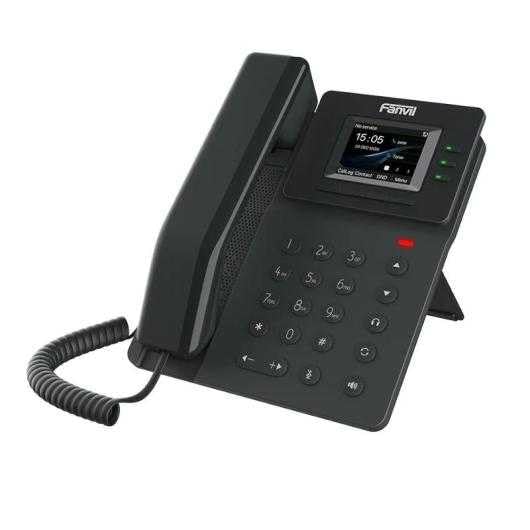
Figure 1: Fanvil V60P Professional IP Phone. This image shows the black IP phone with its handset, color display, and numeric keypad. The display shows "15:05" and menu options.
2. Asennus ja asennus
2.1 Pakkauksen sisältö
Before installation, verify that all items are present in the package:
- Fanvil V60P IP Phone unit
- Luuri ja kierretty johto
- Ethernet-kaapeli
- Seiso
- Pika-asennusopas (jos mukana)
2.2 Fyysinen yhteys
- Kiinnitä teline: Securely attach the desk stand to the back of the phone unit.
- Yhdistä luuri: Kytke kierretyn johdon toinen pää luuriin ja toinen pää puhelimen tukiaseman luuriliitäntään.
- Verkko- ja virtaliitäntä (PoE):
- Liitä Ethernet-kaapelin toinen pää LAN port on the phone.
- Connect the other end of the Ethernet cable to a Power over Ethernet (PoE) enabled switch or injector. The phone will power on automatically.
- Liitä tietokoneeseen (valinnainen): If you need to connect a computer through the phone, connect an Ethernet cable from your PC to the PC port on the phone.
Note: If PoE is not available, a separate power adapter (not included) may be required. Refer to the product specifications for compatible power adapter details.
3. Käyttöohjeet
3.1 Peruspuhelutoiminnot
- Soittaminen:
- Pick up the handset or press the Speakerphone button.
- Soita haluamasi numero näppäimistöllä.
- Paina Soita valintanäppäintä tai odota automaattisen valinnan aikakatkaisua.
- Puheluun vastaaminen:
- Nosta luuri.
- Alternatively, press the Speakerphone button or the Vastaus ohjelmanäppäin.
- Puhelun lopettaminen: Hang up the handset or press the Speakerphone button.
3.2 Using Programmable DSS Keys
The Fanvil V60P features 6 programmable DSS (Direct Station Select) keys. These keys can be configured for various functions such as speed dial, line keys, busy lamp field (BLF), or other custom features as defined by your system administrator.
- To use a programmed DSS key, simply press the corresponding button.
- Configuration of DSS keys is typically done via the phone's web interface or your IP PBX system.
3.3 Local Phonebook
The phone supports a local phonebook with up to 1000 entries.
- Access the phonebook via the Hakemisto or Yhteystiedot näytön valintanäppäintä.
- Use the navigation keys to browse entries.
- Select an entry and press the Soita soft key to initiate a call.
3.4 Äänineuvottelut
The V60P supports local 6-party audio conferencing.
- Establish a call with the first participant.
- Paina Conf soft key. The first participant will be put on hold.
- Dial the number of the second participant and establish the call.
- Paina Conf soft key again to merge all participants into a conference.
- Repeat steps 2-4 to add more participants, up to a total of 6.
4. Huolto
4.1 Laitteen puhdistaminen
To maintain the appearance and functionality of your Fanvil V60P IP Phone (made of plastic material), follow these cleaning guidelines:
- Disconnect the phone from its power source (PoE) before cleaning.
- Käytä pehmeää, hieman damp, lint-free cloth to wipe the surfaces.
- Avoid using harsh chemicals, abrasive cleaners, or solvents, as these can damage the plastic and display.
- Älä suihkuta puhdistusaineita suoraan puhelimeen.
4.2 laiteohjelmistopäivitystä
Firmware updates may be released periodically to improve performance, add features, or fix bugs. Consult your IT administrator or Fanvil's official websivustolta tietoa saatavilla olevista päivityksistä ja asennusohjeet.
5. Vianmääritys
This section addresses common issues you might encounter with your Fanvil V60P IP Phone.
| Ongelma | Mahdollinen syy | Ratkaisu |
|---|---|---|
| Puhelin ei käynnisty. | Ei PoE-yhteyttä tai viallinen Ethernet-kaapeli. | Ensure the Ethernet cable is securely connected to the LAN port and a PoE-enabled switch/injector. Verify the PoE source is active. |
| Ei valintaääntä. | SIP registration failure or network issue. | Check network connectivity. Verify SIP account settings with your IT administrator. Restart the phone. |
| Puheluiden soittaminen/vastaanottaminen ei onnistu. | Network issues, incorrect SIP configuration, or firewall blocking. | Confirm network connection. Check SIP registration status on the phone's display. Contact your IT administrator for network and SIP configuration verification. |
| Huono äänenlaatu. | Network congestion or faulty handset/speaker. | Check network bandwidth and latency. Try using a different handset or speaker mode. If the issue persists, contact support. |
6. Tekniset tiedot
| Ominaisuus | Yksityiskohta |
|---|---|
| Malli | V60P |
| Järjestelmä | Linux |
| Näyttö | 2.4-inch, 320 x 240 Color Screen |
| DSS-avaimet | 6 ohjelmoitavaa näppäintä |
| SIP-linjat | 4 |
| Local Phonebook | 1000 merkintää |
| Luuri | Langallinen luuri |
| Äänineuvottelut | 6-party Local Conference |
| Wideband Codecs | G.722, Opus |
| Kapeakaistaiset koodekit | G.711, G.723.1, G.726, G.729, G.729A, G.729B, G.729AB, iLBC |
| PoE | Kyllä |
| Verkkoportit | 2 x 10/100 Mbps Ethernet Ports |
| EHS Support | Kyllä |
| IPv6-tuki | Kyllä |
| Materiaali | Muovi |
| Mitat (PxLxK) | 15 x 200 x 15 cm |
| Paino | 600 grammaa |
| Soittajan tunnus | Kyllä |
| Monirivinen käyttö | Kyllä |
| Conference Call Functionality | Support Multiple Conferences |
| Standby Duration (if applicable) | 10 tuntia |
7. Takuu ja tuki
7.1 Tuotetakuu
The Fanvil V60P IP Phone comes with a kolmen vuoden takuu valmistusvirheitä vastaanTämä takuu kattaa materiaali- ja valmistusvirheet normaalissa käytössä. Säilytä ostokuitti takuuvaatimuksia varten.
7.2 Tekninen tuki
For technical assistance, troubleshooting beyond this manual, or warranty inquiries, please contact your reseller or Fanvil's official customer support channels. You may need to provide your product model (V60P) and serial number.