
Johdanto
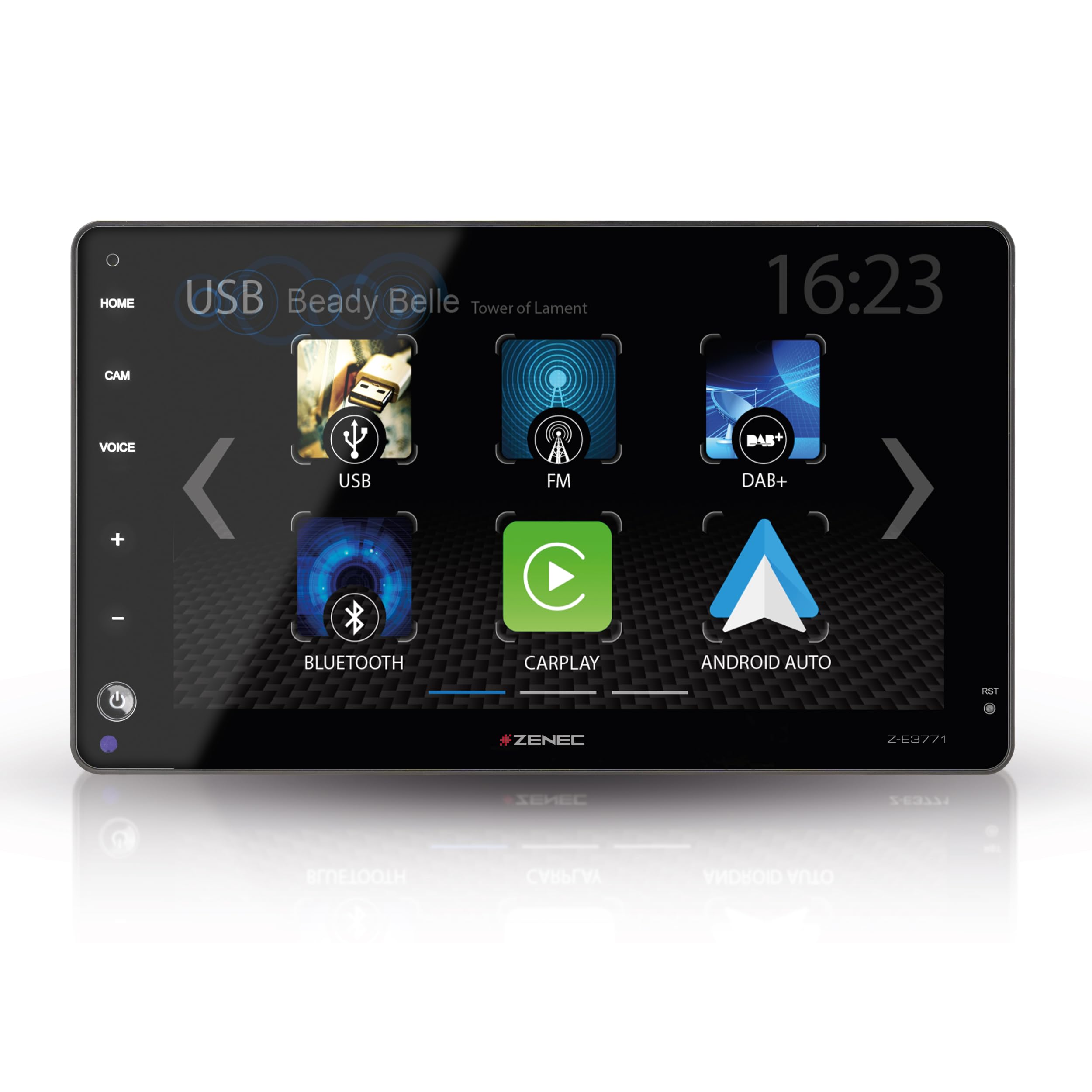
This manual provides detailed instructions for the installation, operation, and maintenance of your ZENEC Z-E3771 multimedia system. Designed for seamless integration into various vehicle models, including Fiat Ducato, Citroën Jumper, Peugeot Boxer, Opel Movano, and Toyota Proace Max, this system offers advanced features such as a 9-inch touchscreen, wireless Android Auto and Apple CarPlay, DAB+ digital radio, and versatile USB connectivity.
Please read this manual thoroughly before using the device to ensure proper operation and to maximize your user experience.
1. Asennus ja asennus
1.1 Ajoneuvojen yhteensopivuus
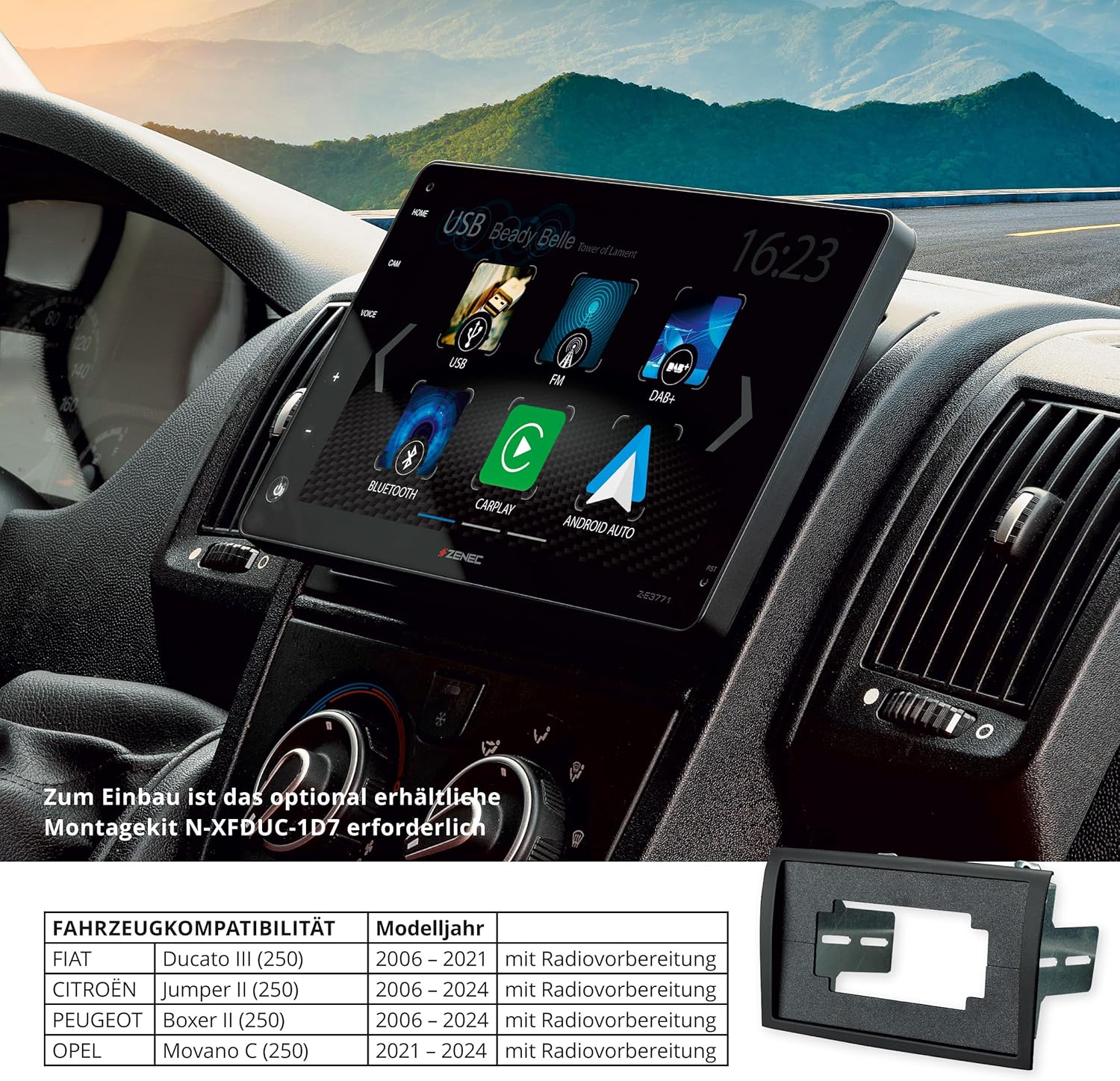
The Z-E3771 is compatible with the following vehicle models. Specific mounting kits may be required for proper integration.
- Fiat Ducato III (Series 8, 9) (Model Year 2021-2024) - Requires mounting kit N-XFDUC-1D8
- Fiat Ducato III (Series 2) (Model Year 2006-2024) - Requires mounting kit N-XFDUC-1D7
- Citroën Jumper II (Series 2) (Model Year 2006-2024) - Requires mounting kit N-XFDUC-1D7
- Peugeot Boxer II (Series 2) (Model Year 2006-2024) - Requires mounting kit N-XFDUC-1D7
- Opel Movano C (Series 2) (Model Year 2021-2024) - Requires mounting kit N-XFDUC-1D8
- Toyota Proace Max (Model Year 2024 onwards) - Requires mounting kit N-XFDUC-1D8
These kits ensure optimal fit and functionality within the vehicle's cockpit, allowing easy operation via touch controls and the capacitive 9-inch touchscreen.
1.2 Laatikon sisältö
Varmista, että pakkauksessa on kaikki osat:
- ZENEC Z-E3771 Multimedia System Unit
- External Hands-Free Microphone
- Analog LFB Adapter (Steering Wheel Control Adapter)
- USB Antenna Adapter
- FM-antennisovitin
- 2 x USB-kaapelit
- Connection Cable (20-pin)
- Connection Cable (24-pin)
- GPS antenni
- 2 x Remote Controls (including maxi remote control)
1.3 Fyysinen asennus
Installation should be performed by a qualified professional. Ensure the vehicle's power is disconnected before beginning installation.
The Z-E3771 features an adjustable display mechanism. The screen's vertical tilt can be adjusted by ±5° (forward/backward), and the vertical display height can be adjusted from 0 to 27.5 mm (up/down) to optimize viewing angle for the driver.


2. Käyttöohjeet
2.1 Touchscreen and User Interface
The Z-E3771 features a capacitive 9-inch touchscreen for intuitive control. The user interface is designed for clear readability and easy navigation. All functions can be controlled via the touchscreen or, where applicable, via voice assistants.

2.2 Wireless Android Auto and Apple CarPlay
The system supports wireless Android Auto and Apple CarPlay. Connect your smartphone wirelessly to access navigation, make calls, send messages, and stream music directly from your phone's interface displayed on the Z-E3771 screen. Control these functions using Siri, Google Assistant, or the touchscreen.


2.3 Radio Functions (DAB+ and FM)
The integrated DAB+ tuner provides high-quality digital radio reception with features such as DAB-DAB following, DLS text, MOT slideshow, and Comfort Scan. An RDS FM tuner is also included for analog radio reception.

2.4 USB-median toisto
Two USB 2.0 ports are available. USB1 and USB2 can be used for audio/video file playback. USB1 also supports smartphone connection for charging and data transfer.

2.5 Bluetooth Hands-Free and Audio Streaming
The integrated Bluetooth module provides excellent voice quality for hands-free calling. It supports importing up to 1000 phonebook contacts with 3 numbers per contact and a search function. A2DP music streaming with AVRCP control from smartphones is also supported.

2.6 Ääniasetukset
The system features a 4 x 50 W amplifier, a 16-band graphic equalizer, and an integrated subwoofer control to fine-tune the audio output for your vehicle. This allows for a perfectly adapted sound experience.

2.7 kameratuloa
The Z-E3771 includes two camera inputs with switched power supply, supporting AHD (720p) cameras. It features an automatic maneuvering/switching function. Guide lines can be displayed and adjusted for improved distance assessment during parking or reversing.
3. Huolto
3.1 Yleishoito
Keep the unit clean and free from dust. Use a soft, dry cloth for cleaning. Avoid abrasive cleaners or solvents that could damage the screen or finish.
3.2 Näytön puhdistus
For the touchscreen, use a microfiber cloth specifically designed for electronics. If necessary, slightly dampKostuta liina vedellä tai näytönpuhdistusaineella. Älä suihkuta nestettä suoraan näytölle.
4. Vianmääritys
If you encounter issues with your ZENEC Z-E3771, please refer to the following common troubleshooting steps:
- Ei virtaa: Tarkista kaikki virtaliitännät ja sulakkeet. Varmista, että ajoneuvon sytytysvirta on päällä.
- Ei ääntä: Tarkista kaiuttimien liitännät. Tarkista äänenvoimakkuustasot ja mykistysasetukset. Varmista, että oikea äänilähde on valittu.
- Kosketusnäyttö ei reagoi: Kokeile käynnistää laite uudelleen. Jos ongelma jatkuu, tehdasasetusten palautus saattaa olla tarpeen (ota yhteyttä ammattilaiseen).
- Bluetooth-yhteysongelmat: Ensure Bluetooth is enabled on both the Z-E3771 and your smartphone. Delete previous pairings and attempt to re-pair the devices.
- GPS-signaalin menetys: Varmista, että GPS-antenni on asennettu oikein ja että sillä on esteetön yhteys. view taivaalta.
- Android Auto/Apple CarPlay Not Connecting: Ensure your smartphone is compatible and the app is updated. Try connecting with a different USB cable if using a wired connection, or re-establish the wireless connection.
For more complex issues, it is recommended to contact a qualified service technician or ZENEC customer support.
5. Tekniset tiedot
| Ominaisuus | Yksityiskohta |
|---|---|
| Mallinumero | Z-E3771 |
| Valmistaja | ZENEC |
| Näyttö | 9-inch / 22.9 cm Capacitive Touchscreen |
| Yhteydet | Bluetooth, USB, Wi-Fi |
| Älypuhelimen integrointi | Langaton Android Auto, langaton Apple CarPlay |
| Radioviritin | DAB+ (with DAB-DAB following, DLS, MOT slideshow, Comfort Scan), RDS FM Tuner |
| USB-portit | 2 x USB 2.0 (Audio/Video playback, Smartphone connection) |
| Bluetooth-ominaisuudet | Hands-free calling, Phonebook import (up to 1000 contacts), A2DP music streaming, AVRCP control |
| Äänen lähtöteho | 4 x 50 wattia |
| Äänenkäsittely | 16-band Graphic Equalizer, Subwoofer control |
| Kameran tulot | 2 (with switched power supply, AHD 720p support, auto-switching, adjustable guide lines) |
| HDMI-portit | 1 |
| Supported Video Encoding | H.264, H.265/HEVC |
| Internet Applications | YouTube, Browser, Netflix (via connected smartphone/hotspot) |
| Alkuperämaa | Kiina |
6. Takuutiedot
ZENEC products are covered by a manufacturer's warranty. The specific terms and duration of the warranty may vary by region and retailer. Please retain your proof of purchase for any warranty claims.
For detailed warranty information, please refer to the documentation provided with your product or contact your authorized ZENEC dealer.
7. Tuki ja yhteydenotto
If you require further assistance or have questions not covered in this manual, please contact your ZENEC dealer or visit the official ZENEC webtukiresurssien sivusto.
Verkkoresurssit: www.zenec.com
For technical support, please have your model number (Z-E3771) and purchase details ready.