
1. Johdanto
The Yanmai X1R USB Gaming Microphone is a high-sensitivity condenser microphone designed for clear audio capture in gaming, e-sports, and other applications. It features RGB lighting, a stable tripod, and intelligent noise reduction for an enhanced audio experience. This manual provides instructions for setup, operation, and maintenance of your microphone.
2. Pakkauksen sisältö
Tarkista pakkauksesta seuraavat tuotteet:
- 1 x Yanmai X1R USB Gaming Microphone
- 1 x Metal Anti-slip Tripod with Gooseneck Pop Filter
- 1 x USB-A to USB-C Cable (1.8 meters)
- 1 x USB-C-sovitin
- 1 x englanninkielinen käyttöohje
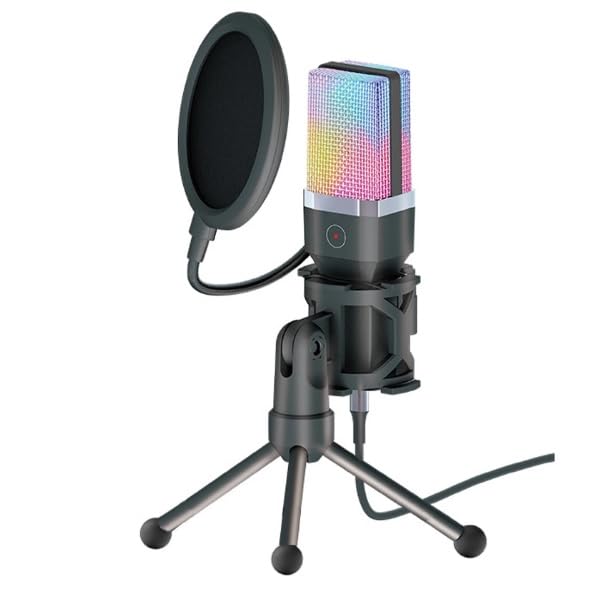
Image: The Yanmai X1R microphone, pop filter, tripod, USB cable, and USB-C adapter.
3. Asennusohjeet
Assemble the Tripod and Microphone:
Unfold the metal anti-slip tripod and place it on a stable surface. Attach the microphone to the tripod mount. Secure the gooseneck pop filter to the tripod or microphone stand, positioning it approximately 2-3 inches in front of the microphone capsule.

Image: The Yanmai X1R microphone mounted on its tripod with the pop filter attached.
Yhdistä laitteeseen:
Connect the provided USB-A to USB-C cable to the microphone. Then, plug the USB-A end into an available USB port on your PC, laptop, or game console. If your device only has USB-C ports, use the included USB-C adapter.

Image: The Yanmai X1R microphone connected to a laptop, showing the USB-A and USB-C connection options.
Ohjaimen asennus (Plug & Play):
The Yanmai X1R is a plug-and-play device. Your operating system (Windows, macOS, PlayStation, etc.) should automatically detect and install the necessary drivers. No manual driver installation is typically required.
Select as Default Audio Input:
After connecting, navigate to your device's sound settings. Select the "Yanmai X1R" or similar name as your default recording (input) device. Adjust the input volume as needed.
4. Käyttöohjeet
4.1 Power On/Off and RGB Lighting
The microphone powers on automatically when connected to a USB port. The RGB lighting will illuminate, cycling through 7 breathing colors. There is no separate power button.
4.2 Mykistystoiminto
The microphone features a one-touch mute button located on the front of the microphone body. Tap this button to instantly mute or unmute the microphone. The indicator light will change to show the mute status (e.g., red for muted).

Image: A finger pressing the one-touch mute button on the Yanmai X1R microphone.
4.3 Mikrofonin optimaalinen sijoittelu
For best audio quality, position the microphone directly in front of you, approximately 6-12 inches (15-30 cm) from your mouth. Ensure the pop filter is between your mouth and the microphone to reduce plosive sounds (P's and B's).

Image: The Yanmai X1R microphone set up on a desk, being used by a person playing a guitar.
4.4 Melunvaimennus
The Yanmai X1R features intelligent noise reduction technology. This helps to minimize background noise, focusing on your voice. No specific user action is required to activate this feature as it operates automatically.

Image: A visual representation of how the microphone's noise reduction feature processes audio, showing "before" and "after" sound wave patterns.
5. Huolto
- Puhdistus: Use a soft, dry cloth to wipe the microphone body and tripod. Do not use liquid cleaners or abrasive materials.
- Pop-suodatin: Pop-suodattimen voi puhdistaa varovasti mainoksellaamp liinalla tarvittaessa. Varmista, että se on täysin kuiva ennen takaisin kiinnittämistä.
- Varastointi: Kun mikrofonia ei käytetä, säilytä sitä puhtaassa, kuivassa paikassa, poissa äärimmäisistä lämpötiloista ja suorasta auringonvalosta.
- Käsittely: Vältä mikrofonin pudottamista tai sen altistamista voimakkaille iskuille, sillä se voi vahingoittaa sen sisäisiä komponentteja.
6. Vianmääritys
| Ongelma | Ratkaisu |
|---|---|
| Microphone not detected by device. |
|
| Ei ääntä tai äänenvoimakkuus on alhainen. |
|
| Background noise is present. |
|
| RGB-valaistus ei toimi. |
|
7. Tekniset tiedot
| Ominaisuus | Yksityiskohta |
|---|---|
| Merkki | Yanmai |
| Malli | X1R |
| Yhteydet | Wired USB (USB-A / USB-C) |
| Mikrofonin tyyppi | Lauhdutin |
| Napainen kuvio | Yksisuuntainen |
| RGB valaistus | 7-värinen hengitysvalo |
| Herkkyys | -38±3dB |
| Taajuusvaste | 20Hz - 20KHz |
| Sampling korko | 44.1/48 KHz |
| Bittinopeus | 16-bittinen |
| Impedanssi | ≤2.2 KΩ |
| Virtalähde | USB 5V |
| Kaapelin pituus | 1.8 metriä |
| Erikoisominaisuudet | One-touch mute, Intelligent Noise Reduction |
| Yhteensopivat laitteet | PC, Laptop, Game Consoles |
| Väri | Musta |
| Tuotteen paino | 598 grammaa |

Image: Technical drawing illustrating the dimensions of the Yanmai X1R microphone, pop filter, tripod, and cable.
8. Takuu ja tuki
8.1 Takuutiedot
The Yanmai X1R USB Gaming Microphone comes with a yhden vuoden takuu ostopäivästä lukien. Tämä takuu kattaa valmistusvirheet ja normaalissa käytössä esiintyvät toimintahäiriöt. Se ei kata väärinkäytöstä, onnettomuuksista, luvattomista muutoksista tai virheellisestä asennuksesta aiheutuneita vahinkoja.
Säilytä ostokuitti takuuvaatimuksia varten.
8.2 Asiakastuki
For technical assistance, troubleshooting, or warranty inquiries, please contact your retailer or the manufacturer's customer support. Refer to the contact information provided with your purchase documentation.