
Johdanto
This manual provides essential information for the setup, operation, maintenance, and troubleshooting of your Onn 22 inch 1080P 100 Hz FHD LED Monitor. Please read this guide thoroughly before using the product to ensure optimal performance and safety.
The Onn 22 inch FHD LED Monitor is designed for a variety of applications, offering a vivid 1920x1080 resolution, a 100Hz refresh rate, and a 6.5ms response time for efficient performance. Its slim profile and T-shaped base are ideal for saving desk space.
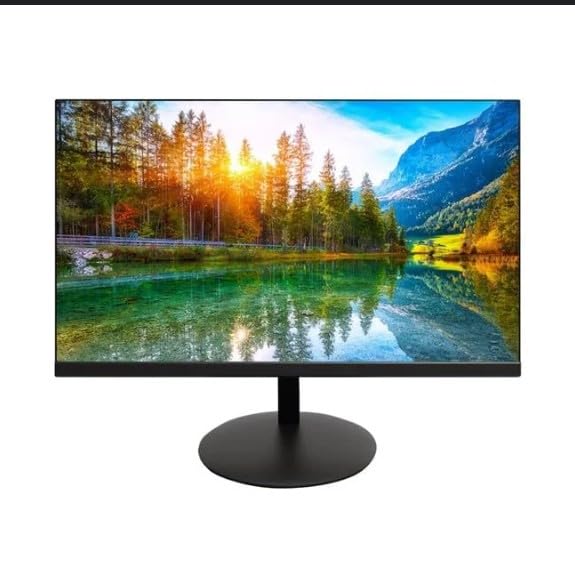
The image shows the Onn 22 inch FHD LED Monitor, highlighting its 100Hz refresh rate and 1080p resolution. The monitor features a slim design and a T-shaped base.
Asennusohjeet
- Purkaminen: Carefully remove the monitor and all accessories from the packaging. Ensure all components are present: monitor, T-shaped base, HDMI cable, and power adapter.
- Jalustan kokoaminen: Attach the T-shaped base to the monitor. The design is screw-less for easy assembly. Ensure it is securely fastened.
- Yhdistäminen laitteeseen:
The monitor supports both HDMI and VGA inputs. Connect the provided HDMI cable from your computer's HDMI output to the HDMI IN port on the monitor. Alternatively, use a VGA cable for VGA input.

This image displays the rear panel of the Onn monitor, illustrating the available input ports: HDMI IN, VGA IN, and the DC 12V power input. These ports are essential for connecting the monitor to a computer or other devices.
- Virtaliitäntä: Connect the power adapter to the DC 12V input port on the monitor, then plug the adapter into a power outlet.
- Näytön säätäminen: The monitor is capable of swivel, tilt, rotation, and height adjustment. Adjust the screen to your preferred viewkulma takaa ergonomisen mukavuuden.
- Kahden näytön asetukset: This monitor is suitable for a fully functioning dual monitor setup. Connect a second monitor using the appropriate cables and configure your operating system's display settings.
Käyttöohjeet
- Virta päälle/pois: Press the power button, usually located on the bottom or back of the monitor, to turn it on or off.
- Tulon valinta: If the monitor does not automatically detect the input source, use the On-Screen Display (OSD) menu buttons to manually select between HDMI and VGA inputs.
- OSD-valikon navigointi: Use the physical buttons on the monitor (typically on the back or bottom edge) to navigate the OSD menu. This allows you to adjust settings such as brightness, contrast, color temperature, and input source.
- Resoluutio ja virkistystaajuus: The monitor supports a native resolution of 1920x1080 at a 100Hz refresh rate. Ensure your computer's display settings are configured to these specifications for the best visual experience.
- Mukautuva synkronointi: The monitor features Adaptive Sync for gaming, which helps to reduce screen tearing and stuttering. Ensure this feature is enabled in your graphics card settings if supported.
Huolto
- Näytön puhdistaminen: Pyyhi näyttö varovasti pehmeällä, nukkaamattomalla liinalla. Pinttyneisiin tahroihin hankaa kevyestiampen the cloth with water or a non-abrasive, monitor-specific cleaning solution. Avoid spraying liquids directly onto the screen.
- C:n puhdistaminenasing: Puhdista näyttö pehmeällä, kuivalla liinalla.asing. Do not use strong detergents or solvents, as they may damage the finish.
- Ilmanvaihto: Varmista, että näytön tuuletusaukot eivät ole tukossa ylikuumenemisen estämiseksi.
- Varastointi: Kun näyttöä ei käytetä pitkään aikaan, säilytä sitä viileässä, kuivassa paikassa, poissa suorasta auringonvalosta ja äärimmäisistä lämpötiloista.
Vianetsintä
- Ei virtaa:
- Tarkista, että virtajohto on liitetty kunnolla sekä näyttöön että pistorasiaan.
- Varmista, että pistorasia toimii oikein.
- Ei signaalia:
- Ensure the video cable (HDMI or VGA) is firmly connected to both the monitor and the computer.
- Valitse oikea tulolähde näytön OSD-valikosta.
- Tarkista, onko tietokoneesi päällä eikä lepotilassa.
- Välkkyvä näyttö tai huono kuvanlaatu:
- Tarkista videokaapeli vaurioiden tai löysien liitäntöjen varalta.
- Adjust the resolution and refresh rate settings on your computer to match the monitor's specifications (1920x1080, 100Hz).
- Palauta näytön asetukset tehdasasetuksiin OSD-valikon kautta.
- Painikkeet eivät vastaa:
- Unplug the monitor from the power outlet, wait for 30 seconds, and then plug it back in.
Jos ongelmat jatkuvat, katso "Tuki ja takuu" -osiossa annettuja tukitietoja.
Tekniset tiedot
| Merkki | Onn |
| Mallinumero | 100140681 |
| Mallin nimi | OTTO |
| Näytön koko | 21.5 tuumaa |
| Näytön tyyppi | LED, LCD |
| Resoluutio | 1920 x 1080 (FHD 1080p) |
| Päivitystaajuus | 100 Hz |
| Vastausaika | 6.5 millisekuntia |
| Laitteistorajapinta | HDMI, VGA |
| Erikoisominaisuudet | Korkeuden säätö |
| Viewkulma | 160 astetta |
| Kuvasuhde | 16:9 |
| Tuotteen mitat | 49.2 x 20 x 37.2 cm; 3.24 kg |
Tuki ja takuu
For technical support, product inquiries, or warranty information, please visit the official Onn support websivustolla tai ota yhteyttä heidän asiakaspalveluunsa.
- Virallinen tuki Websivusto: onnsupport.ca
- Takuu: Specific warranty details may vary by region and purchase date. Please refer to the documentation included with your product or visit the support websivustolta löydät uusimmat takuutiedot.