
1. Johdanto
The MESTEK EMF02R is a versatile 5-in-1 Electromagnetic Field (EMF) meter designed to detect and measure electric fields, magnetic fields, and radio frequency (RF) radiation. This rechargeable device provides accurate readings for various electromagnetic sources, including household appliances, WiFi signals, 5G signals, and base stations. It features a clear LCD display, audible and visual alarms, data hold, and maximum/average value measurement functions, making it an essential tool for assessing electromagnetic environments.

Figure 1: MESTEK EMF02R 5-in-1 EMF Meter with key features highlighted.
2. Turvallisuustiedot
- Lue kaikki ohjeet huolellisesti ennen laitteen käyttöä.
- Älä yritä purkaa tai muokata laitetta. Tämä voi aiheuttaa vahinkoa ja mitätöidä takuun.
- Pidä laite poissa vedestä ja korkean kosteuden ympäristöistä.
- Vältä laitteen altistamista äärimmäisille lämpötiloille tai suoralle auringonvalolle pitkiä aikoja.
- Käytä lataamiseen ainoastaan mukana toimitettua latauskaapelia tai yhteensopivaa USB-C-kaapelia.
- Dispose of the device and its battery according to local regulations. Do not incinerate.
3. Pakkauksen sisältö
Varmista, että pakkauksessa on kaikki tarvittavat osat:
- 1 x MESTEK EMF02R EMF Meter
- 1 x USB Type-C -latauskaapeli
- 1 x Käyttöohje (tämä asiakirja)
- 1 x EMF Meter Carry Bag

Figure 2: Package contents of the MESTEK EMF02R.
4. Tuote ohiview
Familiarize yourself with the components and controls of the MESTEK EMF02R meter.

Figure 3: Labeled diagram of the MESTEK EMF02R components.
- Induktioanturi: Detects electromagnetic fields.
- Näyttö: Shows measurement values, modes, and status indicators.
- Virta päälle / pois-painike: Paina kytkeäksesi laitteen päälle tai pois päältä.
- SEL Button (Function Selection): Used to switch between Electric Field (E-field) and Magnetic Field (H-field) measurement modes.
- AVG/MAX Button: Toggles between average and maximum value display.
- HOLD-painike: Jäädyttää nykyisen lukeman näytössä.
- Hälytyspainike: Kytkee äänihälytyksen päälle tai pois päältä.
- RF Button (High-frequency Signal Selection): Activates Radio Frequency (RF) measurement mode.
- Latauksen merkkivalo: Osoittaa lataustilan.
- Type-C latausportti: USB-C-latauskaapelin kytkemistä varten.
5. Asennus
5.1 Laitteen lataaminen
The MESTEK EMF02R is equipped with a 2000mAh/3.7V Lithium battery and supports USB-C charging.
- Liitä mukana toimitettu USB Type-C -latauskaapeli laitteen latausporttiin.
- Kytke kaapelin toinen pää tavalliseen USB-virtalähteeseen (ei sisälly toimitukseen) tai tietokoneen USB-porttiin.
- Latauksen merkkivalo palaa latauksen aikana.
- Täysi lataus kestää yleensä useita tunteja. Merkkivalo muuttuu tai sammuu, kun lataus on valmis.
- The device features a low battery indication on the display to alert you when charging is needed.

Figure 4: USB-C charging port and charging indicator.
6. Käyttöohjeet
6.1 Virta päälle/pois
- Kytke laite päälle pitämällä -painiketta painettuna Virta päälle/pois -painiketta, kunnes näyttö syttyy.
- Sammuta laite pitämällä painiketta painettuna Virta päälle/pois -painiketta, kunnes näyttö sammuu.
- The device features an auto-shutdown function after 15 minutes of inactivity to conserve battery life.
6.2 Measurement Modes (RF, E-field, H-field)
The MESTEK EMF02R can measure three types of electromagnetic fields:
- RF (Radio Frequency) Radiation: Detects WiFi signals, 5G signals (30MHz ~ 8GHz), and microwave radiation.
- E-field (Electric Field) Radiation: Measures electric fields emitted by household appliances like TVs, laptops, and microwaves.
- H-field (Magnetic Field) Radiation: Measures magnetic fields from appliances such as refrigerators, washing machines, and air conditioners.

Figure 5: Switching between RF, E-field, H-field modes and using the HOLD function.
- High-frequency Signal Radiation Measurement (RF): Paina lyhyesti RF button. The screen will display "RF" and show the high-frequency radiation measurement.
- E-field Radiation Measurement: Paina lyhyesti SEL button. The screen will display "E-field" to enter electric field radiation measurement mode.
- Electromagnetic Field Radiation Measurement (H-field): Paina lyhyesti SEL button again (after E-field mode). The screen will display "H-field" to enter electromagnetic field radiation measurement mode. Short press SEL button again to change the measurement unit (mG/µT).
6.3 Tietojen säilytystoiminto
Nykyisen lukeman jäädyttäminen näytössä:
- Paina lyhyesti PIDÄ button to lock the displayed data. The "HOLD" indicator will appear on the screen.
- Paina PIDÄ button again to unlock the data and resume real-time measurement.
6.4 MAX/AVG Measurement
The device can display either the instantaneous reading, the maximum value detected, or the average value detected.

Figure 6: Maximum (MAX) and Average (AVG) value display.
- Paina lyhyesti AVG/MAX button to cycle through instantaneous, maximum (MAX), and average (AVG) readings during measurement.
6.5 Hälytysasetukset
The MESTEK EMF02R provides visual and audible alarms when radiation levels exceed predefined thresholds.
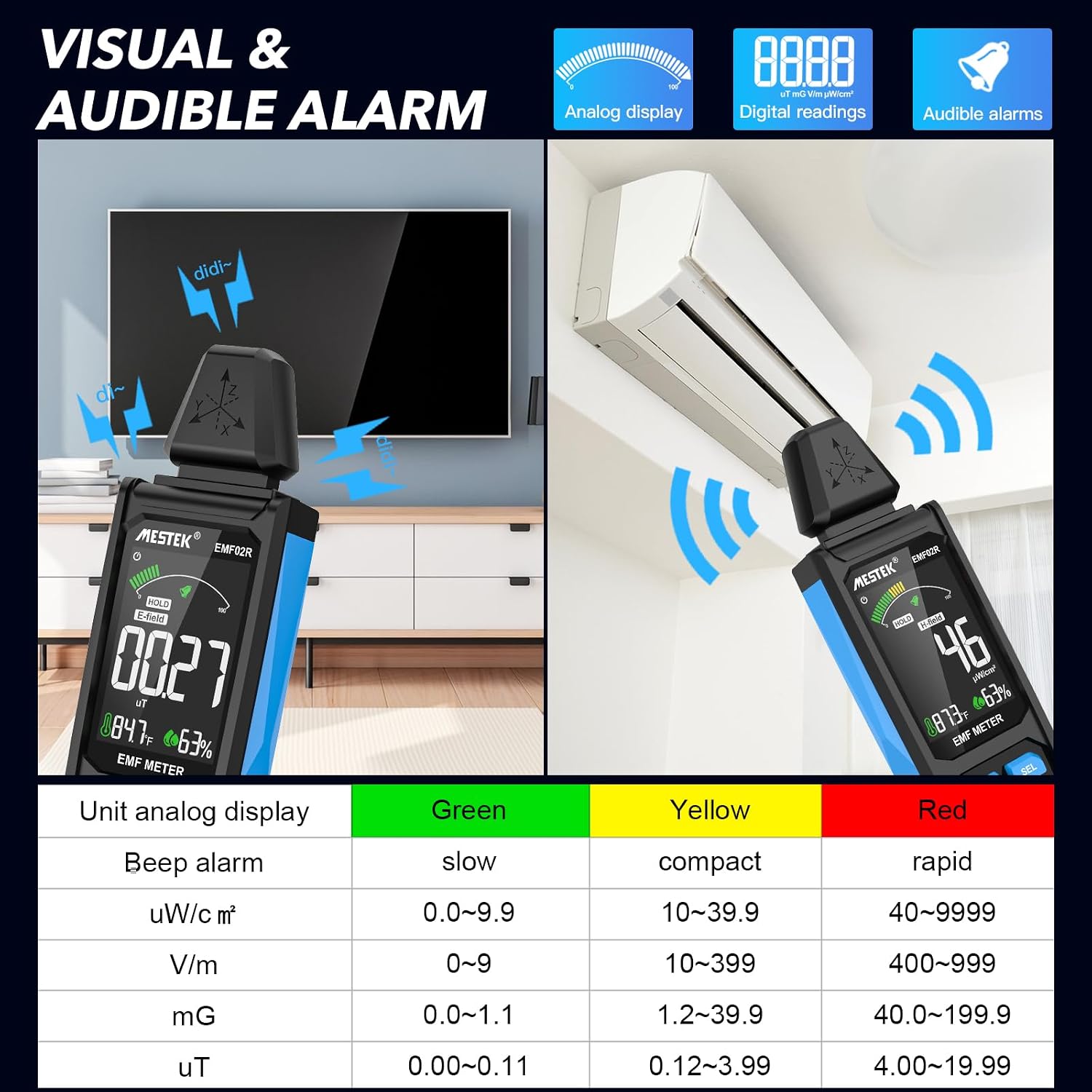
Figure 7: Visual and audible alarm thresholds.
- The display will show a color-coded bar (Green, Yellow, Red) indicating the radiation level.
- When the analog display reaches the yellow area, the device will emit an audible alarm, indicating that radiation levels are elevated.
- When the red area is reached, the alarm will become more rapid, indicating high radiation levels.
- To toggle the audible alarm on or off, short press the Hälytys -painiketta.
6.6 Unit Switching and Temperature/Humidity Display
The device can display temperature and humidity, and allows switching between temperature units.

Kuva 8: Lämpötilan ja kosteuden näyttö yksikön vaihdolla.
- The device displays ambient temperature in both Celsius (°C) and Fahrenheit (°F), and relative humidity (%).
- To switch between °C and °F, refer to the specific instructions in the device's on-screen menu or a dedicated button if available (not explicitly detailed in provided data, typically combined with another button press or a menu option).
7. Understanding Readings and Radiation Sources
The MESTEK EMF02R helps identify common sources of electromagnetic radiation in your environment.

Figure 9: Common sources of electromagnetic radiation.
- Radio Frequency (RF) Sources: Routers, cell phones, 5G towers, microwave ovens (when operating).
- Electric Field (E-field) Sources: TVs, laptops, power lines, ungrounded electrical appliances.
- Magnetic Field (H-field) Sources: Refrigerators, washing machines, induction cookers, motors, high-voltage kaapelit.
When measuring, slowly move the meter closer to the suspected source. Observe the readings and the alarm indicators to determine the strength and type of radiation. If the radiation value reaches the yellow or red alarm zone, consider taking protective measures or increasing your distance from the source.
8. Huolto
- Puhdistus: Pyyhi laite pehmeällä, kuivalla liinalla. Älä käytä hankaavia puhdistusaineita tai liuottimia.
- Varastointi: Store the device in its carry bag in a cool, dry place, away from direct sunlight and extreme temperatures.
- Akun hoito: Akun optimaalisen käyttöiän takaamiseksi lataa laite säännöllisesti, vaikka sitä ei käytettäisikään usein. Vältä akun tyhjentymistä kokonaan pitkiä aikoja.
9. Vianmääritys
| Ongelma | Mahdollinen syy | Ratkaisu |
|---|---|---|
| Laite ei käynnisty. | Akku on vähissä tai akku ei lataudu. | Lataa laite USB-C-kaapelilla. |
| Epätarkkoja lukemia. | Interference from other electronic devices; device not held correctly. | Move away from other electronics; ensure the probe is directed towards the source. |
| Äänimerkki ei toimi. | Alarm function is turned off. | Paina Hälytys -painiketta aktivoidaksesi sen. |
| Display is frozen. | Data Hold function is active. | Paina PIDÄ painiketta vapauttaaksesi. |
10. Tekniset tiedot
- Mittaustilat: Electric Field (E-field), Magnetic Field (H-field), Radio Frequency (RF)
- RF-taajuusalue: 30MHz ~ 8GHz
- Magnetic Field Units: mG / µT (switchable)
- Electric Field Units: V/m
- RF Field Units: uW/cm²
- Näyttö: Large Color LCD Screen
- Akku: 2000mAh/3.7V Lithium Ion (rechargeable)
- Latausportti: USB Type-C
- Automaattinen virrankatkaisu: 15 minuuttia käyttämättömyyttä
- Lisäominaisuudet: Data Hold, MAX/AVG measurement, Audible/Visual Alarm, Low Battery Indication, Temperature & Humidity Display
- Tuotteen paino: 15.2 unssia
- Paketin mitat: 7 x 2 x 1 tuumaa
11. Takuu ja tuki
MESTEK provides comprehensive customer support for your EMF02R meter.
- Takuu: 24 months after-sale service.
- Tekninen tuki: 7/24 customer service available.
- Korvauskäytäntö: If the meter is damaged within 24 months of purchase, please contact MESTEK customer service for a replacement.
For assistance, please refer to the contact information provided with your purchase or visit the official MESTEK websivusto.