
Johdanto
Thank you for choosing the Casio MWA-300H Series watch. This manual provides essential information regarding the setup, operation, and maintenance of your new timepiece. Please read this manual carefully to ensure proper use and to fully understand the features of your watch.
The Casio MWA-300H is an analog watch featuring a chronograph, 100-meter water resistance, and luminous hands for enhanced readability. It is designed for versatile wear, suitable for both daily use and recreational water activities.
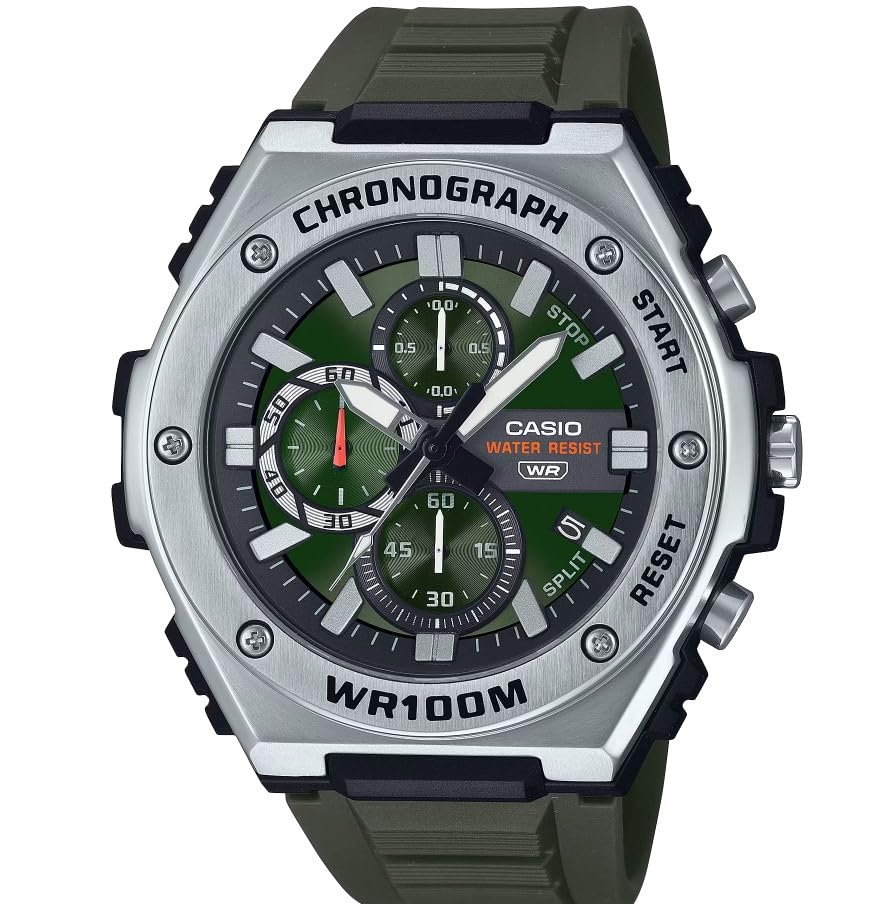
Kuva: Edessä view of the Casio MWA-300H Series watch, highlighting its green dial, chronograph sub-dials, and black resin band.
Setup: Initial Settings
Kellonajan asettaminen
- Pull the crown out to the second click (time setting position). The second hand will stop.
- Rotate the crown to set the hour and minute hands. Ensure the AM/PM setting is correct if your watch has a 24-hour indicator or date changes at midnight.
- Paina nuppi takaisin normaaliasentoon. Sekuntiviisari jatkaa liikettään.
Päivämäärän asettaminen
- Pull the crown out to the first click (date setting position).
- Aseta päivämäärä kiertämällä kruunua. Vältä päivämäärän asettamista klo 21.00 ja 03.00 välillä, sillä se voi häiritä automaattista päivämääränvaihtomekanismia.
- Työnnä kruunu takaisin normaaliasentoon.
Akun tiedot
Your Casio MWA-300H watch is powered by 1 LR44 battery, which is included. The battery life is approximately 3 years. When the battery runs low, the watch may exhibit irregular movement or stop. It is recommended to have the battery replaced by a qualified watch technician to maintain water resistance.
Operating: Watch Functions
Kronografin (sekuntikellon) käyttö
The chronograph function allows for precise timing of events. Your watch features a 1/10-second stopwatch that captures elapsed, split, and 1st/2nd place times across three dedicated sub-dials.
- Starting the Stopwatch: Press button A (typically the upper right button) to start the stopwatch.
- Stopping the Stopwatch: Press button A again to stop the stopwatch.
- Resetting the Stopwatch: After stopping, press button B (typically the lower right button) to reset the stopwatch hands to zero.
- Väliajan mittaus: While the stopwatch is running, press button B to measure split times. The stopwatch hands will momentarily stop to indicate the split time, then resume timing. Press button B again to release the split time and display the current elapsed time.
Note: Refer to the specific button layout on your watch for exact button assignments.
Vedenkestävyys (100 metriä)
Your Casio MWA-300H watch is water resistant up to 100 meters (330 feet). This rating means the watch is suitable for swimming, showering, and recreational water activities. It is not suitable for diving or snorkeling where significant water pressure changes occur.
- Älä käytä kruunua tai painikkeita, kun kello on märkä tai veden alla.
- Huuhtele kello suolavedellä ja pyyhi se kuivaksi, jos se on altistunut suolavedelle.
Valaisevat osoittimet ja tussit
The watch features luminous hands and markers that absorb light and glow in the dark, providing readability in low-light conditions. The intensity and duration of the glow depend on the amount and type of light exposure.
Huolto
Yleinen hoito
- Pyyhi kello säännöllisesti pehmeällä, kuivalla liinalla lian ja kosteuden poistamiseksi.
- Vältä kellon altistamista äärimmäisille lämpötiloille, pitkäaikaiselle suoralle auringonvalolle tai voimakkaille magneettikentille.
- Keep the watch away from solvents, detergents, perfumes, and cosmetics, as these can damage the resin materials.
Akun vaihto
When the battery needs replacement, it is highly recommended to take your watch to an authorized Casio service center or a reputable watch repair shop. This ensures that the watch is properly sealed and its water resistance is maintained after battery replacement.
Vedenkestävyystarkastukset
To maintain the water resistance of your watch, it is advisable to have it inspected periodically (e.g., every 2-3 years) by an authorized service center, especially if it is frequently exposed to water.
Vianetsintä
| Ongelma | Mahdollinen syy | Ratkaisu |
|---|---|---|
| Watch hands do not move or move irregularly. | Akku vähissä. | Vaihda paristo. Ota yhteyttä ammattitaitoiseen kelloasentajaan. |
| Aika on väärä. | Time not set correctly; watch has stopped and restarted. | Aseta aika uudelleen kohdan "Ajan asettaminen" ohjeiden mukaisesti. |
| Päivämäärä vaihtuu keskipäivällä keskiyön sijaan. | AM/PM-asetus on väärä. | Siirrä aikaa 12 tuntia eteenpäin. |
| Kronografin osoittimet eivät nollaudu. | Chronograph hands misalignment. | Consult the full Casio module manual for chronograph hand adjustment procedures, or contact customer support. |
| Kellon sisällä on kosteutta. | Crown or buttons operated underwater; seals compromised. | Immediately take the watch to an authorized service center for inspection and repair to prevent further damage. |
Tekniset tiedot
| Mallin nimi | MWA-300H |
| Näytön tyyppi | Analoginen |
| Liikkeen tyyppi | Kvartsi |
| Vedenkestävyyssyvyys | 100 metriä (330 jalkaa) |
| Lisäominaisuudet | Chronograph, Date Display, Luminous Hands |
| Virtalähde | Paristokäyttöinen (1 x LR44 mukana) |
| Kotelon materiaali | Hartsi |
| Bandin materiaali | Hartsi |
| Kristalli materiaali | Hartsi |
| Kotelon halkaisija | 50.9 millimetriä |
| Kotelon paksuus | 14.3 millimetriä |
| Kaistan leveys | 22 millimetriä |
| Kiinnikkeen tyyppi | Solki |
Takuu ja tuki
Rajoitettu takuu
Your Casio MWA-300H watch comes with a limited warranty. Please refer to the warranty card included with your purchase for specific terms, conditions, and duration of coverage. The warranty typically covers manufacturing defects under normal use.
Asiakastuki
For further assistance, technical support, or warranty claims, please contact Casio customer service. You can find contact information on the official Casio websivustolla tai kellon mukana toimitetuissa dokumenteissa.
For more detailed information, including specific module operations or advanced settings, please visit the official Casio support website or refer to the full module manual for your watch.