
Johdanto
Thank you for choosing the NEWFAST WiFi 6E PCIe Network Card. This card is designed to provide high-speed wireless connectivity and Bluetooth functionality for your desktop PC. Featuring the Intel AX210 chipset, it supports the latest WiFi 6E standard, offering tri-band operation (2.4GHz, 5.8GHz, and 6GHz) with speeds up to 5374Mbps. The integrated Bluetooth 5.3 ensures fast and reliable connections to your wireless peripherals. This manual will guide you through the installation process, operation, and provide troubleshooting tips.

Yliview of the NEWFAST WiFi 6E PCIe Card's multi-performance features, including WiFi 6E standard, Bluetooth 5.3 upgrade, Tri-Band support (6GHz/5.8GHz/2.4GHz), 5374Mbps speed, WPA-PSK/WPA2-PSK/WPA3 security, OFDMA, MU-MIMO technology, and power saving capabilities.
Mitä laatikossa on
Tarkista pakkauksen sisältö varmistaaksesi, että kaikki osat ovat mukana:
- 1 x NEWFAST WiFi 6E PCIe Network Card
- 1 x Multi-language Instruction Manual (this document)
- 1 x Bluetooth Cable
- 2 x 5dBi-antennia
- 2 x ruuvit
Tekniset tiedot
| Ominaisuus | Yksityiskohta |
|---|---|
| Merkki | NEWFAST |
| Malli | NF-P395 |
| Piirisarja | Intel AX210 |
| Langaton standardi | WiFi 6E (IEEE 802.11ax) |
| Data Link Protocol | IEEE 802.11ac/a/b/g/n, IEEE 802.11ax |
| Taajuuskaistat | 2.4 GHz, 5.8 GHz, 6 GHz (kolmikaistainen) |
| Suurin tiedonsiirtonopeus | 5374 Mbps (2.4GHz: 574Mbps, 5.8GHz: 2400Mbps, 6GHz: 2400Mbps) |
| Bluetooth-versio | Bluetooth 5.3 |
| Laitteistorajapinta | PCI-E X1, X4, X8, X16 (PCI slots not supported) |
| Antennit | 2 x 5dBi ulkoista antennia |
| Suojausominaisuudet | WPA-PSK/WPA2-PSK/WPA3 |
| Tuettu käyttöjärjestelmä | Windows 10 (64-bittinen), Windows 11 (64-bittinen) |
| Mitat (paketti) | 19.9 x 11.9 x 3.4 cm |
| Tuotteen paino | 230 g |

Detailed breakdown of WiFi 6E speeds across 6GHz, 5.8GHz, and 2.4GHz bands, highlighting the Intel AX210 chip and Bluetooth 5.3 capabilities.
Asennusohjeet
1. Laitteiston asennus
- Sammuta tietokoneesi: Ennen aloittamista varmista, että tietokoneesi on kokonaan sammutettu ja irrotettu pistorasiasta.
- Avaa tietokoneen kotelo: Irrota tietokoneen kotelon sivupaneeli päästäksesi käsiksi emolevyyn.
- Paikanna PCI-E-paikka: Etsi emolevyltäsi vapaa PCI-E X1-, X4-, X8- tai X16-paikka. Note: Standard PCI slots are not compatible.
- Aseta WiFi-kortti paikalleen: Carefully align the NEWFAST WiFi 6E PCIe card with the chosen PCI-E slot and press it firmly until it is securely seated.
- Suojaa kortti: Use the provided screw to fasten the card's bracket to your PC case.
- Yhdistä Bluetooth-kaapeli: Connect one end of the provided Bluetooth cable to the 9-pin USB header on the WiFi card and the other end to an available F_USB header on your motherboard. This connection is essential for Bluetooth functionality.
- Kiinnitä antennit: Screw the two 5dBi external antennas onto the connectors at the back of the WiFi card. Adjust their orientation for optimal signal reception.
- Sulje tietokoneen kotelo: Aseta tietokoneen kotelon sivupaneeli takaisin paikalleen ja kytke virtajohto takaisin.

Illustration of compatible PCI-E slots on a desktop motherboard.
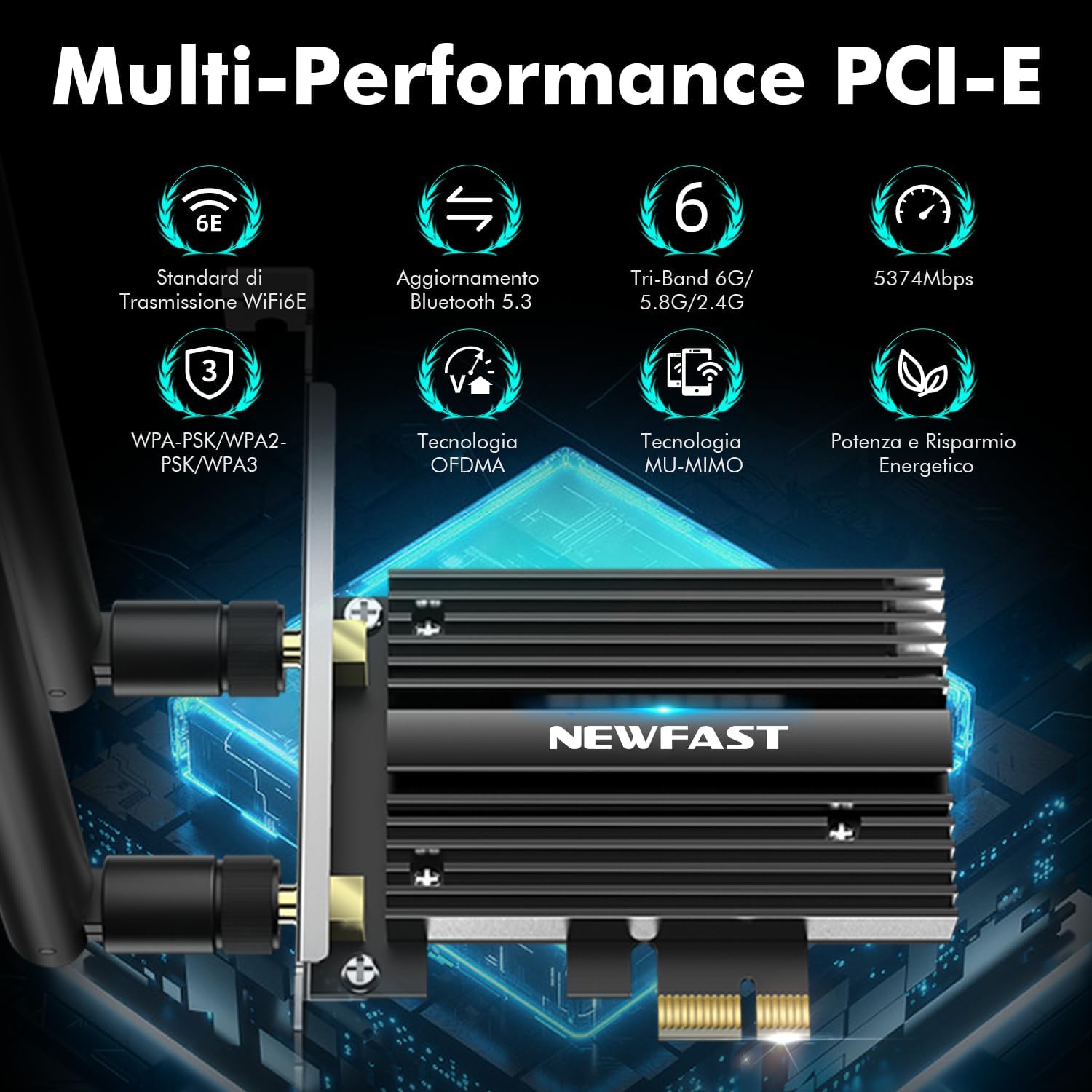
The NEWFAST WiFi 6E PCIe Card with its two external antennas.
2. Ohjaimen asennus
After hardware installation, power on your PC. You will need to install the drivers for both WiFi and Bluetooth functionality. Drivers are typically available on the manufacturer's website. If you do not have internet access, you may need to download them on another device and transfer them via USB.
- Lataa ajurit: Visit the NEWFAST official website or the Intel support page for the AX210 chipset to download the latest WiFi and Bluetooth drivers for Windows 10 (64-bit) or Windows 11 (64-bit).
- Asenna WiFi-ajuri: Locate the downloaded WiFi driver file (usually an executable .exe file) and run it. Follow the on-screen instructions to complete the installation.
- Asenna Bluetooth-ohjain: Similarly, locate and run the Bluetooth driver file. Follow the installation wizard.
- Käynnistä tietokone uudelleen: Kun olet asentanut molemmat ohjaimet, käynnistä tietokone uudelleen varmistaaksesi, että kaikki muutokset tulevat voimaan.

The WiFi card supports Windows 10 (64-bit) and Windows 11 (64-bit).
Käyttöohjeet
1. Yhdistäminen WiFi-verkkoon
- Verkkoasetukset: On your Windows desktop, click the WiFi icon in the system tray (usually bottom-right corner).
- Valitse verkko: Luettelo käytettävissä olevista WiFi-verkoista tulee näkyviin. Valitse haluamasi verkko.
- Anna salasana: Anna pyydettäessä verkon suojausavain (salasana) ja napsauta Yhdistä.
- Tarkista yhteys: Once connected, the WiFi icon will indicate an active connection. You can now browse the internet.
2. Using Bluetooth 5.3
Ensure the Bluetooth cable is correctly connected to your motherboard's F_USB header for Bluetooth functionality.
- Ota Bluetooth käyttöön: Go to Windows Settings > Devices > Bluetooth & other devices. Ensure Bluetooth is turned 'On'.
- Laitteen pariliitos: Napsauta Lisää Bluetooth- tai muu laite ja valitse Bluetooth.
- Tee laitteesta löydettävissä: Put your Bluetooth device (e.g., headphones, mouse, controller) into pairing mode. Refer to your device's manual for specific instructions.
- Valitse ja yhdistä: Your PC will scan for nearby Bluetooth devices. Select your device from the list and follow any on-screen prompts to complete pairing.

The Bluetooth 5.3 feature allows connection to various peripherals with improved speed and range.
Huolto
The NEWFAST WiFi 6E PCIe Network Card is designed for reliable, long-term performance with minimal maintenance. Follow these guidelines:
- Pidä ajurit ajan tasalla: Regularly check the NEWFAST or Intel websivusto uusimmille WiFi- ja Bluetooth-ajureille optimaalisen suorituskyvyn ja tietoturvan varmistamiseksi.
- Varmista oikea ilmanvaihto: Make sure your PC case has adequate ventilation to prevent overheating, which can affect the card's performance. The card's aluminum heatsink is designed for efficient heat dissipation.
- Clean Antennas: Occasionally wipe the antennas with a soft, dry cloth to remove dust.
- Vältä fyysisiä vaurioita: Handle the card with care during installation and avoid bending or stressing the antennas.
Vianetsintä
If you encounter issues with your NEWFAST WiFi 6E PCIe Network Card, refer to the following common problems and solutions:
- Ei WiFi-yhteyttä:
- Ensure the card is properly seated in the PCI-E slot.
- Verify that WiFi drivers are correctly installed and updated.
- Check if the antennas are securely attached.
- Confirm that your router is powered on and broadcasting a WiFi signal.
- Try restarting your PC and router.
- Ei Bluetooth-toimintoa:
- Ensure the Bluetooth cable is securely connected to both the WiFi card and the motherboard's F_USB header. This is crucial for Bluetooth.
- Verify that Bluetooth drivers are correctly installed and updated.
- Check Windows Bluetooth settings to ensure Bluetooth is enabled.
- Yritä käynnistää tietokoneesi uudelleen.
- Hidas WiFi-nopeus:
- Ensure you are connected to a WiFi 6E compatible router for optimal speeds.
- Tarkista muiden elektronisten laitteiden aiheuttama häiriö.
- Säädä antennin suuntausta paremman signaalin vastaanoton saavuttamiseksi.
- Päivitä reitittimesi laiteohjelmisto.
- Ensure your PC is within a reasonable range of your WiFi router.
- Laitetta ei havaittu:
- Double-check all physical connections, including the PCI-E slot and Bluetooth cable.
- Varmista, että käyttöjärjestelmäsi on Windows 10 (64-bittinen) tai Windows 11 (64-bittinen).
- Check Device Manager in Windows for any unknown devices or driver errors.
Takuu ja tuki
NEWFAST products are designed for quality and reliability. For specific warranty information, please refer to the warranty card included with your product or visit the official NEWFAST websivusto.
If you encounter any configuration issues, technical problems, or require further assistance, please do not hesitate to contact NEWFAST customer support. Our team is ready to help you.
- Online-tuki: Visit the NEWFAST official websivusto, josta löydät usein kysytyt kysymykset, ajurilataukset ja tuen yhteystiedot.
- Sähköpostituki: Katso tuotteen pakkauksesta tai virallisesta webasiakastuen sähköpostiosoitteen sivusto.