
1. Johdanto
This manual provides comprehensive instructions for the Mycket portable DAB/DAB+/FM radio, Model D009. It covers setup, operation, maintenance, and troubleshooting to ensure optimal performance and longevity of your device. Please read this manual carefully before using the product.
The Mycket D009 radio features advanced signal reception technology for clear audio, Bluetooth 5.0 for wireless streaming, USB playback, AUX-in connectivity, a dual alarm clock, and a sleep timer. Its integrated rechargeable battery offers portability for use in various environments.
2. Turvallisuusohjeet
- Älä altista laitetta sateelle, kosteudelle tai äärimmäisille lämpötiloille.
- Vältä laitteen pudottamista tai altistamista voimakkaille iskuille.
- Älä pura tai yritä korjata laitetta itse. Jätä kaikki huoltotyöt pätevän henkilöstön tehtäväksi.
- Pidä laite poissa lämmönlähteistä, kuten pattereista, lämmittimistä, liesistä tai muista laitteista (mukaan lukien ampnostimet), jotka tuottavat lämpöä.
- Use only the specified charging cable and power adapter (5V via USB) to charge the device.
- Varmista laitteen ympärillä oleva asianmukainen ilmanvaihto käytön ja latauksen aikana.
- Hävitä paristot ja elektroniset komponentit vastuullisesti paikallisten määräysten mukaisesti.
3. Tuote ohiview
3.1 Pakkauksen sisältö
- 1 x Mycket Portable DAB Radio (Model D009)
- 1 x USB-latauskaapeli
- 1 x Käyttöohje
3.2 Laitteen asettelu ja säätimet
Familiarize yourself with the main components and controls of your Mycket radio.

Kuva 1: Edessä view of the Mycket D009 portable DAB radio, showing the speaker grille, LCD display, control buttons (MODE, OK, O/M, FAV, 1-4), and the telescopic antenna extended. The right side shows the DC 5V USB-C port, reset button, and headphone jack.
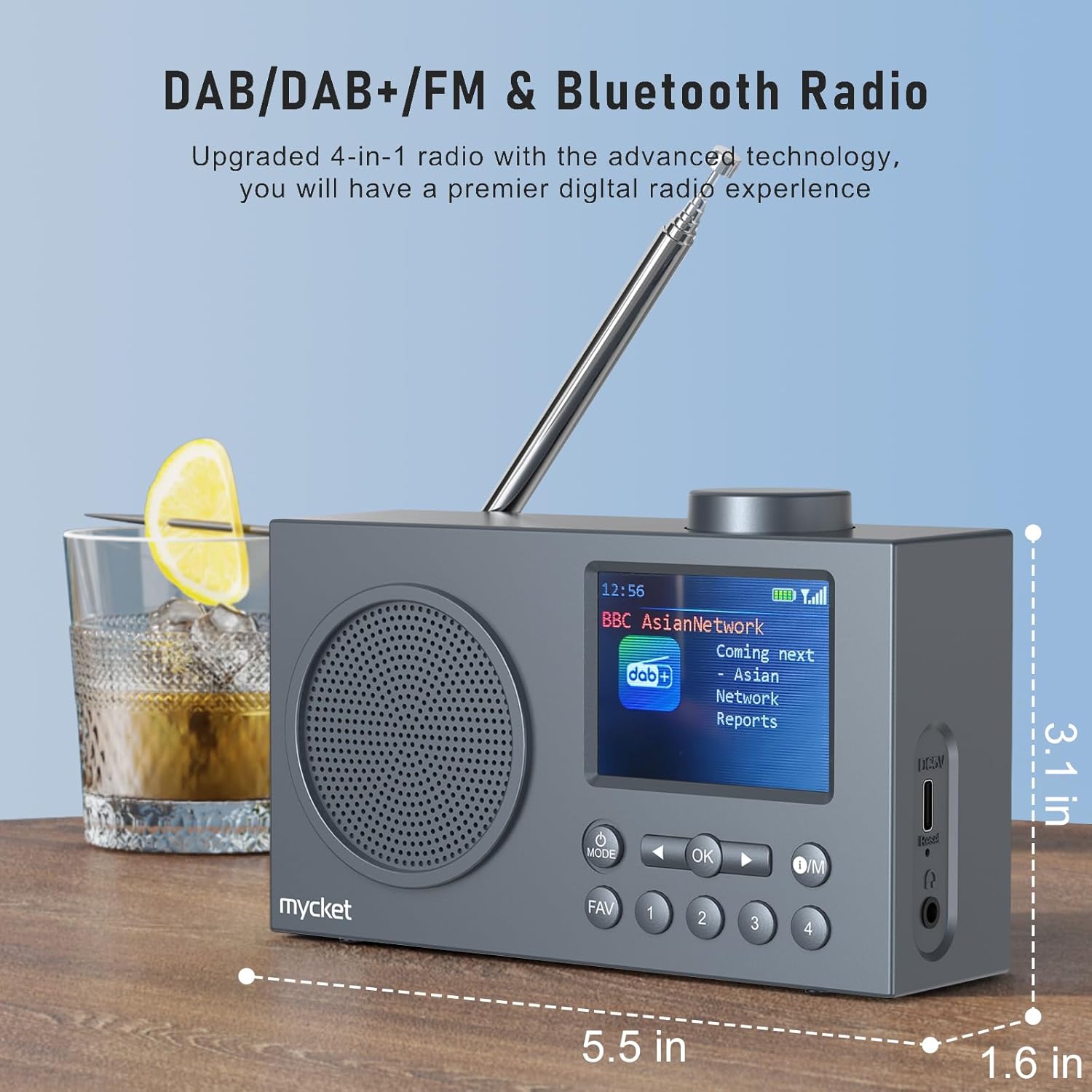
Kuva 2: Sivu view of the Mycket D009 radio illustrating its compact dimensions: approximately 5.5 inches (length), 1.6 inches (width), and 3.1 inches (height). The image also highlights its DAB/DAB+/FM and Bluetooth capabilities.
- Näyttö: 2.4-inch TFT color display for station information, time, and settings.
- Kaiutin: Integrated Hi-Fi speaker for audio output.
- Teleskooppiantenni: For optimal radio signal reception.
- MODE-painike: Switches between DAB, FM, Bluetooth, USB, and AUX modes.
- OK -painike: Vahvistaa valinnat tai siirtyy valikoihin.
- O/M-painike: Power On/Off and Menu access.
- FAV-painike: Accesses favorite presets.
- Numeropainikkeet (1-4): Direct access to stored presets.
- Navigation Buttons (Left/Right): Navigates menus or tunes stations.
- Äänenvoimakkuuden säädin: Säätää äänenvoimakkuutta.
- DC 5V USB-C-portti: Sisäisen akun lataamiseen.
- Reset-painike: Resets the device (use a thin object to press).
- 3.5 mm: n kuulokeliitäntä: Yksityiseen kuunteluun.
4. Asennus
4.1 Akun lataaminen
The radio is equipped with a built-in 2200mAh lithium battery. Before first use, fully charge the device.
- Connect the provided USB charging cable to the DC 5V USB-C port on the side of the radio.
- Liitä USB-kaapelin toinen pää yhteensopivaan USB-virtalähteeseen (ei sisälly toimitukseen) tai tietokoneen USB-porttiin.
- The charging indicator on the display will show the charging status. A full charge typically takes approximately 2.5 hours and provides up to 12 hours of playback time at 70% volume.

Kuva 3: The Mycket D009 radio display showing a full battery indicator, emphasizing its long playback time on a single charge.
4.2 Antennin säätö
Optimaalisen radiovastaanoton saavuttamiseksi vetämällä teleskooppiantenni kokonaan ulos. Säädä sen asentoa parhaan signaalinlaadun saavuttamiseksi.
4.3 Ensimmäinen käynnistys
Paina ja pidä painettuna Käyttö button to power on the radio. The display will light up, and the device will typically start in the last used mode or initiate a DAB scan if it's the first use.
5. Käyttöohjeet
5.1 vaihtotilaa
Paina MODE button repeatedly to cycle through available modes: DAB, FM, Bluetooth, USB, and AUX.
5.2 DAB/DAB+ -radion käyttö
- Vaihda DAB-tilaan käyttämällä MODE -painiketta.
- The radio will automatically perform a full scan for available DAB/DAB+ stations upon first use or if no stations are found. To initiate a manual scan, press and hold the OK button, then select "Full Scan" from the menu.
- Once the scan is complete, use the navigation buttons (Left/Right) to browse through the list of available stations.
- Paina OK valitaksesi ja kuunnellaksesi asemaa.

Kuva 4: The Mycket D009 radio display showing a DAB station and highlighting the auto-scan and 40 preset features (20 DAB & 20 FM).
5.2.1 Storing DAB Presets
The radio supports up to 20 DAB presets.
- Tune to the desired DAB station.
- Press and hold one of the number buttons (1-4) tai FAV button to save the current station to a preset slot. Follow the on-screen prompts to select a slot if using the FAV button.
- To recall a preset, briefly press the corresponding number button or the FAV button and select from the list.
5.3 FM-radion käyttö
- Vaihda FM-tilaan käyttämällä MODE -painiketta.
- To auto-scan for FM stations, press and hold the OK button. The radio will scan and store available stations.
- To manually tune, use the navigation buttons (Left/Right) to adjust the frequency.
- Paina OK vahvistaaksesi aseman.
5.3.1 FM-esiasetusten tallentaminen
The radio supports up to 20 FM presets, similar to DAB presets.
- Viritä haluamasi FM-asema.
- Press and hold one of the number buttons (1-4) tai FAV button to save the current station.
- To recall a preset, briefly press the corresponding number button or the FAV button and select from the list.
5.4 Bluetooth 5.0 Pairing
Connect your smartphone or tablet to the radio via Bluetooth for wireless audio streaming.
- Vaihda Bluetooth-tilaan käyttämällä MODE button. The radio display will show "Bluetooth Pairing" or similar.
- Ota Bluetooth käyttöön mobiililaitteellasi ja etsi käytettävissä olevia laitteita.
- Select "Mycket D009" from the list of devices.
- Once paired, the radio will confirm the connection, and you can play audio from your device through the radio.

Kuva 5: The Mycket D009 radio displaying "Playing" in Bluetooth mode, next to a smartphone showing "Mycket D009" as a connected Bluetooth device.
5.5 USB-toisto
Toista MP3-ääntä files suoraan USB-asemalta.
- Aseta USB-asema, jossa on MP3 files USB-porttiin.
- Vaihda USB-tilaan käyttämällä MODE -painiketta.
- Radio tunnistaa automaattisesti MP3-tiedostot ja aloittaa niiden toistamisen. files. Use the navigation buttons to skip tracks.
5.6 AUX-in-liitäntä
Connect external audio devices using a 3.5mm audio cable (not included).
- Connect one end of a 3.5mm audio cable to the AUX-in port on the radio.
- Liitä toinen pää ulkoisen laitteen kuulokeliitäntään tai äänilähtöön.
- Vaihda AUX-tilaan käyttämällä MODE -painiketta.
- Ohjaa toistoa ulkoisesta laitteesta.
5.7 Herätyskellotoiminto
Aseta jopa kaksi itsenäistä hälytystä.
- Paina ja pidä painettuna Käyttö -painiketta päästäksesi valikkoon.
- Navigate to "Alarm Settings" using the navigation buttons and press OK.
- Valitse Hälytys 1 tai Hälytys 2.
- Set the alarm time, source (DAB, FM, or Buzzer), and volume.
- Vahvista asetukset painamalla OK.
5.8 Uniajastintoiminto
Aseta radio sammumaan automaattisesti tietyn ajan kuluttua.
- Paina ja pidä painettuna Käyttö -painiketta päästäksesi valikkoon.
- Navigate to "Sleep Timer" and press OK.
- Select the desired duration (e.g., 15, 30, 60 minutes).
- The radio will automatically power off after the set time.
5.9 Kuulokkeiden käyttö
Connect 3.5mm headphones to the headphone jack for private listening. The internal speaker will be muted automatically.
6. Huolto
- Puhdistus: Puhdista radion ulkopinta pehmeällä, kuivalla liinalla. Älä käytä hankaavia puhdistusaineita tai liuottimia.
- Akun hoito: Akun käyttöiän pidentämiseksi vältä akun usein tapahtuvaa täydellistä tyhjentymistä. Lataa laite säännöllisesti, vaikka sitä ei käytettäisi pitkään aikaan.
- Varastointi: Säilytä radiota viileässä, kuivassa paikassa, poissa suorasta auringonvalosta ja äärimmäisistä lämpötiloista.
7. Vianmääritys
| Ongelma | Mahdollinen syy | Ratkaisu |
|---|---|---|
| Ei virtaa / Radio ei käynnisty. | Akku on tyhjä. | Lataa radio mukana toimitetulla USB-kaapelilla. |
| Huono radiovastaanotto (DAB/FM). | Antenna not fully extended or positioned correctly. Weak signal area. | Fully extend and adjust the telescopic antenna. Try moving the radio to a different location. Perform a full scan for stations. |
| Bluetooth-pariliitos epäonnistuu. | Radio not in Bluetooth mode. Device too far. Bluetooth not enabled on external device. | Ensure the radio is in Bluetooth mode. Keep devices within range (approx. 10 meters). Enable Bluetooth on your external device and search for "Mycket D009". |
| Kaiuttimesta ei kuulu ääntä. | Äänenvoimakkuus liian alhainen. Kuulokkeet kytketty. | Increase the volume. Disconnect headphones if not intended for private listening. |
| USB-toisto ei toimi. | USB drive not inserted correctly. Incompatible file muoto. | Varmista, että USB-asema on kokonaan paikallaan. Tarkista, että fileovat MP3 -muodossa. |
| Laite ei vastaa. | Väliaikainen ohjelmistohäiriö. | Press the reset button on the side of the radio using a thin object (e.g., a paperclip). |
8. Tekniset tiedot
| Merkki | hyvin |
| Malli | D009 |
| Radiotilat | DAB, DAB+, FM |
| Bluetooth-versio | 5.0 |
| Toistoasetukset | FM, DAB, DAB+, Bluetooth, USB MP3, AUX-in |
| Kaiuttimen lähtöteho | 5 wattia |
| Kaiutinyksikkö | 4 Ω10 W 78 mm x 1 |
| Näyttö | 2.4 tuuman värillinen TFT-LCD |
| Esiasetukset | 40 (20 DAB, 20 FM) |
| Akun tyyppi | Built-in Lithium-ion (18650) |
| Akun kapasiteetti | 2200 mAh (3.7V - 2.2 Ah) |
| Toistoaika | Approx. 8-9 hours at 70% volume (up to 12 hours) |
| Latausaika | Noin 2.5 tuntia |
| Virransyöttö | 5V USB:n kautta |
| Mitat (tuote) | Noin 14 cm (P) x 4 cm (L) x 7.8 cm (K) |
| Lähtöliitännät | 3.5 mm kuulokeliitäntä |
9. Takuu ja tuki
Mycket products are designed for reliability and performance. This product comes with:
- 12 kuukauden takuu: Enjoy a hassle-free 12-month warranty from the date of purchase.
- Asiakastuki: For any questions, issues, or support needs, please contact Mycket customer service.
Säilytä ostokuitti takuuvaatimuksia varten.