
1. Johdanto
Kiitos ostoksestasiasing the Sharp 4T-C65FL6EX 65-inch 4K Frameless Smart TV. This manual provides essential information for the safe and efficient use of your new television. Please read these instructions thoroughly before operating the TV and retain them for future reference.
Tärkeitä turvallisuustietoja
Always follow basic safety precautions when using this product to reduce the risk of fire, electric shock, and injury. Do not expose the TV to rain or moisture. Do not open the cabinet; refer all servicing to qualified personnel. Ensure proper ventilation and avoid placing the TV near heat sources.
2. Tuote ohiview
The Sharp 4T-C65FL6EX is a 65-inch 4K UHD Smart LED TV designed to deliver an immersive viewing experience. It features a frameless design, Google TV operating system, and a built-in digital receiver.
Tärkeimmät ominaisuudet
- 65 tuuman 4K UHD -näyttö: Enjoy stunning visuals with a resolution of 3840 x 2160 pixels.
- Kehyksetön muotoilu: Maksimoi näyttötilan laajan käyttökokemuksen saavuttamiseksi view.
- Google TV Operating System: Access a wide range of apps, movies, and shows.
- Built-in Digital Receiver: Supports DVB-S/S2/T/T2/C broadcast types.
- Dolby Atmos & DTS Studio Sound: Delivers rich, immersive audio.
- Dolby Vision ja HDR10: Enhanced contrast and color for compatible content.
- Integroitu Chromecast: Easily cast content from your mobile devices.
- Far-field Voice Control & Google Assistant: Ohjaa televisiotasi äänikomennoilla.
- Liitettävyys: Wi-Fi, Bluetooth v5.1, 3 HDMI 2.0 ports, 2 USB ports, LAN.
Pakkauksen sisältö
- Sharp 4T-C65FL6EX 65-inch 4K Smart TV
- Kaukosäädin
- Virtakaapeli
- TV-taso (2 kpl)
- Ruuvit jalustan asennusta varten
- Käyttöopas (tämä asiakirja)

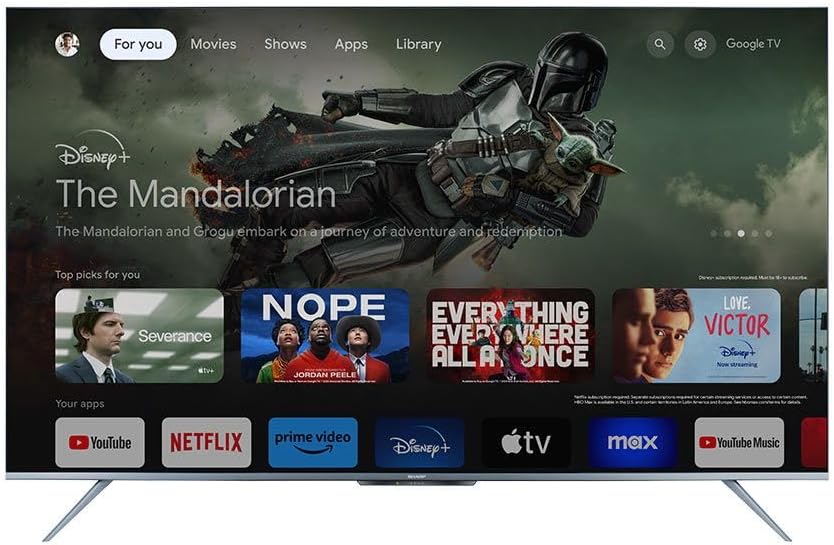
Kuva 2.1: Etuosa view of the Sharp 4T-C65FL6EX Smart TV.
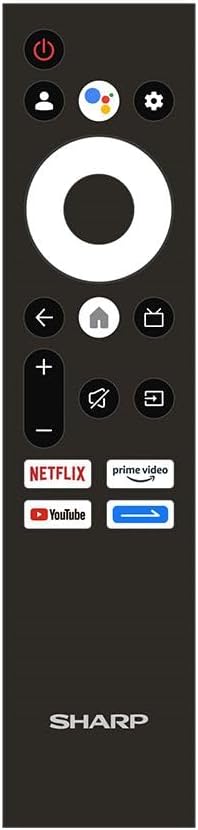
Figure 2.2: The included remote control for the Sharp Smart TV.
3. Asennus
3.1 Pakkauksesta purkaminen ja sijoittaminen
- Poista televisio varovasti pakkauksestaan. On suositeltavaa, että tähän tarvitaan kaksi henkilöä.
- Place the TV on a stable, flat surface or prepare for wall mounting. Ensure adequate space around the TV for ventilation.
3.2 Jalustan asennus
Jos et aio kiinnittää televisiota seinään, kiinnitä mukana tuleva jalusta:
- Lay the TV screen-down on a soft, clean cloth to prevent scratches.
- Kohdista jokainen jalustan osa television pohjassa oleviin vastaaviin uriin.
- Kiinnitä jalustat mukana toimitetuilla ruuveilla. Varmista, että ne on kiristetty tiukasti.
3.3 Seinäkiinnitys (valinnainen)
This TV is compatible with VESA standard wall mounts. Consult a professional for wall mounting to ensure proper installation and safety. Remove the stand before wall mounting.
3.4 Laitteiden liittäminen
Liitä ulkoiset laitteet televisioon käyttämällä sopivia portteja:
- HDMI: For Blu-ray players, game consoles, cable/satellite boxes. The TV has 3 HDMI 2.0 ports.
- USB: For USB drives to play media (video, photos, music). The TV has 2 USB ports.
- Antenna/Satellite (RF Input): Connect your antenna or satellite dish cable to the RF input for digital broadcasting.
- LAN: Kiinteää internetyhteyttä varten.
Kuva 3.1: Takaosa view of the TV illustrating various input/output ports.
3.5 Virran kytkeminen ja ensimmäinen asennus
- Liitä virtajohto televisioon ja sitten pistorasiaan.
- Paina kaukosäätimen tai television virtapainiketta.
- Follow the on-screen instructions to complete the initial setup, which includes selecting language, connecting to Wi-Fi, and signing in with your Google account.
4. Käyttöohjeet
4.1 Kaukosäätimen toiminnot
Kaukosäätimellä voit selata television ominaisuuksia. Tärkeimmät painikkeet ovat:
- Virtapainike: Kytkee television päälle tai pois päältä.
- Google Assistant -painike: Aktivoi ääniohjauksen.
- Navigointialusta (ympyrä): Moves through menus and selects items.
- Koti näppäin: Palaa Google TV:n aloitusnäyttöön.
- Takaisin-painike: Palaa edelliseen näyttöön.
- Äänenvoimakkuus ylös/alas: Säätää äänenvoimakkuutta.
- Mykistyspainike: Mykistää tai poistaa mykistyksen.
- Syöttöpainike: Valitsee tulolähteet (HDMI, AV jne.).
- Sovelluksen pikanäppäimet: Direct access to Netflix, Prime Video, YouTube.
4.2 Google TV -käyttöliittymä
The Google TV interface organizes your content from various streaming services and apps into one personalized screen. You can browse recommendations, access your library, and discover new content.
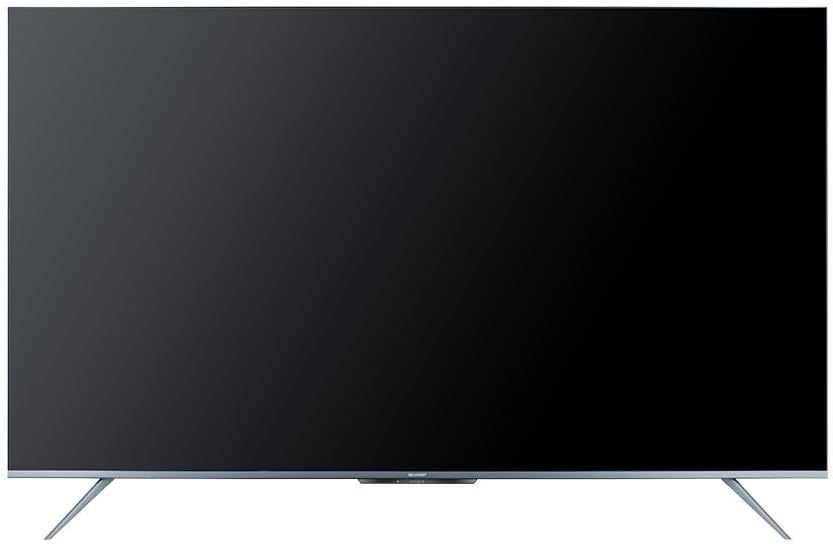
Figure 4.1: The Google TV home screen interface.
4.3 Älykkäiden ominaisuuksien käyttö
- Suoratoistosovellukset: Navigate to the 'Apps' section or use the dedicated remote buttons to launch Netflix, Prime Video, YouTube, and other installed applications.
- Äänihaku: Press the Google Assistant button on your remote and speak into the microphone to search for content, control playback, or ask questions.
- Sisäänrakennettu Chromecast: Use the Chromecast feature to cast videos, photos, and music from your compatible smartphone, tablet, or computer directly to the TV.
- Web Selain: Access the internet using the built-in web selain.
- Google Play Kauppa: Download and install additional apps and games from the Google Play Store.
4.4 Tulolähteen valinta
Voit vaihtaa liitettyjen laitteiden (esim. HDMI 1, HDMI 2, TV-viritin) välillä painamalla Syöte button on your remote control and select the desired source from the on-screen menu.
5. Huolto
5.1 Television puhdistaminen
- Näyttö: Pyyhi näyttö varovasti pehmeällä, nukkaamattomalla liinalla. Pinttyneisiin tahroihin käytä televisioille tarkoitettua näytönpuhdistusliuosta. Levitä sitä liinaan, älä suoraan näyttöön.
- Kaappi: Pyyhi television kotelo pehmeällä, kuivalla liinalla. Älä käytä hankaavia puhdistusaineita, vahoja tai liuottimia.
- Irrota aina television virtajohto pistorasiasta ennen puhdistamista.
5.2 Ohjelmistopäivitykset
Your Sharp Smart TV may receive software updates periodically to improve performance and add new features. Ensure your TV is connected to the internet to receive these updates. You can usually check for updates in the TV's settings menu.
6. Vianmääritys
Ennen kuin otat yhteyttä asiakastukeen, kokeile seuraavia ratkaisuja yleisiin ongelmiin:
| Ongelma | Mahdollinen ratkaisu |
|---|---|
| Ei virtaa | Tarkista, että virtajohto on kytketty kunnolla televisioon ja pistorasiaan. Varmista, että pistorasia toimii. Kokeile painaa television virtapainiketta. |
| Ei kuvaa, mutta ääni kuuluu | Ensure the correct input source is selected. Check HDMI or other video cables for secure connections. |
| Ei ääntä, mutta kuva näkyy | Tarkista äänenvoimakkuus ja varmista, ettei televisio ole mykistetty. Tarkista äänikaapelien liitännät, jos käytät ulkoisia kaiuttimia. Tarkista äänilähtöasetukset television valikosta. |
| Kaukosäädin ei toimi | Vaihda kaukosäätimen paristot. Varmista, ettei kaukosäätimen ja television infrapunatunnistimen välissä ole esteitä. |
| Ei voi muodostaa yhteyttä Wi-Fi-verkkoon | Ensure your Wi-Fi router is on and working. Re-enter the Wi-Fi password carefully. Try restarting your router and the TV. |
| Smart features are slow or unresponsive | Restart the TV. Ensure a stable internet connection. Close unused applications running in the background. |
7. Tekniset tiedot
| Ominaisuus | Yksityiskohta |
|---|---|
| Mallinumero | 4T-C65FL6EX |
| Näytön koko | 65 tuumaa |
| Näyttötekniikka | LED |
| Resoluutio | 3840 x 2160 (4K UHD) |
| Kuvasuhde | 16:9 |
| Viewkulma | 178 astetta |
| Päivitystaajuus | 60 Hz |
| Käyttöjärjestelmä | Google TV |
| Sisäinen muisti | 32 Gt |
| Lähetystyyppi | Digital (DVB-S/S2/T/T2/C) |
| Äänitekniikka | Dolby Atmos, DTS Studio Sound |
| Videotekniikka | HLG, Dolby Vision, HDR10 |
| Yhteydet | Wi-Fi, Bluetooth v5.1 |
| HDMI-portit | 3 2.0 (HDMI XNUMX) |
| USB-portit | 2 |
| LAN-portti | 1 |
| Äänen lähtöteho | 12 wattia x 2 |
| Virrankulutus (käytössä) | 200 wattia |
| Virrankulutus (valmiustila) | <0.5 wattia |
| Mitat (L x K x S) ilman jalustaa | 1447.7 x 837 x 81.3 mm |
| Mitat (L x K x S) jalustan kanssa | 1447.7 x 922.6 x 280.2 mm |
| Nettopaino | 17.9 kg |
| Alkuperämaa | Egypti |
8. Takuu ja tuki
8.1 Tuotetakuu
This Sharp 4T-C65FL6EX Smart TV comes with a 3-year full free warranty. Please retain your proof of purchase for warranty claims. The warranty covers manufacturing defects and malfunctions under normal use conditions. It typically does not cover damage caused by misuse, accidents, unauthorized repairs, or natural disasters.
8.2 Asiakastuki
For technical assistance, service requests, or further inquiries regarding your Sharp TV, please contact Sharp customer support. Refer to the warranty card or Sharp's official websivusto, josta löydät alueesi yhteystiedot.