
Johdanto
This manual provides detailed instructions for the safe and effective operation of your YeeSite 36LEDs RGB DJ Light. This stage par light features 36 high-intensity RGB LEDs, offering a wide range of color combinations for various lighting effects. It supports multiple control modes, including DMX, sound-activated, auto, strobe, fade, RGB dimming, and master-slave. Please read this manual thoroughly before use and retain it for future reference.
Mitä laatikossa on
Pura pakkausta pakkauksesta ja varmista, että kaikki alla luetellut osat ovat mukana ja hyvässä kunnossa:
- 2 x 36LED Par Lights
- 4 x kiinnikkeet
- 2 x kauko-ohjainta
- 1 x Käyttöohje

Image: Contents of the product package, including two par lights, two remote controllers, mounting brackets, and the user manual.
Tuote loppuview
The YeeSite 36LEDs RGB DJ Light is designed for versatile lighting applications. Familiarize yourself with the components and controls for optimal use.
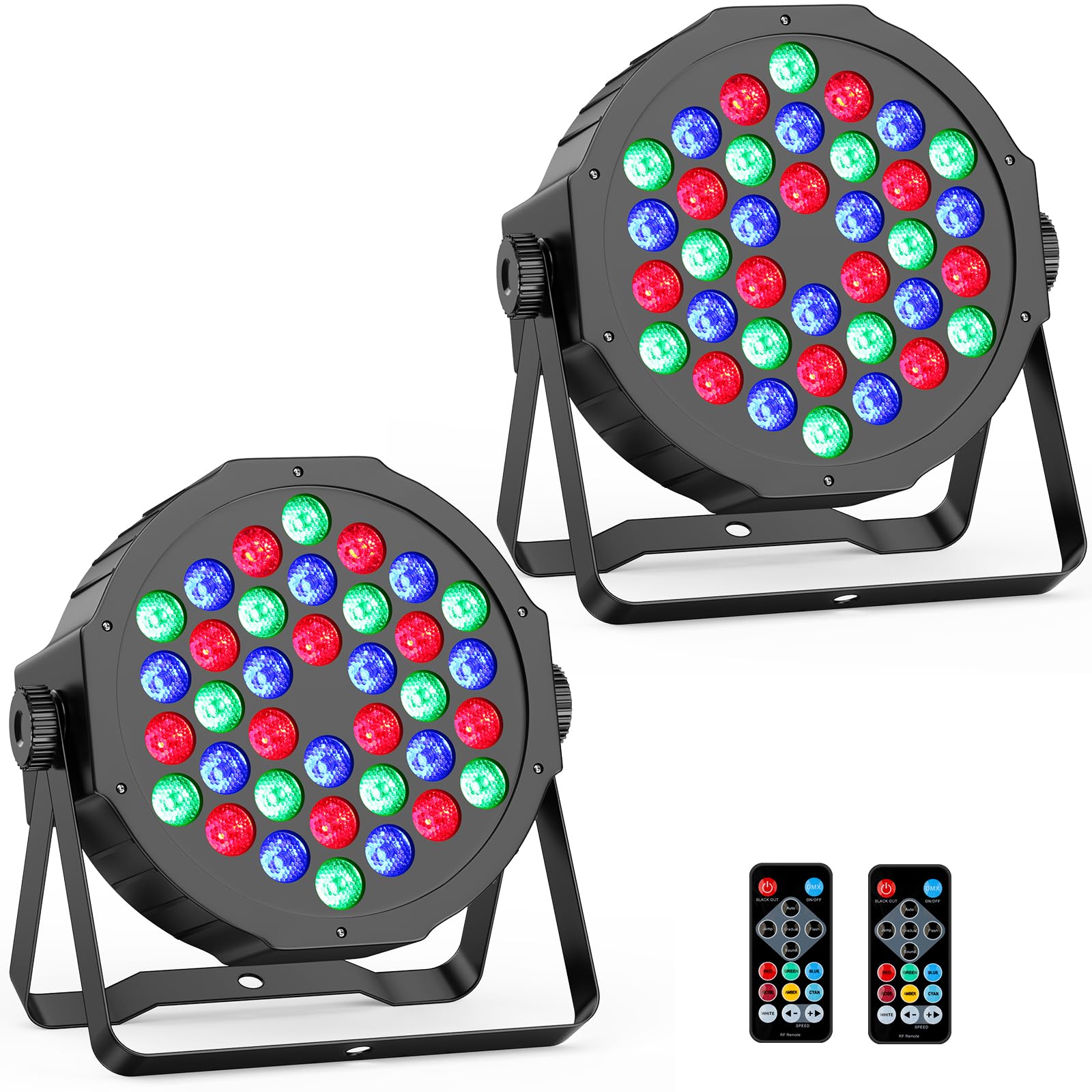
Kuva: Edessä view of the 36LEDs RGB DJ Light, highlighting the LED array.
Rear Panel and Remote Control
The rear panel provides essential connections and a digital display for mode selection. The included remote control offers convenient wireless operation.

Image: Rear panel of the light with DMX ports, digital display, and control buttons, alongside the remote control with its various function buttons.
Takapaneelin säätimet:
- A: DMX IN - Input for DMX signal.
- B: DMX OUT - Output for linking to other DMX devices.
- C: MENU - Accesses the main menu and settings.
- D: UP - Navigates up through menu options or increases values.
- E: DOWN - Navigates down through menu options or decreases values.
- F: ENTER - Confirms selection or enters a submenu.
- G: MIC - Built-in microphone for sound-activated mode.
- H: DIGITAL DISPLAY - Shows current mode, DMX address, or parameter values.
Kaukosäätimen toiminnot:
- 1: Black Out - Turns off all lights.
- 2: DMX Mode - Activates DMX control.
- 3: Automaattinen tila - Cycles through pre-programmed effects.
- 4: Hopping Mode - Jumps between colors.
- 5: Gradual - Smooth color transitions (Fade mode).
- 6: Flash Mode - Strobe effect.
- 7: Sound-active Mode - Lights react to sound.
- 8: Red Color - Activates red LEDs.
- 9: Green Color - Activates green LEDs.
- 10: Blue Color - Activates blue LEDs.
- 11: Rose Color - Activates rose color.
- 12: Amber Color - Activates amber color.
- 13: Cyan Color - Activates cyan color.
- 14: White Color - Activates white LEDs.
- 15: Speed - - Decreases effect speed.
- 16: Speed + - Increases effect speed.
Asennus
- Purkaminen: Carefully remove the par lights and all accessories from the packaging. Inspect for any damage.
- Asennus:
Each unit includes adjustable metal brackets for flexible placement. You can:
- Place the lights on the floor as uplights.
- Mount them to trusses or lighting bars using appropriate clamps (ei sisälly).
- Attach them to a wall or ceiling using suitable hardware (not included).
Ensure the mounting surface or structure can safely support the weight of the light(s).
- Virtaliitäntä: Connect the provided power cord to the light and then to a standard 110V AC power outlet. The lights are corded electric and do not require batteries.
- Ensimmäinen käynnistys: Once connected, the light will power on. Use the rear panel buttons or the remote control to select your desired operating mode.
Toimintatilat
The YeeSite 36LEDs RGB DJ Light offers multiple operating modes to suit various event requirements:
- Automaattitila: The light cycles through pre-programmed effects automatically. This mode is ideal for continuous, dynamic lighting without manual intervention.
- Ääniaktivoitu tila: The built-in microphone detects sound, and the light effects change in sync with the music or ambient audio. Adjust sensitivity if needed.
- DMX-tila: For professional control, connect the light to a DMX controller. This allows precise control over individual light parameters such as color, intensity, and effects. The light supports 6-channel DMX.
- Strobe-tila: Produces rapid flashes of light. The speed of the strobe can often be adjusted.
- Fade Mode (Gradual): Colors transition smoothly from one to another, creating a gentle and continuous color change.
- RGB Dimming: Allows adjustment of the intensity of red, green, and blue LEDs independently to create custom colors and brightness levels.
- Master-Slave-tila: Link multiple lights together using DMX cables. One light acts as the "Master" (controlling unit), and the others act as "Slaves," synchronizing their effects with the Master. This is ideal for coordinated lighting across multiple units.

Image: Visual representation of the various operating modes available for the light.
Kaukosäätimen toiminta
The included remote control provides convenient access to many functions. Ensure the remote has a clear line of sight to the light's sensor for optimal performance.
- Virta päälle/pois: Use the ON/OFF button to turn the light on or off.
- Tilan valinta: Press the dedicated buttons for Auto, DMX, Sound-active, Hopping, Gradual (Fade), or Flash modes.
- Värin valinta: Directly select individual colors (Red, Green, Blue, Rose, Amber, Cyan, White) or combinations.
- Nopeuden säätö: Use the "Speed +" and "Speed -" buttons to increase or decrease the speed of dynamic effects (e.g., auto mode, fade, strobe).
- Black Out: The "Black Out" button will temporarily turn off all light output.

Image: Two par lights with their remote controls, illustrating the ease of remote operation.
DMX-ohjaus
For advanced lighting control, the YeeSite 36LEDs RGB DJ Light can be integrated into a DMX system. It supports 6-channel DMX operation.
- Connecting DMX:
- Connect a DMX cable from your DMX controller's output to the DMX IN port (A) of the first light.
- To link multiple lights, connect a DMX cable from the DMX OUT port (B) of the first light to the DMX IN port of the next light, and so on.
- DMX-osoitteen asettaminen:
Using the MENU, UP, DOWN, and ENTER buttons on the rear panel, navigate to the DMX address setting. Set a unique DMX starting address for each light in your chain. Refer to your DMX controller's manual for channel assignments.
- DMX Channel Functions (6-Channel Mode):
A typical 6-channel DMX setup might include:
kanava Toiminto Arvoalue CH1 Mestari Dimmer 0-255 (0% to 100% brightness) CH2 Punainen intensiteetti 0-255 (0% to 100% red) CH3 Vihreä intensiteetti 0-255 (0% to 100% green) CH4 Sininen intensiteetti 0-255 (0% to 100% blue) CH5 Strobe/Effect Speed 0–255 (Pois päältä - nopea) CH6 Tilan valinta Various values for Auto, Sound, Fade, etc. Note: Specific DMX channel functions and values may vary. Refer to the light's digital display for exact channel mapping if available, or experiment with your DMX controller.

Image: Multiple par lights connected to a DMX controller, illustrating DMX mode operation.
Video: A demonstration of the 36LED RGB Par Lights in action, showcasing various color changes and effects, likely controlled via DMX or auto mode. This video is provided by the seller, YeeSite.
Huolto
Proper maintenance ensures the longevity and optimal performance of your YeeSite 36LEDs RGB DJ Light.
- Puhdistus: Puhdista linssi ja ulkopinta säännöllisestiasing with a soft, dry cloth. Do not use abrasive cleaners or solvents. Ensure the light is unplugged before cleaning.
- Ilmanvaihto: Ensure the ventilation openings are clear of dust and debris to prevent overheating. The unit has a built-in cooling fan.
- Varastointi: When not in use for extended periods, store the lights in a dry, dust-free environment.
- Tarkastus: Tarkista virta- ja DMX-kaapelit säännöllisesti kulumisen tai vaurioiden varalta. Vaihda vaurioituneet kaapelit välittömästi.
Vianetsintä
If you encounter issues with your YeeSite 36LEDs RGB DJ Light, refer to the following common problems and solutions:
| Ongelma | Mahdollinen syy | Ratkaisu |
|---|---|---|
| Valo ei syty. | No power supply; faulty cable; unit malfunction. | Check power connection and outlet. Ensure power cable is not damaged. Try a different power source. |
| Kaukosäädin ei toimi. | Obstruction; remote battery low/dead; light not in remote mode. | Ensure clear line of sight to the light's sensor. Replace remote battery. Check if the light is in a mode that accepts remote input. |
| Ei DMX-ohjausta. | Väärä DMX-osoite; viallinen DMX-kaapeli; DMX-ohjaimen ongelma; valo ei ole DMX-tilassa. | Verify DMX address setting on the light. Check DMX cable connections. Ensure the light is set to DMX mode. Test with a different DMX cable or controller if possible. |
| Sound-activated mode not responding. | Low sound input; microphone obstructed; sensitivity setting too low. | Increase music volume or place light closer to sound source. Ensure microphone (G) on rear panel is not obstructed. Adjust sound sensitivity via menu if available. |
| Valot välkkyvät tai toimivat epätasaisesti. | Loose connection; power fluctuations; DMX signal interference. | Check all power and DMX connections. Ensure stable power supply. If using DMX, check for proper termination and cable quality. |
Tekniset tiedot
| Ominaisuus | Yksityiskohta |
|---|---|
| Mallinumero | YS-073-36R25050 |
| Valonlähteen tyyppi | valodiodi (LED) |
| LEDien lukumäärä | 36 (RGB) |
| Valonlähde Wattage | 36 wattia |
| Virtalähde | Johdollinen sähkö |
| Voitage | 110 volttia |
| Ohjaustilat | DMX (6-channel), Sound-Activated, Auto, Strobe, Fade, RGB Dimming, Master-Slave |
| Asennustyyppi | Ceiling Mount, Floor Mount, Wall Mount |
| Materiaali | Muovi (akryylinitriilibutadieenistyreeni) |
| Väri | Musta |
| Tuotteen mitat (P x L x K) | 8 cm P x 7 cm L x 7 cm K |
| Paino (jokainen) | Noin 0.96 lbs |
Takuu
YeeSite provides a 12 kuukauden takuu for this product. This warranty covers manufacturing defects and ensures the product functions as intended under normal use. Please retain your proof of purchase for warranty claims.
Tukea
For technical assistance, troubleshooting beyond this manual, or warranty inquiries, please contact YeeSite customer support through the retailer where the product was purchased or visit the official YeeSite store page: