
KNAON Y50P-BK
KNAON Bluetooth Label Maker Machine Y50P User Manual
Model: Y50P-BK
Johdanto
This manual provides comprehensive instructions for the KNAON Y50P Portable Thermal Label Maker. It covers setup, operation, maintenance, and troubleshooting to ensure optimal performance and a seamless labeling experience. The Y50P is designed for versatile use in home, office, small business, and school environments, offering both Bluetooth and USB connectivity for efficient label printing.

Figure 1: KNAON Y50P Label Maker and included label roll.
Mitä laatikossa on
Upon unboxing your KNAON Y50P Label Maker, please verify that all the following components are included:
- Y50P Label Maker
- Label Tape 1.97' x 1.18' (50mm x 30mm thermal print paper roll)
- Käyttöopas (tämä asiakirja)
- C-tyypin USB-kaapeli
Asennus
1. Laitteen lataaminen
The KNAON Y50P Label Maker is powered by a durable 1200 mAh battery. Before first use, it is recommended to fully charge the device using the provided USB Type-C cable. Connect the Type-C end to the printer and the USB-A end to a compatible power adapter or computer USB port.
2. Loading the Label Roll
To load the thermal label paper:
- Avaa tarratulostimen yläkansi.
- Insert the label roll with the printing surface facing upwards, ensuring it aligns correctly with the paper guides.
- Vedä pieni osa tarrapaperista ulos tulostuspään ohi.
- Sulje yläkansi tiiviisti, kunnes se napsahtaa paikalleen.

Figure 2: Proper insertion of the label roll into the KNAON Y50P Label Maker.
3. Sovelluksen asennus ja yhteyden muodostaminen
The KNAON Y50P requires the 'FlashLabel Pro' application for wireless operation via Bluetooth. For wired connection, drivers are required for macOS and Windows.
3.1. Bluetooth Connection (via 'FlashLabel Pro' App)
For iOS and Android devices:
- Download the 'FlashLabel Pro' app from the Apple App Store or Google Play Store.
- Ensure your label maker is turned on and Bluetooth is enabled on your smartphone or tablet.
- Open the 'FlashLabel Pro' app. The app will guide you through the connection process. Select your Y50P printer from the list of available devices.
- Note: The device cannot be connected directly via your phone's Bluetooth settings; connection must be initiated through the 'FlashLabel Pro' app.
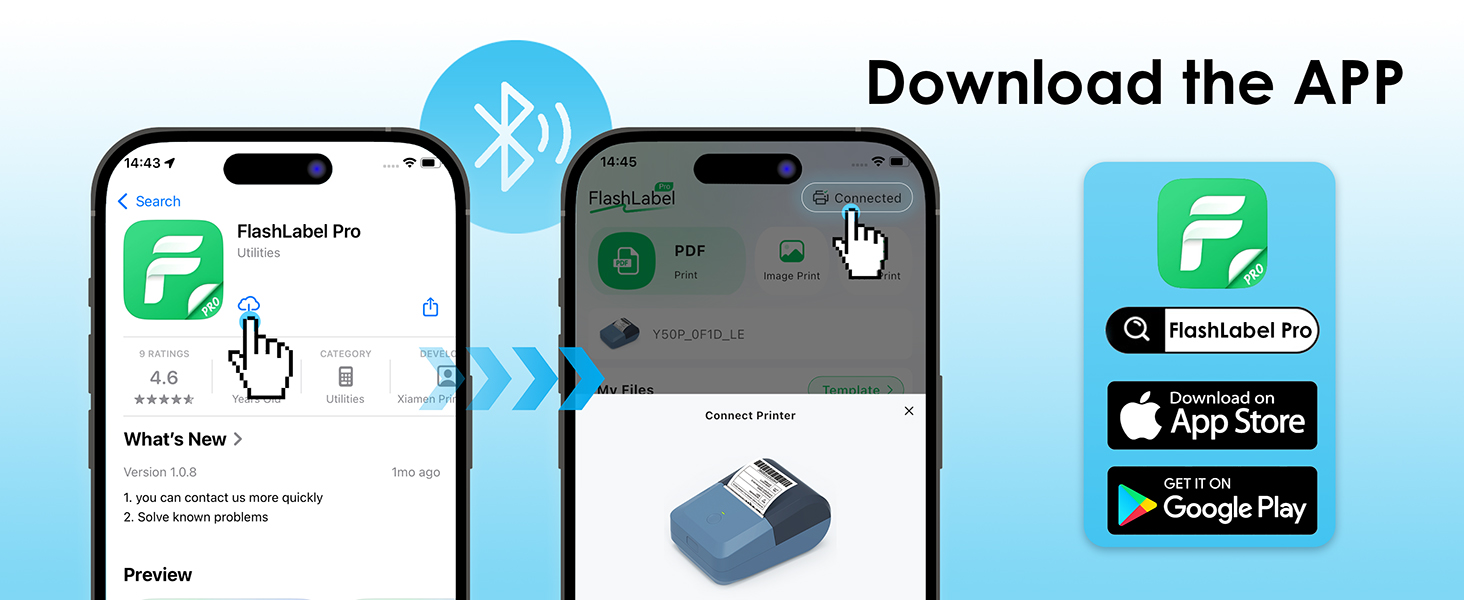
Figure 3: Steps to download and connect the FlashLabel Pro app.

Figure 4: Bluetooth and USB connection options for the label maker.
3.2. USB Cable Connectivity (for macOS and Windows)
For macOS and Windows (7 and above) users:
- Connect the label maker to your computer using the provided USB Type-C cable.
- Drivers must be installed on your operating system for proper functionality. Please refer to the official KNAON website or the support section for driver downloads and installation guides.
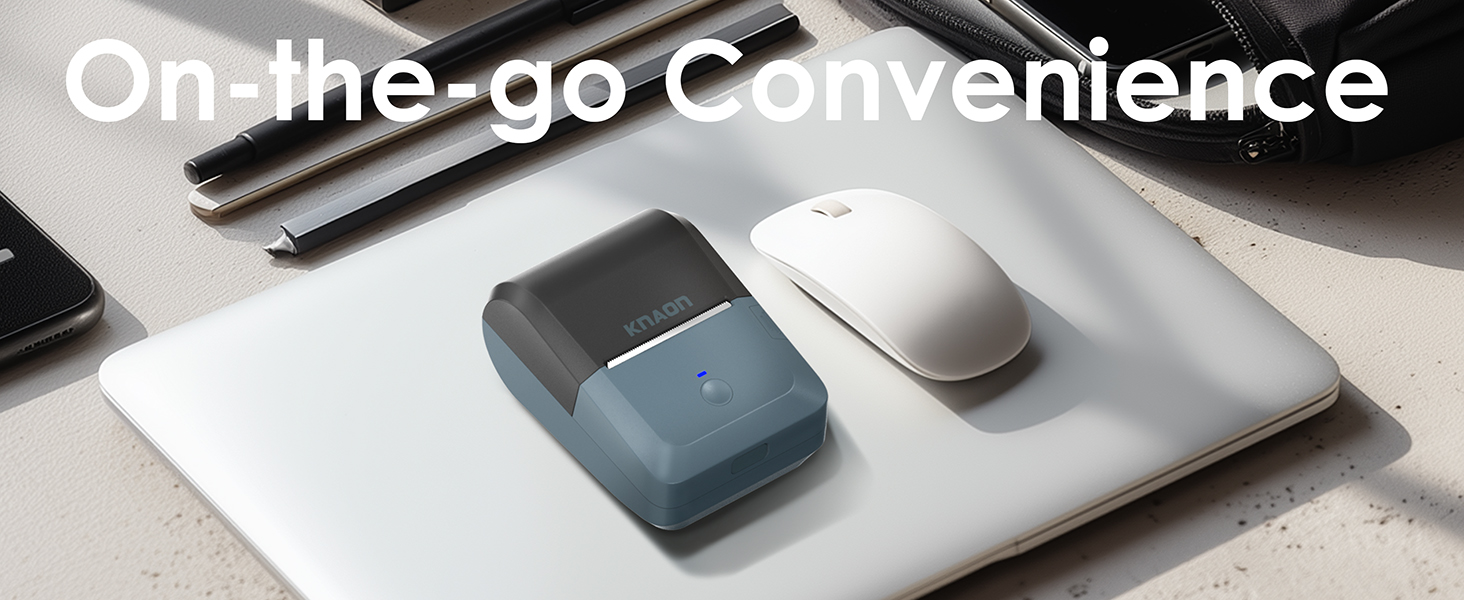
Figure 5: USB cable connection for macOS and Windows.
Käyttöohjeet
1. Designing Labels with 'FlashLabel Pro' App
The 'FlashLabel Pro' app provides extensive customization options for your labels:
- After connecting your printer, tap the "+" icon to create a new label.
- Choose the appropriate label size that matches your loaded label roll (e.g., 50x30mm).
- Utilize the app's features to design your label:
- Access over 3,000 pre-designed templates.
- Select from over 5,000 icons.
- Choose from over 100 fonts.
- Add text, barcodes, QR codes, images, and other elements.
- Double-click on elements to edit their content and properties.
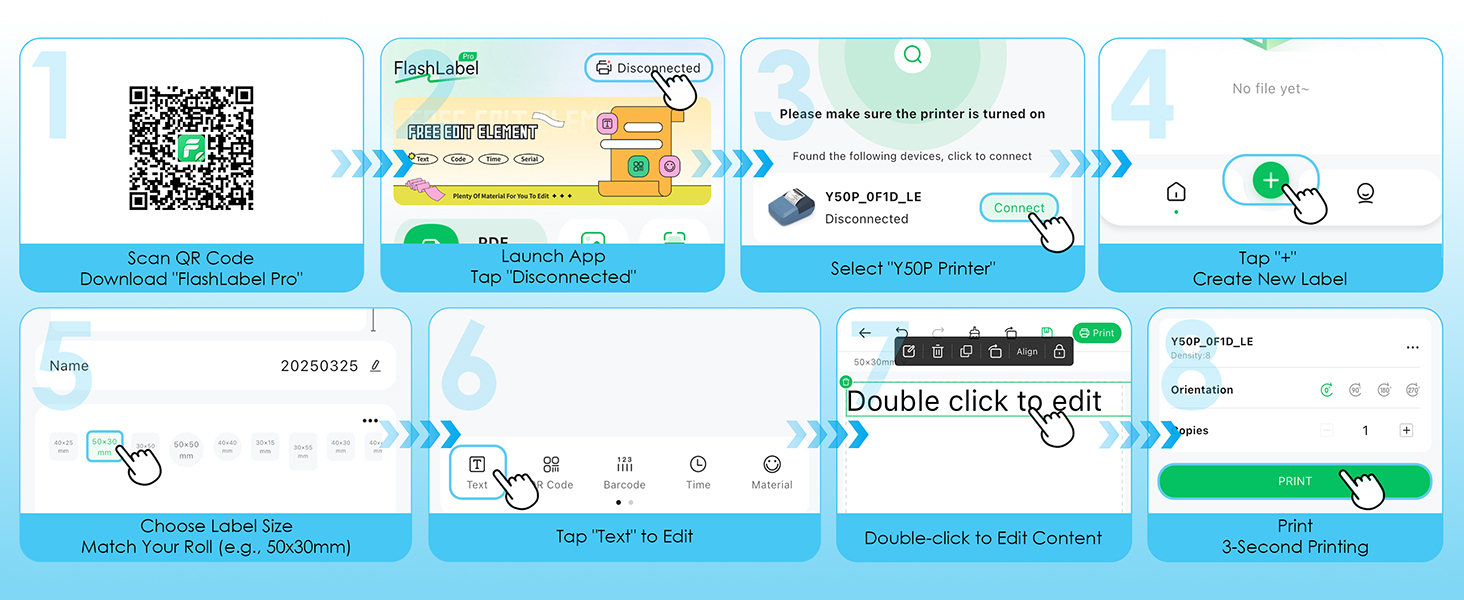
Figure 6: Step-by-step guide for designing and printing labels using the FlashLabel Pro app.
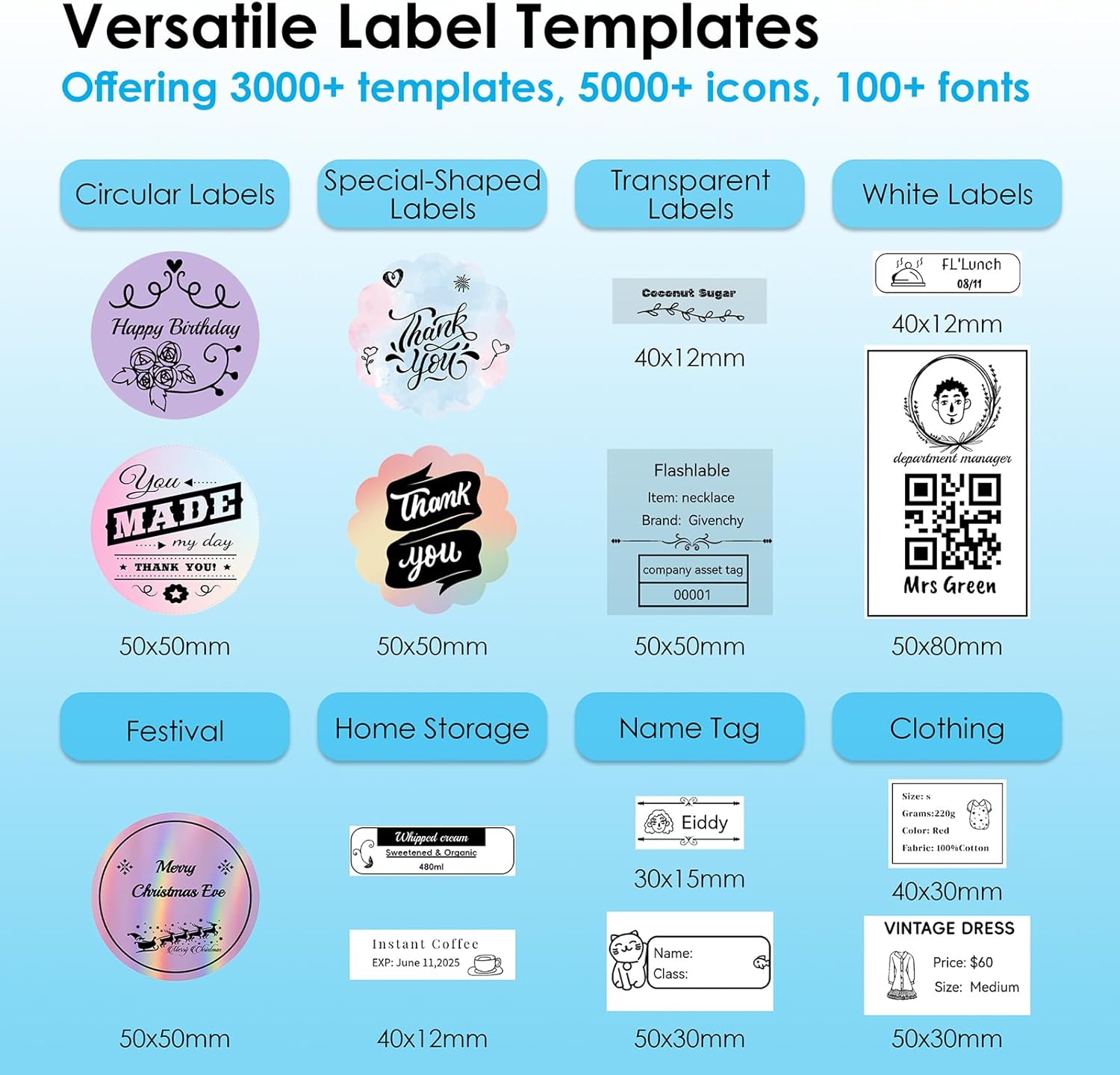
Kuva 7: Esimamples of versatile label templates available in the app.
2. Printing Your Label
Once your design is complete, tap the "Print" button in the app. The printer will quickly produce your label.

Figure 8: The four-step process from app to print.
3. Supported Label Sizes and Applications
The KNAON Y50P supports various thermal paper sizes, ranging from 0.6 to 2.2 inches (15-58mm) in width. This versatility makes it suitable for a wide range of labeling needs, including:
- Home Storage: Organizing pantry items, containers, and storage bins.
- Nimi Tags: Creating personalized name tags for events or personal items.
- Hinta Tags: Generating price labels for retail or small business products.
- Lähetystarrat: Printing small shipping or return labels.
- DIY Barcode Labels: Customizing labels with barcodes for inventory.
- Thank-You Labels: Adding a personal touch to packages or gifts.

Figure 9: Versatile applications of the KNAON Y50P Label Maker.

Figure 10: The compact size of the label maker allows for easy portability.
Huolto
Regular maintenance ensures the longevity and optimal performance of your KNAON Y50P Label Maker.
1. Tulostuspään puhdistaminen
The thermal print head can accumulate dust or residue over time, affecting print quality. To clean it:
- Sammuta tarratulostin ja irrota se kaikista virtalähteistä.
- Open the top cover and carefully locate the print head (the dark strip across which the paper feeds).
- Pyyhi tulostuspää varovasti vanupuikolla kevyesti dampened with isopropyl alcohol. Allow it to dry completely before closing the cover and resuming use.
- Avoid touching the print head with bare hands as oils can transfer and affect printing.
2. Akun hoito
Akun käyttöiän maksimoimiseksi:
- Vältä akun usein toistuvaa täydellistä tyhjentymistä.
- Säilytä laitetta viileässä ja kuivassa paikassa, kun sitä ei käytetä pitkään aikaan.
- Lataa laitetta säännöllisesti, vaikka sitä ei käytettäisikään usein, akun kunnon ylläpitämiseksi.
Vianetsintä
If you encounter issues with your KNAON Y50P Label Maker, refer to the common problems and solutions below.
| Ongelma | Mahdollinen syy | Ratkaisu |
|---|---|---|
| Tulostin ei muodosta yhteyttä Bluetoothin kautta. | Incorrect connection method; Bluetooth off; app not recognizing device. | Ensure you are connecting through the 'FlashLabel Pro' app, not directly via phone settings. Verify Bluetooth is enabled on both devices. Restart the app and printer. |
| Poor print quality (faint, streaky, or incomplete print). | Dirty print head; incorrect label roll insertion; low battery. | Clean the print head as described in the Maintenance section. Re-insert the label roll correctly, ensuring the printing surface faces up. Charge the printer fully. |
| Labels are tilted or misaligned. | Label roll not properly aligned with guides. | Open the cover and ensure the label roll is seated firmly and straight within the paper guides. Adjust if necessary. |
| Tulostin ei vastaa. | Akku vähissä; laite jumiutunut. | Charge the printer. If unresponsive, try resetting by holding the power button for 10 seconds or until it powers off, then restart. |
| Cannot print via USB on computer. | Drivers not installed or outdated. | Ensure the correct drivers for your operating system (macOS/Windows) are installed. Visit the KNAON support websivusto uusimmille ohjaimille. |
For further assistance, including instructional guides and troubleshooting videos, please visit the official KNAON support resources.
Tekniset tiedot
Key technical specifications for the KNAON Y50P Portable Thermal Label Maker:
| Ominaisuus | Yksityiskohta |
|---|---|
| Mallin nimi | Y50P-BK |
| Tuotteen mitat | 4.76" S x 3.35" L x 2.3" K |
| Tuotteen paino | 8.6 unssia (noin 0.54 lbs) |
| Yhteystekniikka | Bluetooth, USB |
| Tulostustekniikka | Lämpö |
| Tulostimen lähtö | Yksivärinen |
| Suurin mustavalkoinen tulostustarkkuus | 300 dpi |
| Kopioinnin maksiminopeus (mustavalkoinen) | 75 ppm |
| Suurin mediakoko | 1.97 x 1.18 tuumaa (50 mm x 30 mm) |
| Tuettu tarran leveys | 0.6–2.2 tuumaa (15–58 mm) |
| Akku | 1200 mAh litiumioniakku (sisältyy pakkaukseen) |
| Mukana olevat komponentit | Y50P Label Maker, Label Tape, User Manual, USB Type-C Cable |
Takuu ja tuki
The KNAON Y50P Portable Thermal Label Maker comes with a limited warranty. For details regarding the warranty period and coverage, please refer to the warranty information provided with your product packaging or contact KNAON customer support.
KNAON is committed to providing a seamless user experience. For additional support, including printer drivers, instructional guides, and troubleshooting videos, please visit the official KNAON website or contact their customer service team. You can also visit the KNAON Store on Amazon saadaksesi lisätietoja tuotteesta ja tukiresursseja.
Ask a question about this manual
Ask about setup, troubleshooting, compatibility, parts, safety, or missing instructions. Manuals+ will review the question and use this page’s manual context to help answer it.