
Johdanto
This manual provides instructions for setting up and using your ECONTROLLY BN59-01385B Voice Remote Control. This replacement remote is designed to be compatible with various Samsung Smart TV models, offering voice control functionality and direct access buttons for popular streaming services.

Edessä view of the ECONTROLLY BN59-01385B Voice Remote Control.
Asennusopas
1. Paristojen asentaminen
Kaukosäädin vaatii kaksi AAA-alkaliparistoa (eivät sisälly toimitukseen).
- Avaa kaukosäätimen takana oleva paristolokeron kansi.
- Aseta kaksi AAA-paristoa paikoilleen varmistaen, että positiiviset (+) ja negatiiviset (-) navat ovat oikein kohdistettuina lokeron sisällä oleviin merkkeihin.
- Sulje paristolokeron kansi kunnolla.
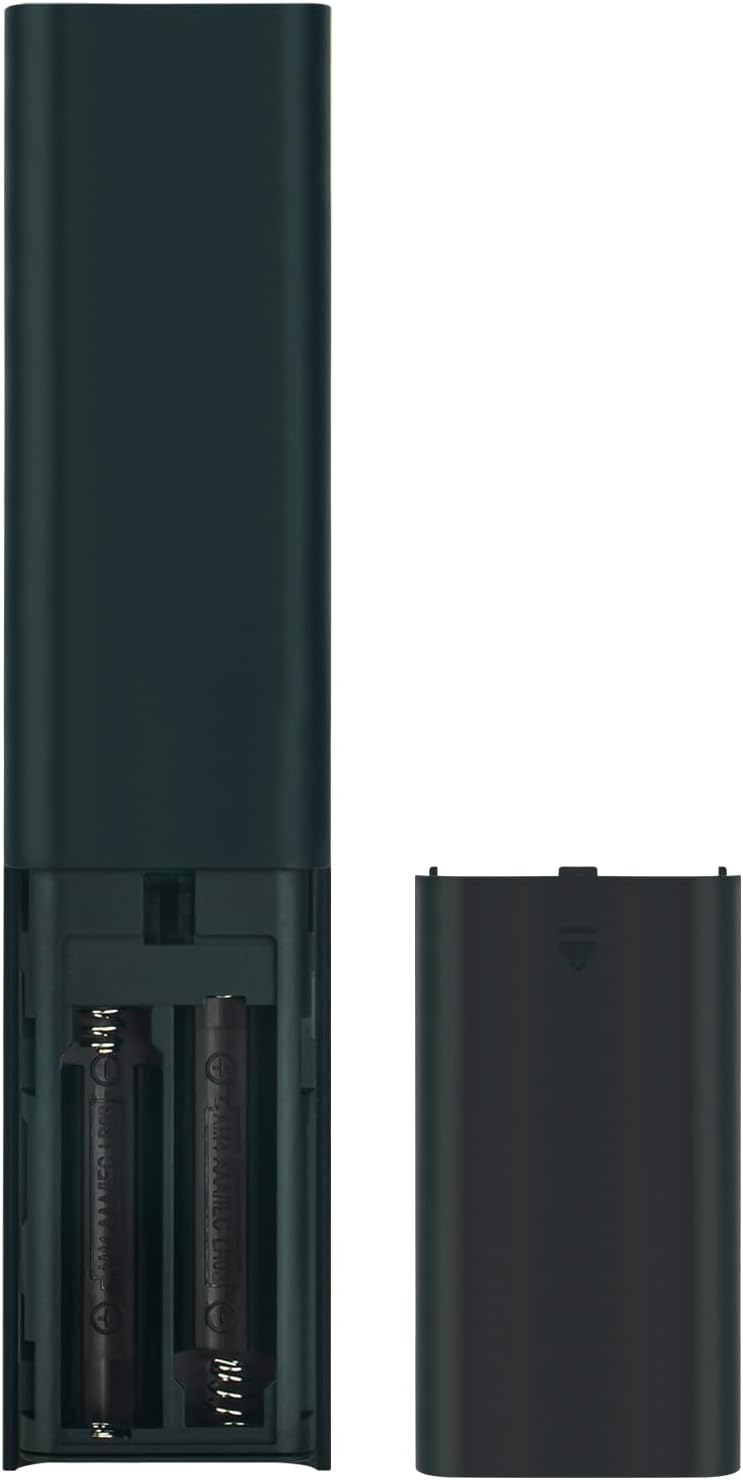
Image showing the battery compartment for AAA batteries.
2. Kaukosäätimen pariliitos television kanssa
This remote control uses Bluetooth connectivity and requires pairing with your Samsung TV before use. Follow these steps to pair:
- Varmista, että Samsung-televisiosi on päällä.
- Suuntaa kaukosäädin televisiota kohti.
- Paina ja pidä painettuna samanaikaisesti Palata painike (kaareva nuoli) ja Toista/Tauko painiketta vähintään 3 sekunnin ajan.
- Pariliitoksen muodostamisesta kertovan viestin pitäisi ilmestyä televisioruutuun.
If pairing is unsuccessful, ensure the batteries are correctly installed and try again. Move closer to the TV if necessary.
Käyttöohjeet
The ECONTROLLY BN59-01385B remote control provides intuitive navigation and voice command capabilities.
Tärkeimmät toiminnot:
- Virtapainike: Located at the top right, typically marked with a circle and a vertical line. Turns the TV on or off.
- Ääniohjauspainike (
 ): Located near the top, marked with a microphone icon. Press and hold to activate voice commands for searching content, changing settings, or controlling smart home devices.
 - Navigation Pad (Directional Buttons & Enter): The large circular pad in the center. Use to navigate menus and select items.
- Paluu-painike: Located below the navigation pad, marked with a curved arrow. Returns to the previous screen or menu.
- Koti-painike: Located below the navigation pad, marked with a house icon. Accesses the Smart Hub or home screen.
- Toisto/Tauko-painike: Located below the navigation pad, marked with a play/pause icon. Controls media playback.
- Äänenvoimakkuus ylös/alas -painikkeet (+/-): Adjusts the TV volume.
- Kanava ylös/alas -painikkeet (up/down arrows): Changes TV channels.
- Pikakäyttöpainikkeet: Dedicated buttons for Netflix, Samsung TV Plus, Prime Video, and Disney+ for direct app launch.
The microphone button activates voice control for your Samsung TV.
Huolto ja hoito
- Keep the remote control dry. Moisture can damage the internal circuits.
- Vältä kaukosäätimen altistamista äärimmäisille lämpötiloille.
- Puhdista kaukosäädin pehmeällä, kuivalla liinalla. Älä käytä hankaavia puhdistusaineita tai liuottimia.
- Jos kaukosäädintä ei käytetä pitkään aikaan, poista paristot vuotojen estämiseksi.
- Handle the remote with care to prevent drops or impacts.
Vianetsintä
| Ongelma | Ratkaisu |
|---|---|
| Kaukosäädin ei vastaa. |
|
| Ääniohjaus ei toimi. |
|
| Painikkeet jumittuvat tai eivät reagoi. |
|
Tekniset tiedot
- Mallinumero: PT-BN59-01385B
- Merkki: HALLINTAAN
- Liitettävyys: Bluetooth
- Ohjaimen tyyppi: Ääniohjaus
- Erikoisominaisuudet: Voice Search, Quick Access Buttons
- Yhteensopivat laitteet: Samsung-televisiot
- Virtalähde: 2 x AAA-alkaliparistoa (eivät sisälly toimitukseen)
- Suurin kantama: 10 metriä (33 jalkaa)
- Materiaali: ABS
- Väri: Musta
- Mitat (P x L): Approximately 16.1 cm (6.33 in) x 3.5 cm (1.37 in)
- Paino: Noin 2 unssia (56.7 grammaa)

Kaukosäätimen fyysiset mitat.
Yhteensopivat TV-mallit
This remote control is compatible with various Samsung Smart TV models, including but not limited to:
- QN85B-sarja: QA55QN85BA, QA65QN85BA, QA75QN85BA, QA85QN85BA, QA65QN85BAW, QA75QN85BAW, QA85QN85BAW, QA55QN85BAWXXY, QA65QN85BAWXXY, QA75QN85BAWXXY
- Q60B Series: QA55Q60BA, QA65Q60BA, QA75Q60BA, QA85Q60BA, QA55Q60BAW, QA65Q60BAW, QA75Q60BAW, QA85Q60BAW, QA55Q60BAWXXY, QA65Q60BAWXXY, QA75Q60BAWXXY, QA85Q60BAWXXY
- Q70B Series: QA55Q70BA, QA65Q70BA, QA75Q70BA, QA85Q70BA, QA55Q70BAW, QA65Q70BAW, QA75Q70BAW, QA85Q70BAW, QA55Q70BAWXXY, QA65Q70BAWXXY, QA75Q70BAWXXY, QA85Q70BAWXXY
- Q80B Series: QA55Q80BA, QA65Q80BA, QA75Q80BA, QA85Q80BA, QA55Q80BAW, QA65Q80BAW, QA75Q80BAW, QA85Q80BAW, QA55Q80BAWXXY, QA65Q80BAWXXY, QA75Q80BAWXXY, QA85Q80BAWXXY
- QN90B-sarja: QA43QN90BA, QA50QN90BA, QA55QN90BA, QA65QN90BA, QA75QN90BA, QA85QN90BA, QA43QN90BAW, QA50QN90BAW, QA55QN90BAW, QA65QN90BAW, QA75QN90BAW, QA85QN90BAW, QA43QN90BAWXXY, QA50QN90BAWXXY, QA55QN90BAWXXY
This list is not exhaustive. If your TV model is not listed, please refer to your TV's user manual or contact ECONTROLLY support for compatibility information.

Visual comparison of the replacement remote with an original remote.
Tuki ja yhteydenotto
For further assistance or inquiries, please refer to the product listing on Amazon or contact ECONTROLLY customer support.