1. Johdanto
This manual provides detailed instructions for the installation, operation, and maintenance of your Xigmatek Aqua V AIR Arctic Mid-Tower PC Case. Please read this manual thoroughly before beginning any installation to ensure proper setup and safe operation. Retain this manual for future reference.
2. Turvallisuustiedot
Noudata seuraavia turvaohjeita asennuksen ja käytön aikana:
- Irrota aina virtalähde pistorasiasta ennen minkään komponentin asentamista tai irrottamista.
- Käytä antistaattista ranneketta estääksesi herkkien komponenttien staattisen sähkön purkausten (ESD) aiheuttamat vauriot.
- Handle components carefully. Avoid touching pins or circuit boards directly.
- Varmista tietokoneen kotelon asianmukainen ilmanvaihto ylikuumenemisen estämiseksi.
- Pidä pienet osat ja työkalut poissa lasten ulottuvilta.
- Älä yritä muokata koteloa tai sen osia, sillä se voi mitätöidä takuun ja aiheuttaa turvallisuusriskejä.
3. Pakkauksen sisältö
Varmista, että pakkauksessa on kaikki tarvittavat osat:
- Xigmatek Aqua V AIR Arctic Mid-Tower PC Case
- Accessory kit (screws, standoffs, cable ties)
- Käyttöopas (tämä asiakirja)
If any items are missing or damaged, contact your retailer or Xigmatek support.
4. Tuote ohiview
The Xigmatek Aqua V AIR Arctic is a mid-tower PC case designed for high-performance gaming configurations. It features tempered glass panels for component visibility and optimized airflow with pre-installed ARGB fans.

Kuva 4.1: Vasen etuosa view of the Xigmatek Aqua V AIR Arctic PC case, showcasing the tempered glass front and side panels, and the pre-installed ARGB fans.

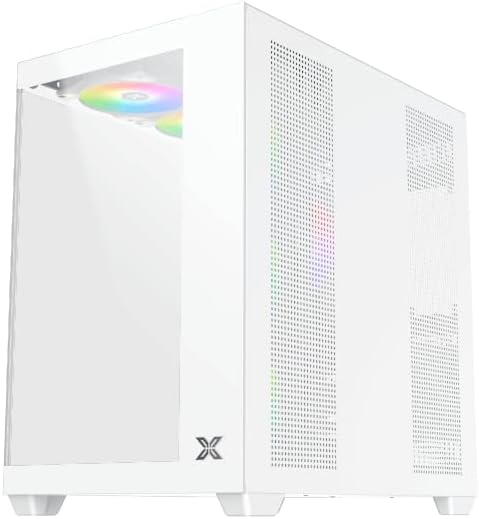
Kuva 4.2: Takaosa view of the PC case, showing the I/O shield cutout, expansion slots, and rear fan mount.
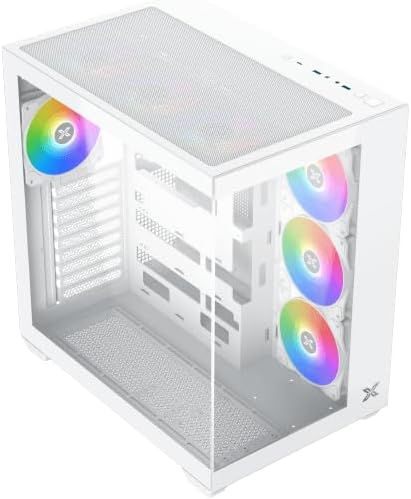
Kuva 4.3: Ylhäältä alas kulmassa view, highlighting the top mesh panel for additional cooling and the internal layout.
5. Asennus ja asennus
Follow these steps to install your PC components into the Xigmatek Aqua V AIR Arctic case.
5.1. Asian valmistelu
- Aseta kotelo tasaiselle ja vakaalle alustalle.
- Remove the tempered glass side panel by unscrewing the thumb screws at the rear and carefully sliding it off. Place it on a soft, non-abrasive surface to prevent scratches.
- Remove the opposite steel side panel by unscrewing the thumb screws and sliding it off.
5.2. Emolevyn asennus
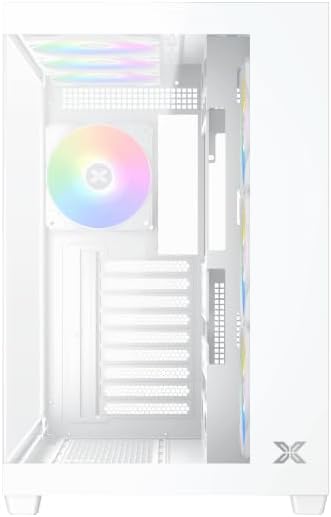
Kuva 5.1: Sisustus view of the case, illustrating the motherboard mounting area and cable routing cutouts.
- Asenna I/O-suoja kotelon takaosassa olevaan aukkoon.
- Align your motherboard with the pre-installed standoffs. Ensure the standoffs match your motherboard's form factor (ATX, Micro ATX).
- Secure the motherboard using the provided screws from the accessory kit. Do not overtighten.
5.3. Virtalähteen (PSU) asennus
- Locate the PSU mounting bracket at the bottom rear of the case.
- Liu'uta virtalähde kotelon takaosasta sille tarkoitettuun lokeroon.
- Kiinnitä virtalähde koteloon virtalähteen mukana toimitetuilla ruuveilla.
5.4. Tallennusaseman asennus
The case supports multiple storage drives:
- 2.5 tuuman SSD-levyt: Mount directly to the SSD trays located behind the motherboard tray. Secure with screws.
- 3.5 tuuman kiintolevyt: Install into the drive cage located beneath the PSU shroud. Slide the drive into the tray and secure with screws.
5.5. Näytönohjaimen (GPU) ja laajennuskortin asentaminen
- Irrota tarvittavat laajennuspaikkojen suojat kotelon takaosasta.
- Aseta näytönohjain tai muut laajennuskortit emolevyn asianmukaisiin PCIe-paikkoihin.
- Secure the cards with the provided screws.
5.6. Kaapelien hallinta
Kuva 5.2: View behind the motherboard tray, illustrating the ample space and tie-down points for effective cable management.
Utilize the cable routing cutouts and tie-down points behind the motherboard tray to organize cables. This improves airflow and aesthetics.
- Kytke kaikki tarvittavat virtakaapelit virtalähteestä emolevyyn, näytönohjaimeen ja tallennusasemiin.
- Connect front panel cables (USB, audio, power/reset switches, LED indicators) to the corresponding headers on your motherboard. Refer to your motherboard manual for specific header locations.
- Connect the ARGB fan cables to the integrated fan controller or directly to your motherboard's ARGB headers if available.
5.7. Fan and Radiator Support
The Xigmatek Aqua V AIR Arctic comes with 7 pre-installed 120mm ARGB fans. Additional cooling options are available:
- Edessä: Supports up to 3 x 120mm or 2 x 140mm fans / 240mm, 280mm, 360mm radiators.
- Yläosa: Supports up to 3 x 120mm or 2 x 140mm fans / 240mm, 280mm, 360mm radiators.
- Taka: Tukee yhtä 120 mm tuuletinta.
- Pohja: Supports up to 3 x 120mm fans.
Ensure proper fan orientation for optimal airflow (intake at front/bottom, exhaust at rear/top).
6. Käyttö
Once all components are installed and cables are connected, replace the side panels. Connect your monitor, keyboard, mouse, and power cable. Press the power button on the front panel to start your system.
The pre-installed ARGB fans can be controlled via the integrated controller (if present) or through compatible motherboard software, allowing customization of lighting effects and fan speeds.
7. Huolto
Säännöllinen huolto auttaa varmistamaan tietokoneesi komponenttien optimaalisen suorituskyvyn ja pitkäikäisyyden.
- Pölynpuhdistus: Periodically clean dust filters (top, front, bottom) to maintain good airflow. Use compressed air to remove dust from inside the case and components.
- Ulkopuolen puhdistus: Pyyhi ulkopinnat pehmeällä, damp liinalla. Vältä hankaavia puhdistusaineita tai liuottimia.
- Kaapelien hallinnan tarkistus: Tarkista kaapelien reititys aika ajoin varmistaaksesi, ettei mikään kaapeli estä tuulettimia tai ilmavirtausta.
8. Vianmääritys
Jos kohtaat ongelmia, katso seuraavat yleiset vianmääritysvaiheet:
- Järjestelmä ei käynnisty:
- Varmista, että virtalähde on päällä ja kytketty oikein pistorasiaan.
- Verify all power cables (24-pin ATX, 8-pin CPU, PCIe, SATA) are securely connected.
- Tarkista etupaneelin virtakytkimen liitännät emolevyyn.
- Ei näyttölähtöä:
- Ensure the monitor cable is connected to the graphics card (not the motherboard I/O if using a dedicated GPU).
- Aseta näytönohjain ja RAM-moduulit uudelleen paikoilleen.
- Fans not spinning or ARGB not working:
- Tarkista tuulettimen virtaliitännät emolevyyn tai tuulettimen ohjaimeen.
- Verify ARGB connections to the controller or motherboard headers.
- Ensure any fan control software or BIOS settings are correctly configured.
For more complex issues, consult your component manuals or contact Xigmatek technical support.
9. Tekniset tiedot
| Ominaisuus | Yksityiskohta |
|---|---|
| Mallin nimi | Aqua V AIR Arctic |
| Mallinumero | FI45837 |
| Asian tyyppi | Keskitorni |
| Emolevyn yhteensopivuus | ATX, Micro ATX |
| Materiaali | Steel Alloy, Tempered Glass |
| Väri | Valkoinen |
| Esiasennetut tuulettimet | 7 x 120 mm ARGB tuuletin |
| Suurin GPU-pituus | 410 mm |
| USB-portit | 3 |
| Paino | 8.8 kiloa |
10. Takuu ja tuki
Xigmatek products are manufactured to high quality standards. For warranty information, please refer to the warranty card included with your product or visit the official Xigmatek website. For technical support or inquiries, please contact Xigmatek customer service through their official channels.
Virallinen Websivusto: www.xigmatek.com