
Johdanto
This manual provides detailed instructions for the setup, operation, maintenance, and troubleshooting of your KOORUI S2721XO 27-inch QD-OLED Gaming Monitor. Please read this manual thoroughly before using the product to ensure proper functionality and to prevent damage.

Image: KOORUI S2721XO 27-inch QD-OLED Gaming Monitor showcasing its main features like 240Hz refresh rate, 0.03ms response time, QHD resolution, QD-OLED panel, VESA compatibility, 99% DCI-P3 color gamut, Eye Care, and Adaptive Sync.
Pakkauksen sisältö
Varmista, että pakkauksessa on kaikki osat:
- KOORUI S2721XO 27-inch QD-OLED Gaming Monitor
- Näytön jalusta (jalusta ja kaula)
- Virtakaapeli
- HDMI kaapeli
- DisplayPort-kaapeli
- Käyttöopas (tämä asiakirja)
- Takuukortti (jos sellainen on)
Asennusohjeet
1. Jalustan kokoaminen
- Poista näytön ja jalustan osat varovasti pakkauksesta.
- Kiinnitä jalustan kaula näyttöpaneeliin. Varmista, että se napsahtaa tukevasti paikalleen tai on kiinnitetty ruuveilla pikaoppaan ohjeiden mukaisesti.
- Kiinnitä jalustan pohja jalustan kaulaan ja kiinnitä se mukana toimitetulla ruuvilla.
- Aseta koottu näyttö vakaalle ja tasaiselle alustalle.
Alternatively, the monitor supports VESA 75mm x 75mm mounting for wall mounts or monitor arms. Ensure the VESA mount is rated for the monitor's weight (3 kg).

Image: Illustrations showing the monitor's ergonomic adjustments including height adjustment (110mm), tilt (-20° to 20°), 90° pivot for vertical viewing, and swivel (-5° to 20°).
2. Liitäntäkaapelit
Identify the ports on the back of your monitor and connect the necessary cables.

Kuva: Takaosa view of the KOORUI S2721XO monitor showing the connectivity ports: 1. Power cable input, 2. HDMI 2.1, 3. HDMI 2.1, 4. DisplayPort 1.4, 5. Audio output interface. Also shows VESA 100x100mm mounting points.
- Sähköjohto: Kytke virtajohdon toinen pää näytön virransyöttöön ja toinen pää pistorasiaan.
- Video Input:
- For HDMI connection, use the provided HDMI cable to connect your computer's HDMI output to one of the monitor's HDMI 2.1 ports.
- For DisplayPort connection, use the provided DisplayPort cable to connect your computer's DisplayPort output to the monitor's DisplayPort 1.4 port.
- Äänilähtö: If desired, connect external speakers or headphones to the audio output jack.
3. Ensimmäinen käynnistys
- Paina näytön virtapainiketta.
- Turn on your computer. The monitor should automatically detect the input signal. If not, you may need to manually select the input source using the OSD menu.
Käyttöohjeet
On-Screen Display (OSD) -valikko
The OSD menu allows you to adjust various monitor settings. Typically, a joystick or a set of buttons located on the back or bottom of the monitor is used to navigate the OSD.
- Press the OSD button/joystick to open the menu.
- Use the navigation controls to move through options.
- Vahvista valinta painamalla valintapainiketta.
- Sulje OSD-valikko painamalla poistumispainiketta.
Kuva-asetukset
- Kirkkaus/kontrasti: Säädä näitä asetuksia itsellesi sopiviksi viewympäristöön.
- Värilämpötila: Select from preset modes (e.g., Warm, Cool, User) or customize RGB values.
- HDR (High Dynamic Range): The monitor supports HDR 400. Enable HDR in your operating system and monitor settings for enhanced contrast and color detail.
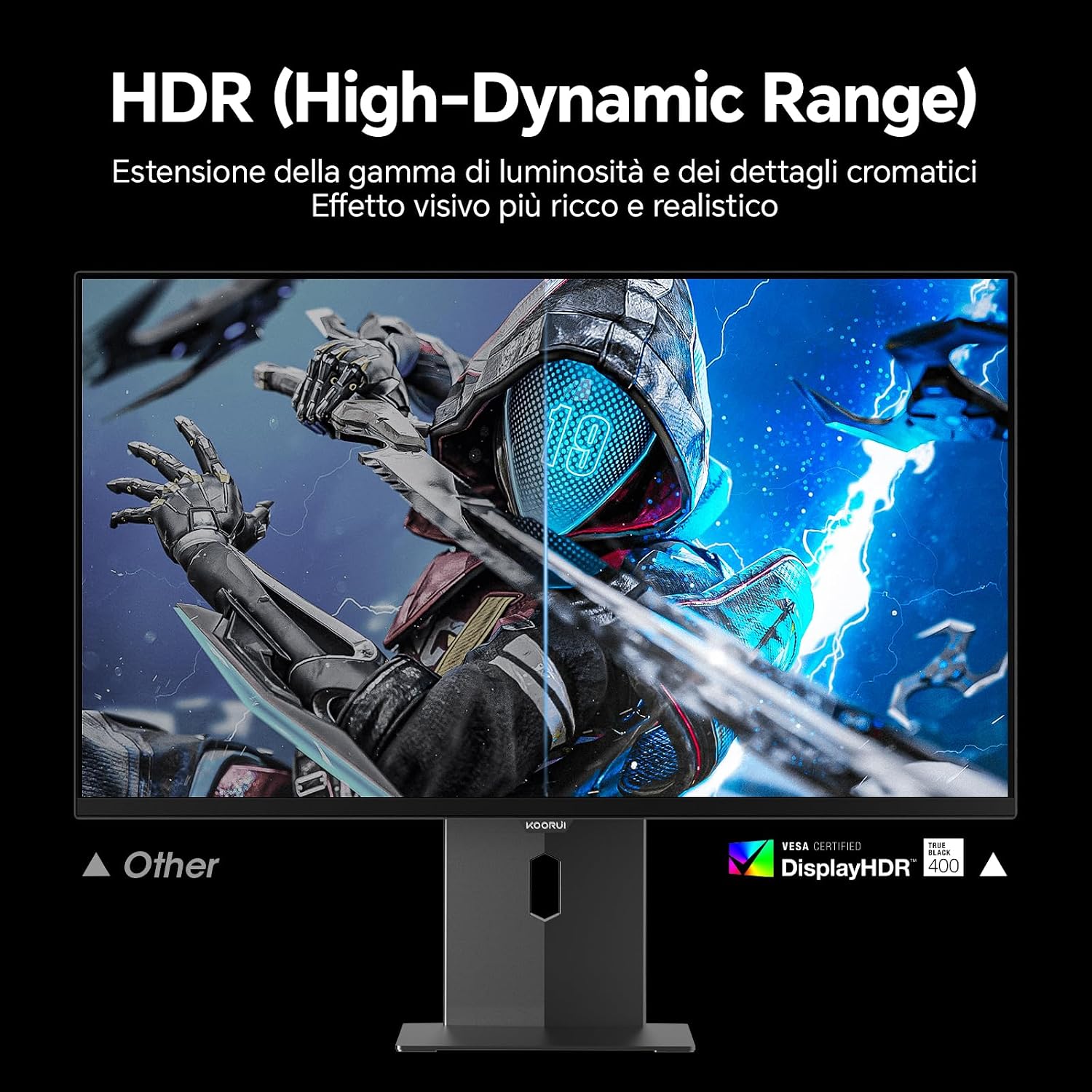
Image: Comparison of a standard display versus the KOORUI S2721XO monitor with HDR (High-Dynamic Range) enabled, showing richer visual effects and realistic details.
Peliominaisuudet
- Päivitystaajuus: The monitor supports up to 240Hz. Ensure your graphics card and system settings are configured to utilize this refresh rate for smooth gameplay.
- Vastausaika: With a 0.03ms response time, motion blur is significantly reduced.
- Mukautuva synkronointi: This technology synchronizes the monitor's refresh rate with your GPU's frame rate, eliminating screen tearing and stuttering. Enable Adaptive Sync in the OSD menu and your graphics card control panel.
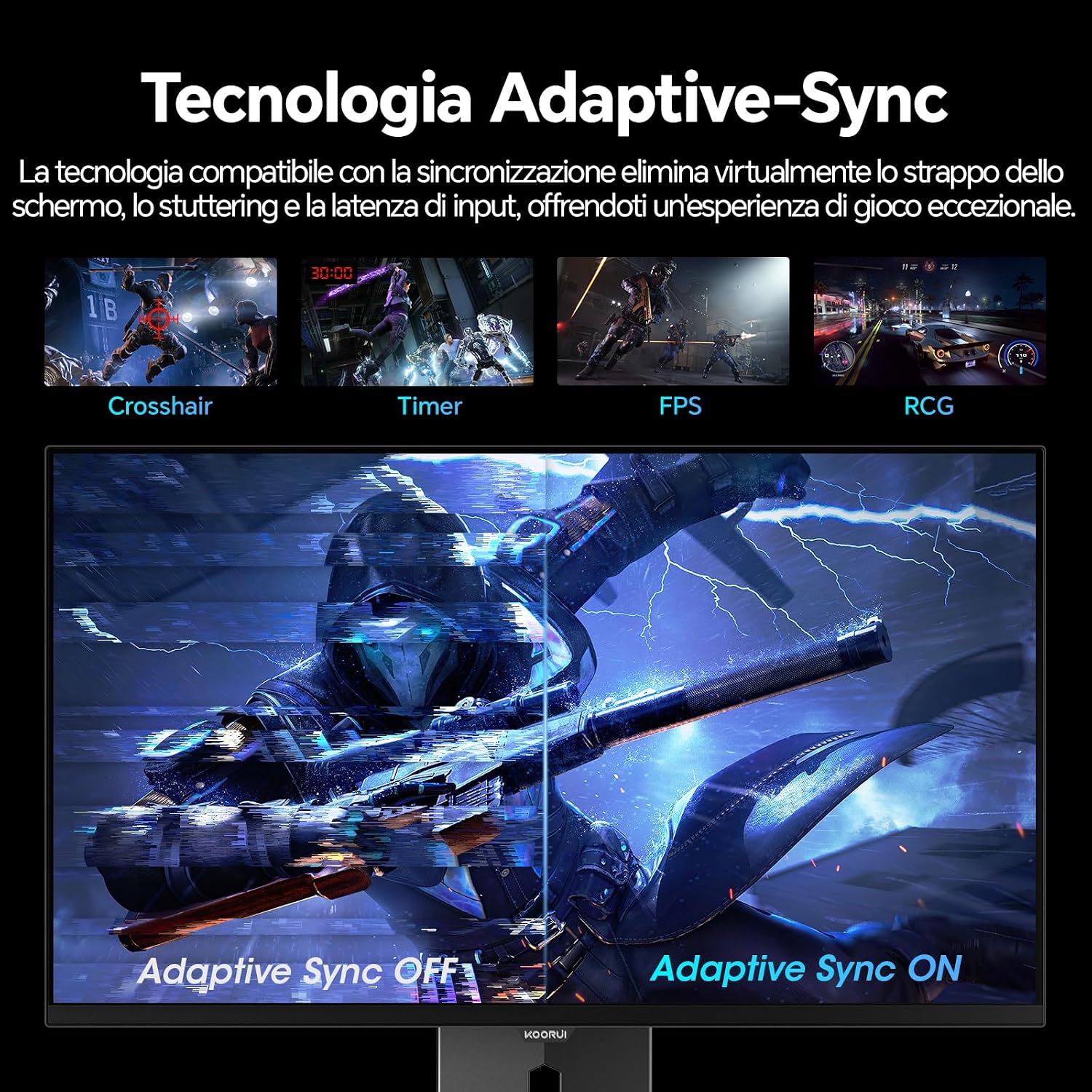
Image: A visual demonstration of Adaptive Sync technology, showing the difference between Adaptive Sync OFF (with screen tearing and stuttering) and Adaptive Sync ON (with smooth, tear-free visuals).

Image: A visual comparison illustrating the ultra-high refresh rate of 240Hz and 0.03ms response time, contrasting it with a 100Hz 5ms display to show the improved fluidity and reduced ghosting.
Silmänhoitotila
The monitor includes features designed to reduce eye strain during extended use. Access the Eye Care settings in the OSD menu to enable modes that reduce blue light emission or adjust flicker-free settings.
Huolto
Näytön puhdistaminen
- Sammuta aina näyttö ja irrota virtajohto pistorasiasta ennen puhdistamista.
- Käytä pehmeää, nukkaamatonta liinaa hieman dampvedellä tai erikoisnäytönpuhdistusaineella.
- Älä suihkuta puhdistusainetta suoraan näytölle.
- Vältä hankaavien puhdistusaineiden, vahojen tai liuottimien käyttöä, sillä ne voivat vahingoittaa näytön pintaa.
- Pyyhi näyttö casing pehmeällä, kuivalla liinalla.
Varastointi
When storing the monitor for an extended period, ensure it is powered off, unplugged, and stored in a cool, dry place away from direct sunlight and extreme temperatures. Use original packaging if available for best protection.
Vianetsintä
| Ongelma | Mahdollinen syy | Ratkaisu |
|---|---|---|
| Ei virtaa | Virtajohto ei ole kytketty; pistorasia ei toimi; näytön virtapainike on pois päältä. | Ensure power cable is securely connected. Test power outlet with another device. Press the monitor's power button. |
| Ei signaalia | Videokaapelia ei ole kytketty; Väärä tulolähde valittu; Tietokone ei ole käynnissä. | Check video cable connections (HDMI/DisplayPort). Select the correct input source via the OSD menu. Ensure your computer is powered on and outputting a signal. |
| Välkkyvä näyttö | Incorrect refresh rate; Faulty cable; Graphics card driver issues. | Adjust refresh rate in display settings. Try a different video cable. Update graphics card drivers. |
| Huono kuvanlaatu | Incorrect resolution; Picture settings misconfigured; Dirty screen. | Set display resolution to 2560x1440. Adjust brightness, contrast, and color settings in the OSD. Clean the screen as per maintenance instructions. |
Tekniset tiedot
| Merkki | KOORUI |
| Mallinumero | S2721XO |
| Näytön koko | 27 tuumaa |
| Paneelin tyyppi | QD-OLED |
| Resoluutio | QHD Wide 1440p (2560 x 1440) |
| Kuvasuhde | 16:9 |
| Päivitystaajuus | 240 Hz |
| Vastausaika | 0.03 ms |
| Kontrastisuhde | 1,500,000:1 |
| Kirkkaus | 280 cd/m² |
| Viewkulma | 178 astetta |
| Värivalikoiman arvo | 99% DCI-P3 (100% sRGB) |
| Yhteydet | 2 x HDMI 2.1, 1 x DisplayPort 1.4, äänilähtö |
| Mukautuva synkronointi | FreeSync compatible |
| Erikoisominaisuudet | HDR 400, Eye Care, Height Adjustment, Tilt Adjustment, Swivel Adjustment, Pivot Adjustment |
| VESA-yhteensopivuus | 75mm x 75mm |
| Mitat (L x K x S) | 610.11 mm x 521.84 mm x 215.82 mm (24.02 x 20.54 x 8.50 tuumaa) |
| Paino | 3 kiloa |
Takuutiedot
The KOORUI S2721XO monitor comes with a 2 vuoden takuu from the date of purchase. This warranty covers manufacturing defects and malfunctions under normal use. Please retain your proof of purchase for warranty claims. For detailed terms and conditions, refer to the warranty card included in your package or visit the official KOORUI websivusto.
Tuki ja yhteydenotto
For further assistance, technical support, or customer service inquiries, please visit the official KOORUI website or contact their customer support team. You can also refer to the official PDF instructions for use: