
1. Johdanto
The Audizio Avola is a comprehensive audio system designed to provide a wide range of listening options. It integrates Internet Radio, DAB+, FM radio, a CD player, and Bluetooth connectivity into a single, elegant unit. This manual will guide you through the setup, operation, and maintenance of your Avola system, ensuring you can fully utilize its features for an optimal audio experience.
2. Turvallisuusohjeet
- Virtalähde: Käytä ainoastaan laitteen mukana toimitettua virtalähdettä. Varmista, että äänenvoimakkuus ontage vastaa alueesi vaatimuksia.
- Vesi ja kosteus: Älä altista laitetta sateelle, kosteudelle tai nesteille. Vältä nesteillä täytettyjä esineitä, kuten maljakoita, asettamasta laitteen päälle.
- Ilmanvaihto: Varmista riittävä ilmanvaihto laitteen ympärillä. Älä tuki tuuletusaukkoja.
- Lämmönlähteet: Pidä laite poissa lämmönlähteistä, kuten pattereista, lämmittimistä, liesistä tai muista lämpöä tuottavista laitteista.
- Puhdistus: Disconnect the unit from the power supply before cleaning. Use a soft, dry cloth. Do not use liquid cleaners or aerosol cleaners.
- Huolto: Älä yritä huoltaa laitetta itse. Jätä kaikki huoltotyöt pätevän huoltohenkilöstön tehtäväksi.
- CD-soitin: Do not insert foreign objects into the CD tray. Handle CDs by their edges to avoid scratches.
3. Pakkauksen sisältö
Varmista, että pakkauksessa on kaikki tarvittavat osat:
- 1x Audizio Avola Internet Radio
- 1x kaukosäädin
- 1x virtalähde
- 1x Käyttöopas (Pikaopas)

Image: Audizio Avola unit shown with its remote control and power adapter.
4. Tuote ohiview
4.1 Etupaneeli

Kuva: Edessä view of the Audizio Avola with the CD tray closed.
The front panel features the main display, control buttons, a CD tray, and input ports.
- Näyttö: Color display for navigation and information.
- Ohjauspainikkeet: MENU, INFO, REC/DEL, PRESET/REPEAT, STANDBY, I/R, Play/Pause, Stop, Skip/Fast Forward/Rewind.
- CD-alusta: Äänilevyjen asettamiseen.
- TUNE/SELECT Knob: Rotate to navigate menus, press to select.
- VOLUME -nuppi: Säätää äänen ulostulon tasoa.
- USB-portti: USB-tallennuslaitteiden liittämiseen.
- SD-korttipaikka: SD-muistikorttien asettamiseen.
- AUX-tulo: 3.5 mm:n liitin ulkoisille äänilähteille.
- Kuulokeliitäntä: 3.5 mm:n liitin yksityiseen kuunteluun.

Image: Close-up of the Audizio Avola front panel showing USB, SD, AUX, and headphone ports.
4.2 Takapaneeli
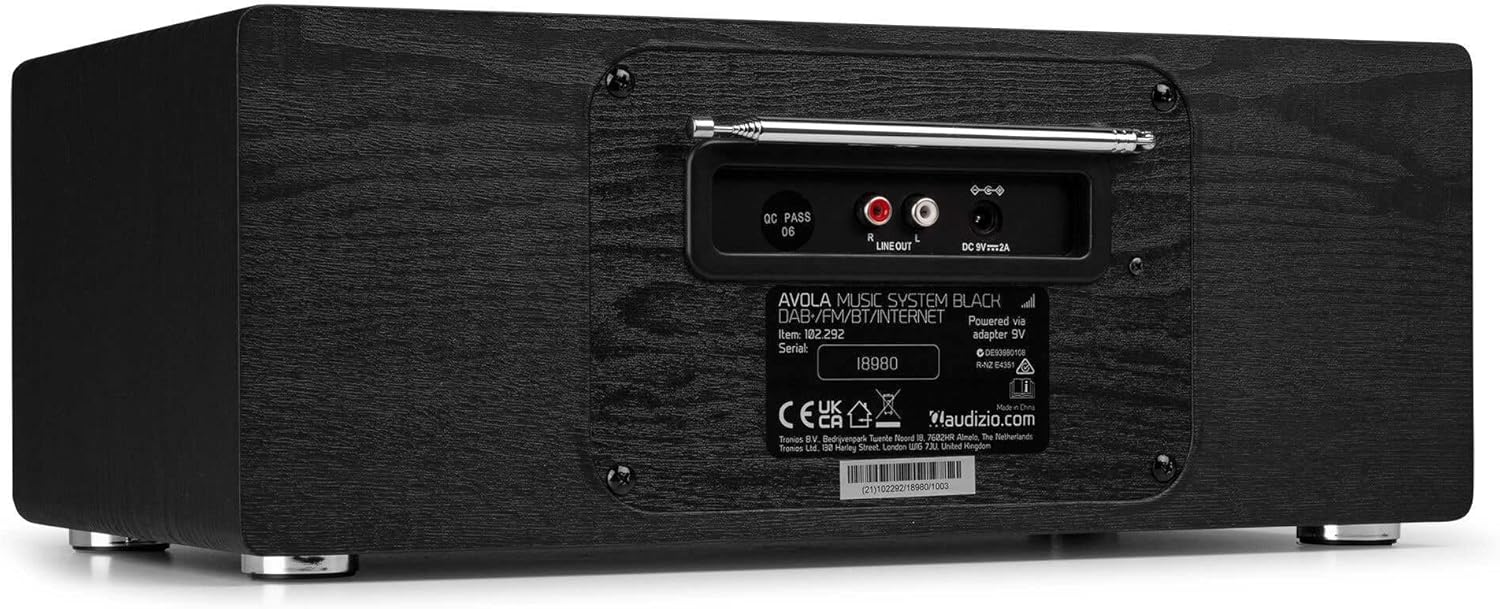
Kuva: Takaosa view of the Audizio Avola, highlighting the antenna and connection ports.
The rear panel houses essential connections:
- Teleskooppiantenni: For DAB+ and FM radio reception. Extend fully for best signal.
- LINJALÄHTÖ (RCA): Ulkoiseen liitäntään ampnostimet tai kaiuttimet.
- DC 9V 2A Power Input: Virtalähteen liittämiseen.
5. Asennus
5.1 Virtaliitäntä
- Connect the power adapter to the DC 9V 2A input on the rear of the Avola unit.
- Kytke virtalähde sopivaan pistorasiaan.
- The unit will enter standby mode. Press the STANDBY button on the unit or remote control to power on.
5.2 Antenniasetukset
For optimal DAB+ and FM radio reception, fully extend the telescopic antenna located on the rear panel. Adjust its position for the best signal quality.
5.3 Initial Setup (WLAN Connection)
To access Internet Radio features, the Avola must be connected to a Wi-Fi network.
- Upon first power-on, the unit may prompt you to set up the network connection. If not, press MENU, navigate to 'System Settings' and then 'Network'.
- Select 'Wi-Fi Network' and choose 'Scan' to find available networks.
- Valitse Wi-Fi-verkko luettelosta.
- Enter your Wi-Fi password using the TUNE/SELECT knob to navigate characters and press to confirm each character.
- Once connected, the display will show a Wi-Fi icon.
6. Toimintatilat
6.1 Internet-radio
Access thousands of radio stations worldwide via your Wi-Fi connection.
- Press the MENU button and select 'Internet Radio'.
- Voit selata asemia sijainnin tai genren mukaan tai hakea tiettyjä asemia.
- Use the TUNE/SELECT knob to navigate and select.
- To save a station as a preset, press and hold the PRESET/REPEAT button until the preset menu appears, then select a preset number.

Image: The Audizio Avola display showing the Internet Radio interface.
6.2 DAB+ -radio
Digital Audio Broadcasting Plus offers high-quality digital radio.
- Press the MENU button and select 'DAB Radio'.
- Laite hakee automaattisesti saatavilla olevia DAB+-asemia.
- Use the TUNE/SELECT knob to browse and select stations.
- Tallenna esiasetukset kuten internetradion kohdalla on kuvattu.
6.3 FM -radio
Listen to traditional analog FM radio broadcasts.
- Press the MENU button and select 'FM Radio'.
- Use the TUNE/SELECT knob to manually tune or press and hold to auto-scan for stations.
- Tallenna esiasetukset kuten internetradion kohdalla on kuvattu.
6.4 CD-soitin
Play your favorite audio CDs.
- Press the MENU button and select 'CD Player'.
- Press the 'Open' button next to the CD tray to open it.
- Carefully place an audio CD onto the tray with the label side facing up.
- Press the 'Open' button again to close the tray. The unit will begin playing the CD automatically.
- Use the Play/Pause, Stop, and Skip buttons for playback control.
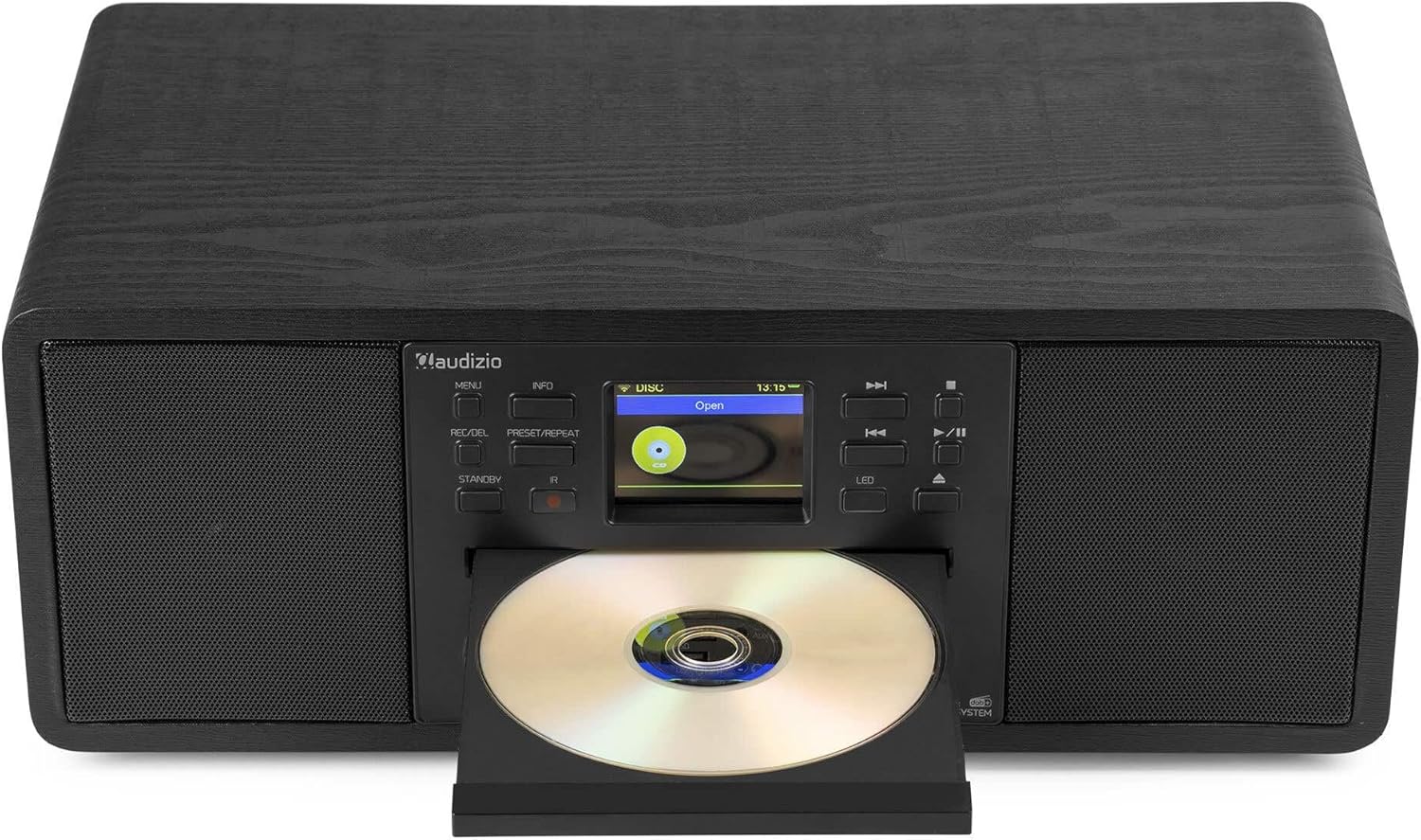
Image: The Audizio Avola with its CD tray open, ready for disc insertion.
6.5 Bluetooth-yhteys
Suoratoista ääntä langattomasti älypuhelimesta, tabletista tai muista Bluetooth-laitteista.
- Press the MENU button and select 'Bluetooth'.
- The Avola will enter pairing mode and become discoverable.
- On your Bluetooth device, search for 'Audizio Avola' in the Bluetooth settings and select it to pair.
- Once connected, the display will show 'BT Connected'. You can now play audio from your device through the Avola.

Image: The Audizio Avola display indicating a successful Bluetooth connection.
6.6 USB/SD-toisto
Toista ääni fileUSB-asemilta tai SD-korteilta.
- Insert a USB drive into the USB port or an SD card into the SD card slot on the front panel.
- Press the MENU button and select 'USB' or 'SD' (the unit may automatically switch to the correct mode).
- Navigoi omassa files and folders using the TUNE/SELECT knob.
- Press the TUNE/SELECT knob to play a selected track.
7. Huolto
- Laitteen puhdistus: Use a soft, dry, lint-free cloth to clean the exterior of the unit. Do not use abrasive cleaners, waxes, or solvents.
- CD-linssin puhdistus: Jos CD-levyn toistossa on epätasaista, puhdista laserlinssi kaupallisesti saatavilla olevalla CD-levyn linssinpuhdistuslevyllä.
- Varastointi: Jos laitetta säilytetään pitkään, irrota se virtalähteestä ja säilytä sitä viileässä ja kuivassa paikassa.
8. Vianmääritys
| Ongelma | Mahdollinen syy | Ratkaisu |
|---|---|---|
| Ei virtaa | Virtasovitin ei ole kytketty tai pistorasia on viallinen. | Tarkista virtaliitännät. Kokeile toista pistorasiaa. |
| Ei ääntä | Äänenvoimakkuus liian alhainen, mykistys käytössä tai väärä lähde valittu. | Increase volume. Check if mute is active. Ensure correct input source is selected. |
| Internetradio ei muodosta yhteyttä | Incorrect Wi-Fi password, weak signal, or network issue. | Re-enter Wi-Fi password. Move unit closer to router. Check router status. |
| DAB+/FM reception poor | Antennia ei ole ojennettuna tai signaalialue on heikko. | Vedä teleskooppiantenni kokonaan ulos ja säädä sitä. Kokeile laitteen uudelleensijoittamista. |
| CD-levy ei soi | CD inserted incorrectly, dirty/scratched CD, or unsupported format. | Ensure CD is inserted label-side up. Clean or replace CD. Verify CD format (supports CD-DA, MP3). |
| Bluetooth ei muodosta pariliitosta | Device not in pairing mode, or Avola not discoverable. | Ensure both devices are in pairing mode. Check Bluetooth settings on your device. |
9. Tekniset tiedot
| Ominaisuus | Erittely |
|---|---|
| Mallin nimi | Avola |
| Tuotenumero | 102.292 |
| Mitat (PxLxK) | 45.8 x 25.8 x 19.7 cm |
| Paino | 4 kg |
| Virransyöttö | 220 Volt (via power adapter) |
| Speaker Output Power (Max) | 60 wattia |
| Äänilähtötila | Stereot |
| Tuetut äänimuodot | CD-DA, MP3 |
| Yhteystekniikka | WLAN, Bluetooth, AUX, RCA |
| Yhteensopivat laitteet | MP3 Player, PC, Smartphone, Tablet |
| Väri | Musta |
10. Takuu ja tuki
Audizio products are designed and manufactured to the highest standards. In the unlikely event of a problem with your product, please contact your retailer for assistance. Keep your proof of purchase for warranty claims. For further support or inquiries, please refer to the official Audizio websivustolla tai ota yhteyttä heidän asiakaspalveluunsa.