
1. Johdanto
This manual provides comprehensive instructions for the installation, operation, maintenance, and troubleshooting of your Fanvil 8-Port 2-Wire PoE Switch (Model PN8). Please read this manual thoroughly before using the device to ensure proper functionality and to prevent damage.
2. Tuote ohiview
The Fanvil PN8 is an 8-port 2-wire Power over Ethernet (PoE) switch designed to transmit both power and data over existing 2-wire cables. This unique capability simplifies installation, especially in environments where traditional Ethernet cabling is not feasible or cost-effective. It supports up to 8 PoE-enabled devices and can transmit data and power over distances up to 300 meters.
2.1 Tärkeimmät ominaisuudet
- 8 PoE ports for data and power transmission.
- Supports power and data over 2-wire connections.
- Long transmission distance of up to 300 meters.
- User-friendly setup with no complex configuration required.
2.2 Laitteen asettelu
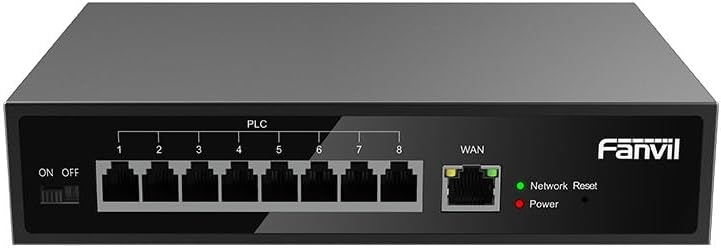
Kuva 1: Edessä view of the Fanvil PN8 switch, showing 8 PLC ports, a WAN port, ON/OFF switch, and LED indicators for Network Reset and Power.

Kuva 2: Kulma view of the Fanvil PN8 switch, highlighting the side ventilation and port layout.
2.3 LED-ilmaisimet
- Network Reset (Green LED): Indicates network activity or status. A steady light typically means a stable connection, while blinking indicates data transmission.
- Virta (punainen LED): Illuminates when the device is powered on and receiving electrical current.
3. Asennusohjeet
3.1 Pakkauksen sisältö
Ennen asennusta tarkista, että pakkauksessa on kaikki tarvittavat osat:
- Fanvil 8-Port 2-Wire PoE Switch (PN8)
- Virtalähde
- Käyttöopas (tämä asiakirja)
- Asennustarvikkeet (jos mukana)
3.2 Kytkimen kytkeminen
- Virtaliitäntä: Connect the provided power adapter to the power input port on the switch and then plug it into a standard electrical outlet (100-240V AC). Ensure the ON/OFF switch is in the OFF position before connecting power.
- WAN-yhteys: Connect your main network router or modem to the WAN port on the Fanvil PN8 switch using a standard Ethernet cable.
- PoE-laitteen liitäntä: Connect your 2-wire PoE-enabled devices (e.g., IP phones, cameras) to any of the 8 PLC ports on the switch. The switch will automatically detect and provide power and data to these devices.
- Virta päälle: Flip the ON/OFF switch to the ON position. The Power LED should illuminate, indicating the switch is operational.
4. Kytkimen käyttö
Once connected, the Fanvil PN8 switch operates automatically. It provides power and data to connected PoE devices without requiring additional configuration. The LED indicators provide visual feedback on the device's status.
4.1 Virran kytkeminen päälle/pois
- To power on the switch, ensure the power adapter is connected and flip the ON/OFF switch to the 'ON' position. The red Power LED will light up.
- To power off the switch, flip the ON/OFF switch to the 'OFF' position. The red Power LED will turn off.
5. Huolto
To ensure optimal performance and longevity of your Fanvil PN8 switch, follow these maintenance guidelines:
- Puhdistus: Puhdista kytkimen ulkopinta pehmeällä, kuivalla liinalla. Älä käytä nestemäisiä tai aerosolipuhdistusaineita. Varmista, että laite on sammutettu ennen puhdistamista.
- Ilmanvaihto: Ensure the switch is placed in a well-ventilated area. Do not block the ventilation openings on the sides of the device.
- Ympäristö: Avoid exposing the switch to extreme temperatures, high humidity, or direct sunlight.
6. Vianmääritys
If you encounter issues with your Fanvil PN8 switch, refer to the following table for common problems and solutions:
| Ongelma | Mahdollinen syy | Ratkaisu |
|---|---|---|
| No power (Power LED off) | Power adapter not connected or faulty; ON/OFF switch is off. | Check power adapter connection and outlet. Ensure ON/OFF switch is in the 'ON' position. |
| Ei verkkoyhteyttä | WAN cable disconnected; faulty cable; upstream network issue. | Verify WAN cable connection. Test with a different cable. Check your router/modem. |
| PoE device not receiving power/data | Device not PoE-compatible; faulty 2-wire cable; device drawing too much power. | Ensure device is PoE-compatible. Test with a different 2-wire cable. Check device power requirements. |
| Hidas verkon nopeus | Kaapelin laatu; verkon ruuhkautuminen; laitteen rajoitukset. | Ensure high-quality 2-wire cables are used. Reduce network traffic if possible. |
7. Tekniset tiedot
| Erittely | Arvo |
|---|---|
| Mallinumero | PN8 |
| Tuotetyyppi | 2-Wire PoE Switch |
| Portit | 8 |
| Tulo Voltage | 100-240V AC |
| Käyttö Voltage | 28 volttia |
| Pitkä siirtoetäisyys | 300 metriä |
| Tuotteen mitat | 5.91 x 78.74 x 5.91 tuumaa |
| Tuotteen paino | 2.49 kiloa |
| Paristot vaaditaan | 1 AAAA-paristoa (mukana) |
| ASIN | B0DP5HXVQJ |
| UPC | 6937295605105 |
| Päivämäärä ensimmäinen saatavilla | 27. marraskuuta 2024 |
8. Takuu ja tuki
For warranty information and technical support, please refer to the documentation provided with your purchase or visit the official Fanvil website. Contact their customer service for assistance with product issues, repairs, or further inquiries.