
1. Johdanto
The TRIGKEY Key-N150 Mini PC is a compact and efficient computer designed for various tasks, from office work to media entertainment. It features an Intel Twin Lake N150 processor, 16GB DDR4 RAM, and a 500GB M.2 PCIeX4 SSD, offering reliable performance in a small form factor. This manual provides essential information for setting up, operating, and maintaining your Mini PC.

Kuva 1.1: Edessä view of the TRIGKEY Key-N150 Mini PC.
2. Pakkauksen sisältö
Tarkista pakkauksesta seuraavat tuotteet:
- TRIGKEY Key-N150 Mini PC
- Käyttöopas
- HDMI-kaapeli (1m)
- AC Power Cable (Optional: US/EU/UK/JP/AU)
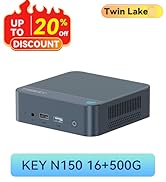
Image 2.1: TRIGKEY Key-N150 Mini PC and included accessories.
3. Tuote ohiview
The Key-N150 Mini PC is equipped with a variety of ports and internal components to support its functionality.
3.1 Front and Rear Panel Interfaces

Image 3.1: Front panel of the Mini PC, showing USB ports and audio jack.

Image 3.2: Rear panel of the Mini PC, showing AC power, USB, LAN, and HDMI ports.
The Mini PC features:
- Edessä: 3.5mm Audio Jack, USB 2.0, USB 3.2 (10Gbps), Power Button, Power Indicator Light.
- Taka: AC Power Input, USB 3.2 (10Gbps) x2, LAN (1000M) x2, HDMI x2.
3.2 Sisäiset komponentit
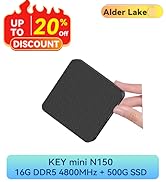
Kuva 3.3: Räjähtänyt view showing the internal components of the Mini PC, including the CPU, fan, RAM, and SSD slots.
Key internal features include:
- Prosessori: Intel Twin Lake N150 (4 Cores/4 Threads, up to 3.60GHz).
- Grafiikka: Intel UHD Graphics (24EUs, 1000MHz).
- Muisti: 16GB DDR4 3200MHz SO-DIMM (single channel, expandable).
- Varastointi: 500GB M.2 PCIeX4 SSD (supports dual M.2 2280 SSDs, up to 2TB expansion).
- Langaton yhteys: WiFi 5 and Bluetooth 5.0.
- Virtalähde: Built-in 45W PSU.

Image 3.4: Details of the Intel Twin Lake N150 processor, highlighting its 3.6 GHz max turbo frequency, 4 cores, and 4 threads.

Image 3.5: Illustration of the 16GB DDR4 SO-DIMM RAM and the dual M.2 2280 SSD slots for storage expansion.
4. Asennusohjeet
Follow these steps to set up your TRIGKEY Key-N150 Mini PC:
- Yhdistä näyttöön: Use an HDMI cable to connect the Mini PC to your monitor or TV. The device supports dual HDMI output for multiple displays.
- Liitä oheislaitteet: Kytke USB-näppäimistö ja -hiiri käytettävissä oleviin USB-portteihin.
- Yhdistä verkkoon: For a wired connection, connect an Ethernet cable to one of the two LAN ports. For wireless, ensure your WiFi network is available during initial setup.
- Virta päälle: Connect the AC power cable to the Mini PC and then to a power outlet. Press the power button on the front panel.
- Alkuperäinen käynnistys: The Mini PC will boot up. Follow the on-screen instructions to complete the operating system setup (if not pre-configured).
Video 4.1: Ylilyöntiview of the TRIGKEY Key-N150 Mini PC, demonstrating its features and connectivity options. This video provides a visual guide to the product's design and capabilities.
5. Käyttöohjeet
5.1 Peruskäyttö
Once set up, your Mini PC functions like a standard desktop computer. You can perform tasks such as web browsing, media playback, and office applications.

Image 5.1: The Mini PC supports various applications including web browsing, media entertainment, office work, and 4K video playback.
5.2 Kahden näytön asetukset
The Mini PC supports connecting two monitors via its dual HDMI ports. To configure dual displays:
- Connect both monitors to the HDMI ports on the rear of the Mini PC.
- Käynnistä Mini PC ja molemmat näytöt.
- The operating system should automatically detect both displays. You can adjust display settings (extend, duplicate, primary display) through your OS display settings.
5.3 Intel Unison App
The Intel Unison App allows seamless connection between your Mini PC and mobile devices. This enables features such as:
- Viewing photo galleries from your PC.
- Extending your PC screen with a tablet.
- Making and receiving phone calls from your PC.
- Siirretään files between phone/tablet and PC.
- Sending and receiving text messages from your PC.
- Managing device notifications from a single source.

Image 5.2: The Intel Unison App facilitates seamless connectivity and data transfer between your Mini PC and mobile devices.
6. Huolto
Varmistaaksesi Mini PC:si pitkän käyttöiän ja optimaalisen suorituskyvyn, ota huomioon seuraavat huoltovinkit:
- Pidä se puhtaana: Regularly clean the exterior of the Mini PC with a soft, dry cloth. Ensure ventilation holes are free from dust and obstructions to maintain efficient cooling.
- Ohjelmistopäivitykset: Pidä käyttöjärjestelmäsi ja ajurit ajan tasalla uusimpiin versioihin parantaaksesi turvallisuutta ja suorituskykyä.
- Oikea sammutus: Sammuta Mini PC aina oikein käyttöjärjestelmän kautta tietojen vioittumisen estämiseksi.
- Ympäristöolosuhteet: Käytä Mini PC:tä hyvin ilmastoidussa tilassa, poissa suorasta auringonvalosta, liiallisesta kuumuudesta ja kosteudesta.

Image 6.1: The Mini PC features an efficient cooling system to ensure stable operation and heat dissipation.
7. Vianmääritys
Jos Mini PC:n kanssa ilmenee ongelmia, katso seuraavia yleisiä ratkaisuja:
- Ei virtaa: Ensure the AC power cable is securely connected to both the Mini PC and the power outlet. Try a different power outlet.
- Ei näyttöä: Check that the HDMI cable is firmly connected to both the Mini PC and the monitor. Verify the monitor is powered on and set to the correct input source. Try a different HDMI cable or monitor if possible.
- Ei Internet-yhteyttä: For wired connections, check the Ethernet cable and router status. For wireless, ensure Wi-Fi is enabled in the operating system and you are connected to the correct network with the correct password.
- Oheislaitteet eivät toimi: Ensure USB devices are properly plugged into the USB ports. Try different USB ports or restart the Mini PC.
- Järjestelmän hidastuminen: Sulje tarpeettomat sovellukset. Tarkista paljon resursseja kuluttavat taustaprosessit. Varmista, että vapaata tallennustilaa on riittävästi.
- Odottamattomat sammutukset: Ensure the Mini PC is in a well-ventilated area and not overheating. Check for any recent software or driver installations that might be causing instability.
If problems persist, consult the TRIGKEY support resources mentioned in the Warranty and Support section.
8. Tekniset tiedot
| Ominaisuus | Yksityiskohta |
|---|---|
| Merkki | TRIGKEY |
| Mallinumero | KEY N150 |
| CPU malli | Intel Twin Lake N150 (Celeron) |
| Prosessorin nopeus | Jopa 3.6 GHz |
| Prosessorin määrä | 4 |
| Grafiikka rinnakkaisprosessori | Intel UHD Graphics |
| Asennettu RAM-muisti | 16GB DDR4 SDRAM |
| Muistin nopeus | 3200 MHz |
| Muistipaikat saatavilla | 1 |
| Muistin tallennuskapasiteetti | 500 Gt |
| Kiintolevyn kuvaus | 500GB M.2 PCIeX4 SSD |
| Käyttöjärjestelmä | Käyttöjärjestelmä (esiasennettu) |
| Yhteystekniikka | Bluetooth, Ethernet, HDMI, Wi-Fi |
| Langaton yhteensopivuus | 802.11ac (Wi-Fi 5), Bluetooth 5.0 |
| USB-portteja yhteensä | 3 (USB 3.2 x2, USB 2.0 x1) |
| Total Number of HDMI Ports | 2 |
| Näytön resoluutio maksimi | 3840x2160 (4K) |
| Jäähdytysmenetelmä | Passive (with fan for efficient heat dissipation) |
| Virtapistokkeen tyyppi | Tyyppi A - 2-nastainen (pohjoisamerikkalainen) |
| Väri | Harmaa |
9. Takuu ja tuki
TRIGKEY is committed to providing excellent customer service and support for your Mini PC.
- Pikavastaus: Support inquiries receive a reply within 24 hours.
- Palautuskäytäntö: 30 päivän palautusoikeus.
- Korvaus: Vaihto saatavilla 12 kuukauden kuluessa ostosta.
- Elinikäinen tuki: Elinikäinen huoltopalvelu ja tekninen tuki.

Image 9.1: TRIGKEY's commitment to customer service, including response times, return policy, replacement period, and lifetime technical support.
Ota yhteyttä
For further assistance, technical support, or warranty claims, please use the following channels:
- Sähköposti: Refer to your product packaging or the official TRIGKEY website for email contact information.
- Websivusto: Visit the official TRIGKEY websivusto usein kysyttyjen kysymysten, ohjainten ja tukiresurssien osalta.
- Online Consultation: Check the TRIGKEY store page for online chat or consultation options.

Image 9.2: Various contact methods for TRIGKEY customer service and technical support.