
Simrad NSS12 evo3S
Simrad NSS12 evo3S Combo Multi-Function Chartplotter/Fishfinder Radar Bundle HALO20+ User Manual
Model: NSS12 evo3S
Merkki: Simrad
Johdanto
This manual provides essential information for the installation, operation, and maintenance of your Simrad NSS12 evo3S Combo Multi-Function Display and HALO20+ Radar Bundle. The NSS12 evo3S is a powerful marine electronics system designed to enhance your navigation, fishfinding, and radar capabilities. It integrates advanced charting, sonar, and radar technologies into a single, intuitive unit. Please read this manual thoroughly before using the product to ensure safe and optimal performance.
Tuote loppuview

The Simrad NSS12 evo3S Multi-Function Display, showcasing its integrated sonar and radar capabilities. This unit serves as the central hub for navigation, fishfinding, and radar operations.

Yksityiskohtainen view of the Simrad NSS12 evo3S display, illustrating a radar overlay on a chart, providing comprehensive situational awareness.

The Simrad HALO20+ Radar Dome, a key component of the bundle, providing high-resolution radar imaging for collision avoidance and weather tracking.
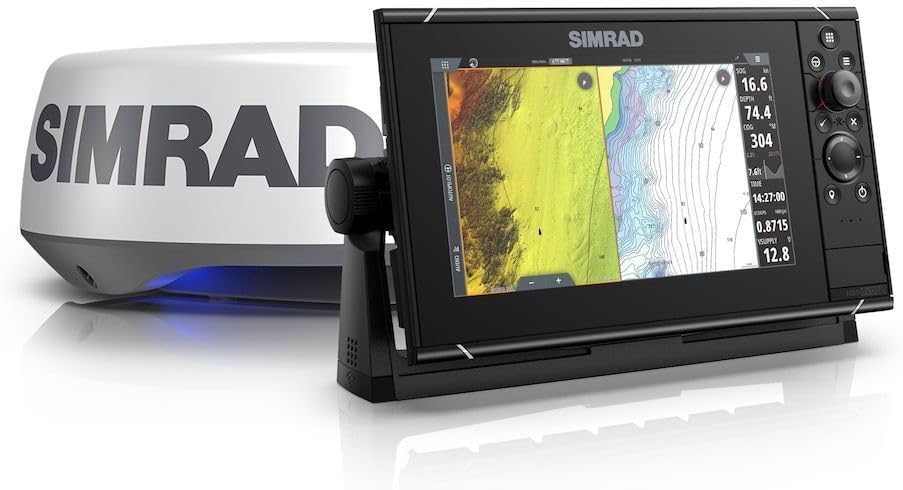
The Simrad NSS12 evo3S Multi-Function Display paired with the HALO20+ Radar Dome, demonstrating the complete system components.
Asennus
The Simrad NSS12 evo3S is designed for flush mounting. Proper installation is crucial for optimal performance and longevity. Ensure all power connections are secure and waterproof. Connect the HALO20+ radar dome to the NSS12 evo3S unit according to the provided wiring diagrams. Verify all network connections (e.g., Ethernet, NMEA 2000) are correctly established for full system integration. It is recommended to consult a qualified marine electronics technician for complex installations.
Asennus
- Uppoasennus: Prepare the mounting surface by cutting an opening to the specified dimensions. Secure the unit using the provided mounting hardware.
- Varmista riittävä ilmanvaihto laitteen ympärillä ylikuumenemisen estämiseksi.
- Route cables carefully to avoid kinks or damage, and secure them to prevent strain.
Käyttöohjeet
The NSS12 evo3S features a Color TFT display with intuitive controls. The unit is primarily powered by a 12V DC battery system. Upon powering on, the system will initiate a self-test. Navigate through the menus using the rotary dial and keypad, or via the touchscreen interface. Familiarize yourself with the various modes: Chart, Sonar (Fishfinder), and Radar.
Chartplotter Operation
- Select the 'Chart' page to view your vessel's position on electronic charts.
- Use pinch-to-zoom or the rotary dial to adjust chart scale.
- Create and manage waypoints and routes for navigation.
Fishfinder (Sonar) Operation
- Access the 'Sonar' page to view real-time underwater imagery.
- Adjust gain, range, and frequency settings to optimize sonar returns.
- Identify fish arches, bottom structure, and depth readings.
Tutkan toiminta
- Select the 'Radar' page to display radar targets.
- Adjust range, gain, and sea clutter settings for clear target detection.
- Utilize features like MARPA (Mini Automatic Radar Plotting Aid) for tracking targets.
Huolto
Regular maintenance ensures the longevity and reliability of your Simrad system.
- Puhdistus: Puhdista näyttöruutu pehmeällä, d:lläamp liinalla. Vältä hankaavia puhdistusaineita tai liuottimia.
- Liitännät: Periodically check all cable connections for corrosion or looseness. Apply dielectric grease to exposed electrical connections in marine environments.
- Ohjelmistopäivitykset: Regularly check the Simrad website for software updates to ensure your unit has the latest features and performance enhancements.
- Radar Dome: Keep the radar dome clean and free from obstructions.
Vianetsintä
Tässä osiossa on ratkaisuja yleisiin ongelmiin, joita saatat kohdata.
- Ei virtaa: Check power connections, fuses, and battery voltage. Ensure the unit is properly connected to a 12V DC source.
- Ei kaikuluotainkuvaa: Verify the transducer is properly connected and submerged. Check sonar settings (gain, range).
- No Radar Display: Ensure the HALO20+ radar dome is powered on and connected. Check Ethernet cable integrity.
- Laite jumiutuu/ei reagoi: Perform a soft reset by holding the power button until the unit restarts. If the issue persists, consult the Simrad support websivusto.
- GPS Not Acquiring: Varmista, että GPS-antennilla on esteetön yhteys view taivaasta. Tarkista antennin liitännät.
For more detailed troubleshooting or issues not covered here, please refer to the comprehensive support resources available on the official Simrad websivusto.
Tekniset tiedot
| Ominaisuus | Erittely |
|---|---|
| Mallin nimi | NSS12 evo3S |
| Merkki | Simrad |
| Näytön tyyppi | Värillinen TFT |
| Asennustyyppi | Huuhtele kiinnitys |
| Virtalähde | Paristokäyttöinen (12 V DC) |
| Tuotteen paino | 35.28 paunaa (noin 16 kg) |
| ASIN | B0DM3GRDGZ |
| Päivämäärä ensimmäinen saatavilla | 9. syyskuuta 2024 |
Takuu ja tuki
Simrad products are built to high standards and come with a manufacturer's warranty. For specific warranty terms and conditions, please refer to the documentation included with your product or visit the official Simrad websivusto.
Suojaussuunnitelmat
Extended protection plans may be available for your Simrad NSS12 evo3S system, offering additional coverage beyond the standard manufacturer's warranty. These plans typically cover repairs or replacements for a specified period. Please inquire with your retailer or check online for available options such as 2-Year or 3-Year Protection Plans.
Asiakastuki
For technical assistance, product registration, or to find authorized service centers, please visit the official Simrad websivustolla tai ota yhteyttä suoraan heidän asiakastukeen. Voit myös käydä osoitteessa Simrad Store on Amazon lisätietoja tuotteesta ja resursseista.